Every Mays organization starts with a 30-day free trial of all plan modules, then moves to Basic or Pro. Here's what each plan includes and what a locked module means.
Where: Settings → Billing in the web app (admins). The page is called Billing & Credits. It shows your current plan, and each plan card shows its current price and how many AI credits it includes.
The 30-day free trial
- The trial starts when you create your account. You don't need a credit card.
- Every module in the Basic and Pro plans is switched on for the whole trial. The paid add-ons aren't included.
- Each location starts with 1,000 AI credits to try the AI features. See AI credits.
- Settings → Billing shows Trial plan while you're on the trial, with the date your trial ends and how many days are left. Mays also emails your admins three days before the trial ends, and again once it has ended.
When the trial ends without a plan:
- modules that aren't in the always-included list below become locked;
- AI features pause until you subscribe.
Your checklists, schedules, people and other records aren't deleted. Pick a plan to get the locked modules back.
What each plan includes
Basic | Pro | |
|---|---|---|
Dashboard, Locations & Users, Tasks and checklists, Settings, Help, Insights, and Chat in the app | ✓ | ✓ |
Knowledge Base | ✓ | ✓ |
Automation & AI | ✓ | ✓ |
Devices (shared kiosk tablets) | ✓ | ✓ |
Integrations (Square, 7shifts and more) | ✓ | ✓ |
FTAR & Tip Pool | ✓ | ✓ |
Reviews | ✓ | ✓ |
Scheduling, including the time clock | ✓ | |
Inventory (see Inventory at a glance) | ✓ | |
Learning, and points and badges (see Creating training modules) | ✓ | |
Thermometers (see Setting up Govee thermometers) | ✓ | |
Disputes | ✓ | |
Catering | ✓ | |
AI Agents | ✓ | |
AI credits per location, every month | 5,000 | 25,000 |
The first row is always included, even when your trial has ended and you don't have a plan yet.
Plans are billed monthly. For current prices, check the plan cards under Settings → Billing.
Labor law compliance (minimum wage, overtime law, premiums, paid sick leave, food safety certificates, tip rules and minors' work rules) isn't part of Basic or Pro: it comes with Enterprise — ask your sales contact — and Mays switches it on for your organization. See Labor & compliance.
Add-ons
A few extras aren't part of any plan. Each is its own subscription, bought for one location at a time:
- AI phone receptionist answers your store's phone. Subscribe from the location's IVR (AI Receptionist) tab under Locations & Users → Locations. See AI phone receptionist.
- Call recording records the receptionist's calls that are put through to your staff. You can add it when you subscribe to the receptionist. See Call recording for the receptionist.
- Digital signage plays your images and videos on your TVs, charged per screen. Subscribe from Signage. See Digital signage.
The free trial doesn't include add-ons.
Locked and hidden modules
A module your plan doesn't include still shows in the sidebar with a small lock next to its name. Opening it shows "… isn't included in your plan" and an Upgrade plan button, which takes you to Settings → Billing.
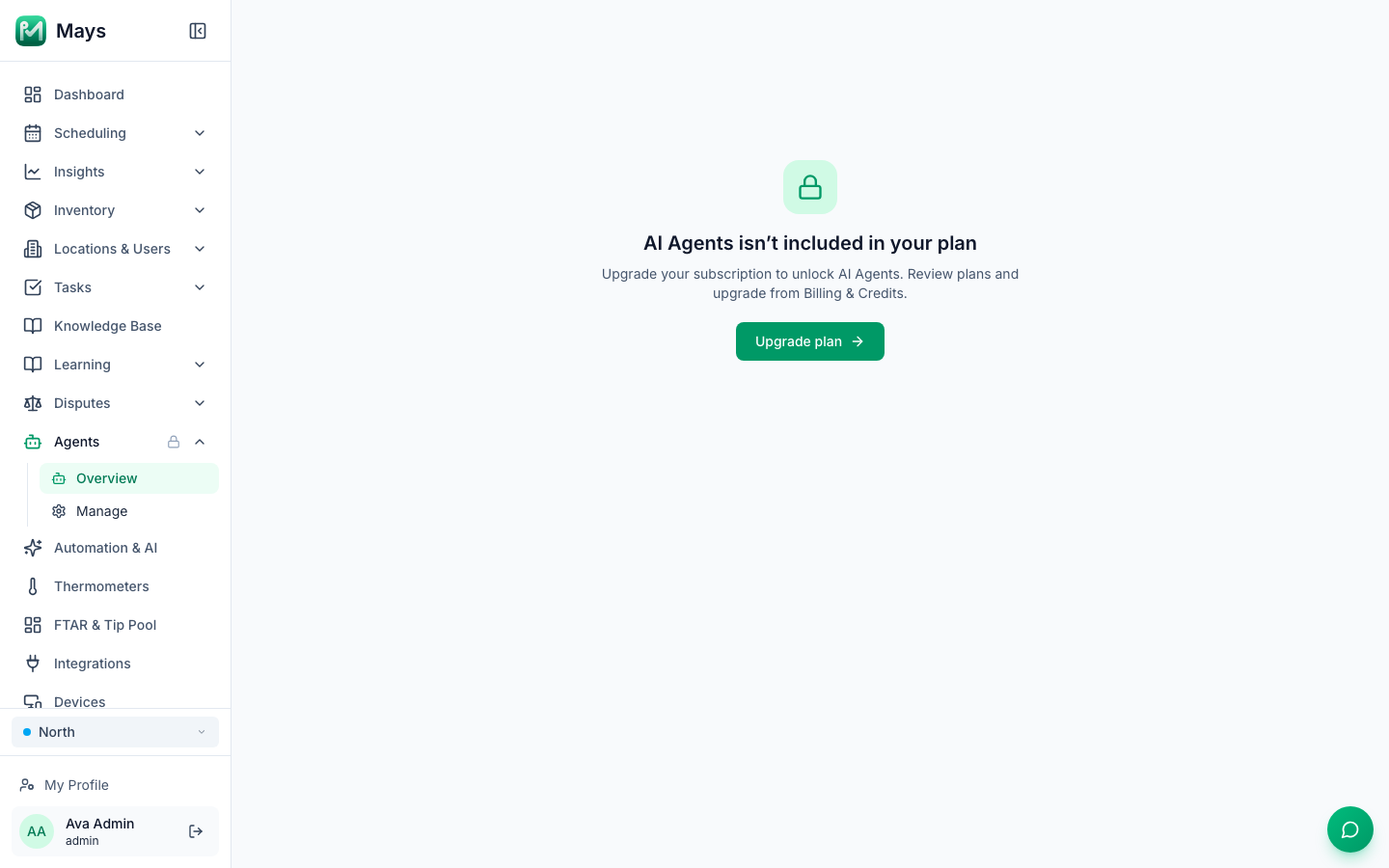
A module that Mays has turned off for your organization doesn't appear in the sidebar at all. If you open one from an old link, you'll see "… isn't available" instead. Write to support if you think it should be on.
Choose or change your plan
- Go to Settings → Billing.
- On the plan you want, click Upgrade.
- Stripe, our payment provider, opens a secure checkout. Enter your card details and confirm.
- You come back to Billing & Credits, and the new plan's modules and monthly AI credits switch on. A receipt is emailed to your admins.
After you subscribe, Manage Subscription at the top of the page opens your billing account on Stripe. There you can update your card and see past invoices. See Billing per location, payment methods and invoices.
Already paying for a plan? Click Upgrade or Downgrade on the plan you want and confirm. There's no checkout: Mays changes the subscription you already have straight away. Stripe adds the prorated difference for the rest of the billing period to your next invoice, or credits it when you move to a smaller plan. Cancelling? Write to Mays support.
Is your organization billed per location? Then Mays sets your plan level, so the plan cards have no Upgrade buttons. Contact support to change plans.
Good to know
- Only admins can see Settings. You need the Edit organization settings permission. See Roles and permissions.
- Organization billing needs Edit organization settings. Choosing or changing the plan, buying credits for all locations and Manage Subscription all need it, and admins have it by default. Anyone else who opens Settings → Billing sees the plan and balances with an Ask an admin note instead of those buttons. A location's managers can still pay for and buy credits for their own locations on the location's Billing & Credits tab. See Billing per location, payment methods and invoices.
- Mays can change which modules a plan includes. The lock icons in your sidebar always show what your organization has right now.
- Questions about your bill? See Getting help and support tickets.