The AI phone receptionist answers a location's phone. It reads out answers you've written, texts callers your address, and puts them through to a real person when it can't help.
Who: admins, and managers for the locations they're assigned to, on the web. A manager doesn't see the receptionist of a location they aren't assigned to, and employees can't open it. In Roles, the tab needs View branches; subscribing, upgrading and Manage billing also need Pay for and buy AI credits for their own locations. Add-on: it's a paid add-on that you buy for one location at a time. It isn't part of the Basic or Pro plan, and the free trial doesn't include it.
What callers hear
- The greeting. By default: Thank you for calling (your business and location). How can I help you today? You can ask a question, press 1 to receive our address by text, or press 9 to speak with someone at the store.
- A question in their own words, such as what time do you close? The receptionist looks for an answer in your FAQ list and reads it out, then asks: Anything else? You can ask another question or press 9 to speak with someone. If the caller says nothing more, the call ends. See Receptionist FAQs and missed questions.
- Pressing 1 texts the caller the location's name and address: We've sent our address to your phone. Have a great day!
- Pressing 9 puts the caller through to your fallback phone: Connecting you to the store.
- A question it has no answer for also goes to the fallback phone: I'm not sure about that. Let me connect you with someone at the store. With no fallback phone, the caller hears I'm sorry, I don't have an answer for that. Please call back during business hours. and the call ends.
- Silence. If the caller says nothing for about 6 seconds after the greeting, they hear I didn't get that. Please call back if you need help. Goodbye.
Some callers first hear Welcome to (your business and location). Press any key to continue. It keeps robocallers out. See Receptionist call log and blocked numbers.
Plans
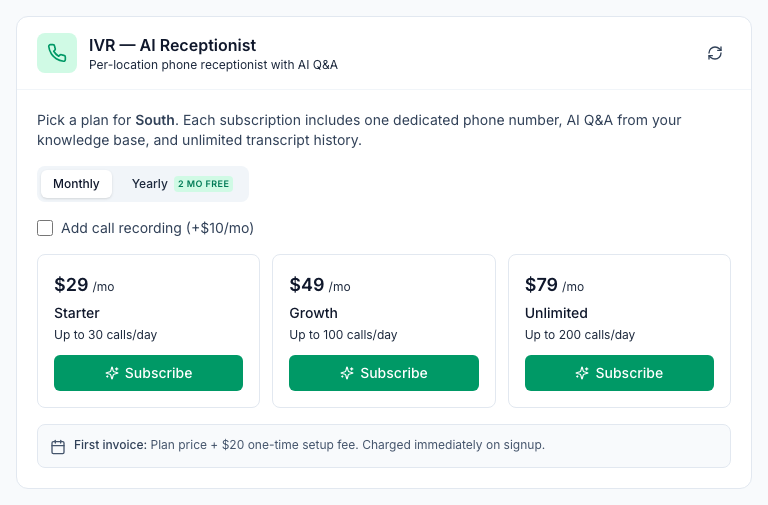
The IVR (AI Receptionist) tab lists the plans and their current prices. When this article was written they were:
Plan | Calls a day | Monthly | Yearly |
|---|---|---|---|
Starter | 30 | $29 | $290 |
Growth | 100 | $49 | $490 |
Unlimited | 200 | $79 | $790 |
- The first invoice adds a one-time $20 setup fee.
- Call recording is an extra $10 a month ($100 a year). See Call recording for the receptionist.
- Yearly billing is 10 times the monthly price, so two months are free.
- You pay for the plan, not by the minute. Calls don't use AI credits.
Subscribe a location
- Go to Locations & Users → Locations and open the location.
- Open the IVR (AI Receptionist) tab.
- Choose Monthly or Yearly. Tick Add call recording if you want it.
- Click Subscribe on a plan. Stripe, our payment provider, opens a secure checkout. Pay the plan and the setup fee.
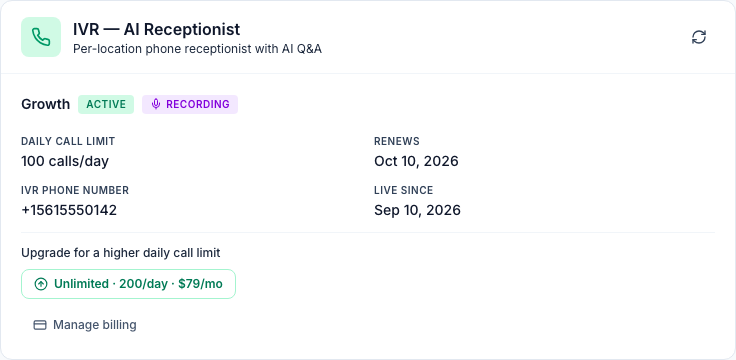
- You come back to the tab and see Payment received — IVR is now active for (location). Mays then buys a local phone number for the location, if possible in its state, and adds six starter FAQs for you to edit.
The number appears under IVR phone number once it's ready. Until then the tab says Provisioning…. If it still says that after a few minutes, contact support.
Send calls to the receptionist
The receptionist answers calls to its own number. You can give that number to customers, or ask your phone company to forward your store's existing number to it: all calls, or only when the line is busy or nobody picks up. The forwarding is set up with your phone company, not in Mays.
Change the greeting
- On the IVR (AI Receptionist) tab, open Greeting.
- Type what callers should hear first. The placeholder shows the default greeting.
- Click Save greeting.
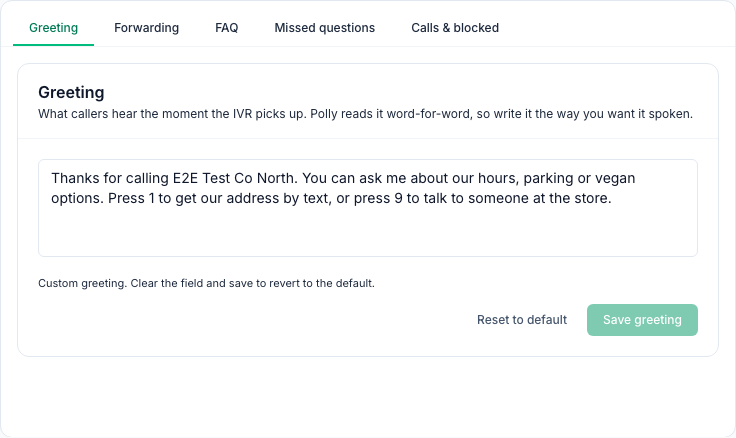
- Your greeting replaces the whole default one, so say that callers can press 1 for the address and press 9 for a person.
- A computer voice reads it word for word. Write numbers as words ("seven", not "7").
- To go back to the default, click Reset to default, then Save greeting.
Put callers through to a person
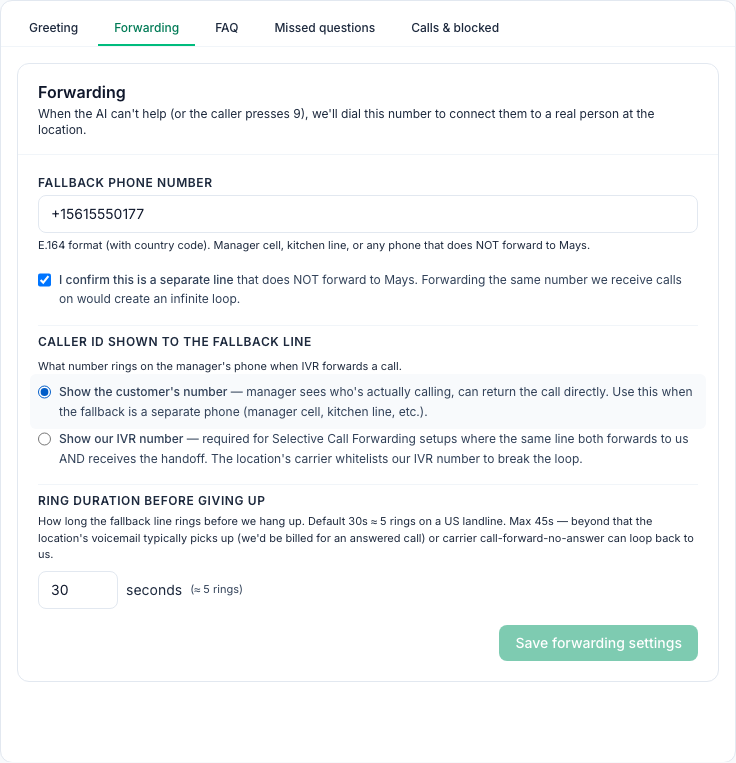
- Open Forwarding.
- Enter the Fallback phone number with the country code, for example +1 561 555 0177. Use a manager's cell phone, a kitchen line or any phone that doesn't forward to Mays.
- Tick I confirm this is a separate line.
- Under Caller ID shown to the fallback line, choose what the fallback phone shows when it rings:
- Show the customer's number: you see who's calling and can call them back.
- Show our IVR number: only for a store whose own line forwards to Mays and also takes the calls back. Your phone company needs to let the receptionist's number through so the call doesn't loop.
- Set Ring duration before giving up: 5 to 45 seconds, 30 by default (about 5 rings).
- Click Save forwarding settings.
- The fallback phone can't be the location's own phone number (from Basic Info) unless you choose Show our IVR number. Otherwise the call would loop back to the receptionist.
- If nobody answers the fallback phone in time, the call ends. The receptionist doesn't take messages.
- With no fallback phone, callers who press 9 hear Sorry, no one is available to take your call right now. Please try again later.
Daily call limit
- Each plan answers a number of calls a day, counted from midnight in the location's time zone.
- Only calls the receptionist answers count. Blocked callers, robocallers who hang up and calls it turns away don't.
- Once the limit is reached, callers hear We've reached today's call volume. Please call back tomorrow, or visit our website. and the call ends.
- Mays emails the location's email address and every admin when the location reaches 80% of the day's limit, and again when callers start being turned away. Each goes out at most once a day. You can reword it, see Branding customer emails.
- To raise the limit, click one of the buttons under Upgrade for a higher daily call limit. The new limit works straight away, and the price difference for the rest of the billing period is added to your next invoice. The tab can't move you to a smaller plan. On Unlimited it says You are on our highest standard plan.
Billing and cancelling
- Manage billing opens Stripe's billing page for this location's receptionist: change the card, see invoices or cancel.
- If a payment fails, the status says Payment failed and the receptionist stops answering. Callers hear This service is temporarily unavailable. Please contact the business directly. The Greeting, FAQ and call tabs are hidden until the payment goes through.
- When the subscription ends, Mays releases the location's receptionist number straight away and it stops working. If you cancel at the end of the billing period, that's the last day of the period, and the tab shows the date.
- To subscribe again after the subscription has ended, open the location's IVR (AI Receptionist) tab: it shows the plans again. Pick one and pay as before. The location gets a new phone number, so update your call forwarding, and your FAQs and call log are kept.
Good to know
- It only speaks English.
- It answers only from your FAQ list. It doesn't use your Knowledge Base, and it doesn't make up answers.
- It doesn't know your opening hours. Write them into the What are your hours? answer. The receptionist answers the same way day and night.
- It doesn't take messages or voicemail. Rewrite the starter What is your phone number? answer, which mentions leaving a message after the tone.
- It doesn't take catering orders. Catering has its own phone line, which is part of the Catering module.
- Texts come from Mays's texting number, not from the receptionist's number. Texts sent to the receptionist's number aren't answered.
- Any key other than 1 or 9 ends the call with I didn't understand that. Goodbye.
- It's on the web only. The phone apps don't have receptionist settings.