Food safety on every shift, at every location
Mays watches your coolers and freezers around the clock, puts food safety checks with photo proof on every phone, and keeps track of training and food handler cards. For restaurants and cafés, from one location to thousands.
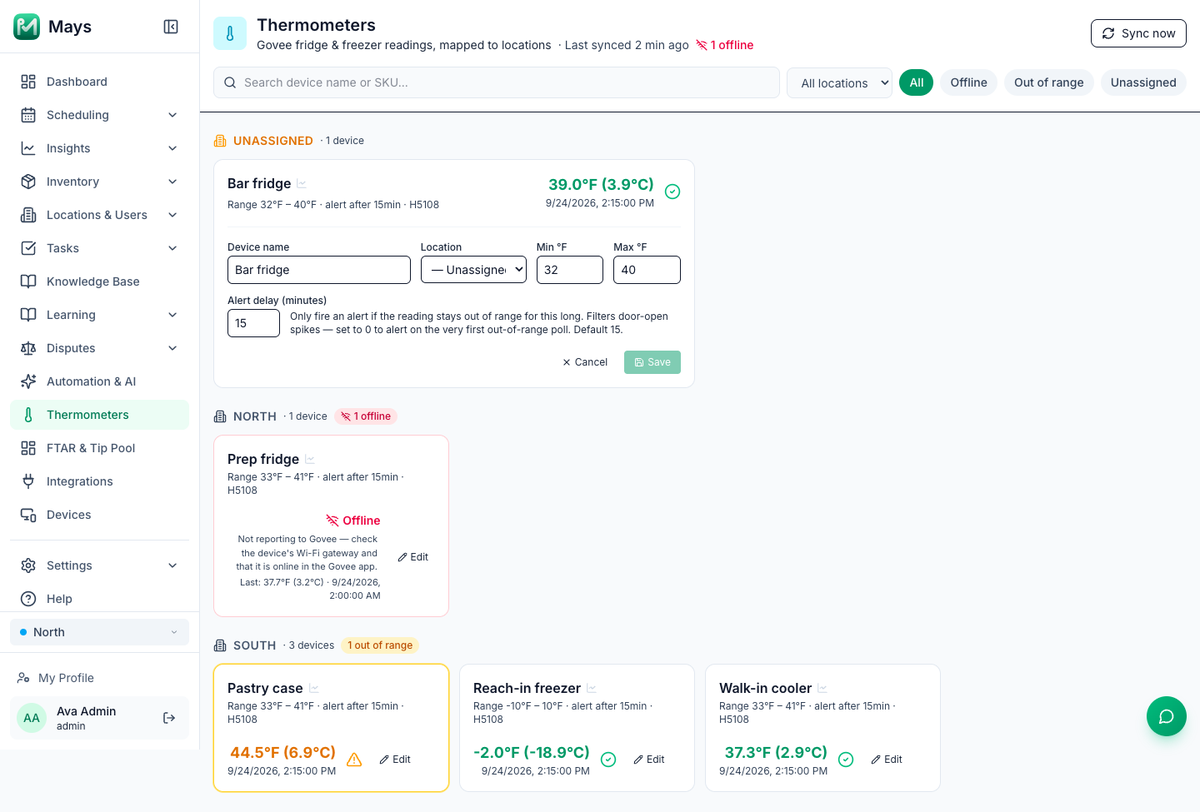
Know when a cooler starts to warm up
Wireless thermometers in your coolers and freezers report to Mays every five minutes, around the clock. When a unit stays out of its safe range, the people on shift hear about it.
- Every unit at a glance. The latest reading, the safe range and whether each sensor is online, grouped by location.
- Your own safe range. Set a minimum, a maximum and an alert delay for each unit, so a door left open for a delivery doesn’t set off an alert.
- An alert becomes a task. Mays creates a high-priority task at that location and sends a push to the people on shift, or to the location’s managers and admins when nobody is on shift.
- Offline sensors stand out. A sensor that stops reporting is marked Offline, so you can fix it before you need it.
Works with Govee Wi-Fi thermometers, bought separately.
Learn more:Setting up Govee thermometersTemperature thresholds and alerts
Temperature logs, ready to show an inspector
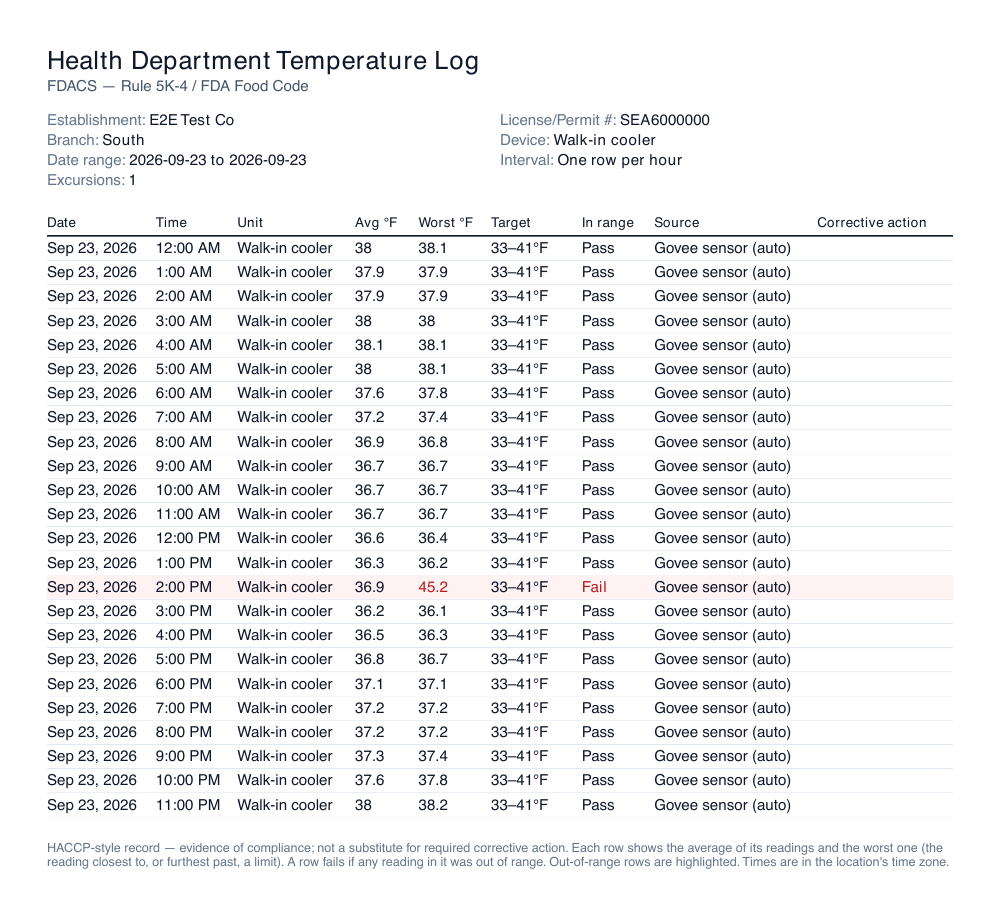
Download any thermometer’s log as a PDF or CSV for the dates you pick, with your license number, the safe range and a pass or fail on every row.
- Pick the detail. One row per hour, one every 4 hours, or every single reading.
- Nothing hides in an average. A row fails if any reading in it was out of range, and the worst reading is printed next to the average.
- History on a chart. See a unit’s temperature by hour, day, week, month or year, with your safe range drawn in.
- Kept for 13 months. Download the logs you need to keep for longer.
Check with your inspector which record they want.
Learn more:Health-department temperature logs
Food safety checks on every phone, with photo proof
Build your opening, closing, prep and cleaning checklists once. Mays puts them on your team’s phones on the days and at the locations you choose.
- Temperatures in the checklist. Add a number task for a probe reading, or a temperature log form with a safe range that shows In range or Out of range as staff fill it in.
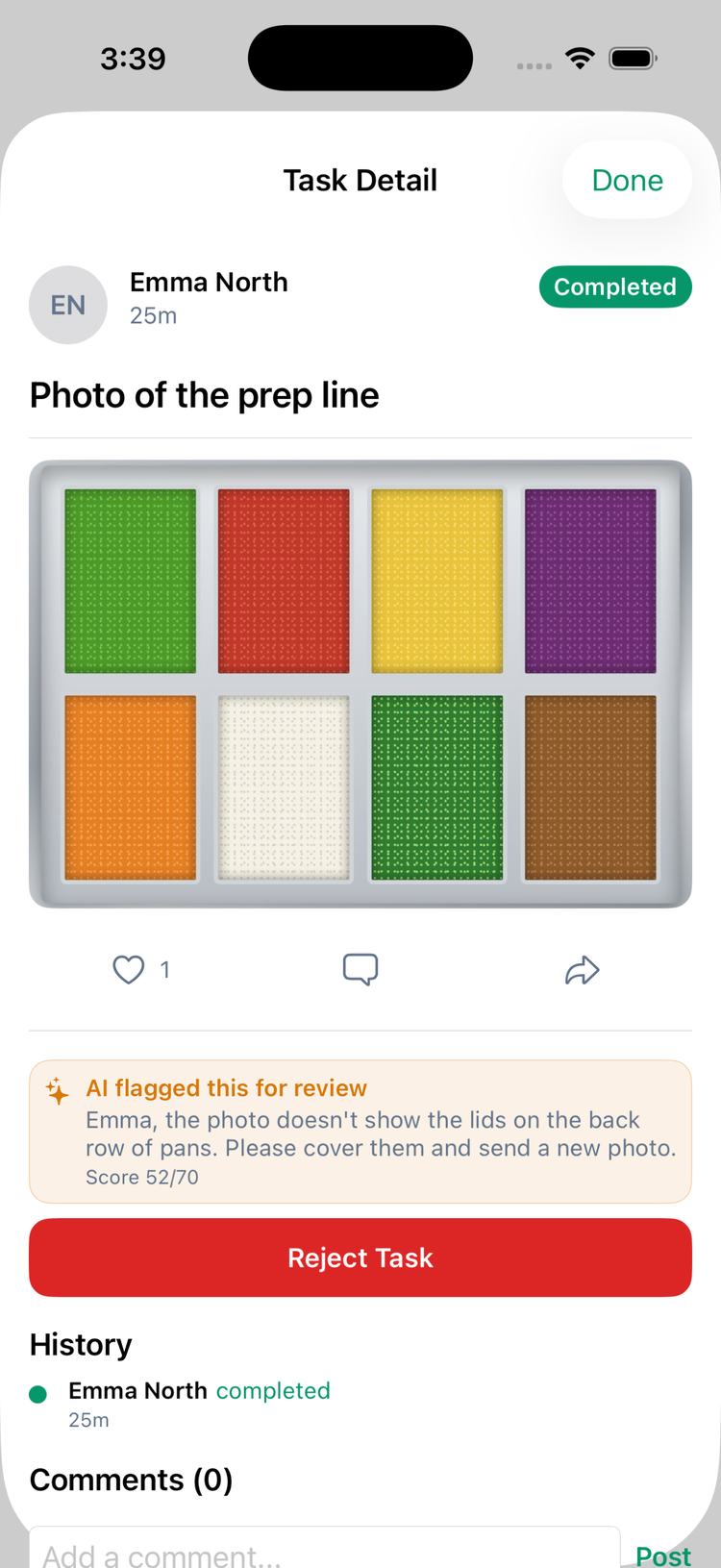
- Photo proof. Photo tasks are answered with the phone’s camera, so managers see the work, not just a tick.
- AI photo checks. Mays AI scores each photo against the task and flags weak ones for the manager, or sends them back to redo once you trust it. Uses AI credits.
- Every answer on record. Temperature log answers land in Task Data, ready to export.
Learn more:Creating a checklist templateBuilding custom forms (Task Types)AI photo verification
Train every new hire the same way
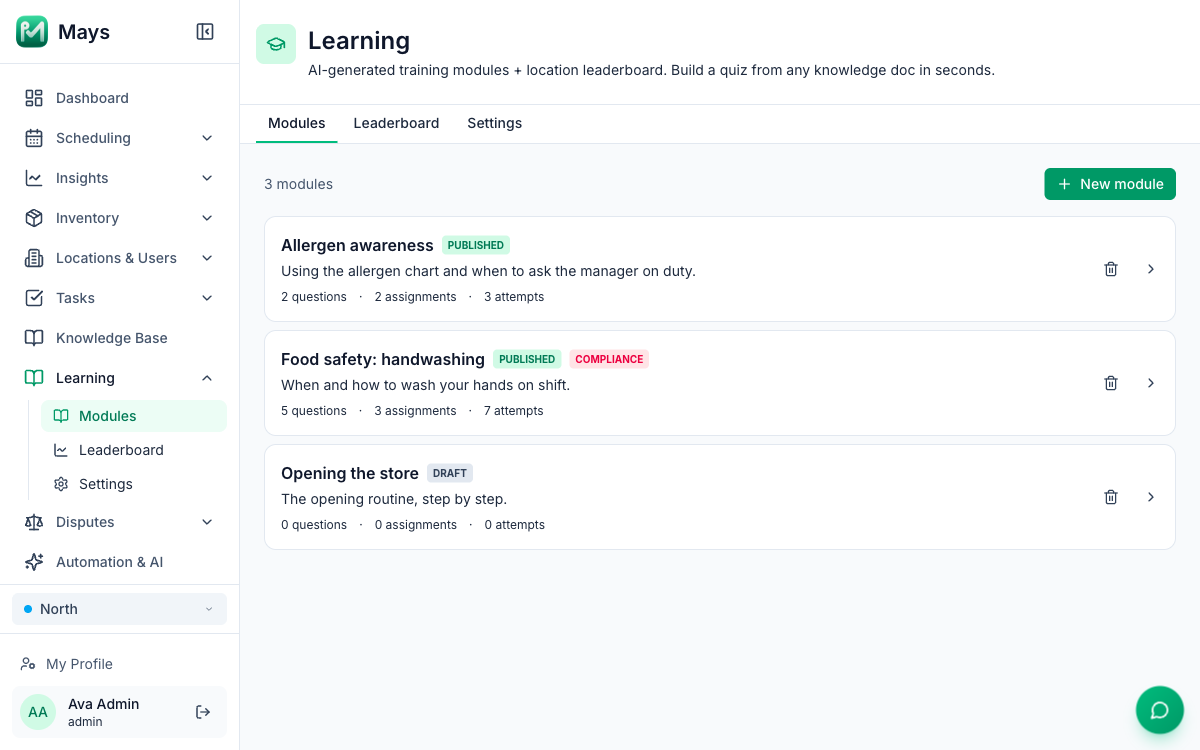
Turn your own SOPs into short quizzes, assign them by location, role or person, and see who has passed.
- Quizzes from your own documents. Mays AI drafts the questions from the knowledge base articles and documents you pick, using only your text. You review them before you publish.
- Assign once. Give a module to a location, role or department, and people who join it later get it too.
- Pop quizzes on shift. At most one question a day, sent to people on shift who haven’t passed their training yet, inside the hours you set.
- Certificates on pass. Modules you mark compliance-critical give a PDF certificate with the person’s name, score and date the first time they pass.
A Mays training certificate shows someone passed your own training. It isn’t a state food handler card.
Learn more:Creating training modulesAssigning trainingSnap quizzesTraining certificates
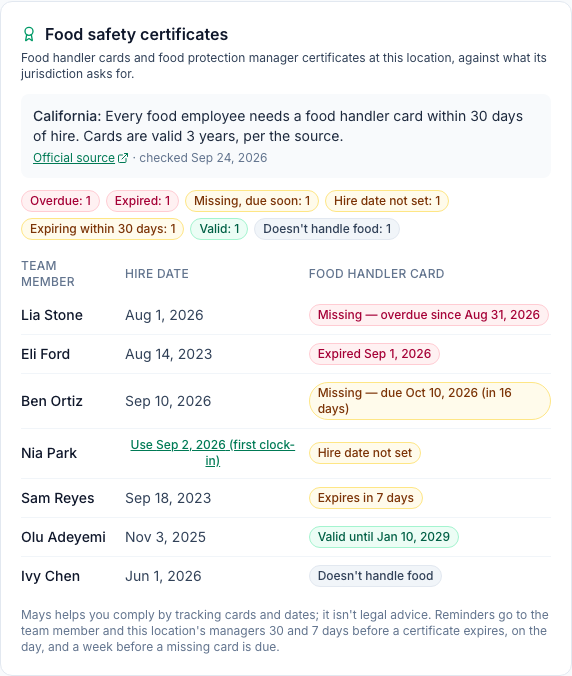
Food handler cards and manager certificates, tracked
Keep each team member’s food handler card and food protection manager certificate on file with its expiry date. Each location shows who is missing a card, who is due and whose card is about to expire, against what its state or county asks for.
- Rules by location. Mays reads the requirement from the location’s address and links the official source it comes from.
- Reminders before a card expires. The team member hears 30 days and 7 days before, and on the day. Their managers get one message listing the cards for their team.
- A warning before you publish. Where a certified person must be on every shift, the schedule warns you about any stretch without one. You can still publish.
- On their phone. Team members see their own certificates in the app under My certificates.
Part of Labor law compliance, which an admin turns on for the organization. Mays helps you comply; it isn’t legal advice.
Learn more:Food safety certificatesLabor & compliance (per location)
Allergens and SOPs, one question away
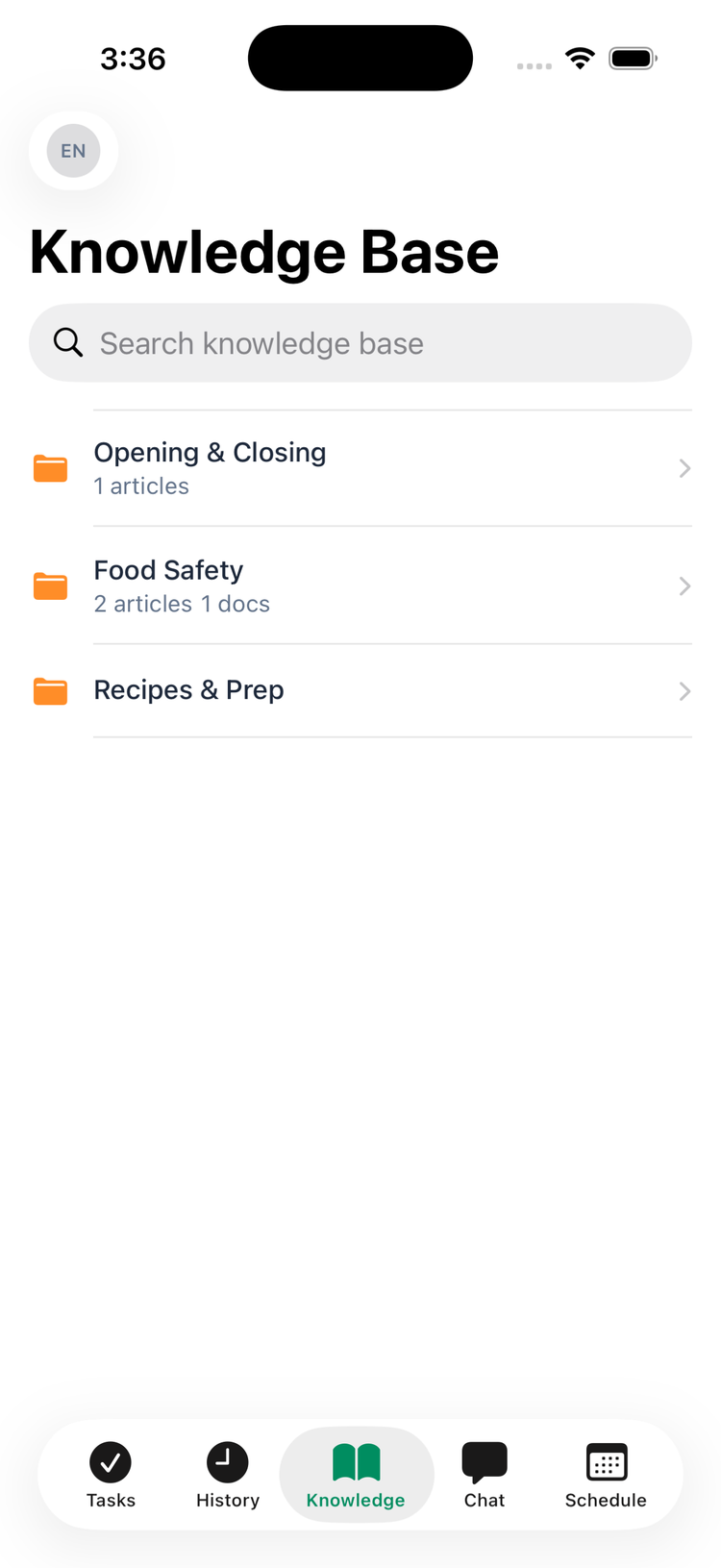
Keep your allergen chart, recipes and food safety SOPs in the knowledge base. Your team reads and searches it in the app, and the AI Assistant in chat answers from it.
- Articles and documents. Write articles, or upload PDFs, Word files and photos, organized in folders.
- Ask in plain words. “How long do we hold soup?” The AI Assistant answers from the articles and documents that person can open. Each answer uses AI credits.
- The right material for each role. Share a folder with everyone, with a location or a role, or with managers only.
Learn more:Your knowledge baseAI answers from your knowledge base
When something goes wrong, the follow-up starts on its own
Automation rules turn an event into action. When you connect your thermometers, Mays adds a rule that turns every temperature alert into a task for the people on shift.
- Choose who is told. Edit the Investigate temperature alert rule to change the task, or send it to all the location’s managers instead of whoever is on shift.
- Overdue checks get chased. A rule can push the location’s escalation manager when a checklist task is past its deadline.
- Rejected photos get a follow-up. When a task is rejected, by a manager or by AI photo checks, a rule can message the person or notify a manager.
- A record of what was done. Whoever handles an alert writes what they did, and the completed task stays as your record.
Temperature alerts need smart thermometers (Included in Pro).
Learn more:Temperature thresholds and alertsAutomation rulesAutomation triggers and actions
Temperature alert: Walk-in cooler at 44.6°F
- Priority
- High
- Description
- Walk-in cooler is above the safe range (33–41°F). Current reading: 44.6°F. Check the unit, document any corrective action (door left open, compressor noise, contents moved), and reset the thermometer if needed.
- Answer
- Text: what was done.
Everyone sees their part
The same app on the phone and the web, for one location or thousands.
Your team
Works through checklists and photo tasks on their phones, handles temperature alert tasks, takes quizzes and asks the AI Assistant.
Managers
See the thermometers and download temperature logs for their own locations, review flagged photos and add their team’s certificates.
Admins
Connect the thermometers and set safe ranges, then build the checklists, training modules and automation rules for every location.
Questions
Which thermometers work with Mays?
Govee Wi-Fi thermometers that report to the Govee Home app, such as the Govee Smart Thermometer with its Wi-Fi gateway. You buy the sensors separately and connect your Govee account to Mays with an API key. Setting up Govee thermometers →
Will a door left open for a delivery set off an alert?
Not if the unit is back in range in time. Each thermometer has an alert delay, 15 minutes to start with, and Mays only alerts when a reading is still out of range after the delay. The temperature log still marks that row Fail, so the spike stays on record. Temperature thresholds and alerts →
Will my inspector accept the temperature log?
The log is a PDF or CSV with your establishment name, license number, the safe range and a pass or fail on every row, made to show an inspector. Check with your inspector which record they want. Health-department temperature logs →
Do the sensors measure the food itself?
No. They read the air in the unit. Keep probing hot-holding and cooling food, and record those readings on a checklist or a temperature log form in the app. Setting up Govee thermometers →
Is a Mays training certificate a food handler card?
No. It shows someone passed your own training. Official food handler cards and manager certificates go on the team member’s Certificates tab, part of Labor law compliance on the Enterprise plan. Food safety certificates →
See food safety in Mays on one of your stores.
Every Basic and Pro module free for 30 days, no card needed. Or book a walkthrough and we’ll show you around.
Prefer to talk? +1 (561) 286-3939
Which plan is right for you? See plans and get a quote →