The multi-location owner's weekly check: a one-page scorecard for every store
With one café, you know how the week went because you were there. With three, you know how the week went at the store you were in, and you hear about the other two when something breaks. The weekly scorecard fixes that: the same lines for every store, filled in every Monday, so the store that needs you shows up as a red cell, not a phone call.
This isn't the shift handoff between managers (that's the manager shift log), and it isn't each store's team meeting (that's the weekly manager meeting). It's the owner's view across all of them, plus one store visit a week. The walk-through for that visit is in opening a second location.
The scorecard
One column per store, one row per line. Set your own limits once, write them in the last column, and colour each cell green, yellow or red.
Line | Store A | Store B | Store C | Your limits (green / yellow / red) |
|---|---|---|---|---|
Money | ||||
1. Net sales vs. the same week last year (or forecast) | ||||
2. Labor % of net sales | ||||
3. Prime cost % (labor plus cost of goods) | ||||
4. Overtime hours | ||||
5. Cash over/short for the week | ||||
6. Waste ($) | ||||
Food safety | ||||
7. Opening and closing checklists completed (%) | ||||
8. Temperature excursions, and how many have a written action | ||||
9. Food protection manager on every shift; certificates current | ||||
Guests | ||||
10. Reviews at 3 stars or below, and how many are unanswered | ||||
11. Complaints logged | ||||
Team | ||||
12. Call-outs and no-shows | ||||
13. Training due or overdue | ||||
The building | ||||
14. Open maintenance items older than 7 days | ||||
15. Logbook follow-ups still open |
Line 9 comes from the Food Code. The permit holder must "ensure that a PERSON IN CHARGE is present at the FOOD ESTABLISHMENT during all hours of operation" (§2-101.11(A)), and "The PERSON IN CHARGE shall be a certified FOOD protection manager" (§2-102.12(A)), both in the 2022 FDA Food Code and unchanged in the 2026 edition. States adopt their own version, so check yours. A new store that opens shifts with no certified manager on duty is the kind of gap a scorecard catches early.
How to compute lines 2 and 3 is in our labor cost percentage and weekly prime cost posts, and line 5 comes from the daily sales and cash report.
A filled-in week
Made-up numbers, with the owner's limits:
Line | North Avenue | Riverside | Old Town | Limits |
|---|---|---|---|---|
Net sales vs. last year | +4% (green) | −2% (yellow) | +9% (green) | ≥0 / −5 to 0 / below −5% |
Labor % | 27% (green) | 33% (red) | 29% (yellow) | ≤28 / 28 to 31 / above 31% |
Overtime hours | 0 (green) | 11 (red) | 3 (yellow) | 0 / 1 to 5 / above 5 |
Checklists completed | 98% (green) | 81% (red) | 95% (green) | ≥95 / 85 to 95 / below 85% |
Temperature excursions with an action | 1 of 1 (green) | 2 of 4 (red) | 0 (green) | all / one missing / two or more missing |
Low reviews unanswered | 0 (green) | 1 (yellow) | 0 (green) | 0 / 1 / 2+ |
Logbook follow-ups open | 2 (green) | 6 (red) | 3 (yellow) | ≤2 / 3 to 4 / 5+ |
Riverside isn't "a bit worse". Overtime, a skipped checklist and unlogged temperature actions together often point to one thing: short-staffed shifts where the basics slide. That's this week's conversation, and Riverside is this week's visit.
The Monday routine (45 minutes)
- Pull the numbers (15 minutes). Sales, labor and prime cost by store; checklist completion; temperature excursions; reviews; the logbooks.
- Fill in the scorecard (10 minutes). Colour every cell. Don't explain anything yet.
- Pick one red per store (5 minutes). Not three. The one that, fixed, fixes others.
- Send each manager their line (10 minutes). A short message: what you saw, what you'd like by Friday, and when you'll check. Green stores get a message too: say what went well, by name.
- Choose this week's visit (5 minutes). The store with the most red, or the one you haven't visited longest. Go on a different day and time from last time, and use the visit checklist from opening a second location.
Keep the scorecards in one file, a tab per week. After a month, look across the tabs: a store that's yellow on labor four weeks running needs a different schedule, not a fifth message.
What not to do
- Don't compare stores' raw numbers without context. A store that opened in March won't match one that's been open three years. Compare each store to its own limits and its own trend.
- Don't add lines. Fifteen lines take ten minutes. Thirty lines get skipped.
- Don't only send bad news. Managers who only hear from you about red cells stop wanting to see them.
Where Mays fits
Most of the scorecard can come from Mays without opening three logins:
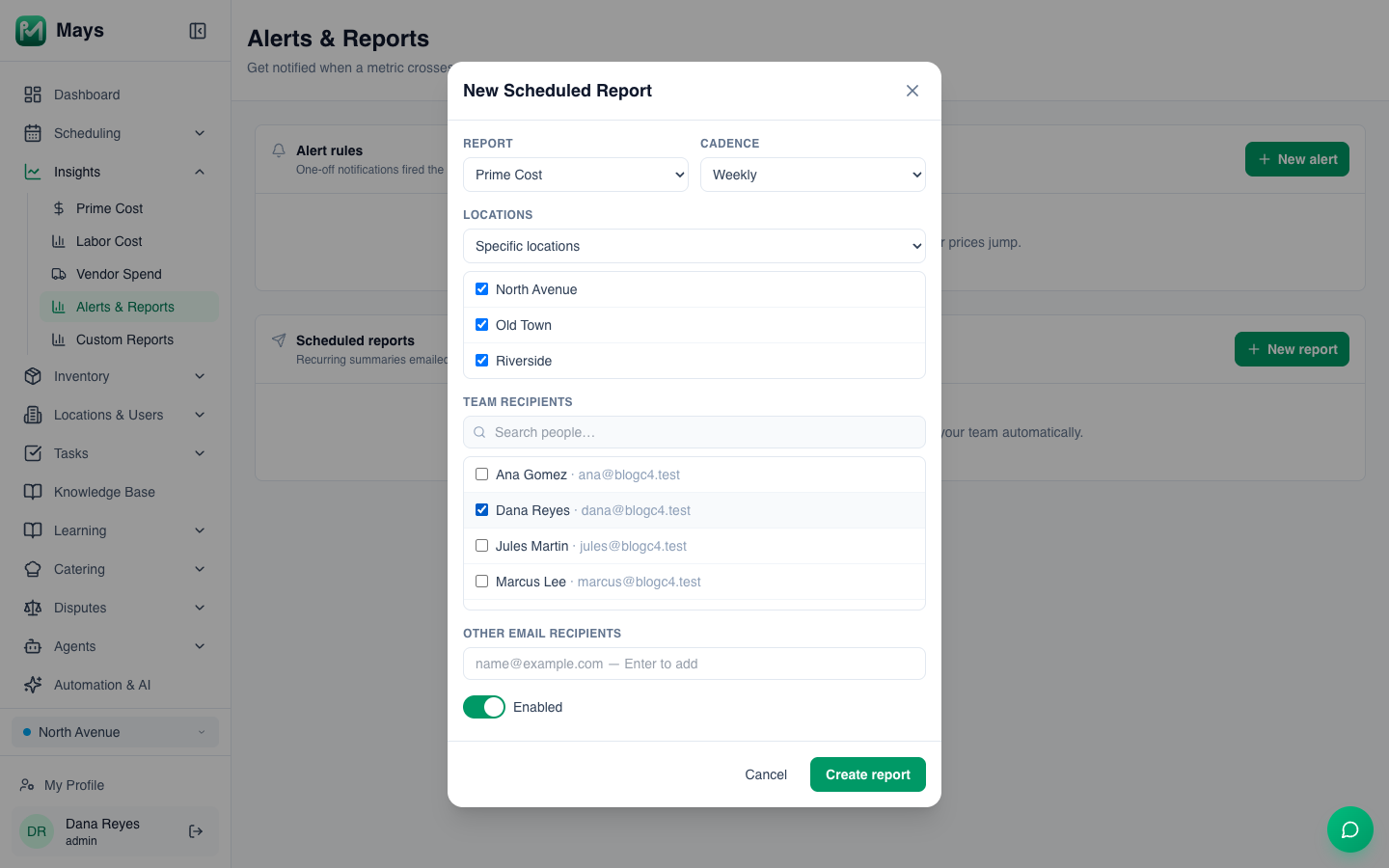
- The numbers in your inbox on Monday. Under Insights → Alerts & Reports → New report, schedule a weekly Prime Cost, Labor Summary or Vendor Spend report (the image at the top of this post). Weekly reports arrive every Monday around 7 a.m. for the previous Monday to Sunday. Pick Specific locations and tick each store: a report set to All locations currently arrives with every number at zero. Prime cost and labor need your POS connected. See Alerts and scheduled reports.
- Checklists across stores. The Dashboard opens on All Locations, with every checklist running that day and how far along it is; step back a day at a time with the arrows. See The operations dashboard.
- Temperatures. The Thermometers page filters to Out of range, Offline and Unassigned, and alert tasks show what each store did. See Temperature thresholds and alerts.
- Reviews. The Reviews page lists every store's Google reviews, with ≤ 3 stars and Unanswered filters, once your locations are linked to their Google listings. See Google reviews.
- Follow-ups. Each store's logbook has a Follow-ups tab with every entry still flagged. See The manager logbook.
- Certificates. With Labor law compliance on, each team member's food protection manager certificate is kept with its expiry date, and Mays reminds them 30 and 7 days before it expires. See Food safety certificates.
What Mays doesn't do: there's no single scorecard page with every store side by side, so the scorecard itself still lives in your spreadsheet.
Monday, every Monday
The scorecard works because it's boring: the same lines, the same day, every week. The week you skip it is the week a red cell turns into a closed store.
Start your free trial: 30 days, every module, no card needed. Or book a walkthrough and we'll set up your Monday reports for every store.