Manager shift log template: a handover the next manager will read
At shift change, the closing manager knows the dish machine is leaking, that Sam called out for tomorrow, and that table 12 left unhappy about a cold steak. The opening manager knows none of it. A shift log is how that knowledge crosses the gap between two people who may never be in the building at the same time.
This template is a one-page handover for a small restaurant or café with one manager or shift lead on each shift. It's written to be filled in in five minutes at the end of a shift, and read in two at the start of the next one.
This is general information, not legal advice.
What a useful shift log does
- It's short. Five minutes to write, or it won't get written on a busy night.
- It's the same every shift, so the reader knows where to look.
- It separates information from follow-ups. "Sales were $4,100" is information. "Call the plumber about the dish machine" is a follow-up, and needs an owner.
- It's written for someone who wasn't there. Names, times and what was done, not "the thing from yesterday".
The template
Shift summary
Field | What to write |
|---|---|
Date, shift, manager | Tue Oct 13, dinner, Riley |
Sales and covers | Net sales, covers or transactions, against the forecast if you have one |
Labor | Call-outs, who covered, anyone sent home early or kept late, overtime risk for the week |
86'd items | What ran out and when; what to prep more of tomorrow |
Staff
Field | What to write |
|---|---|
Attendance | Late arrivals, no-shows, swaps that happened outside the schedule |
Illness reported | Who, the symptom, what you did (sent home, restricted to non-food duties) |
Injury | Who, what happened, first aid given, whether they saw a doctor |
Recognition | Someone who handled a rush or a guest well, by name |
Coaching | Anything you talked to someone about, factually |
Guests
Field | What to write |
|---|---|
Complaints | Table or order, the issue, what you offered |
Allergy or illness reports | The guest's report, what they ate, who took it, contact details if given |
Big parties and reservations | Anything booked for the next shifts that needs extra prep or staff |
Food safety
Field | What to write |
|---|---|
Out-of-range readings | Unit, reading, what was done (moved product, discarded, called service) |
Discards | What and why (past date, temperature, dropped) |
Line check and closing list | Done, and anything that failed |
Building and equipment
Field | What to write |
|---|---|
Broken or not working | Equipment, what's wrong, whether service was called |
Deliveries | Short, wrong or late items, credits requested |
Safety | Wet floors, loose mats, lights out, anything a guest or staff member could trip on |
Cash
Field | What to write |
|---|---|
Drawer | Over or short, by how much, and the explanation if known |
Paid-outs and voids | Anything unusual |
Deposit | Prepared, where it is, who has the safe |
Follow-ups for the next shift
Follow-up | Owner | By when |
|---|---|---|
End every log with this table. If a follow-up has no owner, it's a wish.
The rules behind the staff and safety lines
Illness. The 2022 FDA Food Code requires food employees to report to the person in charge "information about their health and activities as they relate to diseases that are transmissible through FOOD" (§2-201.11(A)), including symptoms such as "Vomiting", "Diarrhea", "Jaundice" and "Sore throat with fever" (§2-201.11(A)(1)). The person in charge excludes a food employee who is "Symptomatic with vomiting or diarrhea" unless it's from a noninfectious condition (§2-201.12(A)(1)). Your shift log is where the next manager finds out who can't work tomorrow, and why. For how to handle the call-out side, see handling call-outs and no-shows. (The FDA has since published a 2026 edition; the rules quoted here haven't changed in substance. Check which edition your state enforces.)
Keep health details to what the next manager needs ("sent home with vomiting, can't return until cleared under our illness policy"), and keep medical documents out of the log.
Serious injuries. Most restaurants don't keep OSHA injury logs. OSHA's rule says that if your establishment is in an industry on its partial-exemption list, "you do not need to keep OSHA injury and illness records unless the government asks you to keep the records", and the list includes "7221 Full-Service Restaurants" and "7222 Limited-Service Eating Places" (29 CFR 1904.2 and Appendix A). But the same rule adds: "However, all employers must report to OSHA any workplace incident that results in an employee's fatality, in-patient hospitalization, amputation, or loss of an eye". A death is reported within eight hours, and an in-patient hospitalization, amputation or loss of an eye within 24 hours (29 CFR 1904.39). States that run their own OSHA plan can have their own rules, and workers' compensation has its own reporting deadlines. If the log says someone went to the hospital, the next manager needs to know whether OSHA was called.
Guest complaints and illness reports have their own process; see handling customer complaints.
A fill-in version
SHIFT LOG: ___day ___/___, ___ shift, manager: ________
Sales: $______  Covers: ____  Forecast: $______
Labor: call-outs ________ covered by ________ sent home early ________
86'd: ________________________________

STAFF
Late / no-show: ________________________________
Illness reported (who, symptom, action): ____________
Injury (who, what, first aid, doctor?): _____________
Shout-out: ________________________________

GUESTS
Complaints (table, issue, what we offered): __________
Allergy or illness reports: _________________________
Coming up (parties, catering): ______________________

FOOD SAFETY
Out-of-range readings and action: ___________________
Discards: ________________________________

BUILDING
Broken / service called: ____________________________
Deliveries short or wrong: __________________________

CASH
Drawer over/short: $____  Deposit ready: Y / N

FOLLOW-UPS (owner, by when)
1. ______________________________________
2. ______________________________________
Run it in the Mays logbook
Mays has a logbook for exactly this: a daily journal per location, under Scheduling → Logbook on the web and Schedule → Logbook in the app.
- Sections become categories. Each entry gets one of Shift Notes, Incidents, Maintenance, Staff, Customer or Health & Safety, and the day's entries are grouped by category. Map the template to them: sales, labor and 86'd items in Shift Notes; illness and injury in Health & Safety or Incidents; equipment and deliveries in Maintenance.
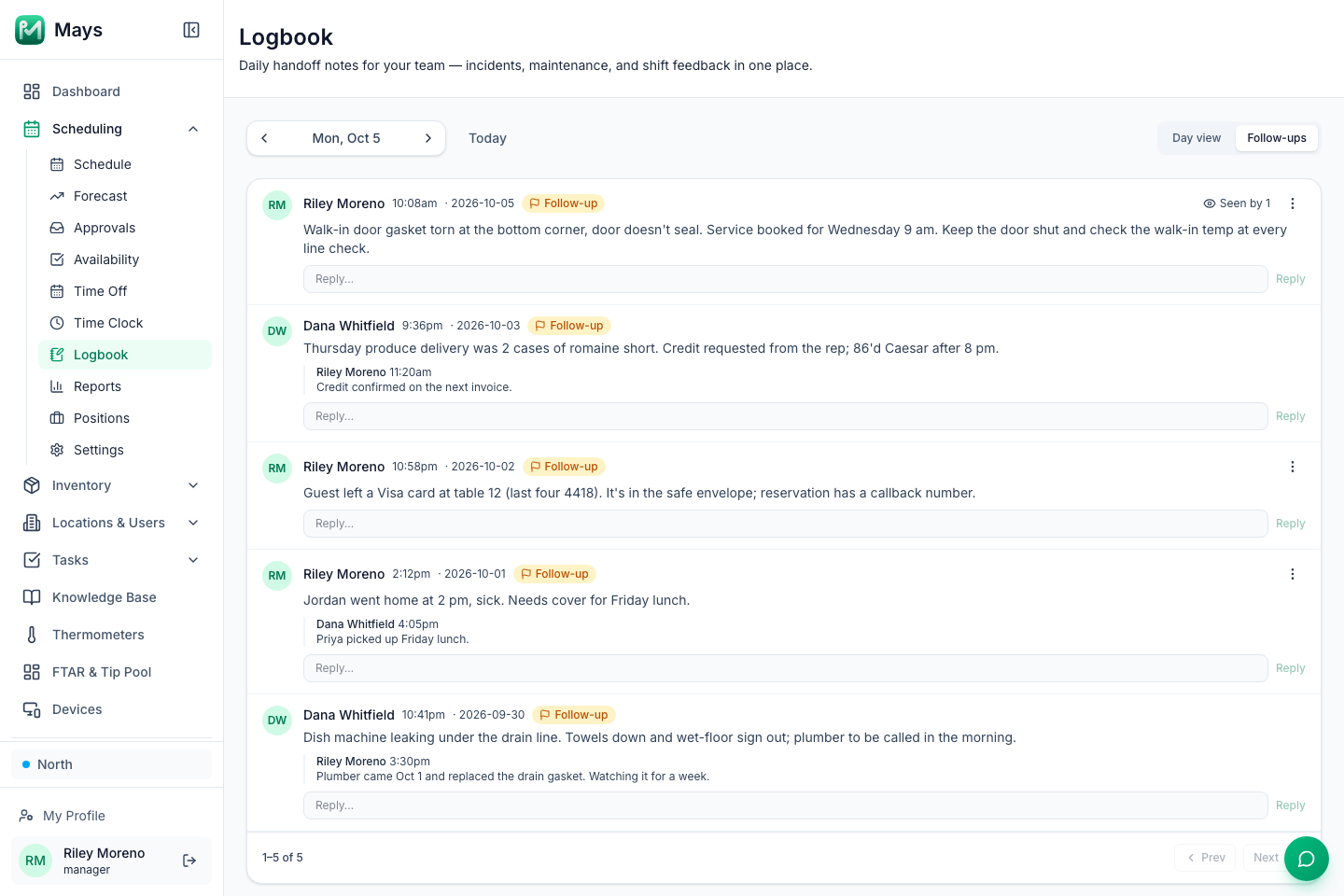
- Follow-ups are flagged. Tick Needs follow-up on an entry, and it appears under Follow-ups, which lists every flagged entry at the location from any day, newest first.
- The next manager is told. The other managers and admins at that location get a notification with the start of the entry, and Seen by shows who has opened that day's logbook since it was posted.
- Replies keep the thread. "Plumber booked for Thursday" goes as a reply under the original entry.
- The team's view of the shift. When people clock out in the app, they're asked How was your shift?, and the ratings and comments show at the bottom of that day's logbook.
What to know before you rely on it:
- There's no "done" button for a follow-up yet. The flag stays on and the entry stays in Follow-ups; reply on the entry to say it's sorted.
- It's text only: no photos in the logbook. Put the photo of the broken part in a task or a chat.
- Managers and admins only. Employees don't see the logbook, so a shift lead on the Employee role needs a role with View log book and Manage log book to read and post.
- Categories are fixed to the six above.
For the weekly view of what the logs added up to, see the weekly manager meeting. For handing the close to a shift lead, see promoting your first shift lead.
Start every shift with the last one
Use the template for a week on paper or in the logbook, then cut whatever nobody reads.
Start your free trial: 30 days, every module, no card needed. Or book a walkthrough and we'll set up your logbook with you.