Opening a second location: what to standardize first
Your first store runs on you. You open it, you answer every question, and you notice when the milk order is short. The second store is where you find out which of those things are written down and which live in your head.
You don't have to standardize everything before you open. Standardize the few things that protect the customer and the business, let the rest adapt to the new store, and check both every week. This guide covers what to standardize first, what can differ, the paperwork a second store adds in Florida, and a checklist for your weekly visits.
This is general information, not legal advice. Updated September 24, 2026: the Florida Statutes, DBPR and eCFR pages cited here were re-checked.
Standardize these first
Priority | What | What "standard" means |
|---|---|---|
1 | Food safety and opening and closing checklists | The same checklist, the same temperatures, the same proof, at both stores |
2 | Recipes and portions | Written recipes with grams and photos; one master menu |
3 | Prices | One price list, with local exceptions decided on purpose |
4 | Roles and approvals | The same roles, and the same rules for who approves voids, refunds, time off and schedule changes |
5 | Training | The same SOPs and sign-offs, so a barista can cover the other store |
6 | Cash handling | The same count sheet and over/short tolerance (our cash-handling guide) |
7 | Inventory | The same items, units and vendors; pars set per store |
8 | Scheduling | The same labor target, publish day and swap rules |
Start at the top. A customer forgives a different pastry case. They don't forgive a food-safety problem, or a latte that tastes different across town.
What can differ by store
- Opening hours and staffing, by daypart, from each store's own sales.
- Par levels, from each store's own usage.
- A few menu items, if the kitchen or the neighborhood calls for it.
- Local rules, if the second store is in another city, county or state.
Write the differences down, too. "South closes at 3 on Sundays" is a standard for South.
Write the SOPs before the second store opens
The best source is the first store on a good day. Watch your strongest opener and closer, and write down what they actually do: one task per page, with photos and the numbers (grams, seconds, degrees). Test each SOP at the first store before you copy it to the second. Our checklist guide covers writing tasks people follow, and the training guide covers the week-one plan, food handler training and food manager certification for a new team.
What a second store adds in Florida
- Its own license. "Each public lodging establishment and public food service establishment shall obtain a license from the division. Such license may not be transferred from one place or individual to another," and you apply and receive it before you open (s. 509.241, F.S.).
- Plan review if the space is newly built, converted from another use, remodeled, or reopening after being closed at least 18 months (DBPR plan review). New licensees must pass a sanitation and safety inspection before opening. Taking over a space that's currently licensed as a restaurant, or where one closed less than a year ago? DBPR says to apply for a change of owner, "even if the business is completely different" (DBPR food service licensing guide).
- E-Verify counts employees, not stores. Private employers with 25 or more employees must use E-Verify for new hires (s. 448.095, F.S.). If both stores are the same employer, the second one can take you over 25. If each store is its own company, ask your accountant how to count. Our hiring guide has the rest of the new-hire paperwork.
- Overtime counts both stores. The employer "must total all the hours worked by the employee for him in that workweek (even though two or more unrelated job assignments may have been performed)," and when two employers jointly employ someone, "all hours worked by the employee for such employers during the workweek must be totaled" (29 CFR 778.103). With made-up numbers: 24 hours at the first store and 20 at the second in the same week is 44 hours, so 4 of them are overtime, even though neither store's schedule shows more than 40.
- Another state brings its own minimum wage, overtime and break rules. Check them before you copy your policies; our time clock post shows how much they can differ.
The first four weeks at the new store
Week | Focus |
|---|---|
Before opening | New hires train at the first store, or with trainers from it, on the same SOPs and checklists. |
1 | Two or three of your best people from the first store work alongside the new team. You or the new store's lead are there for every opening and closing, and every checklist is checked the same day. Fix unclear tasks at both stores. |
2 | Compare the two stores' checklist completion, temperatures, over/short and labor % side by side. Differences are either a training gap or a standard that needs a local exception. |
3–4 | Step back to the weekly visit below. The trainers go home; the new lead owns the store. |
Borrowing people from the first store thins it out, so plan those weeks on both schedules, and remember that their hours at both stores count toward overtime.
Roles when you're not in the room
- One person in charge of each store, a general manager or a lead, with a clear list of what they decide alone.
- The same approvals everywhere: who approves time off, schedule changes, voids and refunds.
- Access to match: each manager sees their own store; you see both.
- A fixed weekly check-in with each store's lead, with the numbers in front of you.
Your weekly visit checklist
Visit each store once a week, varying the day and the time, and walk through the same list:
Check | What good looks like |
|---|---|
Opening and closing checklists | Done on time, with photos that match the task |
Temperature logs | Complete, in range, with corrective actions written down |
A recipe spot-check | One drink or plate made to the recipe and the photo |
Cash | The over/short log complete; deposits match the bank statement |
Schedule | Next week published and within budget |
The team | A short conversation with each person on shift |
Customers | Reviews and complaints since your last visit answered |
The back | Walk-in, dish area and restroom walked through |
Follow-ups | Last visit's issues closed, or a date to close them |
Where Mays fits
- Add the store under Locations & Users → Locations → Add Location: address, phone, email, time zone, and the license number that's printed on exported temperature logs. Each location has its own Scheduling tab.
- Who sees what: each person's Assigned Locations decide where they work. Managers see only the locations they're assigned to; admins see all of them. Someone assigned to both stores appears on both schedules.
- One checklist for both stores: a checklist template can run at several locations (1. Where does this run?), and each store gets its own copy every day.
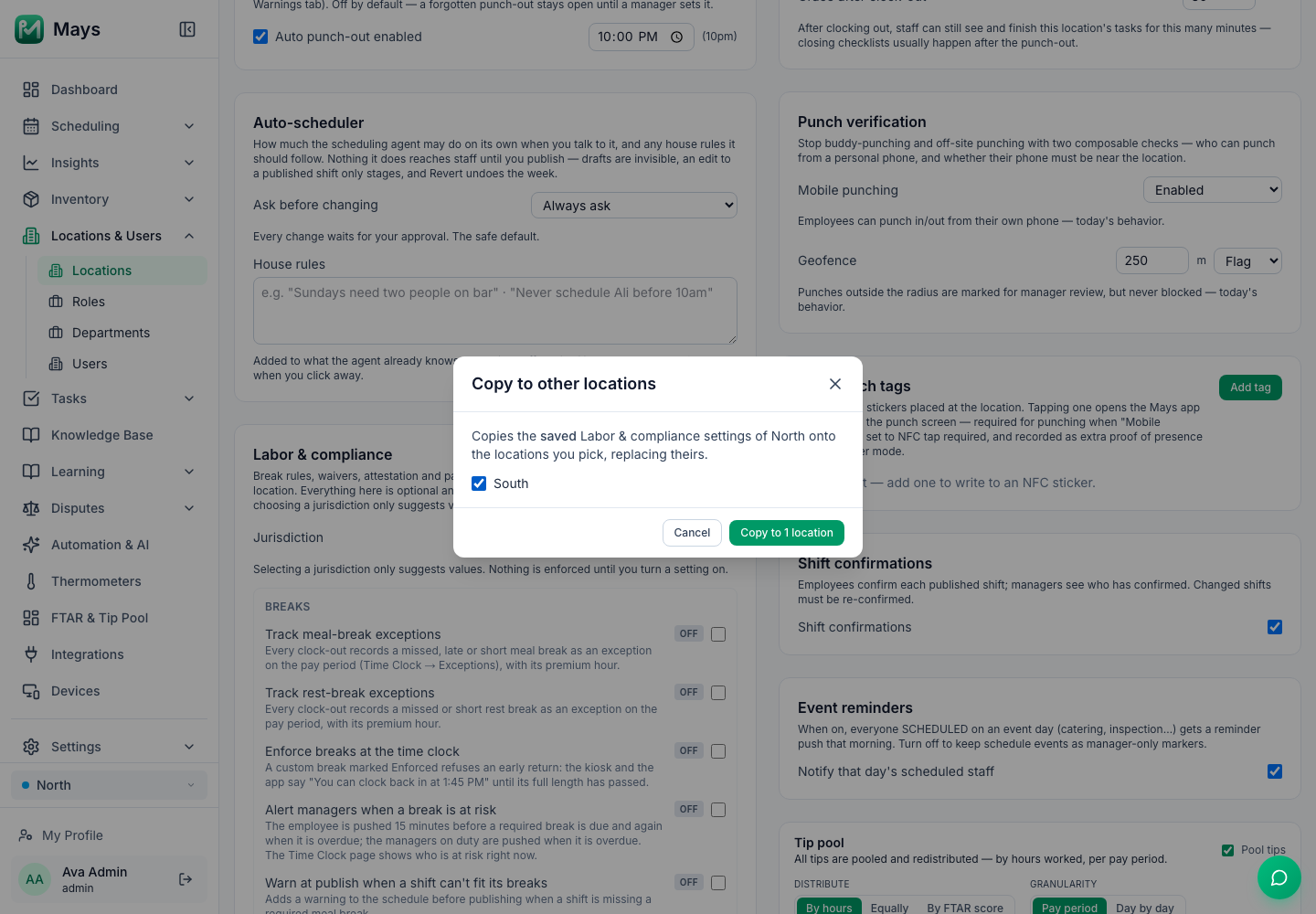
- Copying settings: on a location's Scheduling tab, Labor & compliance has Copy to other locations…, which copies that store's saved break and compliance settings onto the stores you pick (the image at the top of this post). Time clock rules, punch verification and the tip pool are set per location, so set them on the new store's tab too.
- Shared SOPs: a Knowledge Base folder can be shared with the whole company, or with a location, role or person.
- Stock: admins can make an inventory item shared by all locations; pars stay per store, and Transfers move stock between stores.
- Both stores at a glance: the Dashboard has an All Locations view and a view per store, and admins can filter Insights by location.
- Staff who work at both stores: give each store a shared kiosk tablet or an NFC tag at the counter, so every punch is recorded at the store where it happens.
Your second-store checklist
- The top of the standards table written down and tested at the first store
- The differences for the new store written down too
- A license applied for, plan review done if it applies, and the opening inspection passed
- E-Verify and overtime checked across both stores
- One person in charge of each store, and the same approvals at both
- The same checklists, recipes, count sheet and training at both
- A weekly visit on the calendar, with the same checklist each time
Run two stores like one
Add the location, share the checklists and SOPs, copy the settings, and see both stores from one dashboard.
Start your free trial: 30 days, every module, no card needed. Hiring for the new store? Read Hiring your first restaurant team.