Labor cost percentage: schedule to your sales forecast, then review it every week
For most cafés and restaurants, labor is one of the two biggest costs, and it's the one you decide on every week when you build the schedule. Labor cost percentage is the number that tells you whether those decisions fit the sales you actually had.
This is the fourth post in our series on running the numbers in your first year. It covers what goes into labor cost %, how to turn a sales forecast into a labor budget before you build the schedule, and a 15-minute review every Monday that tells you why last week's number came out the way it did.
Every business number in this post is made up to show the math. This is general information, not financial advice.
What labor cost % is
Labor cost % = labor cost ÷ net sales, for the same period
Labor cost should include everything you spend on people for that period: hourly wages and overtime, salaries, employer payroll taxes and benefits. Our post on prime cost lists what belongs in it, with sources.
You'll work with labor % in three versions, and it helps to keep them apart:
Version | Labor | Sales | When you know it |
|---|---|---|---|
Planned | The schedule you built | The forecast | Before the week starts |
Scheduled, against actual sales | The schedule | Real sales so far | During the week |
Actual | Hours worked, from the time clock | Real sales | After the week ends |
What's a normal labor %?
It depends on your service style, your menu, your wages and your sales volume, and there's no official target. For reference, in the National Restaurant Association's survey of 2024 results, "salaries and wages (including benefits) represented a median of 36.5% of sales" among full-service respondents, and 31.7% among limited-service respondents (National Restaurant Association, October 8, 2025). Those are medians of what operators reported, not goals.
Set your own target from your break-even math and your prime cost, then track your trend against it.
Step 1: Start from the forecast
Build the forecast before the schedule, never after. A hypothetical café expects $10,000 in net sales next week (the forecasting post shows how to get to a number like that).
Step 2: Turn the target into a budget
With a 30% labor target:
Line | Amount |
|---|---|
Forecast sales | $10,000 |
Total labor at 30% | $3,000 |
Minus estimated payroll taxes and benefits | −$250 |
Budget for the schedule (wages and salaries) | $2,750 |
Take taxes and benefits out first if the tool you schedule in only adds up wages; otherwise the schedule will look on budget while the full labor cost isn't. Then turn the budget into hours by daypart, starting from the minimum crew you need to open, as in our post on planning labor for a slow season.
Step 3: Build to the budget, then check it before you publish
Build the week, then look at the total before anyone sees it:
- Over budget? Trim the edges of shifts first (a later start, an earlier cut) before you take a whole shift away.
- Overtime building up? Check each person's total for the workweek before you publish. Overtime is owed by the workweek, so a few extra hours for one person can cost more than the same hours for someone else (time clock, breaks and overtime has the details).
- Under budget by a lot? Make sure every daypart still has its minimum crew. A schedule that's cheap but can't serve the rush costs you sales.
Planned labor %: $2,750 ÷ $10,000 = 27.5% of sales for the schedule, plus taxes and benefits to reach 30%.
Step 4: Watch the week as it happens
A forecast is a plan, not a promise. By Wednesday you'll know whether sales are tracking above or below it:
- Sales running behind: look at the rest of the week's shifts. Can a shift end earlier, or a second person on a quiet afternoon go?
- Sales running ahead: have someone on call for the busy day, rather than overstaffing every day just in case.
Make changes early and tell people as soon as you can. A schedule that changes every day is hard on your team, and in some places it's regulated (see the slow-season post for the cities and states with scheduling laws).
Step 5: The 15-minute weekly labor review
Every Monday, once last week's punches are fixed and approved, write down five numbers:
Plan | Actual | |
|---|---|---|
Sales | $10,000 | $9,000 |
Labor (wages and salaries) | $2,750 | $2,950 |
Labor % (wages and salaries) | 27.5% | 32.8% |
Hours | 130 | 140 |
Overtime hours | 0 | 6 |
Labor % came in 5.3 points over plan. That one number hides two different problems, and they have different fixes. Split it:
- The sales miss. If labor had been exactly as planned, $2,750 on $9,000 of sales would be 30.6%. That's 3.1 points from sales coming in under the forecast.
- The extra hours. The $200 of extra labor on $9,000 of sales is another 2.2 points.
3.1 + 2.2 = 5.3 points, the whole gap.
Now each half has its own questions:
If most of the gap is… | Ask |
|---|---|
The sales miss | Was the forecast too high, or did something happen (weather, an event, a closed road)? Did we trim shifts when sales ran behind? Does next week's forecast need the same correction? |
Extra hours | Who worked more than scheduled, and why? Early clock-ins, late clock-outs, a missed punch-out? Was the overtime planned? Did a call-out get covered with someone who was already near 40 hours? |
Close the review with one change for the coming week, such as "no clock-in more than 5 minutes before the shift" or "Friday forecast down $200", and check it next Monday.
Common mistakes
- Building the schedule first and checking labor % at the end of the month
- Comparing scheduled labor with last week's sales instead of next week's forecast
- Leaving salaried managers, payroll taxes or benefits out of labor, so the number looks better than it is
- Treating every high-labor week as a scheduling problem when the forecast was the miss
- Fixing nothing until payroll, when the week is long gone
Where Mays fits
The forecast, the budget, the schedule and the time clock are in one app, so the plan and the actuals come from the same place:
- Weekly budget (Scheduling → Schedule): set a budget for the week at a location, and the Scheduled labor card adds up the week's shifts in dollars and hours as you build, with overtime priced in, drafts included. The budget card says within budget or over budget, and OT warnings lists who's heading into overtime.
- Projected labor % (Scheduling → Forecast): the cost of the shifts on the schedule as a share of the week's projected sales, from your Square or Union sales history. See forecasting weekly sales.
- Weekly Overtime report (Scheduling → Reports): hours, projected hours and estimated overtime cost per person, for planning before the week starts.
- Variance (Scheduling → Reports → Variance): scheduled hours and cost against worked hours and cost, per person, for the "extra hours" half of the review. Actuals in the same list shows projected and actual sales, actual labor and Labor % per day.
- Labor Cost (Insights → Labor Cost, for admins): Labor Variance compares scheduled and worked shifts and hours by day, week or month, and Labor Cost Trend tracks Labor Cost % over time.
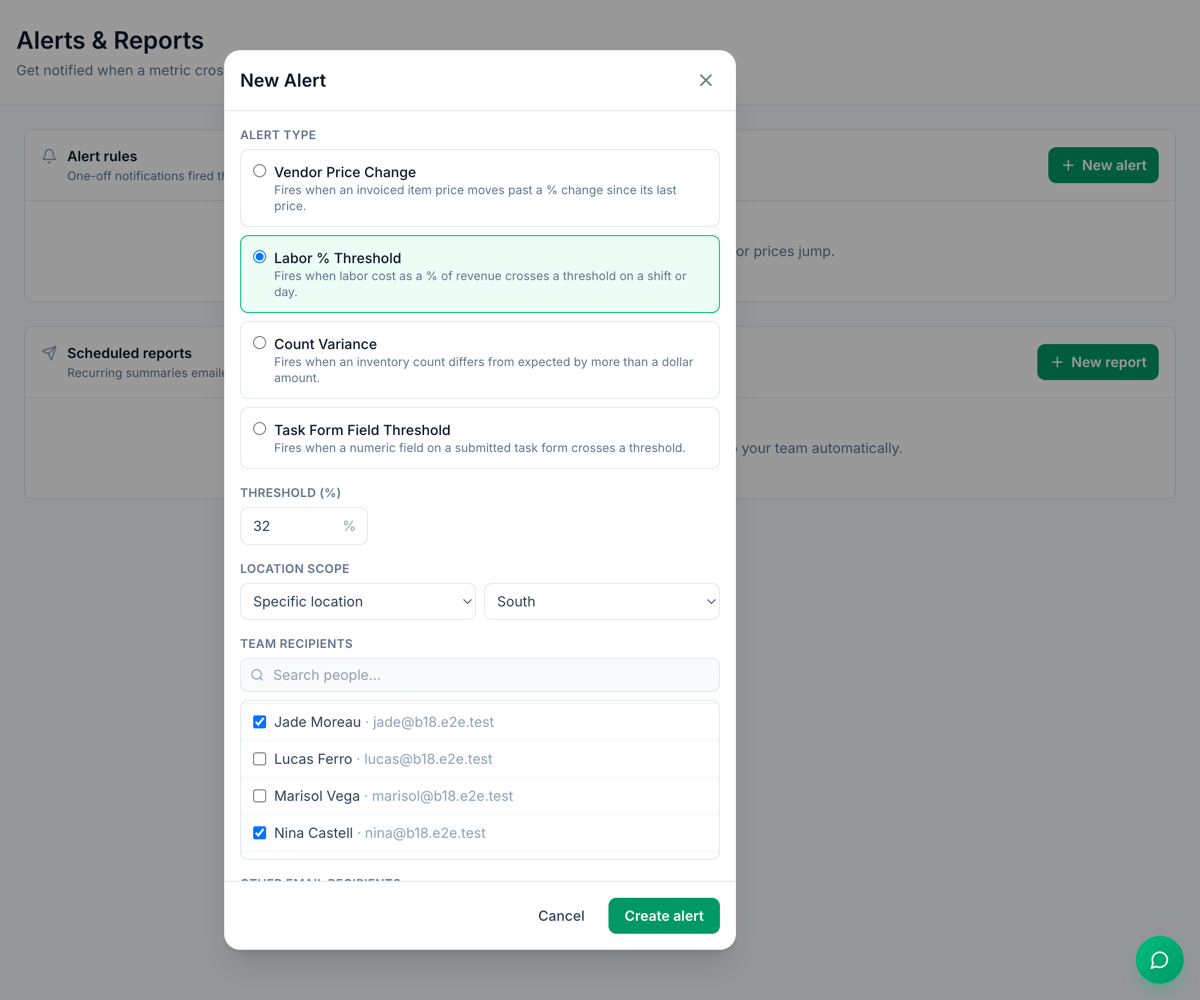
- A weekly email and an alert (Insights → Alerts & Reports, the image at the top of this post): a Labor Summary report every Monday morning for the previous week, for the locations you pick, and a Labor % Threshold alert the morning after a day's labor cost crosses the share of sales you set.
Three things to know:
- Labor costs in Mays are wages and salaries. Payroll taxes and benefits aren't included, so take your estimate out of the budget first, as in Step 2.
- The budget is per location, per week. Set it again for each week you build.
- The schedule's own Labor % card needs Square. It compares scheduled labor with the week's actual Square payments, tax included, so it only has a number once the week is under way. The Forecast page's Projected labor % and Insights work with Square or Union.
Your weekly labor checklist
- Next week's forecast done before the schedule
- A labor target, and a schedule budget with taxes and benefits taken out
- The schedule built to the budget, with overtime checked before publishing
- Sales checked mid-week, with shifts trimmed or added early
- Punches fixed and approved before Monday's review
- Plan vs actual for sales, labor, hours and overtime
- The gap split into a sales miss and extra hours
- One change for the coming week, checked the Monday after
Plan and review labor in Mays
Set the budget, build to it and see scheduled against worked hours, without a spreadsheet.
Start your free trial: 30 days, every module, no card needed. Next in this series: setting up payroll for the first time.