Mays keeps each team member's food handler card, food protection manager certificate and other credentials on file with their expiry dates. Each location shows who is missing a card, who is due or overdue, and whose card is about to expire, against what that location's state or county asks for. Mays reminds the team member and their managers before a certificate expires.
Mays helps you comply; it isn't legal advice. The rules come from official sources, and each location links the source it read. Check it for your own situation.
Turn it on first. Certificates are part of Labor law compliance, which is off until an admin turns it on for your organization in Settings → Organization. After that, Food safety certificates is on at every location unless an admin turns it off on the location's Labor & compliance card (see Labor & compliance). While it's off, a team member's page has no Certificates section, the location has no Food safety certificates panel, the schedule gives no food safety warning, no certificate reminders go out, and My certificates isn't in the app. The certificates you entered are kept for when it's turned back on.
What each location checks
A location's rule comes from its address. Where a county or health district sets its own card rule (Maricopa County in Arizona, the Southern Nevada Health District), an admin picks it on the location, because Mays never guesses a county from the city.
What the rules ask for | Examples | What Mays shows |
|---|---|---|
A food handler card for every food employee, by a deadline after hire | California, Florida, Illinois, Oregon, Texas, Washington | Each scheduled team member's status: valid, expiring, expired, missing and due on a date, overdue, or hire date not set |
A certified food protection manager | Georgia, Massachusetts, Michigan, Ohio, Pennsylvania | Whether someone at the location holds a valid manager certificate |
A certified person on every shift | Hawaii | The same, plus a warning on the schedule before you publish |
Nothing in our data yet | Many other states | The certificates you keep, with reminders, and no statuses |
The deadline after hire is the official figure: for example 30 days in California and 60 days in Florida. Where the source gives no single figure (Washington, for example), the location says Deadline after hire: not in our data yet — check the official source, and a missing card shows as Missing with no due date.
Add a certificate
Managers and admins add certificates on the web. A manager can do this for people at their own locations; an admin for everyone.
- Go to Locations & Users → Users and open the team member.
- Scroll to Certificates and click Add certificate.
- Choose the type (Food handler card, Food protection manager (CFPM), Alcohol server, Allergen training or Other), then enter the name, the issuer, the certificate number if there is one, and the issue and expiry dates. Tick Never expires for a certificate with no expiry.
- Optionally attach a photo or PDF of the card.
- Click Save.
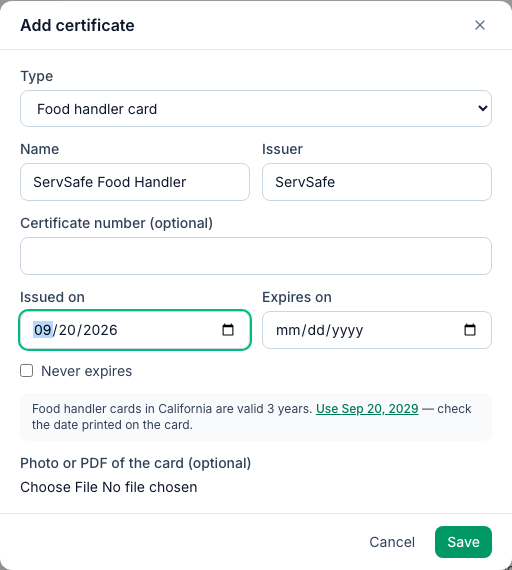
Where the location's state says how long a card is valid, Mays offers that expiry date as a suggestion (Use Sep 20, 2029). Check it against the date printed on the card.
To change or remove a certificate, use the pencil or bin next to it.
The Certificates section on a team member's page
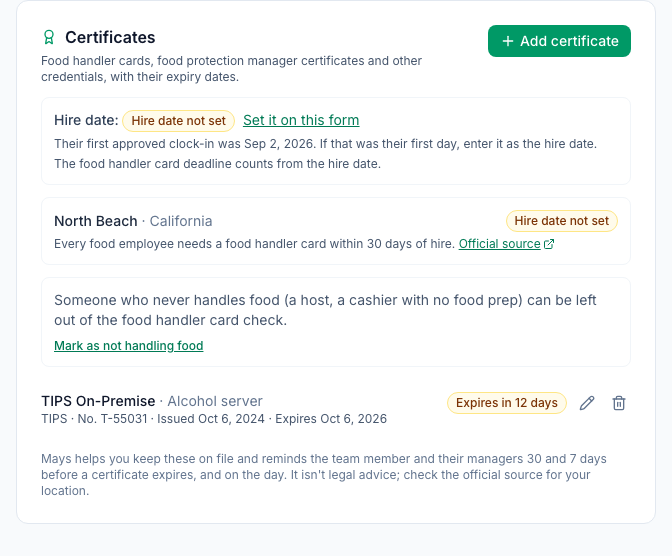
- Hire date. The card deadline counts from the hire date, which you set on the team member's form. If it isn't set, the status is Hire date not set, and Mays shows the day of their first approved clock-in to help you fill it in. Mays never uses that date on its own.
- Each location the person works at, with what its rule asks for, a link to the official source and the person's status there.
- Doesn't handle food. Someone who never handles food, such as a host, can be left out of the food handler card check. Click Mark as not handling food and give a reason. Their other certificates still get reminders.
- The certificates, each with its status: Valid until …, Expires in 12 days, Expires today, Expired … or No expiry.
The location's Food safety certificates panel
Go to Locations & Users → Locations, open a location and go to the Scheduling tab. The Food safety certificates panel sits under Labor & compliance.
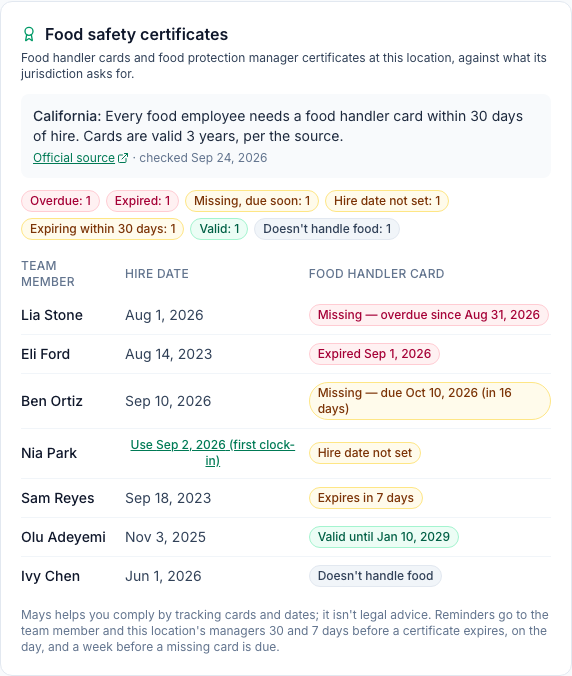
Where every food employee needs a card, the panel lists everyone on the location's schedule, worst first:
Status | Meaning |
|---|---|
Missing — overdue since … | No card, and the deadline after their hire date has passed |
Expired … | Their newest card has expired |
Missing — due … | No card yet, still within the deadline |
Hire date not set | No card, and no hire date to count the deadline from. Use … (first clock-in) fills it in from their first approved clock-in |
Expires in … days | The card expires within 30 days |
Valid until … | The card lasts more than 30 days |
Doesn't handle food | Left out of the check, with the reason on their page |
Where the rule is a certified food protection manager, the panel shows Met, Expiring within 30 days or Missing, and who holds a valid certificate.
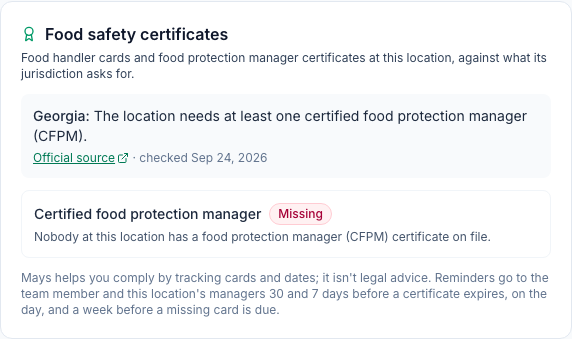
A certified person on every shift (Hawaii)
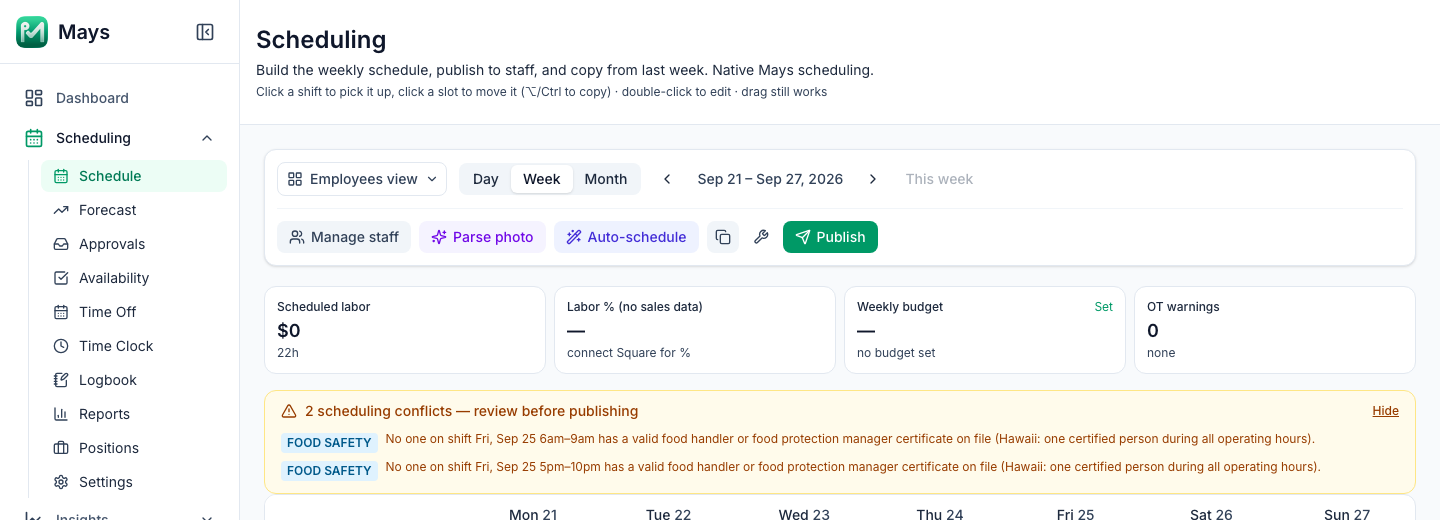
Where the rule asks for a certified person during all operating hours, a food handler card or a food protection manager certificate counts. Before you publish, the schedule's review before publishing banner shows a FOOD SAFETY row for any stretch when people are on shift but nobody on shift has a valid certificate on file. It's a warning: you can still publish.
Reminders
Each morning at about 9 AM location time, Mays sends a push and a notification in the app:
- to the team member, 30 days and 7 days before a certificate expires, and on the day it expires;
- to the team member, a week before a missing food handler card is due after their hire date;
- to the location's managers, one message listing the same cards for their team.
Each reminder goes out once. If you enter a renewed card with a new expiry date, its reminders start again.
On the phone
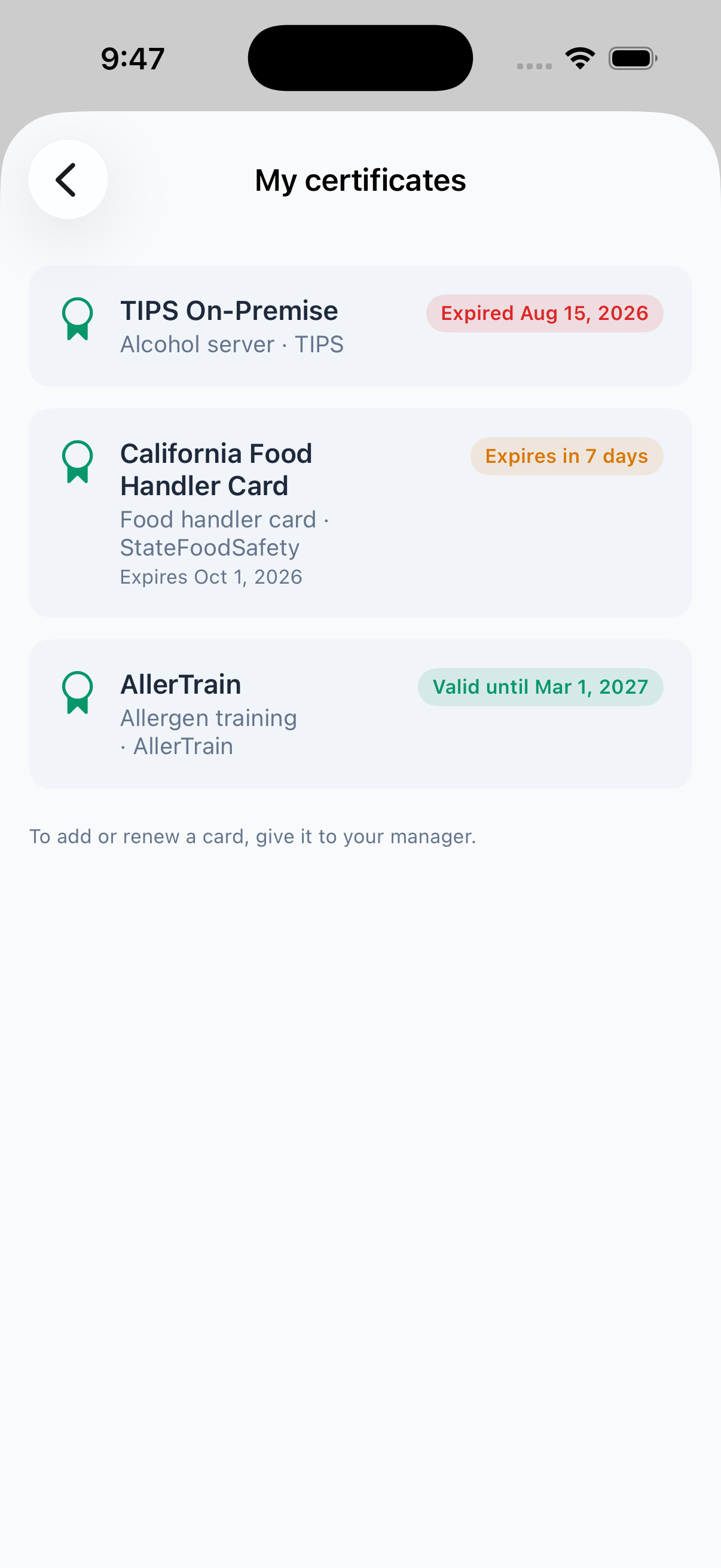
Team members see their own certificates in the Mays app under Profile → My certificates, with each one's status. The list is read-only: to add or renew a card, they give it to their manager.
Good to know
- Certificates from Mays training modules are proof of your own training, not a state food handler card or manager certificate. Record official cards here.
- Only a food handler card counts for the every-employee check, not a manager certificate.
- A county or district rule applies only after an admin picks it on the location.
- A location whose time zone is outside the US gets no US rule. Its team's certificates are still kept, with their expiry reminders.
- Team members can't add a card from the phone yet.