Your weekly manager meeting: a 30-minute agenda that works
Many small restaurants don't have a manager meeting. They have conversations between rushes: a word at the pass, a text at 11 pm, a note on the back of a receipt. Decisions get made but not written down, and the same problem comes up three weeks in a row.
Thirty minutes a week fixes most of that, if the meeting has a fixed agenda, the numbers are ready before it starts, and every decision leaves the room with an owner and a date. This post gives you the agenda, the data to bring, the rules that keep it short, and a notes template to copy.
Who, when and where
- Who: the owner and whoever runs shifts: the general manager, the kitchen lead, the shift leads. Keep it to the people who can act on what's decided.
- When: the same day and time every week, in a quiet hour, and before next week's schedule is published, so staffing decisions can still land in it. For a café that's busiest in the morning, that might be early afternoon on a Tuesday.
- Where: a table, not the counter. Standing at the pass turns it into another rush conversation.
- Two stores? Run the same agenda for each store, back to back, or together with both stores' numbers side by side.
The agenda
Minutes | Topic | Questions | Bring |
|---|---|---|---|
0–5 | Last week's follow-ups | Did we do what we said we'd do? What's stuck, and why? | Last week's task list |
5–12 | Numbers | How did sales compare with last week and the forecast? Labor % against the target? Overtime? Cash over/short? | The one-page numbers sheet |
12–19 | People | Where are next week's gaps? Time off, hiring, training, who needs feedback, who deserves a thank-you? | The draft schedule and time-off requests |
19–25 | Customers | What did reviews and complaints say? What did we change? | Reviews since last week, the logbook |
25–30 | Fixes | What will we change this week, who owns it, and by when? | New tasks |
Starting with last week's follow-ups is the easiest part to skip, and it's what makes the rest count. If nothing from last week happened, that's the first thing to talk about.
What to bring: one page of numbers
Someone prepares it the day before, from the same sources every week:
Number | Why it matters | Where it comes from |
|---|---|---|
Sales by day, against last week and the forecast | Shows trends before they reach the bank account | Your POS |
Labor % and overtime hours | Labor is the cost you control week to week | Your schedule and time clock |
Checklist completion | Are openings and closings done, and on time? | Your checklist app |
Temperature exceptions | Food safety problems, and whether someone acted | Your temperature log |
Cash over/short | Patterns by drawer, day or person (our cash guide) | Your count log |
Reviews and complaints | What customers noticed this week | Google and your logbook |
Open follow-ups | Nothing forgotten | Your task list and logbook |
Read it before the meeting. The meeting is for deciding what to do about the numbers, not for reading them out loud.
Rules that keep it to 30 minutes
- Start on time, even if someone's late.
- Phones face down, except for whoever has the numbers sheet open.
- Decide, don't just discuss. If a topic needs more facts, the follow-up is "get the facts," with an owner and a date.
- Every problem gets an owner and a date, or it's dropped. "We should look at that" isn't an outcome.
- One person takes notes and shares them within the hour.
- Big topics go to a parking lot: a new menu or a pay change gets its own meeting.
- End with one thank-you, by name, for something specific someone did that week.
When the meeting drifts
If this happens | Try |
|---|---|
It runs to an hour | Put a timer on the table; move anything unresolved to the parking lot |
It becomes the owner talking | Let each lead present their own numbers and propose the fix |
The same issue comes back every week | Name one owner for it, and make "done" something you can check |
People come unprepared | Send the numbers sheet the day before, and start with it anyway |
It turns into a complaint session | For every complaint, ask "what will we change this week?" |
It gets skipped in busy weeks | Keep it and shorten it to 15 minutes: follow-ups and fixes only |
Your first meeting
Keep the first one simple. Explain the agenda and why it exists, go through last month's numbers instead of last week's, and agree on three follow-ups at most. Ask the team what they'd want on the numbers sheet. Then hold the second meeting the following week at the same time, even if the first felt awkward. The habit matters more than any single meeting.
Turn follow-ups into tasks
A decision without an owner and a due date is a wish. Write each follow-up as a task: a verb, the thing, the person and the day.
Instead of | Write |
|---|---|
"The walk-in is acting up." | "Call the repair company and book a visit: Maria, Tuesday." |
"Afternoons are overstaffed." | "Cut the 1–4 pm second shift on weekdays in next week's schedule: Sam, Thursday." |
"Reviews mention slow service." | "Time five morning tickets and bring the results: Dee, next meeting." |
Next week, the meeting starts with exactly this list.
A notes template
Weekly manager meeting: [store], [date]
Attendees:

1. Last week's follow-ups
   - [task]: [owner]: done / not done (why)

2. Numbers, week of [dates]
   Sales: $____ (forecast $____, last week $____)
   Labor: ___% (target ___%), overtime ___ h
   Cash over/short: $____; drawers outside tolerance: ___
   Checklists completed on time: ___ of ___
   Temperature exceptions: ___

3. People
   Gaps in next week's schedule:
   Time off:
   Hiring and training:
   Thank-you:

4. Customers
   New reviews: ___ (answered ___, 3 stars or below ___)
   Complaints and what we changed:

5. This week's follow-ups
   - [task]: [owner]: [due date]
Where Mays fits
Most of the one-page numbers sheet comes out of Mays:
- Checklists: on the Dashboard, pick a location (or All Locations) and use the date arrows to see any day's checklists, with how many tasks in each were completed. The Team Stats panel on the Tasks page shows completed tasks, open tasks and the completion rate per person for the week.
- Scheduling reports (Scheduling → Reports): Scheduled Hours & Wages, Weekly Overtime, Attendance (late, no-show, sick, called off) and Time Off, each with a CSV download.
- Sales and labor: with your POS connected, admins get Labor Cost and Prime Cost under Insights, and Alerts & Reports can email a weekly Labor Summary or Prime Cost report to the addresses you add, every Monday morning. Managers can ask Mays AI, for example "What were sales and labor last week?"; each message uses one AI credit.
- Reviews: once your Google Business Profile is linked to your locations, the Reviews page lists reviews for every store, with filters for ≤ 3 stars and Unanswered, and your replies post to Google. Linking each location to its Google listing is done with our team today, so book a walkthrough and we'll connect it with you.
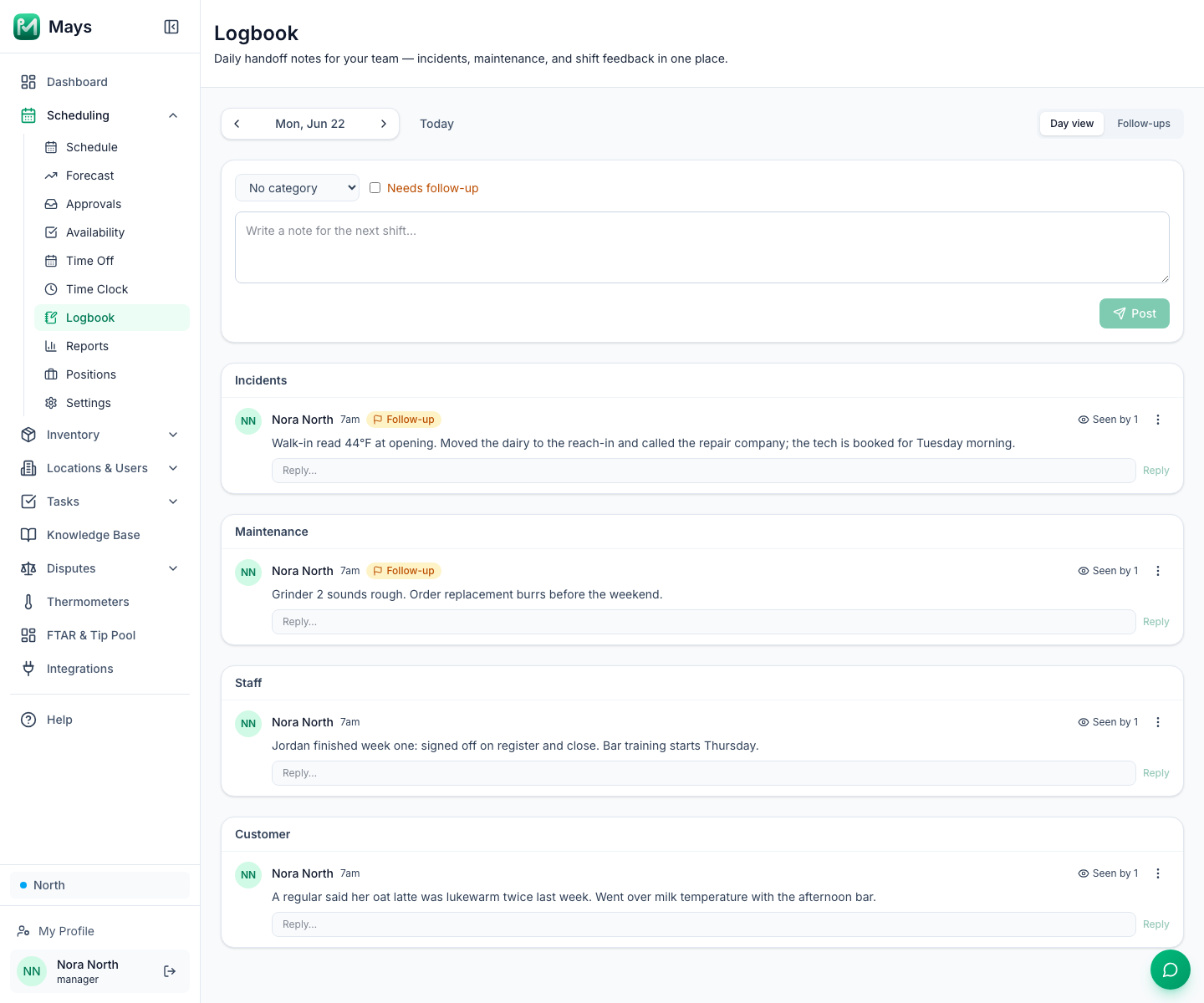
- The logbook (Scheduling → Logbook, the image at the top of this post): managers write the day's incidents, maintenance, staff and customer notes, tick Needs follow-up on the ones that need action, and see them all on the Follow-ups tab.
- Follow-ups as tasks: Tasks → Create Task → Custom Task, assigned to one person, who gets a push notification. On the web, a task is due the same day; in the phone apps you can pick a due date.
Your weekly meeting checklist
- The same day and time every week, before the schedule is published
- The one-page numbers sheet ready the day before
- Last week's follow-ups reviewed first
- Numbers, people, customers and fixes, in that order
- Every decision leaving with an owner and a date
- Notes shared within the hour
- One thank-you, by name
Run your next meeting from Mays
Bring the dashboard, the reports and the logbook to the table, and leave with tasks instead of notes.
Start your free trial: 30 days, every module, no card needed. Planning a quieter stretch? Read Planning labor for a slow season.