Holiday and event staffing for a small café
Holidays and local events do strange things to a small café. The Saturday of a street fair can be your best day of the year; the morning of a holiday can be your quietest. Either way, the schedule you'd normally copy from last week is wrong, and you find out at 9 am.
The fix is to treat these days as their own small project: know the dates weeks ahead, estimate the day, lock in time off early, publish early, and plan any overtime on purpose. This guide walks through each step, with worked numbers, and ends with a checklist.
This is general information, not legal advice. Updated September 24, 2026: the Department of Labor pages cited here were re-checked.
Step 1: List the dates early
Once a quarter, sit down with a calendar and list every day that won't be normal:
Kind of day | Examples | What usually changes |
|---|---|---|
Holidays you close or shorten | Thanksgiving, Christmas Day | Nobody works, or a short crew works a short day |
Holidays that get busier | Mother's Day weekend, the Saturday before a holiday | More staff, often at unusual hours |
Local events | A street fair, a parade, a big game, a race that closes your street | Busier or much quieter, depending on where people go |
School calendar | Graduation, spring break, the first week back | Your customers and your student staff both change |
Your own events | A catering order, a private party, a tasting | An extra person for prep and a pickup or delivery time |
Ask your neighbors and the city what's planned, too. A road closure you didn't know about can empty a café as fast as a parade can fill it.
Step 2: Estimate the day
If you were open on the same day last year, start there: pull last year's sales by hour from your POS for that day. If you weren't, start from a normal day and adjust for what you know. With made-up numbers for a café's July 4th:
Starting point | Made-up number |
|---|---|
A normal Saturday | $2,400 in sales |
Open 8 am to 2 pm instead of 7 am to 6 pm | Most of the afternoon's sales disappear |
Parade route two blocks away until noon | The morning gets busier than a normal Saturday |
Your estimate | $1,900, with the peak between 9 and 12 |
Then turn the estimate into hours. If your café usually does about $80 in sales per labor hour on a busy morning (use your own number; our slow-season guide shows how to work it out), $1,900 is about 24 labor hours: four people for the six-hour day, with one of them ready to leave early if it's slow.
Write down the estimate and the reasoning. After the day, you'll compare it with what actually happened, and next year's estimate gets much better.
Step 3: Decide the hours and the menu
Staffing is easier when the day itself is simpler:
- Shorter hours on a slow holiday cost less than a full crew waiting for customers.
- A limited menu on a very busy day keeps tickets moving with the crew you have.
- Pre-orders for pastries or party trays move work to the day before.
- Post the hours on your door, your Google listing and your social accounts two weeks ahead, so customers don't show up to a closed door.
Step 4: Lock in time off early
Holidays are exactly when people want time off, and when you can least afford it. Set the rules early and in writing:
- Blackout dates: the few days nobody can request off, announced months ahead, not weeks.
- A fair way to decide the requests you can grant: first come, first served, or a rotation so the same person doesn't work every holiday.
- Volunteers first: some people want the extra hours. Ask before you assign.
- A trade for working the holiday: first pick of the next holiday off, or a better shift the following week.
A blackout date is a rule for vacation requests. It doesn't change what the law says about sick leave or protected leave, covered in our guide to call-outs and no-shows.
Step 5: Build and publish the holiday week early
A holiday week needs more lead time than a normal one, for you and for your team:
- Start from the normal week, then change the special days by hand.
- Add the extra shifts as open shifts and let people claim them, so the ones who want hours get them.
- Name a backup for each key role, from the people who said they want extra hours.
- Publish two to four weeks ahead, earlier than usual, and change as little as possible after that.
- Tell people about the day itself: the hours, the menu, the parking, who's running the shift.
If your team includes teenagers on summer break, check the hours rules for minors before you schedule them late (our hiring guide covers them).
Step 6: Plan overtime on purpose
Busy weeks are where overtime happens by accident: someone picks up an extra shift, the rush runs long, a close runs late. The federal rules:
- Overtime is weekly. Non-exempt employees must get at least time and a half for hours over 40 in a workweek. A workweek is a fixed, recurring 168 hours, and "averaging of hours over two or more weeks is not permitted" (DOL Fact Sheet #23).
- Holidays aren't special under federal law. The FLSA "does not require overtime pay for work on Saturdays, Sundays, holidays, or regular days of rest, as such" (the same fact sheet), and it "does not require payment for time not worked, such as vacations or holidays" (DOL: holiday pay). Holiday pay is generally a matter of agreement between you and your employees. Check your state's rules too; our time clock guide covers overtime in more detail.
If you offer a holiday premium, put it in writing and apply it the same way to everyone.
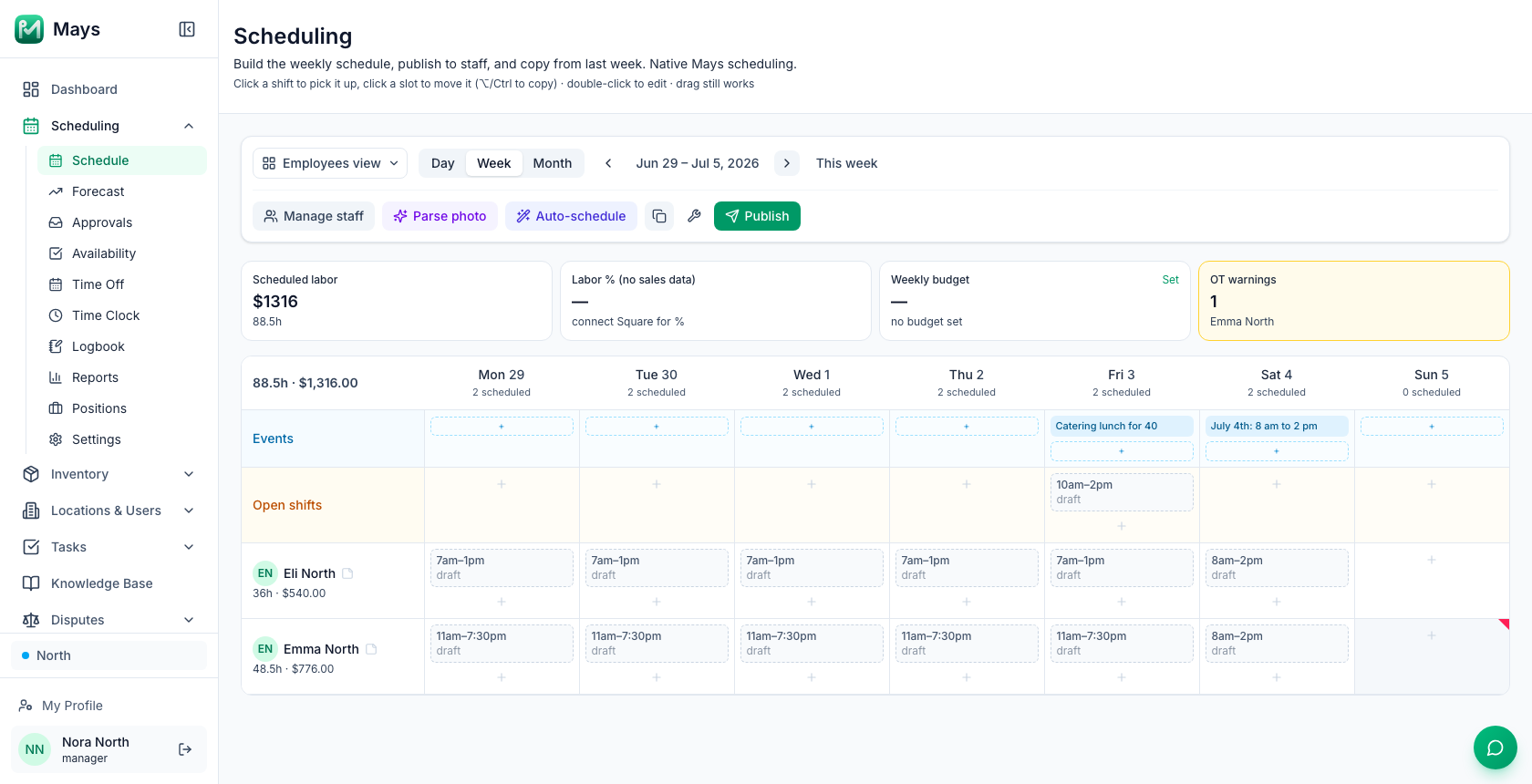
A made-up example: Emma is scheduled 48.5 hours in the July 4th week at $16.00 an hour. The first 40 hours cost $640. The other 8.5 hours cost $24.00 each, $204 instead of $136. If that's a choice, fine; if it isn't, move a shift to someone at 30 hours before you publish.
Step 7: Staff event and catering days as their own block
A catering order or a private event is a second job running inside your normal day:
- Plan the prep time the day before or in the quiet hours, not in the middle of the rush.
- Add one person for the event, with a clear start and end, rather than stretching the normal crew.
- Write the pickup or delivery time on the schedule, so the whole team sees it.
- Know who's responsible for the order from prep to handoff.
Our guide to catering and phone orders without a host covers taking the orders in the first place.
Step 8: Look back while you still remember
Within a day or two, write down what happened: sales against your estimate, the hour the rush started and ended, what ran out, who was overworked and who was idle. Keep it where you'll find it next year. That note is the most valuable forecast you'll have.
Where Mays fits
- Forecast (Scheduling → Forecast): with Square or Union connected, Mays projects each day's sales from the same weekday over the last 8 weeks, with recent weeks counting more, and shows the weather for the coming days and the week's Projected labor %. It doesn't know about holidays or events, so click a special day's projection and type your own estimate. Projections appear for weeks within reach of your recent sales history, so for a holiday months away, use your notes and last year's POS reports.
- Events on the schedule (the image at the top of this post): in Week view, the + in each day's Events row adds an event, with a note for the team. On the day, staff with a published shift get a morning reminder with the note, unless you turn off Notify that day's scheduled staff in the location's Scheduling settings. Staff can also subscribe to an Events calendar in the app's calendar sync. Catering orders don't appear there on their own, so add them as events.
- Blocked days (Scheduling → Time Off → Blocked Days): add a date and a title, such as "July 4th", for one location or all of them (all locations needs an org admin). Employees can't request those days off in the app. Time off you add as a manager isn't blocked.
- Open shifts and publishing: add extra shifts as Open shift (unassigned). When you publish, Notify only affected people tells the people whose shifts changed, and the rest of the team hears that new open shifts are available to claim. Claims come to Approvals. Copy week → Last week gives you a draft week to start from.
- Overtime: the OT warnings card above the schedule counts the people over your weekly overtime threshold at that location, drafts included, and names them. Reload the page after big edits so the card is current. For a week that hasn't started, Scheduling → Reports → Weekly Overtime shows projected overtime hours and cost per person.
- Weekly budget: set a budget for the week and watch Scheduled labor against it as you build.
- Catering: once catering is switched on for your account, Catering → Orders lists paid jobs with the delivery address, dietary notes and time, and moves each through Start prep, Mark ready and Mark delivered.
Mays doesn't calculate holiday premium pay. If you pay one, add it in payroll.
Your holiday and event checklist
- Every unusual day for the next quarter on one list
- An estimate for each day, with the reasoning written down
- Hours, menu and pre-orders decided and posted two weeks ahead
- Blackout dates announced months ahead, and a fair way to grant requests
- Extra shifts offered as open shifts, and a backup for each key role
- The schedule published two to four weeks ahead
- Overtime checked before publishing, not after payroll
- Event and catering days staffed as their own block
- A note after the day, for next year
Plan your next holiday in Mays
Put the day on the schedule, block the time off, and see the overtime before you publish.
Start your free trial: 30 days, every module, no card needed. Building your first schedule? Start with How to build your first restaurant staff schedule.