Catering and phone orders without a host at the counter
It's 8:15 on a Tuesday, there are nine people in line, and the phone rings. The barista on register can take the call and make nine people wait, or let it ring and hope it wasn't the office manager who wanted breakfast for 40 on Friday.
Small cafés don't have a host stand. The people who answer the phone are the same people making drinks. This guide covers how to handle calls during the rush, how to work out what missed calls cost you, a simple catering workflow from first call to delivery, and where a phone receptionist can take the repetitive calls off your team.
Why the phone is hard in a small café
Every call during a rush costs twice: the caller waits, and so does the customer standing in front of you. And most calls aren't orders. They're the same few questions: are you open, where do I park, do you have oat milk, do you do catering?
Don't guess which questions yours are. Keep a tally by the phone for one week: a line for each call, grouped as "hours and directions," "menu question," "order or catering," "vendor or sales call," and "other." That tally decides everything else in this guide.
Work out what a missed call costs you
There's no universal number, so work out your own:
Weekly revenue at risk = missed calls per week × share that are orders or catering × your average order for those calls
- Missed calls: most phone providers show missed calls in the call log.
- Share that are orders or catering: from your one-week tally.
- Average order: from your POS, or from the catering orders you've done.
A made-up example: 20 missed calls a week, and 1 in 10 of them is a catering or large-order inquiry. That's 2 calls a week. If your average catering order is $150, that's $300 a week walking to another café. Your numbers will differ. The point is to know them before you decide how much effort the phone deserves.
A phone routine for the rush
- Decide who answers. One role, usually the shift lead, not "whoever's closest." If nobody can pick up during the peak, say so on the voicemail greeting and promise a callback time.
- Use a 10-second script: "Thanks for calling [café], this is [name]. Can I put you on a short hold?" Then actually come back within a minute, or take a number.
- Keep a callback list next to the register: name, number, what they want, and when you promised to call back. Check it when the rush ends.
- Answer the top questions before people call. Keep your hours, address, menu and catering contact up to date on your Google Business Profile and your website.
- Decide your phone-order policy once. If you take pickup orders by phone, write each one on a ticket like any other order, read it back, and take payment at pickup. If you don't, say how to order instead.
Catering, step by step
Catering is often the biggest ticket a café sees in a week, and it arrives in the least organized way: a call during the rush, a scribbled note, a "we'll get back to you." A simple, written workflow fixes most of that.
1. Inquiry: capture the same details every time
Detail | Why |
|---|---|
Name, phone and email | So you can send the quote and confirm |
Event date and time | Check it against your schedule before you say yes |
Guest count | Drives quantities and price |
Pickup or delivery, and the address | Delivery needs a driver, a vehicle and time |
Dietary needs and allergies | Vegan, gluten-free, nut allergies |
Budget, if they'll share it | Lets you suggest the right package |
A printed form by the phone beats a sticky note.
2. Packages: make quoting fast
Keep three to five catering packages, each priced per person, with a minimum and maximum guest count and a clear list of what's included: cups, cutlery, napkins, setup. "Breakfast for 20" becomes a pick from a list, not a new menu every time.
3. Quote: in writing
Send a written quote with the package, price per person × guests, tax, any delivery fee, what's included, and how long the quote is valid. Nothing is confirmed until the customer accepts it in writing.
4. Deposit and payment: decide the policy before the first order
There's no standard, so write your own terms and put them on every quote:
- a deposit to hold the date, or payment in full ahead of time
- when the balance is due, for example before the event
- a cancellation deadline, and what happens to the deposit after it
5. Prep and fulfillment
- Order for it. Add the catering quantities to your next order before the vendor cutoff. The inventory guide covers ordering around delivery days.
- Staff for it. Put the prep and delivery time on the schedule as real shifts.
- Keep it at temperature. Hot food stays at 135°F or above and cold food at 41°F or below, including in the car. The temperature log guide has the rules.
- Check before it leaves: count the items against the quote, and pack the labels, utensils and a copy of the order.
6. Follow up
Send a thank-you the next day, ask how it went, and share your review link, the same way you'd ask any customer, with no incentive attached. The Google reviews guide covers the rules.
Florida note. DBPR's catering guide says any public food service establishment it licenses can provide catering without a separate catering license, and that all food storage and preparation must happen in an approved, licensed establishment, never in a private home (DBPR form HR 5030-037, Guide to Public Food Service Catering Establishments). This is general information, not legal advice. Check your own situation with DBPR.
Where Mays fits
The AI receptionist: an add-on for each location
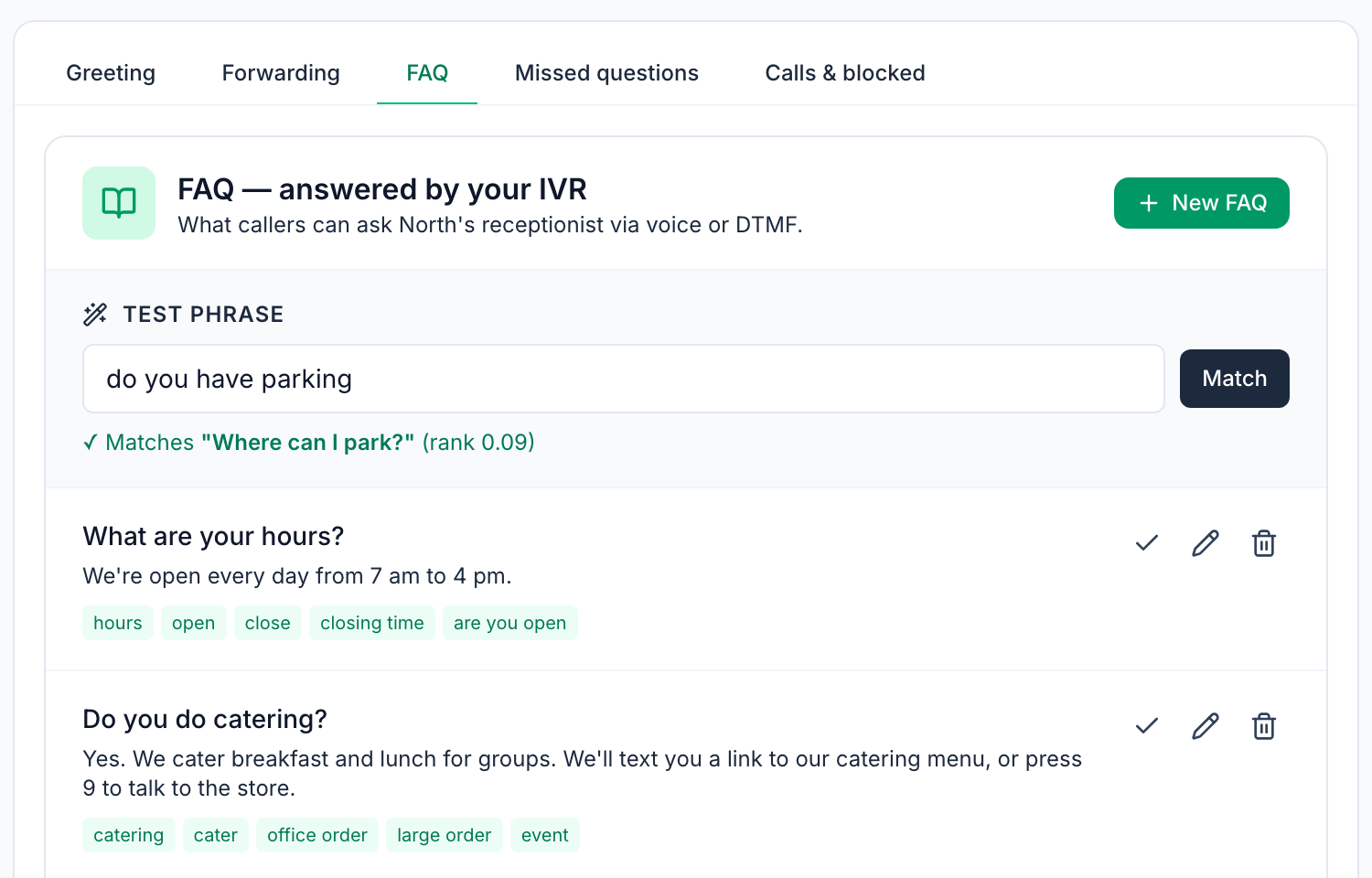
The AI receptionist answers a location's phone with a greeting you write, and answers callers from FAQs you set up: the question, the answer it speaks, and trigger phrases (the words callers actually use).
- Text a link instead of reading it out. Callers can press 1 to get the store's address by text, and any FAQ can also text a link, such as your catering menu.
- A person when it matters. Callers can press 9 to be forwarded to a number you choose, like the shift lead's phone. If no FAQ matches and you've set that number, the call is forwarded there too.
- Test before callers do. Type what a caller might say and see which FAQ it matches, as in the image at the top of this post.
- Missed questions. Questions from the last 30 days that no FAQ answered well are grouped with a count, and you can add each as an FAQ in one click.
- Call log and spam protection. Every call has a transcript. Callers whose caller ID isn't fully verified have to press a key first, numbers with repeated short hang-ups are blocked automatically for a week, and you can block a number yourself. Each plan has a daily call limit.
Know its limits: it doesn't take orders or voicemail, it speaks English, and it only knows your hours, menu and policies if they're in your FAQs. Matching is based on the words in your questions and trigger phrases, so add the phrasings your callers use, and check the missed questions every week. The receptionist is a paid add-on for each location, on top of your plan.
Catering: set up with our team
Mays catering covers the workflow above, from the first call to delivery:
- A catering hotline where the AI takes the call and collects the caller's name, event date and time, guest count and ZIP code, then texts them a link to add their email, dietary notes and address.
- A lead queue with a status for every inquiry (Pending assignment, Quote sent, Quote accepted, Paid, In prep, Ready, Delivered or Canceled) and a suggested location based on the ZIP code.
- Packages with a price per serving, minimum and maximum guests, what's included and dietary tags. Suggest packages picks two from your catalog for each lead.
- A quote page where the customer sees the options, the price per serving × guests plus sales tax, and chooses one.
- Payment through Square: accepting a quote creates a Square invoice for the full amount, emailed to the customer and due the day before the event. There's no separate deposit step. When it's paid, the lead moves to Paid.
- An orders queue for each location: Start prep, Mark ready, Mark delivered.
Catering needs a connected Square account, and the hotline, texting and email are configured by our team, so contact us to set up catering.
Your phone and catering checklist
- One week of call tallies, and your own missed-call number
- One person who owns the phone during the rush, a hold script and a callback list
- Hours, address, menu and catering contact up to date online
- A catering intake form by the phone, and three to five packages priced per person
- Written quotes, with deposit, balance and cancellation terms on every one
- Catering orders on the schedule and in the vendor order, and hot and cold food kept at temperature on the way
Take the phone off the register
Start with the questions you answer ten times a day, and let the receptionist take them.
Start your free trial: 30 days, no card needed. The AI receptionist is a paid add-on for each location, and catering is set up with our team, so book a walkthrough and we'll set up your FAQs and your catering with you.