Handling call-outs and no-shows without wrecking the shift
It's 6:10 am, the café opens at 7, and the opener has just texted: "so sorry, can't make it today." Every restaurant gets that message. What decides whether it wrecks the morning is what happens in the next fifteen minutes: who you call, how fast you reach them, and whether the rest of the team knows the plan.
This guide covers a call-out policy people can follow, a backup list you build before you need it, the fastest ways to find cover, when you shouldn't want a sick person to come in, the leave rules to know, and how to keep attendance records that are fair.
This is general information, not legal advice. Updated September 24, 2026: the Department of Labor, EEOC, FDA Food Code, DBPR, Florida Statutes and California Labor Code pages cited here were re-checked.
Call-outs, late call-outs and no-shows
They're not the same, and your policy shouldn't treat them the same:
What happened | Example | What it costs you | How to respond |
|---|---|---|---|
Call-out with notice | Tells you the evening before | Time to find cover | Thank them for the notice; find cover |
Late call-out | Texts 30 minutes before an opening shift | A short shift, or the manager covering | Find cover; talk about notice if it keeps happening |
No-call, no-show | Doesn't come and doesn't tell anyone | A short shift and no warning | Try to reach them first; then follow your policy |
Always try to reach a no-show before you decide anything; something may have happened to them.
Step 1: Write a call-out policy people can follow
A policy works when it's short, specific and the same for everyone. Put it in writing, go through it on the first day (see training your first hires), and answer five questions:
- Who do I tell? The manager on duty, by phone or a direct message. Not a coworker, and not a group chat.
- How early? Pick a number you can live with, for example two hours before the shift, and more for openers.
- What do I say? That you can't come, which shift, and whether you've already arranged a swap.
- Who finds cover? Let staff offer swaps, but make finding cover the manager's job, not a condition of calling out sick.
- What happens after repeated no-shows? Say what the steps are, and apply them the same way to everyone.
Don't make a sick employee find their own replacement. Beyond being a bad way to find cover, some sick leave laws prohibit it. California's, for example, says an employer "shall not require as a condition of using paid sick days that the employee search for or find a replacement worker" (California Labor Code §246.5).
A template to adapt:
Can't make your shift?

1. Tell the manager on duty as soon as you know, and at least
   [2] hours before your shift ([4] hours for an opening shift).
   Call or message [name/number]. A text to a coworker doesn't count.
2. Say which shift, and whether you've arranged a swap.
3. You can offer your shift to the team in the app. The manager
   approves who takes it. Until then, it's still your shift.
4. If you have vomiting, diarrhea, jaundice, a sore throat with
   fever or an infected cut, tell the manager before your shift.
   With vomiting or diarrhea, don't come in.
5. Not showing up without telling anyone is a no-call no-show.
   First time: a conversation. Second time within [90] days:
   a written warning. Third time: [your next step].
Step 2: Build a backup list before you need it
At 6:10 am you don't want to be scrolling through contacts. Keep a short list per station, and keep it current:
Station | Call first | Then | Notes |
|---|---|---|---|
Opening barista | Someone trained to open who's off today | Your closer, for a split day | Openers need a key and the alarm code |
Counter | Anyone cross-trained on the register | A part-timer who wants more hours | Check who's close to 40 hours this week |
Kitchen prep | Your second cook | The owner or manager | Can prep move to later in the day? |
Cross-training is what makes a backup list work: every person who can cover two stations doubles your options (our slow-season guide has a cross-training table). Put the owner or manager at the bottom of the list, not the top, or you'll cover every call-out yourself.
Step 3: Find cover fast
Work through these in order, and stop as soon as the shift is covered:
- A swap from the person calling out, if they called early enough to arrange one.
- Offer the shift to the whole team at once, in your scheduling app or group message, so the first person who can take it does.
- Call your backups directly. A phone call gets an answer faster than a message at 6 am.
- Change the shift instead of filling it: start a later person earlier, close a station, simplify the menu for the morning, or have the manager step in.
Before you give an extra shift to someone, check their hours. Overtime is due for hours over 40 in a workweek, and it has to be paid even if you didn't approve it: an announcement that overtime "will not be paid for unless authorized in advance" doesn't cancel an employee's right to be paid for overtime actually worked (DOL Fact Sheet #23). Our time clock guide covers overtime in more detail.
Step 4: Don't pressure a sick food worker to come in
In a restaurant, a sick call is often the right call. Florida's Division of Hotels and Restaurants enforces the 2017 FDA Food Code (DBPR); outside Florida, check which edition your state enforces. Under the 2017 Food Code:
- Food employees must report to the person in charge if they have vomiting, diarrhea, jaundice, a sore throat with fever, or an infected, draining cut or boil that isn't properly covered, or if they've been diagnosed with norovirus, hepatitis A, Shigella, Shiga toxin-producing E. coli, typhoid fever or nontyphoidal Salmonella (§2-201.11).
- The person in charge must exclude a food employee who has vomiting or diarrhea, unless it's from a noninfectious condition (§2-201.12(A)).
- They can come back after at least 24 hours without those symptoms, or with a note from a health practitioner that the cause isn't infectious (§2-201.13(A)(1)), unless they were diagnosed with one of the illnesses above, which has its own rules.
So the policy has to make it safe to call out sick. If every sick call costs someone a warning, people will come in sick instead, and that's how one stomach bug turns into a closed kitchen.
Step 5: Know which leave rules apply
- Federal family and medical leave (FMLA) covers private employers with 50 or more employees in 20 or more workweeks in the current or previous year. An employee is eligible after 12 months with you and 1,250 hours in the last 12 months, if you have at least 50 employees within 75 miles of where they work (DOL Fact Sheet #28). If you're covered, you can't count FMLA leave under a "no fault" attendance policy or use it against someone in discipline (DOL Fact Sheet #77B). A single café is usually below 50; a group of stores can cross it.
- Paid sick leave: "there are no federal legal requirements for paid sick leave" (DOL), but some states and cities require it, and those laws often protect employees who use it. California, for example, bars retaliation for using accrued sick days (§246.5(c)). Check your state and city.
- Florida: cities and counties generally can't require private employers to provide employment benefits that state or federal law doesn't, and the statute's definition of benefits includes sick leave (s. 218.077, F.S.).
- Disability: with 15 or more employees, you're covered by the federal anti-discrimination laws the EEOC enforces, including disability (EEOC). If absences are tied to a medical condition, talk with the employee and get advice before you discipline.
Step 6: Keep attendance records that are fair
When a call-out pattern turns into a conversation, or a termination, the record is what makes it fair:
- Write down the same facts every time: the date, the shift, what happened (called out 30 minutes before, no call, 20 minutes late) and what you did about it.
- Keep medical details out of shared notes. "Called out sick" is enough.
- Don't count protected leave against anyone.
- Use a time window, such as the last 90 days, so a bad month two years ago doesn't follow someone forever.
- Talk early. A conversation after the second late call-out is easier than a warning after the fifth.
Where Mays fits
- Staff offer their own shift in the app: Drop shift → Put up for grabs sends it to their coworkers, and it stays theirs until a manager approves a claim. Hand off or Swap offers it to a coworker, who accepts before a manager approves. Staff can also request time off with the Sick category. If you've set a minimum notice for time off, it applies to sick requests too, so same-day sick calls still go to the manager directly.
- Managers find cover from the phone: Manage schedule, tap the shift, Find cover. The list shows who's available for that window, who's already working, who's off and how many hours each person has this week. Tap someone to assign the shift (then publish, so they're notified), or tap Put in pool to offer it to the whole team.
- Claims come to one place: Scheduling → Approvals on the web shows the shift pool and every claim, with Approve and Decline. Approving assigns the shift and tells both people.
- Late and no-show alerts: in each location's Scheduling tab, Alert managers when late by and Mark as no-show after (10 and 30 minutes by default) push a "Late clock-in" or "Possible no-show" alert to the location's managers when nobody has clocked in for a shift. This works for schedules built in Mays.
- Late clock-in phone calls: with Automation, Mays can call the employee on the day's opening shift when they haven't clocked in, and ask for an ETA: press 1 for five minutes, 2 for ten, 3 for fifteen or more, 9 if they can't come in. If they don't answer after three tries, it calls the location's escalation manager. The manager's notification says whether the call was answered, not which key was pressed, so follow up. These rules come with a 7shifts connection; otherwise our team can set them up with you, or an admin can build one under Automation & AI.
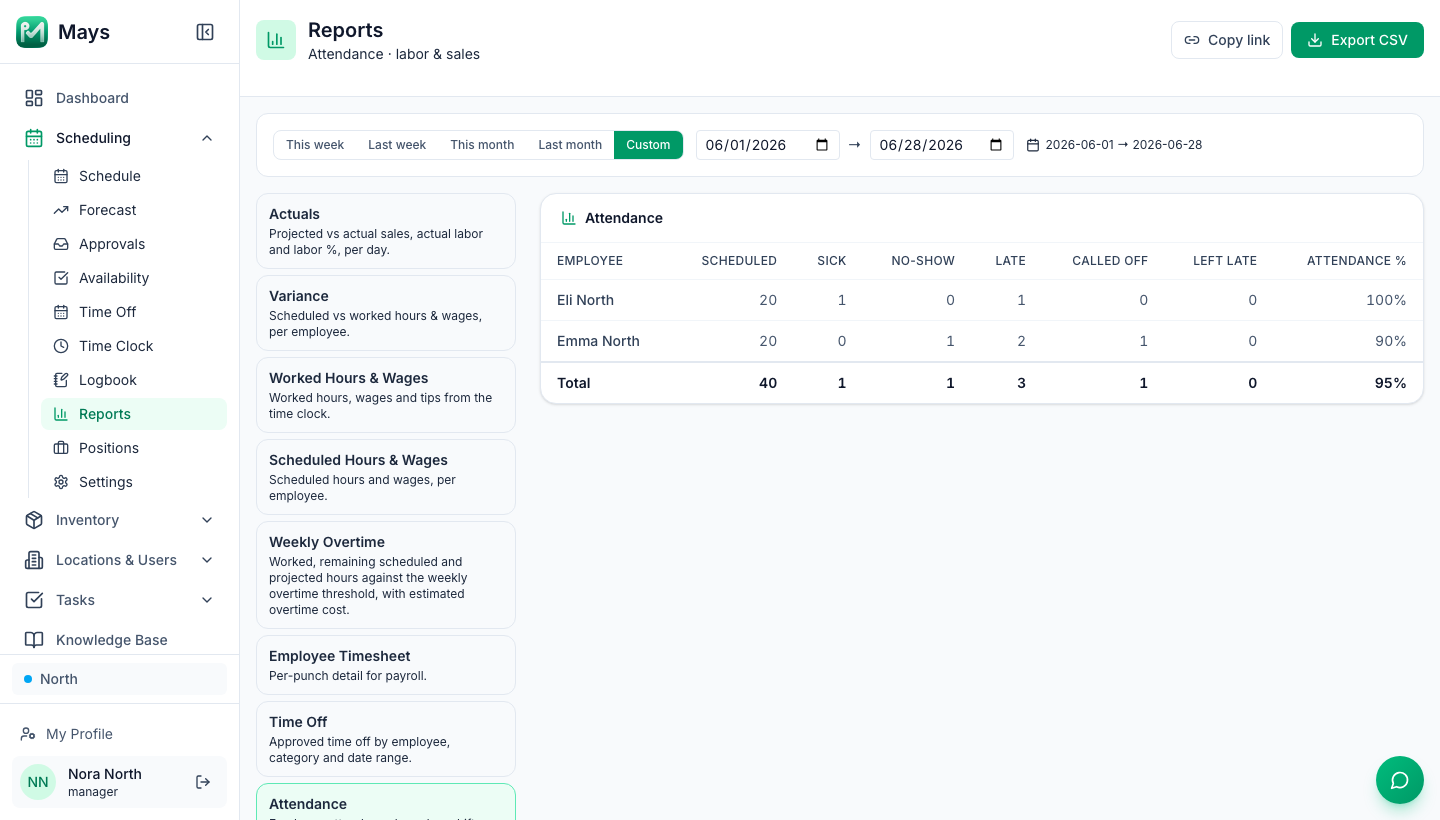
- Attendance: on the web schedule, open a shift and use Mark attendance… to record No-show, Late, Sick, Call-out or Left late. Scheduling → Reports → Attendance (the image at the top of this post) totals them per person, with an attendance percentage that counts no-shows and call-outs, not sick days. It counts what managers mark, and every shift in the date range counts as scheduled, so run it for weeks that are over. There's no note field, so keep the details of each case in your own records.
Your call-out checklist
- A written call-out policy, explained on the first day
- One way to call out: the manager on duty, not a group chat
- Finding cover is the manager's job, not a condition of calling out sick
- A backup list per station, with cross-trained people on it
- Hours checked before anyone picks up an extra shift
- Sick food workers with vomiting or diarrhea kept home
- Leave rules checked for your size, state and city
- The same facts recorded for every call-out and no-show
Cover your next call-out in Mays
Let staff offer their shift to the team, approve the claim in one tap, and see who's late before the doors open.
Start your free trial: 30 days, every module, no card needed. Building your first schedule? Start with How to build your first restaurant staff schedule.