Time clock, breaks and overtime: first-month payroll mistakes to avoid
The first payroll at a new café is usually a late night with a spreadsheet: punches that don't match the schedule, a clock-out nobody remembers, a barista who worked 44 hours across a busy week. Most of those problems were set up weeks earlier, when nobody decided how the time clock should work.
This guide covers the mistakes that show up in month one and the rules behind them, federal first and then Florida. Fix them before your first pay period closes, and payroll becomes a routine export instead of a late night.
This is general information, not legal advice. State and local laws can add to the federal rules; check yours, and ask an employment lawyer or accountant about your situation.
Mistake 1: Rounding that only goes one way
Rounding punches to the nearest 5, 6 or 15 minutes is allowed under federal rules, as long as it averages out. The regulation accepts rounding "to the nearest 5 minutes, or to the nearest one-tenth or quarter of an hour," provided that over time it doesn't result in "failure to compensate the employees properly for all the time they have actually worked" (29 CFR 785.48(b)).
The mistake is rounding that always favors the business: late arrivals rounded up to the next quarter hour, early clock-outs rounded down, and the extra minutes in the other direction ignored. That doesn't average out.
Do this instead: pay exact minutes, or round to the nearest interval in both directions and check a few timesheets each month to confirm it evens out.
Mistake 2: Early clock-ins nobody decided about
A barista who clocks in 20 minutes early "to get settled" creates a question: do you pay those 20 minutes? Federal rules say employees who voluntarily come in early don't have to be paid for that time, "provided, of course, that they do not engage in any work" (29 CFR 785.48(a)). But work you "suffer or permit" is work time and must be paid, even if you didn't ask for it (DOL Fact Sheet #22). If they're grinding beans, it's work.
Do this instead: decide how early people may clock in, and enforce it at the clock rather than trimming punches afterwards. A rule like "no overtime without approval" doesn't remove the obligation to pay overtime that was actually worked (DOL Fact Sheet #23), so the clock is the place to control it.
Mistake 3: Missed punches fixed from memory
Someone forgets to clock out. On Friday, the manager guesses. Multiply that by a team of eight and a two-week pay period, and the timesheet is fiction.
The FLSA requires accurate records of the hours worked each day and each workweek, among other items. It doesn't require any particular form or a time clock, but whatever you use must be "complete and accurate." Keep payroll records for at least three years and the records wages are calculated from, like time cards and schedules, for two (DOL Fact Sheet #21).
Do this instead: fix missed punches the same week, with a note saying why, and tell the employee what was changed. An automatic clock-out at a set time stops a forgotten punch from running all night, but it's a safety net, not a fix: someone still has to enter the real time.
Mistake 4: Break rules you assumed
Federal law doesn't require meal or rest breaks. When you do give breaks, the rules on pay are specific (DOL Fact Sheet #22):
- Short rest breaks, usually 20 minutes or less, count as hours worked and are paid.
- Bona fide meal periods, typically 30 minutes or more, don't have to be paid, but only if the employee is completely relieved from duty. A barista eating lunch at the counter while ringing up customers is working.
Florida doesn't require meal or rest breaks for adults; it isn't listed in the Department of Labor's state tables for adult meal periods or paid rest periods. It does protect minors: workers 15 and under can't work more than 4 hours in a row without a meal break of at least 30 minutes, and the same applies to 16- and 17-year-olds on days they work 8 hours or more (s. 450.081(4), Florida Statutes).
Other states go further. California, for example, requires a 30-minute meal period when an employee works more than 5 hours in a day, and a paid 10-minute rest period for every 4 hours worked or major fraction of 4 hours (DOL's state tables above). If you open a second location in another state, check its rules before you copy your break policy.
Mistake 5: Counting overtime by the pay period
Under the FLSA, non-exempt employees get at least time and one-half their regular rate for hours over 40 in a workweek. The workweek is "a fixed and regularly recurring period of 168 hours," it can start on any day you choose, and, in the fact sheet's words, "Averaging of hours over two or more weeks is not permitted" (DOL Fact Sheet #23).
So a barista who works 44 hours one week and 36 the next is owed 4 hours of overtime, even though the two-week pay period adds up to 80. Two more rules from the same fact sheet catch new owners:
- Overtime can't be waived, not by agreement and not by a policy that says unapproved overtime won't be paid.
- Two jobs, two rates: when someone works different jobs at different rates in the same week, their regular rate is the weighted average of those rates.
A worked example with made-up numbers: in one week, Maya works 30 hours as a barista at $15.00 and 15 hours as a shift lead at $17.00.
Step | Amount |
|---|---|
Straight-time pay | 30 × $15.00 + 15 × $17.00 = $705.00 |
Regular rate | $705.00 ÷ 45 hours = $15.667 an hour |
Overtime premium | 5 hours × ½ × $15.667 = $39.17 |
Total for the week | $744.17 |
Paying the 5 overtime hours at 1.5 × $15.00 because "she was mostly a barista" would underpay her.
Mistake 6: Leaving bonuses out of the regular rate
The regular rate isn't just the hourly wage. It includes all pay for the work, with a short list of exclusions (DOL Fact Sheet #23).
- Nondiscretionary bonuses count. Attendance bonuses and bonuses paid by a set formula must be included in the regular rate. Truly discretionary bonuses can be left out, but only if they meet all the legal conditions (DOL Fact Sheet #56C). A "$50 if you don't miss a shift this month" bonus is an attendance bonus.
- Tips, if you take a tip credit: a tipped employee's regular rate includes the tip credit you take, and overtime is calculated on the full minimum wage, not the lower cash wage (DOL Fact Sheet #15). Tips received beyond the tip credit don't have to be included (29 CFR 531.60).
- Service charges are not tips. Amounts you distribute from a mandatory service charge are part of pay and must be included in the regular rate (Fact Sheet #15).
A weekly timesheet routine
Payroll goes smoothly when the timesheet is clean before the pay period ends. Once a week:
- Fix missing punch-outs from the week, with a note on each.
- Look at the flags: punches with no matching shift, punches outside the store, very early or very late clock-ins.
- Check overtime by workweek, not pay period, including anyone who worked two jobs.
- Approve the week.
- At the end of the period, close it so nobody changes approved hours after payroll runs, then export.
Where Mays fits
Mays handles the time clock, timesheets and the payroll export, per location:
- Three ways to clock in: on the employee's own phone, on a shared tablet kiosk with a 4-digit PIN, or by tapping an NFC tag at the counter. Each location decides whether phone punches are allowed, kiosk-only, or need an NFC tap.
- Geofencing: set a radius around the store and choose whether a clock-in from outside it is only flagged for the manager or blocked.
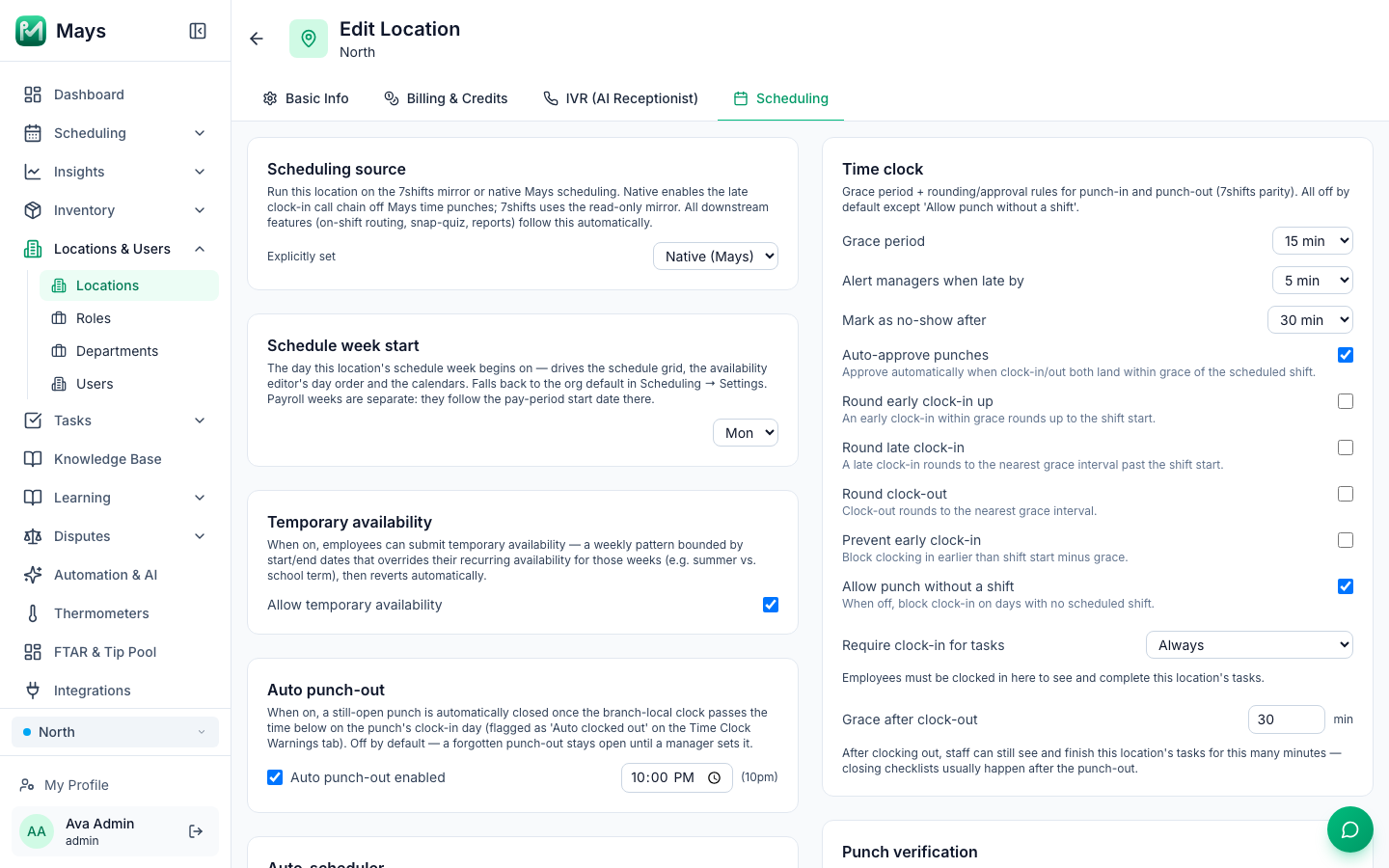
- Time clock rules (the image at the top of this post): a grace period, optional rounding that's off by default, a "prevent early clock-in" rule, whether people can clock in without a scheduled shift, auto-approval for punches within grace of the shift, and late and no-show alerts to managers.
- Automatic punch-out at a time you set, flagged on the timesheet so a manager fixes it.
- Timesheets by pay period (weekly, every two weeks, twice a month or monthly): missing punch-outs and punches outside the geofence are flagged, managers add or edit punches with a note, and employees are notified of every change. You approve the period, then close it to lock it.
- Overtime is calculated by workweek, over 40 hours, with an optional daily threshold for states that have one.
- Break rules per location, including a built-in California pack for meal and rest breaks and premium pay. See Labor & compliance.
- Payroll export as a standard CSV or a Gusto-format CSV, with regular, overtime and double-time hours per employee (and pooled tips, if you use the tip pool).
Your first-month checklist
- One way (or a clear set of ways) to clock in, the same for everyone at a location
- A written rule for how early people may clock in, enforced at the clock
- Rounding off, or rounding that works in both directions
- Missed punches fixed weekly, with a note
- Break policy written down, with minors' meal breaks built into their shifts
- Overtime checked per workweek, including two-rate weeks
- Bonuses reviewed for the regular rate before payroll
- Timesheets approved weekly, the period closed before export
Get your first payroll right
Set up the clock, the rules and the pay period once, and your first payroll is an export instead of an evening.
Start your free trial: 30 days, every module, no card needed. Still building your first schedule? Start with How to build your first restaurant staff schedule.