How to build your first restaurant staff schedule (without spreadsheets)
The first schedule is usually built at 11 pm in a spreadsheet, sent as a screenshot to a group text, and wrong by Tuesday. Someone couldn't work Thursday, the rush was bigger than expected, and nobody knows whose copy is the current one.
It doesn't have to go that way. This guide walks through building a new café's first staff schedule in six steps: dayparts, positions, availability, a labor target, the week itself, and publishing. It includes the Florida rules that affect a schedule. The steps work on paper, and we'll show where Mays takes the busywork out.
Step 1: Map your dayparts and the coverage each needs
Start with the hours you're open, not with the people you have. Split the day into dayparts (the stretches where the work is different) and write down how many people each one needs, by position.
Here's an example for a café open 7 am to 4 pm:
Daypart | Hours | Shift lead | Baristas | Counter / prep |
|---|---|---|---|---|
Opening setup | 6:30–7:00 | 1 | 1 | — |
Morning rush | 7:00–10:00 | 1 | 2 | 1 |
Midday | 10:00–1:00 | 1 | 1 | 1 |
Afternoon | 1:00–4:00 | 1 | 1 | — |
Close | 4:00–4:30 | 1 | 1 | — |
Weekends usually look different, so make a second table for Saturday and Sunday. For the first two or three weeks it's a guess. After that, adjust it to your actual sales by hour.
This table is your schedule's skeleton. Every shift you create later should fill a cell in it.
Step 2: Set up positions and who can work them
A position is a job on the floor: barista, counter, prep, shift lead. List them, then mark who is trained for each. A new hire might only be on counter for the first two weeks. Your strongest barista can cover as shift lead.
Keep the list short. Four positions are easier to schedule than eleven.
In Mays: you create positions (with a color and a wage) and assign them to team members. The schedule can show shifts by employee or by role, so you can check that every daypart has a barista and a shift lead at a glance.
Step 3: Collect availability — in writing, with a deadline
The group text is where availability goes to die. Ask everyone for their regular weekly availability once, then for exceptions (a class, a trip, a second job) as they come up. Set two simple rules:
- Availability changes need a week's notice.
- Time-off requests are due before you build the week you're asking about (for example, two weeks ahead).
In Mays: staff set their weekly availability, or a temporary change with a reason, and request time off from the iOS or Android app. Requests land in one approvals inbox for the manager.
Step 4: Pick a labor target before you build
Labor % is labor cost divided by sales for the same period. A café that schedules without a target usually over-schedules the quiet hours "just in case." Choose your own target from your budget. There's no universal right number, and it depends on your menu, prices and how much prep you do in-house.
Then turn it into hours. With made-up numbers:
- You forecast $12,000 in sales for the week.
- Your target is 30%, so the wage budget is $3,600.
- Your average wage is $16 an hour, so you can schedule about 225 hours.
Build to 225 hours, then adjust. If the week comes out at 250 hours, cut from the slowest daypart first (usually the last hour of the afternoon), not the rush.
Two legal floors shape these numbers.
Minimum wage. In Florida the minimum wage is $14.00 an hour from September 30, 2025 through September 29, 2026. For tipped employees, employers must pay a direct wage of at least $10.98 an hour, which is the minimum wage minus a fixed $3.02 tip credit (FloridaCommerce announcement). The minimum rises to $15.00 on September 30, 2026, which puts the tipped direct wage at $11.98 under the same formula, and from 2027 it's adjusted for inflation each year. Florida's rates are above the federal minimum of $7.25 ($2.13 cash wage for tipped employees), so the Florida rates are the ones that apply (US Department of Labor, tipped minimum wages by state).
Overtime. Under federal law, non-exempt employees must be paid at least time and one-half for hours worked over 40 in a workweek. A workweek is a fixed period of seven consecutive days, and hours can't be averaged across two weeks (US Department of Labor). A 44-hour week is four hours of overtime, even if the next week is 36.
In Mays: you set a weekly budget, and the schedule shows scheduled hours and labor cost as you build. Labor % against sales appears once your POS is connected (Square today), and the Forecast page projects sales from your history.
Step 5: Build the week
Work from the skeleton you made in Step 1:
- Fill the anchors first. Opening and closing shift leads, then the openers and closers. These are the shifts you can't be short on.
- Then the rush. Add the second barista and counter person for the morning peak.
- Then the gaps. Fill midday and afternoon with the remaining hours.
- Check each person. Is anyone over 40 hours? Is anyone scheduled outside their availability? Does anyone close one night and open the next morning? Nobody does their best work after a late close and an early open.
- Check the total against your hour budget from Step 4.
Florida breaks. Florida doesn't require meal or rest breaks for adult employees. It isn't in the US Department of Labor's state tables for adult meal periods or paid rest periods. It does have rules for minors: workers 15 or younger can't work more than 4 hours in a row without a meal break of at least 30 minutes, and the same applies to 16- and 17-year-olds on days they work 8 hours or more (s. 450.081(4), Florida Statutes). Federally, breaks aren't required, but short breaks you do give (about 5 to 20 minutes) are paid time, while meal periods of at least 30 minutes aren't (US Department of Labor). If you schedule a teenager, build the break into the shift.
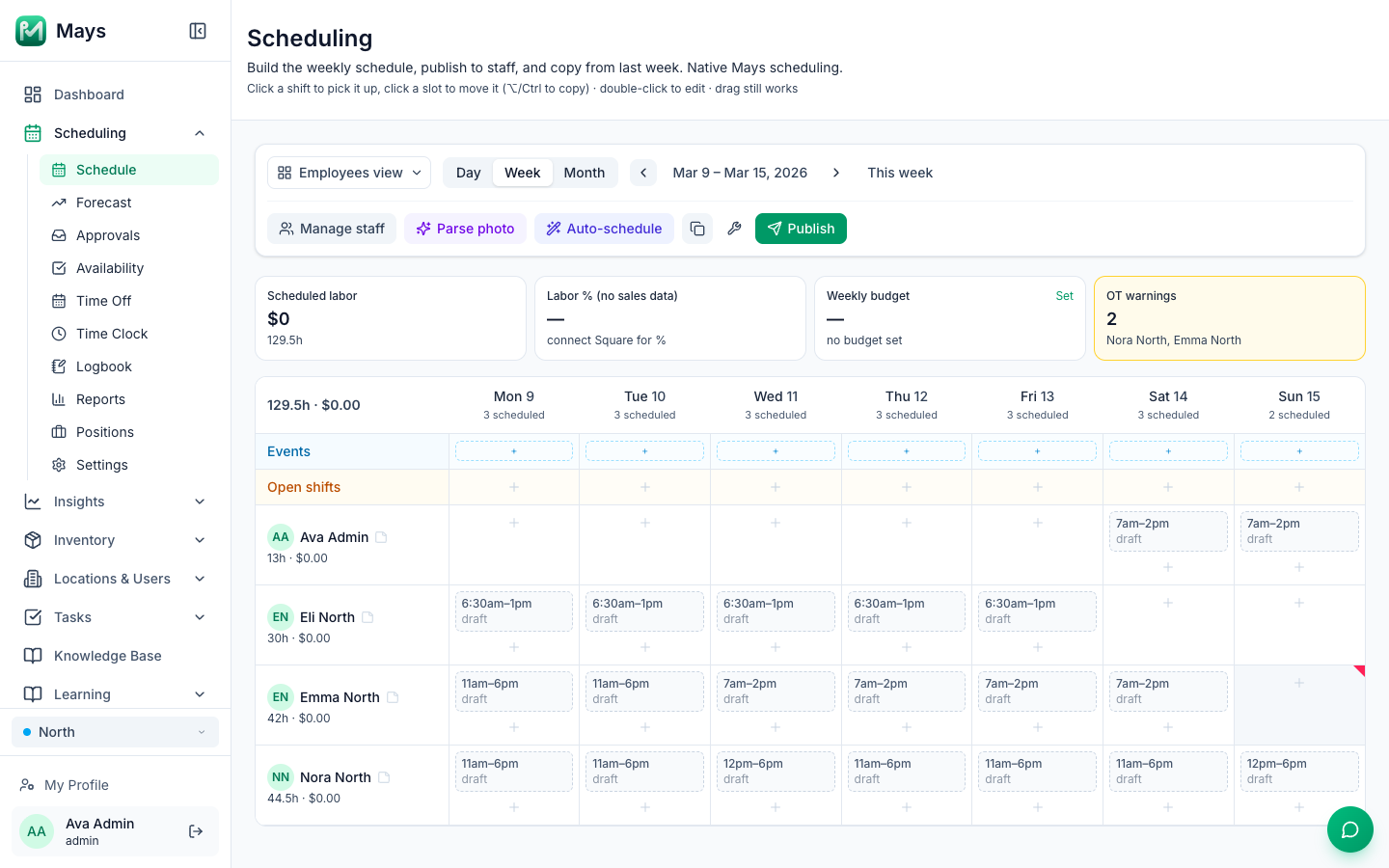
In Mays: the week is a drag-and-drop grid. You can click a slot to add a shift, drag it to another day, or copy last week and adjust it. Overtime warnings appear while you build (like the two in the image at the top of this post), along with overlap warnings, and you can save shift presets for your regular openers and closers. If your first schedule is on paper, Parse photo turns a photo of it into draft shifts. Auto-schedule can draft the week with AI, and nothing goes out until you publish it. Locations that need it can turn on per-location labor and break rules.
Step 6: Publish on a fixed day, and decide how swaps work
Publish at the same time every week, at least a week ahead. Predictability is what keeps people. Then settle how changes happen after publishing, before the first one comes up:
- Trades: a team member offers a shift to a coworker, the coworker accepts, and a manager approves.
- Open shifts: a shift nobody is assigned to (or one someone drops) goes to a pool, and qualified people can claim it, subject to approval.
- Last-minute cover: the manager on duty finds a replacement, not the person calling out.
Write those three rules on one page and share it with the team.
In Mays: shifts stay drafts until you press Publish, so you can rearrange freely. Publishing notifies the people whose shifts changed (or everyone). Trades and open-shift claims happen in the app and wait in the manager's approvals inbox. When someone calls out, Mays suggests who can cover based on availability, conflicts and hours. Employees can also subscribe to their shifts in Apple Calendar, Google Calendar or Outlook.
Your first-schedule checklist
- Dayparts mapped, with coverage by position for weekdays and weekends
- Positions listed and each person's trained positions marked
- Weekly availability collected from everyone, with a deadline for changes
- Time-off deadline announced
- Labor target chosen and turned into an hour budget
- Anchors (openers, closers, shift leads) scheduled first
- Nobody over 40 hours without meaning to, and no close-then-open shifts
- Minors' 30-minute meal breaks built into their shifts
- Published on your fixed day, with the swap rules shared
Build it once, then copy it forward
The first schedule takes an evening. The tenth should take ten minutes: copy last week, fix the exceptions the approvals inbox already told you about, check the hours against your budget, publish.
Start your free trial and build your first week in Mays: 30 days, every module, no card needed. Setting up a new café? Start with the first 90 days playbook.