When someone passes a compliance-critical module for the first time, Mays creates a PDF certificate with their name, score and date. Admins set the certificate's look under Learning → Settings.
Which modules give a certificate
Only modules created with Compliance-critical (issues a PDF certificate on pass) ticked. They show a red Compliance tag on the web and a shield in the app. The box can only be ticked when you create the module. See Creating training modules.
The certificate is created the first time someone passes. Later passes don't create another one.
Until they pass, someone who fails a compliance module sees which answers were wrong but not the right ones, and waits 30 minutes between tries, with 3 tries a day (see Creating training modules). The certificate is still created on their first pass.
Design the certificate (admins)
- Go to Learning → Settings.
- Under Certificate template, fill in what you want to change. Anything you leave empty uses the default:
- Header text — Certificate of Completion.
- Footer text — Issued by {orgName} via Mays. Type {orgName} where your organization's name should go.
- Accent color — the frame and the person's name. Green to start with.
- Signature name — printed as a signature and under the line. Your organization's name to start with.
- Signature title — Authorised Signatory to start with.
- Click Save + refresh preview. The Live preview on the right shows a sample certificate for Sample Trainee.
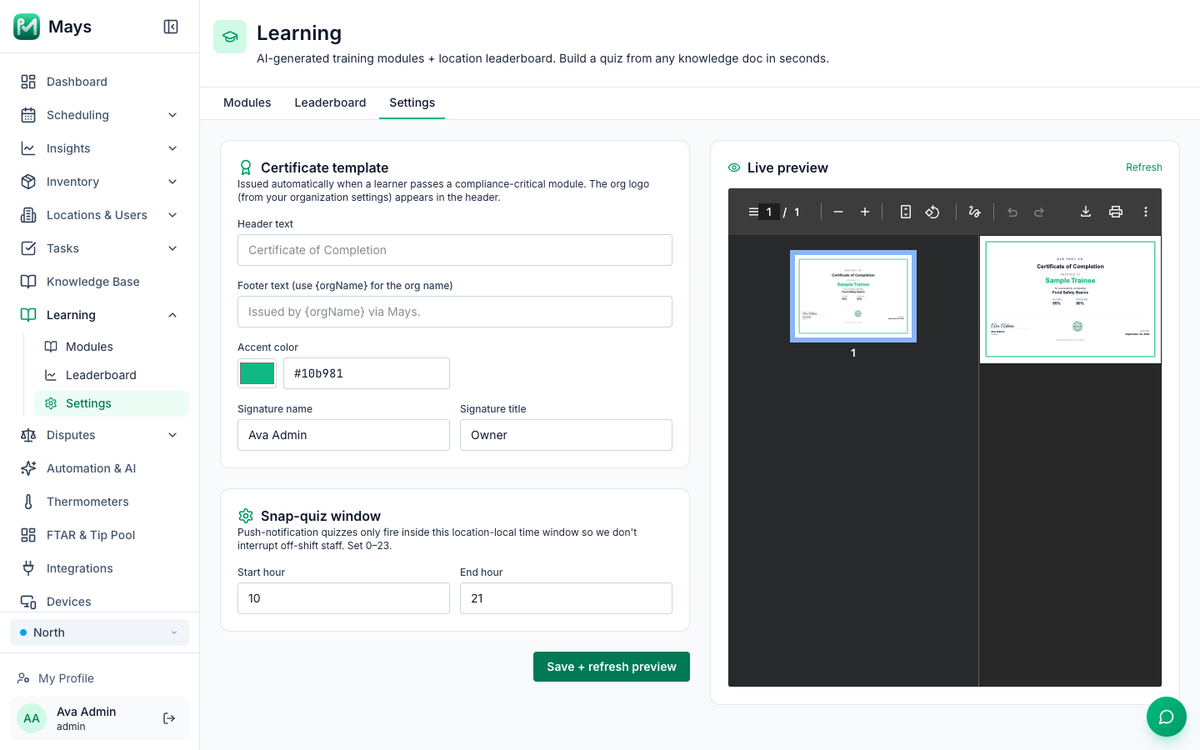
About the logo: the settings page says your logo comes from your organization settings, but there's no place to add one yet, so certificates show your organization's name without a logo. The logo you set for customer emails isn't used here.
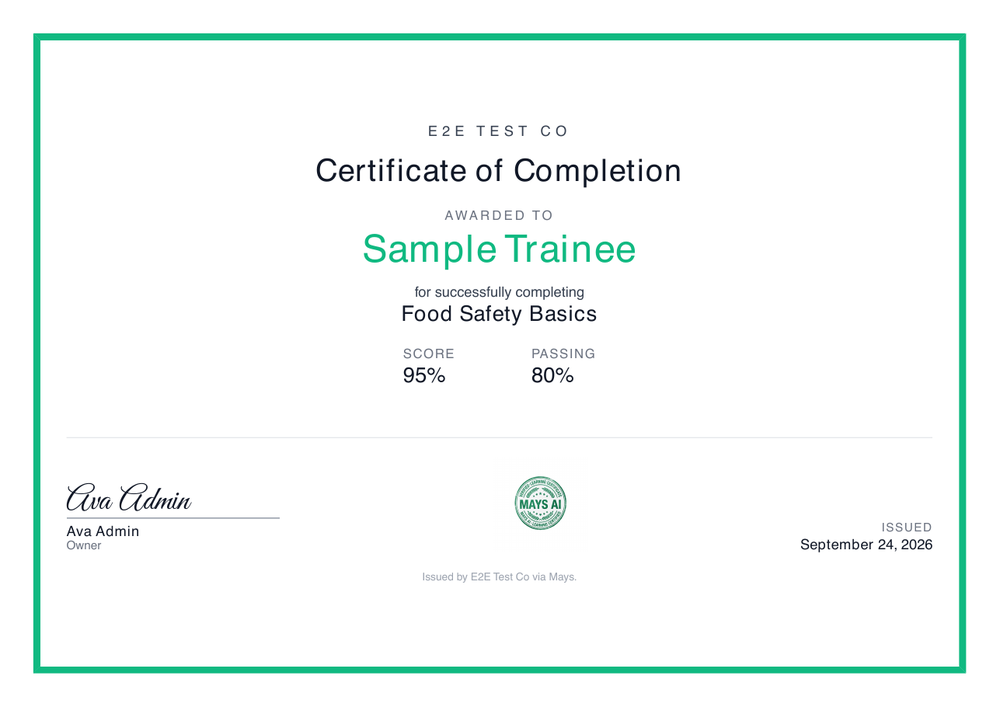
Each certificate shows your organization's name, the person's full name, the module's title, their score and the passing score, the signature, a Mays seal and the date it was issued. It's a landscape page that prints on Letter or A4.
Get the certificate (staff)
- Right after passing: tap Download certificate on the result screen.
- Any time later: open Profile → Learning. The passed module has a download icon; tap it.
The certificate opens as a PDF you can save or share. The link works for an hour, so if it stops working, close and reopen Learning.
Good to know
- Admins can't open someone's certificate on the web yet. View answers under Who's taken it shows their passed attempt; ask the person to share the PDF from their phone when you need a copy.
- No expiry or renewal. Certificates don't expire, and Mays doesn't ask people to retake a module after a year. If your rules need refresher training, create a new module and assign it.
- The issued date is the day the module was passed in the person's location's time zone (their first location's, or your organization's if they have none).
- If the certificate couldn't be created at the moment someone passed, there's no button to create it again. Write to support.
- Changing the template only affects certificates created from then on.
- Not an official food handler or food manager certificate. It shows your team passed your own training. With Labor law compliance on, record state-required certificates on the Certificates tab of the team member's page, where Mays tracks their expiry; until then, keep them on file yourself. See Food safety certificates.