The break-even point for a small café: fixed costs, variable costs and a worked example
Ask a new owner how the café is doing and you'll often hear about yesterday's sales. A good day feels like a win and a slow one feels like a crisis, but neither number means much on its own. What turns sales into an answer is one more figure: how much you need to sell to cover your costs. That's the break-even point.
This is the second post in our series on running the numbers in your first year. It shows how to sort your costs, work out break-even in dollars, days and tickets, and use it to decide things like whether to open on a slow Monday. The first post, on prime cost, covers the two biggest costs in more detail.
Every number in this post is made up to show the math. Use your own lease, quotes and statements. This is general information, not financial advice; an accountant can help you build the real version.
What break-even means
The U.S. Small Business Administration puts it simply: "The break-even point is the point at which total cost and total revenue are equal, meaning there is no loss or gain for your small business" (SBA, Calculate your startup costs).
Below that point, every month costs you money. Above it, each extra sale starts to earn a profit. To find it, you need to split your costs into two kinds.
Step 1: Sort your costs
Fixed costs stay the same whether you sell a lot or a little. The SBA describes them as costs "that do not change with the increase or decrease in production or services", like rent, salaries, insurance and interest (same page).
Variable costs rise and fall with sales. Every latte uses milk, coffee and a cup; every card payment carries a processing fee.
Some costs are a mix. The SBA calls them semi-variable: "a mixture of both fixed and variable components", like phone, repairs and power (same page). For a café, the big one is labor:
- The minimum crew you need to open the doors (an opener and a closer, someone on the register) is effectively fixed. You pay it on a quiet Tuesday too.
- The extra hours you add for a busy Saturday or a catering order move with sales.
There's no single right way to sort a mixed cost. Pick a rule you can explain, write it down and use it every month. A common approach is to put the minimum crew in fixed costs and the hours above it in variable costs.
One more rule: if you plan to pay yourself, put your pay in fixed costs. Break-even without it is break-even for the business, not for you.
Step 2: A hypothetical café's costs
Here's a made-up café, open 30 days a month, with round numbers.
Fixed costs, per month:
Cost | Per month |
|---|---|
Rent and common area charges | $5,000 |
Minimum crew: 450 hours at $20 an hour, payroll taxes included | $9,000 |
Utilities | $1,500 |
Equipment loan payment | $1,000 |
Insurance | $500 |
Software, phone and internet | $500 |
Accounting, licenses and repairs | $500 |
Total fixed costs | $18,000 |
Variable costs, as a share of each sales dollar:
Cost | Share of sales |
|---|---|
Food and drink | 30% |
Packaging (cups, lids, bags) | 4% |
Card processing fees | 3% |
Other supplies (napkins, cleaning) | 3% |
Total variable costs | 40% |
Use the real numbers from your own invoices and your card processor's statement; the 3% here is only for the example. Our post on food cost and plate costing shows how to work out your food and drink share item by item.
This is a cash view of the month: it includes the loan payment because the money leaves the account. Your accountant's profit-and-loss statement may treat loan payments and equipment differently, which is fine. Use whichever view you'll actually check.
Step 3: Find the contribution margin
The contribution margin is the share of each sales dollar left after variable costs. It's what "contributes" to paying the fixed costs, and then to profit.
Contribution margin = 100% − variable costs %
For our café: 100% − 40% = 60%. Every $10 sale leaves $6 to cover rent, the crew and the rest.
Step 4: Calculate break-even
The SBA's formula: "Break-even point (sales dollars) = fixed costs ÷ contribution margin" (SBA).
Break-even sales = $18,000 ÷ 0.60 = $30,000 a month
Now turn it into numbers you can check every day:
Break-even | |
|---|---|
Per month | $30,000 |
Per week ($18,000 × 12 ÷ 52 = $4,154 of fixed costs, ÷ 0.60) | about $6,923 |
Per day, open 30 days | $1,000 |
Tickets per day, at a $10 average ticket | 100 |
"A hundred tickets a day" is something the whole team can understand. Your POS shows both the day's sales and the average ticket.
Step 5: Add the profit you want
Break-even is the floor, not the goal. To aim for a profit, add it to the fixed costs:
Sales needed = (fixed costs + target profit) ÷ contribution margin
For $3,000 of monthly profit: ($18,000 + $3,000) ÷ 0.60 = $35,000 a month, or about $1,167 a day.
Step 6: Test what changes it
Break-even is most useful when you ask "what if?". Each row changes one thing in the example:
What changes | New break-even per month | Change |
|---|---|---|
Nothing (the example) | $30,000 | — |
Rent goes up $1,000 a month | $31,667 | +$1,667, about 6 more tickets a day |
Food and drink cost rises from 30% to 33% of sales | $31,579 | +$1,579 |
Prices go up 5% (a $10 ticket becomes $10.50) and costs per item stay the same | $29,144 | −$856, and only about 93 tickets a day |
Three lessons hide in that table:
- A fixed-cost increase is permanent. A rent increase raises the bar every single day. Negotiate the lease, and the escalation clause, before you sign.
- A few points of food cost matter as much as a rent rise. That's why it's worth checking invoices and portions every week (see our prime cost post).
- Small price increases lower break-even twice: each sale brings in more, and the food, packaging and supplies are a smaller share of it. Card fees stay a share of the price either way. Whether guests keep coming at the new price is the part only you can judge.
Step 7: Use it for real decisions
Should you open on a slow day?
Break-even is a monthly number, but days aren't equal. Saturday may carry the week while Monday falls short. That doesn't mean Monday loses money.
Ask what you'd save by closing. Say Monday brings in $600 in sales. At a 60% contribution margin, that leaves $360. If closing would save the Monday crew (15 hours at $20, or $300) and about $20 of power, Monday still adds $40 toward rent. Closing would make the month worse, not better, unless the savings are bigger than that or the hours could earn more somewhere else.
Run the numbers with your own sales and crew before you change your hours. Our post on planning labor for a slow season covers trimming shifts before you trim days.
Should you add a catering order or a new item?
Look at its own contribution: the price, minus its food, packaging and the extra labor it needs. If that's positive and it doesn't push out better sales, it helps you clear break-even sooner.
How long until the café pays for itself?
Break-even tells you when you stop losing money each month, not when you earn back what you spent to open. Those are different questions. The SBA suggests that new businesses make financial projections and, "For the first year, be even more specific and use quarterly — or even monthly — projections" (SBA, Write your business plan). Your monthly break-even is one of the first lines in that plan.
Common mistakes
- Leaving out the owner's own pay
- Treating all labor as variable, as if the crew shrinks with sales
- Using the card processor's advertised rate instead of the effective rate on the statement
- Calculating break-even once, before opening, and never again after the lease, the menu or the wages change
- Looking at days in isolation instead of the week and the month
Where Mays fits
Mays doesn't keep your rent, loan or other fixed costs, so the break-even math itself lives in your spreadsheet or your accounting software. Mays gives you the numbers that move it, each day:
- Daily sales and labor (Scheduling → Reports → Actuals): projected sales, actual sales, actual labor and Labor % per day for one location, with Export CSV. Sales come from Square or Union POS. Set the projection for a day on the Forecast page, then hold each day's actual sales up against your daily break-even.
- Food and labor as a share of sales (Insights → Prime Cost, for admins): revenue, labor cost and Theoretical COGS by day, week or month. The food share comes from your recipes and mapped POS sales, so it's what your sales should have used. Our prime cost post explains how to read it.
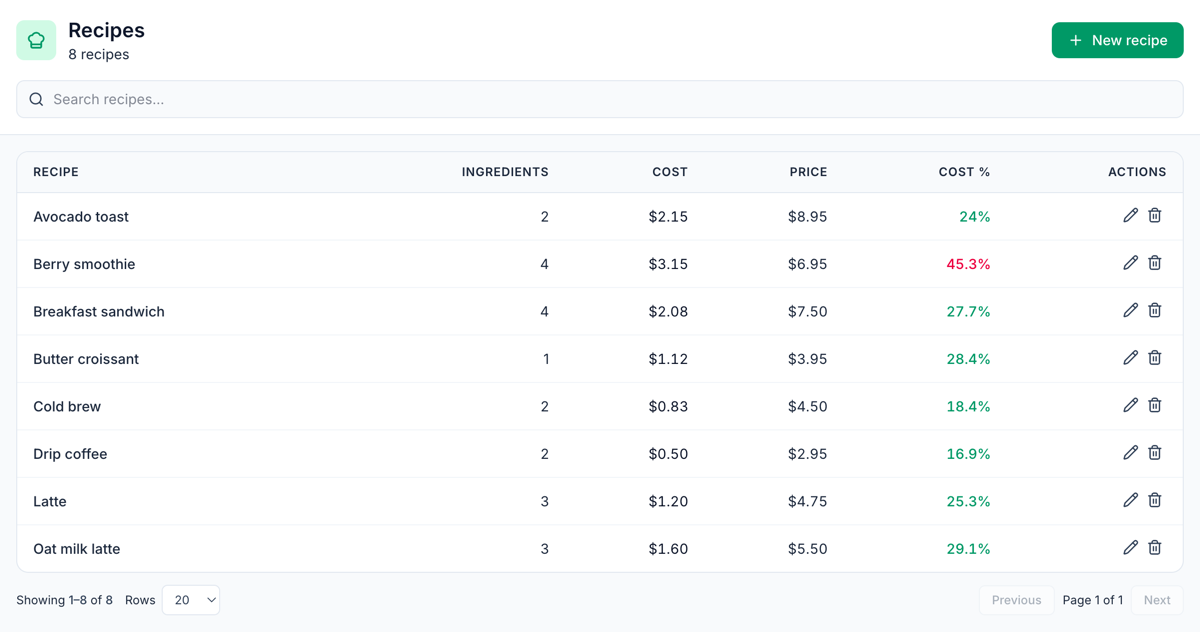
- Plate costs (Inventory → Setup → Recipes, the image at the top of this post): each recipe's cost, cost % and margin, so you can see the contribution of a single item before you change its price.
- Labor % alerts (Insights → Alerts & Reports): a notification the morning after a day's labor cost crossed the share of sales you set.
Your break-even checklist
- Every monthly cost listed, with your own pay included
- Costs sorted into fixed, variable and mixed, with a written rule for labor
- Variable costs as a share of sales, from real invoices and statements
- Contribution margin and break-even in dollars per month, week and day
- Break-even in tickets per day, at your real average ticket
- A target profit added on top
- "What if" rows for rent, food cost and prices
- Recalculated whenever the lease, menu or wages change
See your daily numbers in Mays
Put each day's sales, labor and food cost next to your break-even, without building the report by hand.
Start your free trial: 30 days, every module, no card needed. Next in this series: forecasting weekly sales from your POS history.