Order accuracy and remakes at a café: how to track them, find the cause and count the cost
A remake looks small. One latte, made twice. But the second one costs the same ingredients as the first, takes the same bar time, and happens at the worst moment, in the middle of a line. The guest waited twice. Everyone behind them waited a little longer.
Most cafés remake drinks without a second thought, which is the right instinct for the guest in front of you. The problem is that nobody counts them, so nobody knows whether it's two a week or two an hour, or why they happen.
This is the third post in our series on the guest experience at a new café. The service standards post covers the read-back and the handoff, and the morning rush post covers the setup that keeps the bar from falling behind. This one covers what to do when a drink still comes out wrong.
First, remake without arguing
When a guest says their drink is wrong, make it again. Don't debate whether they ordered it that way. The time to find out what happened is after the guest has left, from the ticket.
Our post on handling customer complaints has five steps anyone on shift can follow and a table of what each role can offer without a manager. A remake is the first line of that table.
Decide what counts
Before you track anything, agree on the words:
- Remake: the drink or plate is made again because it was wrong or not up to standard.
- Guest change: the guest changed their mind after it was made right. Still worth counting, but it's not an accuracy problem.
- Comp: something given free to make up for a problem.
- Refund: money given back.
Count all four, but keep them apart. A café with lots of guest changes has a menu problem, not a bar problem.
Log every remake in a few seconds
If logging takes longer than a few seconds during a rush, nobody will do it. Keep it to a tally the bar can fill in with one hand.
A simple remake log has five columns:
Time | Item | What was wrong | Where it went wrong | Who caught it |
|---|---|---|---|---|
8:12 | Large oat latte | Whole milk | Ticket | Guest |
8:40 | Cappuccino | Too hot to drink | Bar | Barista |
9:05 | Iced vanilla latte | Picked up by the wrong guest | Handoff | Guest |
"Where it went wrong" is the column that matters. Train everyone to pick one of a short list:
- Order: the register misheard or didn't ask.
- Ticket: the order was heard right but rang in wrong, or a modifier didn't print.
- Bar: the ticket was right but the drink wasn't made to the recipe.
- Handoff: the drink was right but went to the wrong guest, or sat too long.
- Guest change: it was right; the guest changed their mind.
Keep the sheet next to the bar, on a clipboard or in a phone app. Collect it at close.
Find the cause, then fix the cause
At the end of the week, count the remakes by "where it went wrong". One column usually stands out. Here's what each one usually points to.
Where it went wrong | Common causes | Fixes to try |
|---|---|---|
Order | Noise, guessing defaults, no read-back | Ask the same questions in the same order; read back before payment |
Ticket | Hard-to-find modifier buttons, free-text notes the bar can't read | Reorder POS buttons so common modifiers are one tap; ban free-text milk notes |
Bar | Recipe not followed, wrong milk grabbed, rushed steaming | Recipe cards at the station, labeled milk pitchers, dial-in at open |
Handoff | Names not called, drinks set at the wrong spot | Call drink and name, one pickup shelf, mobile orders on their own shelf |
Guest change | Unclear menu, sizes or sweetness | Describe drinks on the menu; offer "less sweet" as a standard option |
Pick one cause, change one thing, and count again next week. If you change four things at once, you won't know what worked.
Two causes deserve a closer look:
- The ticket. If the register hears "oat milk" and the bar sees whole milk, the POS layout is the problem, not the barista. Watch someone ring a few complicated drinks and see where their finger hesitates.
- The handoff. Many "wrong drinks" were made right and given to the wrong person. Calling the drink and the name, every time, fixes more remakes than any bar training.
What a remake costs
The cost has three parts: what goes in the cup, the time to make it, and what it does to the line. You can put a number on the first two. Here's a worked example. Every number in it is made up; use your own.
Part | How to work it out | Example (made up) |
|---|---|---|
Ingredients and packaging | The drink's plate cost from your recipe | $1.40 |
Bar time | Minutes to remake x hourly wage / 60 | 2 minutes x $16 / 60 = $0.53 |
Direct cost per remake | $1.93 |
Now multiply. At six remakes a day, that's about $11.58 a day, or roughly $81 a week if you're open seven days, again with made-up numbers. That's before the comps, the refunds and the guests who quietly don't come back.
Our post on plate costing and menu pricing shows how to work out the plate cost of each drink. Remakes and over-pouring are also one reason the coffee and milk you actually use runs higher than your recipes say you should; that comparison is covered in the same post.
Make the review a habit
Tracking only helps if someone reads it. Put remakes on the agenda of your weekly manager meeting as a standing item:
- Total remakes, guest changes, comps and refunds this week.
- The top "where it went wrong".
- The one fix you tried last week, and whether the number moved.
- The one fix for this week, and who owns it.
Write the outcome in your manager shift log so the next shift knows what changed.
Waste and refunds are part of the story
Remakes overlap with two other things you may already track:
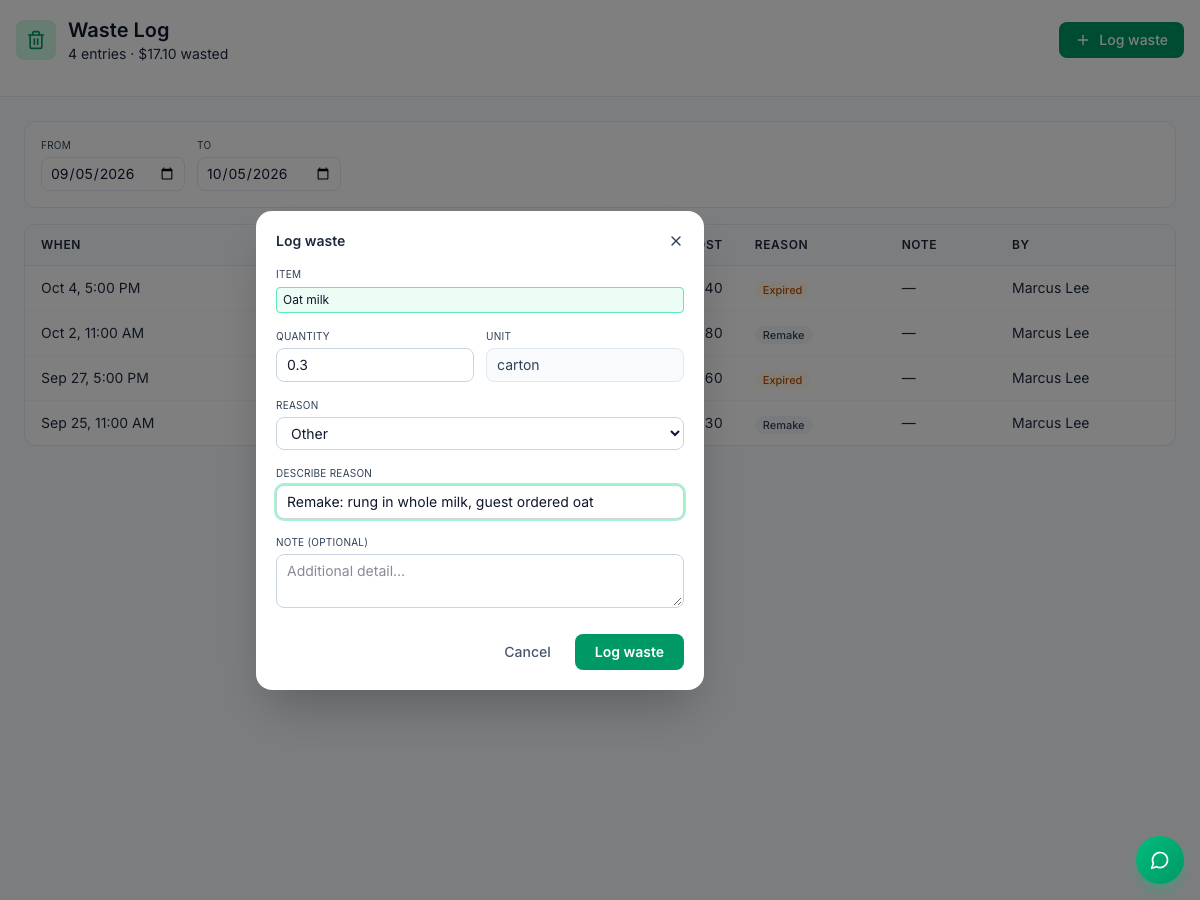
- Waste. A remade drink is waste. If you keep a waste log, log remakes there too, with "remake" as the reason, so they don't vanish into general waste.
- Refunds. A refund for a wrong order is a remake that didn't happen. Ask for a reason on every refund, and read them in the same weekly review.
Where Mays fits
- Make the review happen: in Automation, a Scheduled rule can create a task every week, such as "Remake review: top 3 reasons last week and one fix", at a time you pick in the location's time. Another can ask for a photo of the pickup shelf at 8:30 every weekday. A Manual rule has a Run now button for after a bad rush.
- Log the waste: Log waste records an inventory item, a quantity and a reason (the image at the top of this post). There's no "Remake" reason in the list, so pick Other and describe it, starting with "Remake".
- A remake log form: with Task Types, you can build a custom form with your columns (item, what was wrong, where it went wrong). Staff fill it in from the phone app; it can't be filled in on the web yet.
- Notes for the next shift: the manager Logbook has a Customer category for remakes and comps that need a follow-up.
- Refunds with a reason: with Square connected, Mays creates a task to explain each refund, so every refund gets a reason.
Mays doesn't count remakes for you. Your POS doesn't tell it which drink was made twice, so the tally still starts with the person on bar.
Your order accuracy checklist
- Remakes, guest changes, comps and refunds counted separately
- A tally sheet on the bar with "where it went wrong": order, ticket, bar, handoff or guest change
- The direct cost of a remake worked out from your own plate cost and wage
- One cause and one fix per week, reviewed in the manager meeting
- Remakes logged as waste with "remake" as the reason
- A reason recorded for every refund
Count your remakes with Mays
Put the weekly review on autopilot, log the waste, and keep the fixes where the next shift will see them.
Start your free trial: 30 days, every module, no card needed. Next in this series: consistency in coffee and food, from recipe specs to dial-in routines and spot checks.