Log what you throw away and why. Each entry takes the item out of stock and adds its cost to your waste total, so shrink has an explanation.
Where: Inventory → Waste on the web (the page is called Waste Log), for the location you're on. Staff can also log waste in the app with a form task (see below).
Log waste on the web
- Click Log waste.
- Search for the Item and pick it.
- Enter the Quantity. It's in the item's count unit, shown under Unit.
- Pick the Reason: Spoiled, Expired, Damaged, Prepared too much or Other. For Other, fill in Describe reason.
- Add a Note (optional).
- Click Log waste.
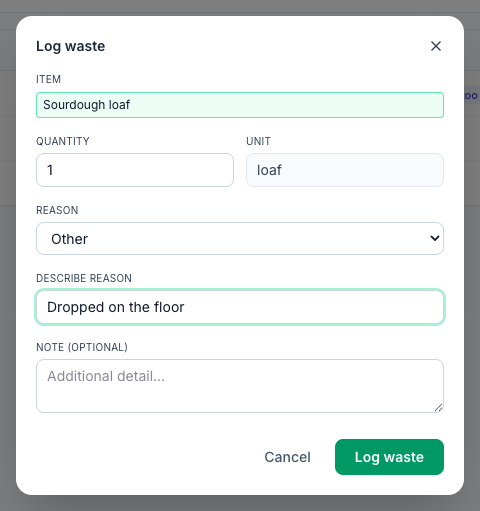
The entry is taken out of stock on hand straight away.
See what you've wasted
The Waste Log lists every entry between the From and To dates (the last 30 days to start with): When, Item, Qty, Cost, Reason, Note and By who. The header adds them up, for example 3 entries · $12.53 wasted.
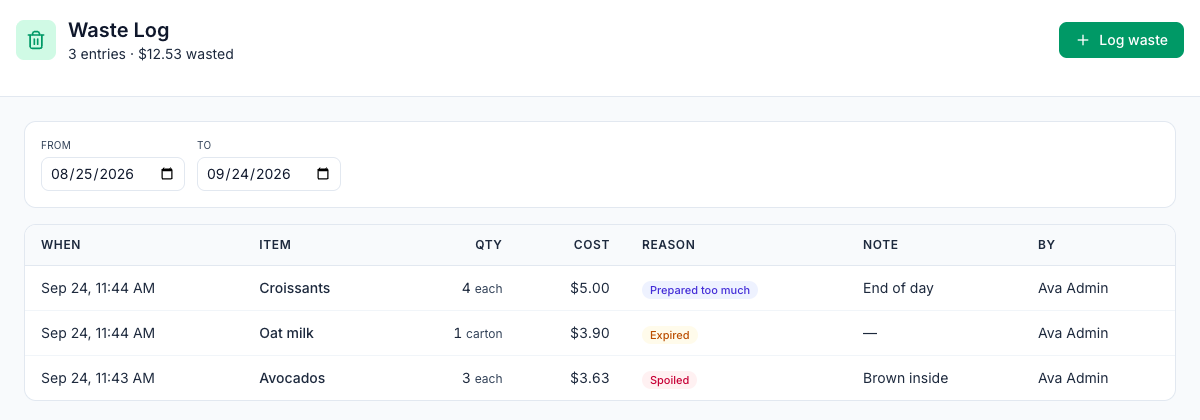
Cost is the quantity × the item's cost per count unit: its cheapest vendor price for this location, or the cost it came with from an import. An item with no price costs $0.00.
Look at the week's log once a week. If the same item is at the top every week, a lower par or a smaller batch usually fixes it.
Log waste from the app
Staff don't have Inventory in the app, but they can log waste with a Waste log form:
- An admin creates a task type from the Waste log preset under Tasks → Types. It has Wasted items rows with Item, Quantity and Reason (Spoilage, Overproduction, Prep error, Dropped, Expired), and Notes.
- Add it to a checklist, for example at close.
- When the task is submitted, each row is taken out of stock and appears on the Waste Log with its reason.
See Building custom forms (Task Types).
Good to know
- Entries can't be edited or deleted. If one is wrong, your next count sets the item's stock right.
- Where waste shows up: in the Waste column on the Theoretical page, and as the reason behind part of your count variances. See Theoretical vs actual usage.
- Dates: the From and To days follow the location's time zone, and To starts on the location's today. Waste logged late in the evening counts on that day.
- Who: admins, and managers at their own locations, on the web; anyone assigned the form task in the app.