A recipe lists what goes into one menu item. Mays prices each ingredient from your vendor prices and shows the plate's cost, its cost % and your margin.
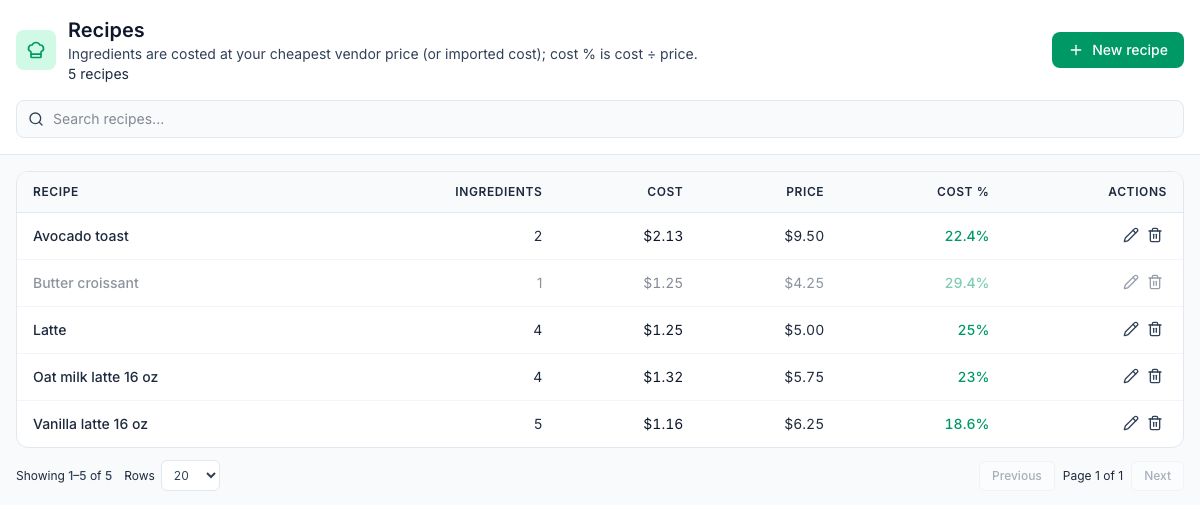
Where: Inventory → Recipes on the web. The line under the title sums up where costs come from. The list shows each recipe's number of Ingredients, its Cost, Price and Cost %. A cost % above 35% shows in red.
Build a recipe
A recipe is one serving. Enter the amounts for one plate or one drink.
- Click New recipe.
- Enter the Recipe name and the Serving price $ you charge.
- Pick a Menu list if you use them (see below).
- Under Ingredients, click + Add item…, search for an item and pick it. Add each ingredient the same way.
- For each ingredient, set:
- Qty and Unit: the item's count unit, any of its alternate units, or a standard measure such as g or fl oz;
- Yield %: the usable share of what you buy (see below).
- Click Save recipe.
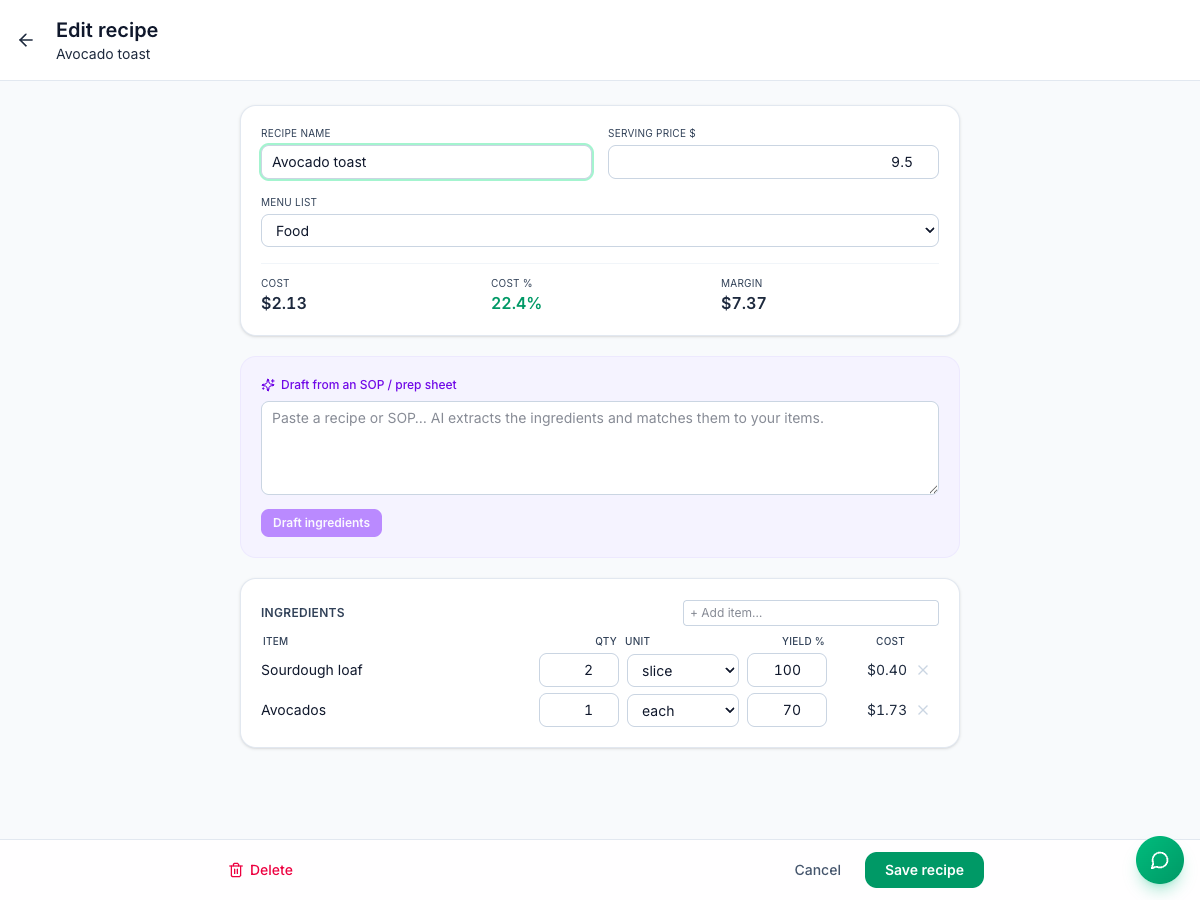
Open the recipe again to see its Cost, Cost % and Margin, and the cost of each line. They're worked out when the recipe is saved and each time you open it.
How the cost is worked out
For each ingredient: amount in count units × cost per count unit ÷ yield.
- Cost per count unit is the cheapest active vendor price for this location, divided by its pack size. A vendor's price for this location beats its price for all locations. If your items were imported from another system with their own cost, that cost is used instead.
- Yield accounts for trim and cooking loss. With a 70% yield, every usable ounce costs 1 ÷ 0.70 as much as an ounce on the invoice.
Avocado toast | Amount | Cost |
|---|---|---|
Sourdough loaf ($24.00 a case of 6 = $4.00 a loaf) | 2 slices = 0.1 loaf | $0.40 |
Avocados ($58.00 a case of 48 = $1.21 each), 70% yield | 1 each | $1.21 ÷ 0.70 = $1.73 |
Plate cost | $2.13, 22.4% of $9.50 |
Because costs are worked out from current prices, a new price shows up in every recipe that uses the item: one you enter on the item, one from a posted invoice, or one from Sync catalog for a vendor product mapped to the item. See Vendor invoices and Vendor catalogs.
A line shows $0.00 when the item has no vendor price, or when its unit can't be converted to the item's count unit. Add the price, or add the unit on the item. See Inventory items.
Draft ingredients from a recipe card
The Draft from an SOP / prep sheet box uses AI to read ingredients from text you paste:
- Paste the recipe or prep sheet into the box.
- Click Draft ingredients.
- Check what was added under Ingredients, fix quantities and units, and click Save recipe.
Only ingredients that match one of your items are added. Anything it can't match is left out without a message, so compare with your card. If the AI can't answer, nothing is added and the box is cleared. Drafting doesn't use AI credits.
Menu lists and modifiers
- Menu lists (Inventory → Menu Lists) group recipes, such as Drinks or Food, each with a Target cost % to compare with the list's actual cost %.
- Modifiers (Inventory → Modifiers) use the same form for add-ons and swaps, such as an extra shot. They're used for POS modifiers. See POS mapping and automatic depletion.
For both, see Menu lists and modifiers.
Good to know
- Recipes belong to the location you're on. Recipes shared with all locations come from an import. Only admins can change them; managers see view only.
- Deleting a recipe can't be undone. It stays in the list, dimmed, and can't be switched back on. Its POS mappings are removed too, so sales of that item stop taking its ingredients out of stock, and the sale item shows as unmapped on Inventory → POS, ready to map to another recipe.
- No batch yield or sub-recipes on the web. Sub-recipes brought in by an import show with ↳ and are costed, but you can't add one here.
- Changing a recipe changes recent usage too. Mays recalculates the last three days of sales every night with the current recipe.