Food cost for a small restaurant: plate costing and menu pricing basics
Many new owners price the menu once, before opening, from a quick guess at ingredient costs and what the café down the street charges. Then vendor prices move, portions drift, and six months later nobody knows what a sandwich actually costs to make.
Food cost doesn't need an accountant. It needs a recipe card for each item, prices from your real invoices, and the habit of checking both. This guide covers how to cost a plate (yields included), how to price from a target food cost, what to do when a vendor raises a price, and how to compare what your plates should cost with what you actually spent.
Every number in this post is made up to show the math. Use your own invoices and your own targets.
Two numbers called "food cost"
Plate cost | Actual food cost | |
|---|---|---|
What it measures | What one menu item should cost to make | What you really spent on food over a period |
How to calculate it | Each ingredient's quantity × its cost, added up | Opening inventory + purchases − closing inventory |
As a percentage | Plate cost ÷ menu price | Actual food cost ÷ food sales for the same period |
What it tells you | Whether each item is priced right | Whether the kitchen uses food the way the recipes say |
You need both. The gap between them is waste, over-portioning, spoilage, comps and theft.
There's no universal "right" food cost percentage. It depends on your menu, your prices and your other costs, so choose your own target and use it consistently.
Step 1: Cost one plate
Start with your best sellers, not the whole menu. For each item, write a recipe card:
- List every ingredient that goes on the plate, including the ones that feel too small to count: the spread, the garnish, the pickle, the oil in the pan.
- Write the quantity per serving in a unit you can measure: ounces, slices, pieces. Weigh a few real plates rather than trusting the recipe you wrote before opening.
- Get the price per unit from your latest invoice. Divide the pack price by the units in the pack: a $42.00 case of 10 lb of turkey is $4.20 a pound, or about $0.26 an ounce.
- Adjust for yield. Much of what you buy never reaches the plate. Avocados lose skin and pits, tomatoes lose cores and ends, meat loses weight when it's trimmed or cooked.
- Add up the lines. That's the plate cost.
Yield: the step most people skip
The yield is the usable share of what you bought. If you peel and pit 10 lb of avocados and end up with 7 lb of flesh, the yield is 70%, and every usable ounce costs more than an ounce on the invoice:
Cost per usable unit = purchase price per unit ÷ yield
At $3.20 a pound and a 70% yield, usable avocado costs $4.57 a pound, not $3.20. To find your own yields, weigh the product before and after prep on three different days and average the results. Yields change with the product, the season and who's doing the prep, so re-check the big ones every few months.
A worked example
A made-up turkey and avocado sandwich, with made-up prices:
Ingredient | Bought as | Price per unit | Per sandwich | Yield | Line cost |
|---|---|---|---|---|---|
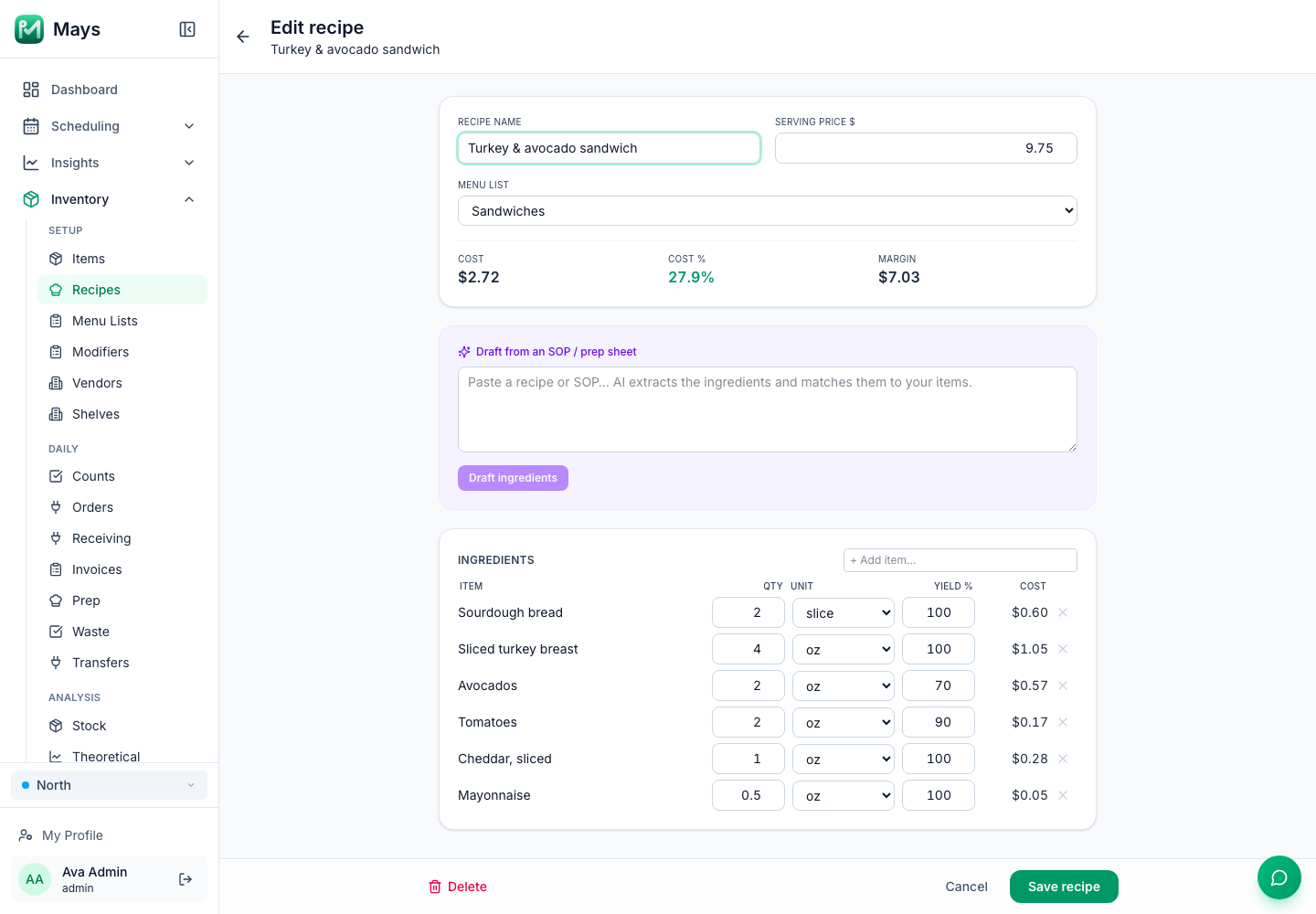
Sourdough bread | Loaf of 20 slices, $6.00 | $0.30 a slice | 2 slices | 100% | $0.60 |
Sliced turkey breast | 10 lb case, $42.00 | $4.20 a lb | 4 oz | 100% | $1.05 |
Avocados | 10 lb case, $32.00 | $3.20 a lb | 2 oz | 70% | $0.57 |
Tomatoes | 25 lb case, $30.00 | $1.20 a lb | 2 oz | 90% | $0.17 |
Cheddar, sliced | 5 lb pack, $22.50 | $4.50 a lb | 1 oz | 100% | $0.28 |
Mayonnaise | 30 lb pail, $45.00 | $1.50 a lb | 0.5 oz | 100% | $0.05 |
Plate cost | $2.72 |
To check a line: 2 oz of avocado is 0.125 lb, which costs $0.40 at $3.20 a pound. Divided by the 70% yield, that's $0.57.
Leave packaging (the wrap, the cup, the napkin) out, or cost it separately, so your food cost stays comparable from month to month.
Step 2: Price from a target food cost
With a plate cost and a target, the minimum price is one division:
Menu price = plate cost ÷ target food cost %
With a 28% target, the sandwich needs to sell for at least $2.72 ÷ 0.28 = $9.71. Round up to a price that fits your menu, say $9.75, and the food cost is $2.72 ÷ $9.75 = 27.9%.
Then check the price three ways:
- Against the market. What do places near you charge for something similar? If the math says $14 and the street says $10, the recipe or the portion needs work, not just the price.
- In dollars, not only percent. A latte that costs $0.95 to make and sells for $5.25 runs at 18% and earns $4.30. The sandwich runs at 27.9% but earns $7.03 per sale. Both can be good items. You want the percentage and the dollars to make sense.
- Across the whole menu. A few low-cost items can carry a few expensive ones. Look at the blended food cost of what you actually sell, not each item alone.
Step 3: Keep costs current when vendor prices change
A plate cost is only as good as the prices behind it. Vendor prices move all the time, and a jump on one key ingredient can eat an item's margin before anyone notices.
Say turkey goes from $42.00 to $50.40 a case, a 20% increase. The turkey line goes from $1.05 to $1.26, the plate cost from $2.72 to $2.93, and at $9.75 the food cost goes from 27.9% to 30.1%. Across a few hundred sandwiches a month, that adds up.
Make checking a habit:
- Know your top ingredients. A handful of items usually make up a large share of what you spend. Watch those closely; don't chase pennies on salt.
- Check each invoice against the last price before you file it, especially for those top items.
- Update the recipe card when a price moves, so the plate cost reflects today, not opening day.
When a cost goes up, raising the price isn't the only option:
Option | Example | Watch out for |
|---|---|---|
Absorb it for now | A seasonal spike in produce | Absorbing every increase until the margin is gone |
Change the portion | 3.5 oz of turkey instead of 4 oz | Guests notice smaller plates; train the line on the new portion |
Change the product or vendor | A different brand or supplier | Quality and consistency; ask for samples first |
Change the recipe | Swap a costly garnish | Don't change what people order the item for |
Raise the price | $9.75 to $10.50 (27.9% at the new cost) | Raise a few items at a time, not the whole menu at once |
Step 4: Compare plate costs with what you actually use
Plate costs assume every sandwich gets exactly 4 oz of turkey. Real kitchens don't work that way. To see the difference, calculate actual food cost for a week or a month:
Actual food cost = opening inventory + purchases − closing inventory
With made-up numbers: $2,100 of food on the shelves at the start of the month, $6,300 of food purchases and $1,900 left at the end means you used $6,500 of food. On $22,000 of food sales, that's 29.5%.
Then compare it with what your sales say you should have used. If your plates average 27% and actual food cost is 29.5%, the difference is food that left without being sold as planned. The usual causes:
- Portions drifting up during a rush
- Waste and spoilage: over-prep, expired product, dropped plates. Log it, so you know which.
- Comps and staff meals that aren't recorded
- Receiving errors: short deliveries, wrong prices on the invoice
- Theft
This only works if you count the same way every time: the same items, the same units, on the same day of the week. Our guide to café inventory from day one covers counts and par levels.
Common mistakes
- Costing recipes once, before opening, and never again
- Using the price from the vendor's catalog instead of what the invoice actually charged
- Ignoring yield on produce, meat and anything that's trimmed or cooked
- Leaving out the small stuff that adds up: oils, sauces, garnishes
- Setting prices by percentage only, without checking the dollars
- Counting inventory on different days or in different units each time
Where Mays fits
Mays does plate costing in the web app, under Inventory:
- Items and vendor prices: each item has a count unit (a slice, a pound) and can have alternate units, like an ounce set as 0.0625 lb. On the item, you add each vendor's pack and $ / pack, shared by all your locations or for one location only.
- Recipes (Inventory → Setup → Recipes, the image at the top of this post): a recipe has a name, a Serving price $ and a Menu list. For each ingredient you set Qty, Unit and Yield %, and Mays shows each line's cost. Once you save, the recipe shows its Cost, Cost % and Margin. The recipe list shows every item's cost, price and cost %, with anything above 35% in red. A recipe in the web app is one serving, so enter the quantities for one plate.
- Where costs come from: each ingredient is priced at its cheapest active vendor price per unit, and the cost is recalculated whenever you open a recipe, so a price change shows up without re-entering anything.
- Invoices: take a photo of an invoice or upload the PDF, and the AI reads it into a draft. Each location also gets its own email address for invoices. Post & receive adds the stock and updates that vendor's price for the location.
- Price alerts: under Insights → Alerts & Reports, an admin can add a Vendor Price Change alert with a Threshold (%). When a posted invoice has a price that moved past the threshold since the last one, the team members you pick get a notification, and the email addresses you add get an email.
- Menu lists: group recipes (Sandwiches, Drinks) and set a Target cost % to compare with each list's Actual cost %. The actual figure is the list's total recipe cost over its total prices; it isn't weighted by how many of each you sell.
- Sales and theoretical usage: with Square or Union connected, you map what you sell to recipes on the POS page (Inventory → Analysis), and sales take the ingredients out of stock. The Theoretical page then lists, for each item, what your sales should have used, next to deliveries, waste and transfers.
Comparing that with counted stock (the Actual Usage and Variance columns, and the actual-vs-theoretical report) needs approved counts, and approving a count isn't available in the apps yet. Until it is, use your count totals for the actual food cost math above.
Your food cost checklist
- A recipe card for each best seller, with quantities weighed on real plates
- Prices from your latest invoices, not from memory
- Yields measured for produce and anything trimmed or cooked
- A target food cost you've chosen for your menu
- Prices checked against the target, the market and the dollars earned
- Invoices checked against the last price for your top ingredients
- A monthly actual food cost, with counts done the same way every time
- Waste logged, so the gap between plate cost and actual cost has an explanation
Cost your menu in Mays
Add your top ingredients and their vendor prices, build your best sellers as recipes, and see each plate's cost, cost % and margin.
Start your free trial: 30 days, every module, no card needed. Setting up inventory for the first time? Start with Café inventory from day one.