A 13-week cash flow forecast for a new café, with a template you can copy
A café can be profitable on paper and still run out of cash. Rent is due on the 1st, payroll lands every other Friday, the sales tax return comes due in the middle of the month, and the espresso machine breaks the same week. Profit is measured over a month. Cash runs out on a Tuesday.
A 13-week cash flow forecast is the tool for that. It's a simple table of the cash you expect to come in and go out, week by week, for the next quarter. You update it every week, so you always see about three months ahead.
This is the first post in our series on money basics for a new café. It builds on the "Running the numbers" posts: prime cost, the break-even point, forecasting weekly sales and labor cost percentage. Those tell you whether the café makes money. This one tells you whether the bank account can keep up.
Every number in this post is made up to show the method. Use your own bank statements, bills and sales history. This is general information, not financial advice; your accountant can check the real version.
Why cash and profit aren't the same
The U.S. Small Business Administration explains the two ways a business records money: "The accrual method puts transactions on the books immediately upon completing the sale. The cash method only records this once payment has been received" (SBA, Manage your finances).
Your accountant decides which method your books use. A cash flow forecast doesn't care. It only asks one question for each line: in which week does the money actually move?
That's why the forecast catches things a profit report hides:
- Bills that come in lumps. Rent, the loan payment, the quarterly insurance installment and the monthly sales tax return don't arrive evenly.
- Timing gaps. Card sales can take a day or two to reach your bank, and a supplier on 14-day terms gets paid two weeks after the delivery.
- Money that isn't yours. The sales tax you collect sits in your account until the return is due. In Florida that's the DR-15; see our post on Florida sales tax for restaurants and cafés.
- Spending that isn't an expense. Loan principal and a new grinder leave the account even if your profit and loss statement treats them differently.
What goes in the forecast
Keep it to lines you can actually predict. You can always add detail later.
Cash in:
- Card deposits from your processor (by the day they reach the bank, not the day of the sale)
- Cash deposits, from your deposit log (see cash handling for a small restaurant)
- Delivery app payouts, if you use them, on their payout schedule (see what delivery apps really cost)
- Catering invoices you expect to be paid, in the week you expect the payment
- One-offs: a loan disbursement, an owner contribution, an insurance claim payment
Cash out:
- Vendors, by their payment terms: cash on delivery in the week of the delivery, net 14 two weeks later
- Payroll, on the payday, including the employer's share of payroll taxes
- Rent and common area charges
- Loan and equipment lease payments
- Sales tax, in the week you file and pay the return
- Utilities, phone, internet and software
- Insurance installments
- Repairs and replacement smallwares
- Owner pay or draws
The template
Copy this into a spreadsheet. Weeks run down the side so it fits on a phone; flip it if you prefer weeks across the top.
Week | Opening cash | Cash in | Cash out | Net | Closing cash | Big items due |
|---|---|---|---|---|---|---|
1 | ||||||
2 | ||||||
… | ||||||
13 |
Three rules make it work:
- Closing cash = opening cash + cash in − cash out. Each week's closing cash is next week's opening cash.
- Start from the real bank balance, not the balance in your accounting software, and only after cards and deposits in transit have landed.
- Keep a second tab with the detail: one row per line from the list above, one column per week. The summary pulls its totals from there.
A worked example
A made-up café opens the quarter with $12,000 in the bank. It expects about $7,000 a week in deposits, a little less in two slow weeks and a little more in a holiday week. Its regular payments:
Payment | Amount | When |
|---|---|---|
Vendors | $2,300 | every week |
Payroll, with employer taxes | $4,400 | every other week (weeks 2, 4, 6…) |
Rent | $5,000 | first week of each month (weeks 1, 5, 9) |
Equipment loan | $1,000 | monthly (weeks 3, 7, 11) |
Sales tax return | $1,900 | monthly (weeks 3, 7, 11) |
Utilities and software | $800 | monthly (weeks 2, 6, 10) |
Insurance installment | $1,500 | week 6 |
Owner pay | $1,000 | monthly (weeks 4, 8, 12) |
Grinder repair (known in advance) | $1,200 | week 9 |
Here's the forecast:
Week | Opening cash | Cash in | Cash out | Net | Closing cash | Big items due |
|---|---|---|---|---|---|---|
1 | $12,000 | $7,000 | $7,300 | −$300 | $11,700 | Rent |
2 | $11,700 | $7,000 | $7,500 | −$500 | $11,200 | Payroll, utilities |
3 | $11,200 | $7,000 | $5,200 | +$1,800 | $13,000 | Loan, sales tax |
4 | $13,000 | $7,000 | $7,700 | −$700 | $12,300 | Payroll, owner pay |
5 | $12,300 | $7,000 | $7,300 | −$300 | $12,000 | Rent |
6 | $12,000 | $7,000 | $9,000 | −$2,000 | $10,000 | Payroll, utilities, insurance |
7 | $10,000 | $6,000 | $5,200 | +$800 | $10,800 | Loan, sales tax |
8 | $10,800 | $6,000 | $7,700 | −$1,700 | $9,100 | Payroll, owner pay |
9 | $9,100 | $7,000 | $8,500 | −$1,500 | $7,600 | Rent, repair |
10 | $7,600 | $7,000 | $7,500 | −$500 | $7,100 | Payroll, utilities |
11 | $7,100 | $8,000 | $5,200 | +$2,800 | $9,900 | Loan, sales tax |
12 | $9,900 | $7,000 | $7,700 | −$700 | $9,200 | Payroll, owner pay |
13 | $9,200 | $7,000 | $2,300 | +$4,700 | $13,900 | — |
The quarter ends with more cash than it started with. But look at week 10: the account bottoms out at $7,100. Most weeks lose a little money, and only the weeks without payroll or rent catch up.
Set a cash buffer
Pick a minimum balance you never want to go below: the cash buffer. One simple way to set it: enough to cover one payroll plus one week of vendor bills, which in this example is $6,700. Round it to $5,000 or $7,000, write it at the top of the sheet and color any week that dips under it.
The buffer is there for the things you didn't forecast: a cooler that dies, a slow week of rain, a deposit that's late.
Run "what if" weeks
The forecast earns its keep when you test it. Copy the sheet and change one thing:
- Sales 10% lower from week 7 to week 12. In the example, week 10 drops to $4,500, below a $5,000 buffer. That's three weeks' notice to act, which is much better than finding out on payday.
- A supplier changes from net 14 to cash on delivery. Two weeks of that vendor's bills move earlier.
- A catering client pays 30 days late. Move their payment four columns to the right.
- A new hire starts in week 5. Add their pay from week 6, the first payday after.
When a week dips under the buffer, the levers are the usual ones, in roughly this order: trim the schedule to the sales forecast, move a purchase or a repair to a later week, ask a supplier for terms (we'll cover that later in this series), and line up a credit line before you need it. The break-even post shows how to check whether a slow day is worth opening at all.
The 20-minute weekly routine
Pick a day, ideally the same day you review prime cost and labor, and do this:
- Replace last week's forecast with actuals. Put in the real deposits and payments, and the real closing balance from the bank.
- Note the misses. If sales came in $600 under, ask whether that's a one-off (weather) or a trend (a new competitor).
- Add a new week 13 at the end, so you always see a full quarter.
- Update the next four weeks in detail: this week's vendor orders, the payroll from the hours you've scheduled, any bill that just arrived.
- Check the lowest week against your buffer.
Your sales forecast is the biggest input. Our post on forecasting weekly sales from your POS history shows how to build it, and for the first year the SBA suggests going down to monthly detail: "For the first year, be even more specific and use quarterly — or even monthly — projections" (SBA, Write your business plan). A weekly cash forecast takes that one step further.
Common mistakes
- Forecasting sales by the day of the sale instead of the day the money lands
- Treating the sales tax you collected as spending money
- Forgetting quarterly and yearly bills: insurance, licenses, the accountant's fee
- Using payroll gross pay without the employer's share of taxes
- Building the forecast once for a lender and never updating it
- Letting the "actuals" drift from the real bank balance
Where Mays fits
Mays doesn't connect to your bank or track your bills, so the cash forecast itself lives in a spreadsheet or your accounting software. Mays fills in several of its biggest lines:
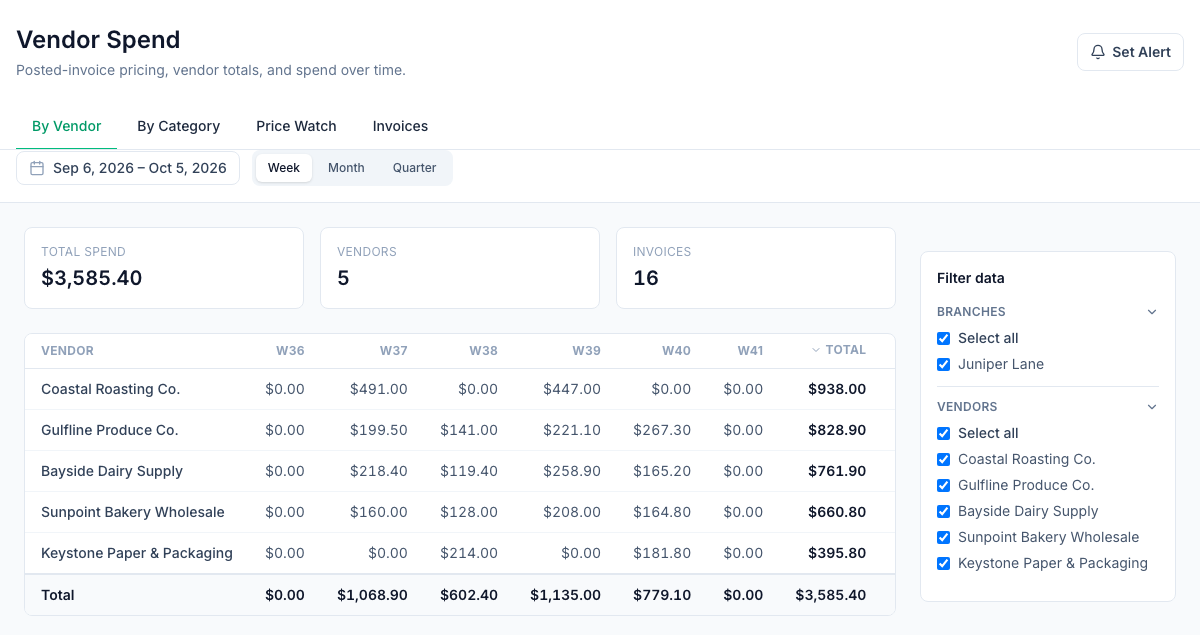
- What you spend with each vendor (Insights → Vendor Spend, the image at the top of this post): what you spent with each vendor by week, month or quarter, from the vendor invoices you post under Inventory → Invoices. Only posted invoices count, and each one is dated by the day it was posted. An admin can have a Vendor Spend summary emailed every week or month from Insights → Alerts & Reports. Use it to check that the vendor line in your forecast matches what you're really buying.
- Sales and labor by day (Scheduling → Reports → Actuals): projected sales, actual sales, actual labor and labor % per day for one location, with Export CSV. Sales come from Square or Union POS.
- Projected sales on the Forecast page, the starting point for your cash-in line.
- Payroll hours from the time clock: each pay period's hours export as a Standard CSV or a Gusto timesheet, so the payroll line can start from real hours instead of a guess.
Your cash flow checklist
- A 13-week table with opening cash, cash in, cash out, net and closing cash
- A detail tab with every regular payment in the week it leaves the account
- Card deposits by the day they land, not the day of the sale
- Sales tax, insurance, loan and other lumpy bills in their real weeks
- A cash buffer, written down and color-coded
- At least two "what if" versions: lower sales, and a big surprise expense
- A 20-minute update every week, ending with a new week 13
See your weekly spending in Mays
Get vendor spend, sales and labor in one place, so the forecast is quicker to update every week.
Start your free trial: 30 days, every module, no card needed. Next in this series: paying for the build-out and equipment, from SBA loans to equipment leases.