What delivery apps really cost a small restaurant
A few months after opening, the delivery apps start calling. Sign up, and your café shows up in front of people who've never walked past it. The catch is the commission: a share of every order, before you've paid for the food, the packaging or the person bagging it.
Delivery can still be worth it. But you should decide with the real numbers: what each platform charges, what's left of an order after that, whether to raise your app prices, and what a wrong order costs you. This guide covers all of it, with an order-accuracy checklist at the end.
Updated September 24, 2026: every platform figure below comes from the platform's own public pricing page as of that date, and the city rules were re-checked. Prices change often, so check the current page before you sign up. This is general information, not legal advice.
What each platform charges
All three offer plans. The more you pay, the more reach and perks you get (lower customer delivery fees, promotions, membership programs).
Platform | Plans (commission on delivery orders) | Pickup orders | Source |
|---|---|---|---|
DoorDash | Basic 15%, Plus 25%, Premier 30%, after a 0% intro rate (7 days on Basic, 30 days on the others) | 6% on all plans | |
Uber Eats | Lite 20%, Plus 25%, Premium 30% (Plus and Premium after a 30-day 0% intro rate); Self-delivery 15% | 7% with validated in-store pricing, 10% without | |
Grubhub | Basic 5%, Plus 15%, All-access 20% "marketing commission," plus Grubhub Delivery "starting at 10%" if Grubhub delivers | Not listed |
What the fine print says:
- DoorDash: "You pay a percentage of each order's subtotal — that's it. No activation fee, no subscription fee, no payment processing fee." A DoorDash tablet is optional at $6 a week after the trial. Orders through DoorDash's own online ordering for your website are commission-free "but do carry a payment processing fee"; the rate isn't on the pricing page.
- Uber Eats: payment processing is listed among the benefits in all marketplace plans. On Plus, taking part in Uber One (Uber's paid membership) costs an extra 5% on members' orders; Premium includes it. The page also says "Marketplace fees may differ depending on applicable regulations in your market," and lists lower Lite rates in some cities.
- Grubhub: the plan rates don't include payment processing ("Does not include payment processing fees"), and the processing rate isn't on the pricing page. "Pricing in select markets may differ."
Read the plan details before you choose. A higher plan only pays off if it brings enough extra orders to cover the extra 5 to 15 percentage points on every order.
What's left of a $30 order
Here's one made-up delivery order: a $30.00 subtotal of sandwiches and drinks. Your food cost is 30% ($9.00), and packaging (containers, a bag, a sticker seal, napkins) is $1.20. The same order in the café leaves you $21.00 before labor and card fees.
Commission | Commission on $30 | After food and packaging | Compared with in-store |
|---|---|---|---|
15% | $4.50 | $15.30 | $5.70 less |
20% | $6.00 | $13.80 | $7.20 less |
25% | $7.50 | $12.30 | $8.70 less |
30% | $9.00 | $10.80 | $10.20 less |
All numbers are made up except the commission rates. Use your own food cost, packaging and average ticket.
Two more things eat into delivery:
- Refunds and adjustments when an item is missing or wrong. Check each platform's merchant terms for how they're handled and whether they come out of your payout.
- Promotions you opt into, like a discount or a free item. Check who pays for them before you opt in.
Delivery is most likely to be worth it when it fills slow hours, when the kitchen has spare capacity, and when the orders are additional business rather than regulars switching from the counter to the app.
Should you charge more on the apps?
Often you can. DoorDash's pricing page says it directly: "you can set different prices for delivery orders if you want. Many restaurants do." New York City's consumer protection department says restaurants "can charge different prices for items ordered on the app and items ordered directly at the restaurant, with limited exceptions" (NYC DCWP: restaurants using delivery apps).
Two catches:
- Pickup rates can depend on matching prices. DoorDash's 6% pickup rate requires "having DoorDash Pickup menu prices match in-store prices." Uber Eats' 7% pickup fee needs proof that in-app pickup prices match in-store, or it's 10%.
- Customers compare. Big differences between the counter and the app get noticed, and regulars may ask.
To keep the same dollars after commission, the markup has to be bigger than the commission rate, because the commission is also charged on the markup:
Commission | Markup that fully covers it | A $10.00 item becomes |
|---|---|---|
15% | 17.6% | $11.76 |
20% | 25.0% | $12.50 |
25% | 33.3% | $13.33 |
30% | 42.9% | $14.29 |
(The math: app price = in-store price ÷ (1 − commission rate).)
A middle ground: a partial markup, rounded to clean prices, plus a leaner app menu without the items that travel badly or cost the most to package.
City commission caps
Some cities limit what delivery apps can charge restaurants. Three examples:
- New York City caps delivery fees at 15% of each online order, transaction fees at 3%, basic service fees at 5%, and an optional "enhanced service fee" at 20%, which apps can only charge if they also offer a plan at the basic service fee amount (NYC DCWP, page updated January 2026). The enhanced tier comes from Local Law 79 of 2025 (NYC Council: Int 0762-2024).
- San Francisco made its cap permanent in 2021: apps may not charge a fee that "totals more than 15% of the purchase price of the online order" (Board of Supervisors: Ordinance 164-22; Ordinance 097-21). Since January 31, 2023, an app can charge more if it also offers restaurants a basic delivery-only option at 15% or less and tells them about it.
- Seattle added a 15% limit on delivery fees to its city code in 2022, replacing its emergency cap, with an opt-out for restaurants when the app also offers a delivery package within the limit (Seattle City Council: Ordinance 126639).
That's why the platforms' pages show different rates for some cities: Uber Eats' pricing page lists lower Lite rates in more than a dozen places. Other cities have rules too, so check yours.
Packaging: cost it per order
Packaging is part of the cost of every delivery order, so give it a line of its own:
- Containers that fit the item and keep hot food hot and crisp food crisp. Test them: order from yourself and see what arrives.
- Separate hot and cold. An iced drink next to a hot panini ruins both.
- Drink lids and carriers that don't leak in a car.
- A seal or sticker on the bag, so the customer can see it wasn't opened.
- Labels with the customer's name and order number.
Add it up per typical order ($1.20 in the example above), and include it when you set app prices.
Order accuracy: the checklist
A wrong or missing item costs you twice: the refund, and a customer who blames your café, not the app. Check the same things on every order:
- Read the whole ticket, including every modifier (oat milk, no onions, extra shot).
- Flag allergies and special requests out loud to whoever makes the item.
- Check the bag against the ticket item by item before sealing it. One person bags; ideally a second person checks during the rush.
- Add the sauces, dressings and sides the order calls for.
- Add utensils and napkins only if the customer asked for them.
- Seal and label the bag with the customer's name and order number.
- Hand off by order number, not just by the app's name. Driver says the number, you match the label.
- Pause sold-out items on every app the moment you run out, so no one orders what you can't make.
Then count the misses: the refunds and complaints each app reports to you, and the ones customers tell you about directly. Write the weekly number down, and fix the step they come from.
Where Mays fits
Mays doesn't connect to DoorDash, Uber Eats or Grubhub: orders, menus and payouts stay in each app. What it helps with is the operating side:
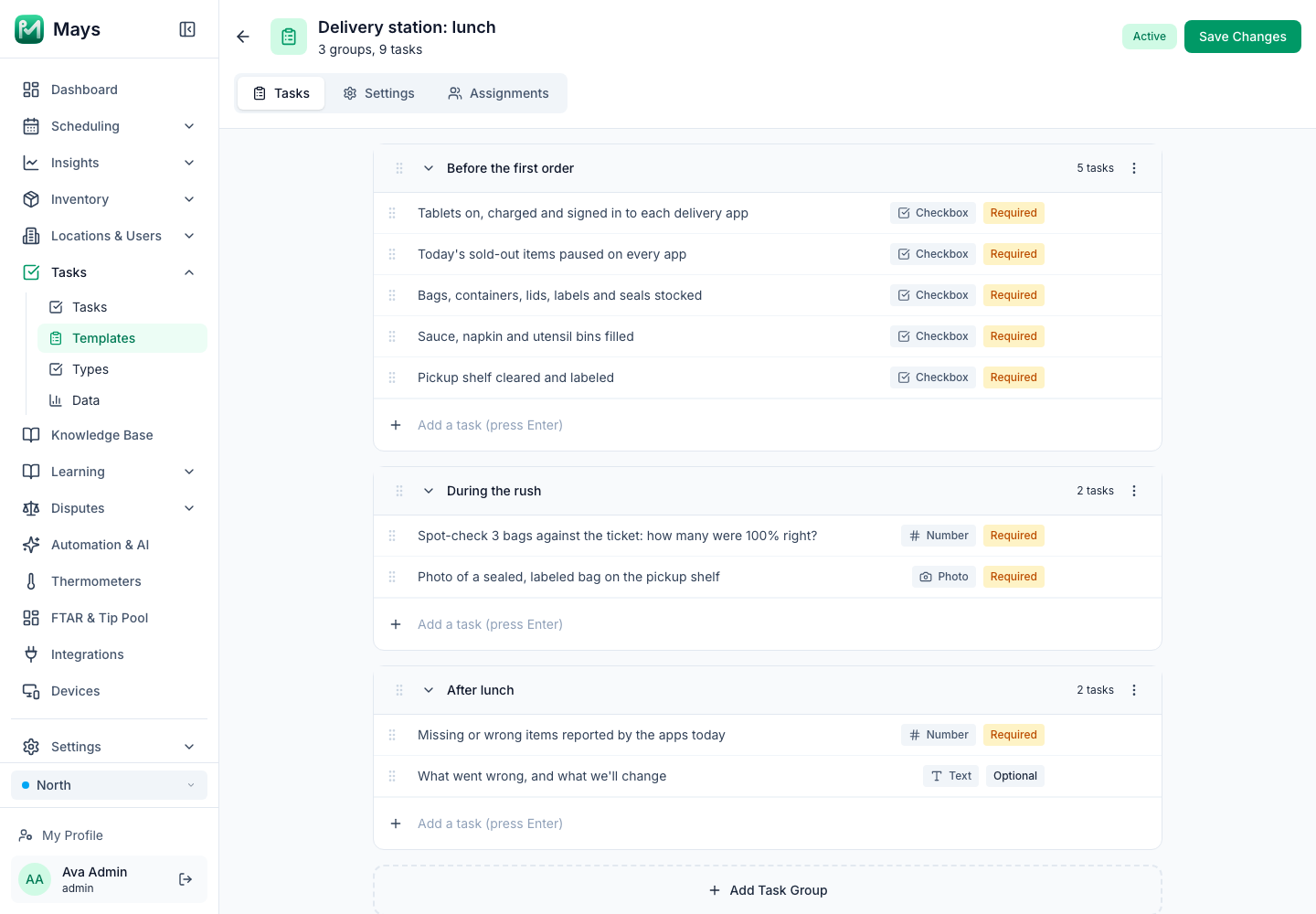
- The delivery station as a checklist: in Tasks → Templates, build a checklist like the one at the top of this post, with Checkbox tasks for the setup, a Number answer for the spot-check and the day's missing items, a Photo of a sealed bag, and a Text note for what went wrong. A Visibility Window (for example, 10:30 to 2:30) shows it only during the lunch rush, and staff complete it on their phones.
- Sales next to labor: with Square connected, the dashboard shows today's sales. With Square or Union connected, Insights → Labor Cost shows staffing against revenue by half hour, so you can see whether delivery is filling your quiet hours. Mays shows what your POS records; it doesn't split sales by delivery app, so compare each app's payouts in its own merchant reports.
- Follow-ups as tasks: when a mistake keeps coming back, Tasks → Create Task assigns the fix to one person.
Your delivery checklist
- Each platform's current pricing page read, and a plan chosen on purpose
- Your own math on a typical order: commission, food, packaging
- A decision on app prices, and the pickup price rules checked
- Your city's commission rules checked
- Packaging tested and costed per order
- An order-accuracy routine at the delivery station
- Sold-out items paused on every app, every time
- A weekly count of wrong and missing orders
Run the delivery station like the rest of the café
Put the delivery setup and the accuracy checks on a checklist, and count the misses every day.
Start your free trial: 30 days, every module, no card needed. Want to know what your menu really costs to make? Start with plate costing and menu pricing.