If nobody from the opening shift has clocked in a few minutes after opening, Mays phones each late opener to ask when they'll arrive. If they don't pick up, it calls the escalation manager.
It's part of Automation & AI (Basic and Pro plans, and the free trial), and it needs a schedule: 7shifts, or Mays scheduling (Pro and the trial). If your plan stops including them, the calls stop. It isn't an add-on: calls don't cost extra and don't use AI credits.
Who gets called, and when
- Only the opening crew. For each location and day (in the location's time zone), that's everyone whose shift starts at the day's earliest start time. An open shift (nobody on it) doesn't count, so the first shift someone is on opens the day. Later shifts are never called.
- Not someone you've already handled. On Mays scheduling, an opener whose shift you've marked Sick, Call-out or No-show on the schedule isn't called, and the escalation manager isn't called or notified about them. Mark it before the grace time is up. A Late mark doesn't stop the call. The others on the opening crew are still called.
- Not someone who no longer works here. A deactivated or deleted person isn't called, even if their shift is still on the schedule. The others on the opening crew are still called. The next shift of the day doesn't become the opening shift.
- Only while nobody has opened. If any of the openers has clocked in, nobody is called. Mays checks again before every call, so the calls stop as soon as the late person, or anyone else on the opening crew, clocks in.
- When:
- 7shifts locations: 5 minutes after the shift starts. Only shifts published in 7shifts count. If 7shifts doesn't answer at that moment, Mays tries again for a few minutes.
- Mays scheduling locations: after the shift's Late grace (min) (set in the shift window; 5 minutes if it's empty). Only published shifts count.
- Each opener gets their own calls, on the phone number in their Mays profile.
What the late person hears
The call comes from Mays's own number. In English it says:
Hi (first name). Your shift at (location) started (minutes) minutes ago, but we don't see you clocked in yet. Please press a key to let us know your ETA. Press 1 for five minutes. Press 2 for ten minutes. Press 3 for fifteen minutes or more. Press 9 if you cannot come in.
Key | Means |
|---|---|
1 | About 5 minutes |
2 | About 10 minutes |
3 | 15 minutes or more |
9 | Can't come in |
After a key press they hear Thank you. We are notifying your manager. Goodbye. and the calls stop. The escalation manager gets a push with the key, for example Olivia (attempt 1): answered, pressed 1 (5 min). If they press 9 and Late clock-in — opener can't come is on, Mays also calls the escalation manager: This is an automated message from Mays. Olivia, on the opening shift at (location), pressed 9 to say they cannot come in today. Please arrange cover.
If nobody presses a key within 12 seconds (the Timeout (seconds) in the call rule), the call says No response received. Please contact your manager about your shift. Goodbye. and counts as unanswered.
If they don't answer
- Mays calls up to 3 times, about 90 seconds after each call ends. Voicemail counts as no answer, and the message plays into it.
- After the third unanswered call, Mays calls the location's escalation manager: This is an automated message from Mays. The opening shift employee (name) at (location) is (minutes) minutes late and has not answered our calls. Please check on the situation.
- The escalation manager also gets a push notification, Late: (location), with the name and the last result, for example Olivia (attempt 3): no answer.
When the late person does answer, the manager isn't called (unless they pressed 9); they get the push instead, for example Olivia (attempt 1): answered, pressed 2 (10 min). There's one push per late person, when the calls end, not one per call, and none if they clock in first.
The escalation manager is set on each location's Basic Info tab. With — None —, Mays calls the location's first manager, or else the first admin. See Add and manage locations.
Set it up
- Find the rules. They're under Automation & AI: Late opening shift — call employee, Late clock-in — escalate to manager, Late clock-in — notify manager of the result and Late clock-in — opener can't come. If your plan includes Mays scheduling, Mays adds them paused. Connecting 7shifts adds any you don't have, switched on.
- Turn them on. Paused rules are under Draft & Paused: click the play button (Activate) on each one you want. Nobody is called until Late opening shift — call employee is on.
- Check phone numbers. Openers and escalation managers need a phone number in their profile.
- Pick the language. Admins choose Voice call language under Settings → Organization: English or Türkçe. See Organization settings.
To change how many times Mays calls, or how long it waits in between, click Late opening shift — call employee and change Max attempts and Seconds between retries in the Place Phone Call action. Voice locale sets a different language for just this rule. Click Save changes.
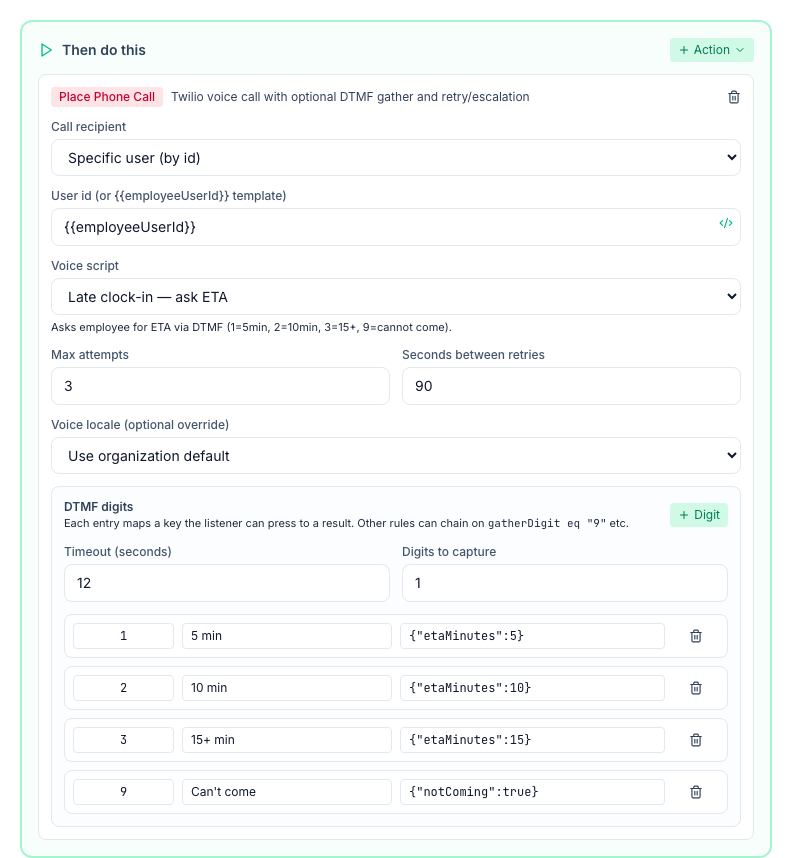
To stop the calls, click the pause button (Pause) on Late opening shift — call employee. Managers can't change the rules with the built-in roles; ask an admin.
Good to know
- Clocking in stops the calls. Someone who clocks in after the first call gets no more calls, and the escalation manager isn't called or notified.
- Marking a shift after the calls start doesn't stop them: the mark is read once, when the grace time is up. To stop calls already under way, pause Late opening shift — call employee.
- Renamed rule: Late clock-in — notify manager of the result used to be called Late clock-in — notify manager per attempt. Mays renamed it for you unless you had already given it your own name.
- Late grace is kept when you edit a shift on the web schedule, and can be up to a day.
- No quiet hours. The calls go out at opening time, however early that is.
- No phone number for the opener: Mays can't call them, so it calls the escalation manager straight away. If the call can't be placed (the phone company rejects it), Mays tries again like an unanswered call, then calls the escalation manager.
- Keypad settings: Timeout (seconds) and Digits to capture in the call rule change the call. Only the opening shift is ever called.
- There's no call log. A rule's View history shows that a call was placed, not whether it was answered.
- On Mays scheduling, managers also get a separate Late clock-in push when someone is late for any shift. See Attendance, late and no-show alerts.