Raising menu prices without losing guests: when, which items and how to tell people
The prices on your opening menu were set with the costs you had then: the quote from the dairy, the roaster's price per pound, the wage you planned to pay. A few months later, some of those numbers have moved. If the menu hasn't, your margin has quietly shrunk.
This is the fourth post in our series on money basics for a new café. It builds on food cost and plate costing, which shows how to cost a single item, and on the break-even post, which showed that a small price increase lowers break-even twice. The previous post, on card processing fees, ended with a choice between a card surcharge and building costs into prices; this post covers the second.
Every price and cost in this post is made up to show the method. This is general information, not financial advice.
Costs keep moving
You don't need to guess whether restaurant prices are rising in general. The USDA's Economic Research Service tracks it. In its September 2026 Food Price Outlook, "Food-away-from-home prices are forecast to increase 3.5 percent" in 2026, and it notes that this is the "20-year historical average rate of price increase" for food away from home (USDA ERS, Food Price Outlook: Summary Findings, updated September 25, 2026).
Some ingredients swing much more than the average. The same report gives retail egg prices as an example: they "increased 32.2 percent in 2022, 1.4 percent in 2023, 8.5 percent in 2024, and 21.9 percent in 2025."
Your own invoices matter more than any national number. A café that sells mostly espresso drinks cares about milk and coffee; a sandwich shop cares about bread, meat and produce.
When to review prices
Pick a rhythm instead of reacting to every invoice:
- A scheduled review, for example once a quarter, where you re-cost every item with current prices.
- A trigger review, whenever a key ingredient's price jumps on an invoice, or an item's plate cost drifts past the target you set for it.
- Before a menu change. If you're printing new menus anyway, update prices at the same time (see seasonal menu changes without the chaos).
Some owners move a few items at a time; others change the whole menu once or twice a year. Either way, what matters is that you look on a schedule.
Step 1: Re-cost the menu
Update each recipe with today's ingredient prices. Our plate costing post walks through it, including yield. For each item you want three numbers:
- Plate cost: what the ingredients and packaging cost per serving
- Food cost %: plate cost ÷ menu price
- Contribution margin: menu price − plate cost, in dollars
The dollars matter as much as the percentage. A drip coffee at 15% food cost may leave less money per sale than a sandwich at 34%.
Step 2: Sort the menu with a simple grid
Menu engineering is a classic way to decide where to act. It sorts each item by two things: how popular it is and how much contribution margin it brings. You need a month of item counts from your POS and the margins from step 1.
Here's a made-up café's month:
Item | Sold | Price | Plate cost | Margin | Group |
|---|---|---|---|---|---|
Latte (16 oz) | 900 | $5.25 | $1.30 | $3.95 | Star |
Drip coffee | 700 | $3.00 | $0.45 | $2.55 | Plowhorse |
Breakfast sandwich | 450 | $8.50 | $2.90 | $5.60 | Star |
Blueberry muffin | 400 | $3.75 | $1.05 | $2.70 | Plowhorse |
Cold brew | 300 | $5.00 | $0.90 | $4.10 | Puzzle |
Avocado toast | 180 | $10.50 | $3.70 | $6.80 | Puzzle |
Berry smoothie | 120 | $7.00 | $3.60 | $3.40 | Dog |
How the groups are set:
- Popular means selling at least 70% of an equal share. Seven items sold 3,050 in total, so an equal share is about 436, and 70% of that is 305.
- High margin means at or above the average margin per item sold, weighted by how many of each sold: $3.87 here.
That gives four groups, each with its usual move:
Group | Popular? | Margin | What to try |
|---|---|---|---|
Star | yes | high | Keep the quality and placement. Raise gently, if at all. |
Plowhorse | yes | low | Small price increases, a slightly smaller portion or cheaper packaging, or pair it with a higher-margin add-on. |
Puzzle | no | high | Don't raise yet: move it up the menu board, have staff suggest it, photograph it. |
Dog | no | low | Rework the recipe, reprice it, or take it off the menu. |
In the example, the drip coffee and muffin are where a small increase does the most good, the latte deserves care because it's the café's best seller, and the smoothie needs a decision.
Step 3: Work out the new price
Start from a target food cost for the item and work backwards, as in the food cost post:
Price = plate cost ÷ target food cost %
Say the latte's plate cost has gone from $1.30 to $1.45 after a few dairy price increases, and your target for espresso drinks is 25%. $1.45 ÷ 0.25 = $5.80. You then round to a price that fits your menu: $5.75 puts it at 25.2%, and $5.50 at 26.4%.
Then check the result against three things:
- Your neighbors. Walk past the cafés near you. You don't have to match them, but know where you stand.
- The rest of your menu. A 12 oz and a 16 oz latte should still make sense next to each other, and so should hot and iced.
- The margin in dollars. Look at what the new price does to the item's margin, not just its percentage.
Step 4: Roll it out on one day
A price change goes wrong when the menu board says one thing and the register says another. Change everything together:
- Tell the team first. Give them the new prices a few days ahead and a short, honest answer for guests who ask: costs went up, and you'd rather adjust a few prices than cut quality. Avoid long apologies.
- Update the POS, menu boards, printed menus and your website on the same morning.
- Update delivery app menus at the same time. If you price differently there, know why (see what delivery apps really cost).
- Check the first receipts of the day against the board.
If you add a mandatory fee instead of raising prices, check the rules where you are. In California, for example, the Attorney General's guidance says mandatory fees charged by restaurants are exempt from the state's hidden-fees law "so long as the fee is clearly and conspicuously displayed wherever prices are shown" (California Attorney General, SB 478 - Hidden Fees).
Step 5: Check the result
Two to four weeks after the change, look again:
- Did the raised items keep selling? Compare item counts with the same weeks before.
- Did the average ticket go up?
- Did food cost as a share of sales come down? Our prime cost post shows how to track it weekly.
If a raised item's count fell sharply, look at whether guests moved to something similar on your menu, which may be fine, or left it altogether.
Common mistakes
- Raising every price by the same percentage, whatever each item's cost and popularity
- Re-costing only when a supplier announces an increase, and missing the slow creep
- Looking only at food cost % and ignoring the dollars each sale brings in
- Changing the register but not the menu board, the website or the delivery apps
- Raising the price of your best seller first
Where Mays fits
Mays doesn't set prices for you or build the menu-engineering grid; take the item counts from your POS's item sales report. Mays keeps the cost side current:
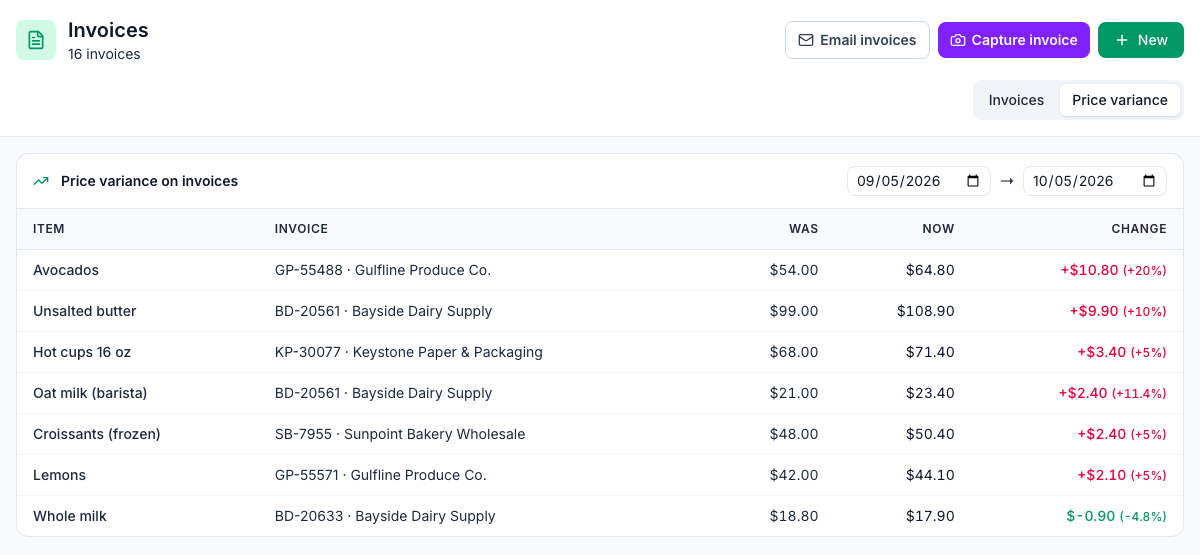
- Price variance on invoices (Inventory → Invoices → Price variance, the image at the top of this post): every item whose price changed on a posted invoice in the dates you pick, with the old price, the new one and the change. That's your list of recipes to re-cost.
- Prices that update themselves: posting a vendor invoice updates the location's price for that item, so recipe costs use what you just paid.
- Recipe costs (Inventory → Setup → Recipes): each recipe's cost, cost % and margin against its menu price.
- Vendor Price Change alerts (Insights → Alerts & Reports): a notification when a posted invoice changes an item's price, up or down, by at least the percentage you set.
Your price review checklist
- A set review date, plus triggers for big ingredient price changes
- Every recipe re-costed with current prices
- Plate cost, food cost % and margin in dollars for each item
- A month of item counts from the POS
- The menu sorted into stars, plowhorses, puzzles and dogs
- New prices worked out from a target food cost, then rounded
- Staff told first, with a short answer for guests
- POS, boards, printed menus, website and delivery apps changed the same day
- A check two to four weeks later
Keep plate costs current in Mays
See which supplier prices moved, and what that does to each recipe, before it shows up in your month-end numbers.
Start your free trial: 30 days, every module, no card needed. Next in this series: vendor payment terms and negotiating with suppliers.