Opening and closing checklists your staff will actually follow
Every café has an opening checklist. Most of them are laminated, taped next to the espresso machine, and ticked from memory at 6:55 am while the first customer waits. The list exists. The standard doesn't.
A checklist only works when it's short enough to finish, clear enough that two people do the same thing, and checked by someone who'd notice if it wasn't done. This guide covers how to get there, with a sample opening and closing checklist for a small café at the end that you can copy.
Why checklists get ignored
When a checklist fails, it's usually for one of these reasons:
- It's too long. Forty items before open means people skim, and skimming becomes the habit.
- The tasks are vague. "Clean the bar" means something different to every person who reads it.
- Nobody owns it. If the opener and the shift lead both think the other one did the sanitizer, nobody did.
- There's no proof. A tick mark says someone held a pen, not that the cooler was at 41°F.
- Nobody looks. If a skipped task never gets a comment, the list is optional.
- Weekly jobs live on the daily list. "Descale the kettle" shows up every day, gets skipped every day, and the list teaches people to skip.
Each fix below targets one of these.
Write tasks two people will do the same way
A good task is one action, on one thing, with the standard in it:
Vague | Clear |
|---|---|
Clean the espresso machine | Backflush both groups with cleaner and wipe the steam wands |
Check the fridge | Walk-in cooler at 41°F or below: photo of the thermometer |
Stock the front | Cups, lids, sleeves and napkins filled to the line at the handoff counter |
Close out | Count the drawer and enter the total |
A few rules help:
- Start with a verb. Check, wipe, count, restock, label, lock.
- Put the number in the task, not in someone's head: 41°F, 135°F, "to the line."
- Keep the "how" in the instructions. The task says what; the instructions say how, for the new hire who needs them.
- Group tasks in the order people walk the space. Back of house first, then the bar, then the front. A list that sends people back and forth gets done out of order.
- Size the list to the time you've scheduled. If opening takes 45 minutes of tasks and you schedule the opener 30 minutes early, the list will lose.
Decide what needs proof, and what doesn't
Asking for a photo on every task slows everyone down and buries the photos that matter. Match the answer type to the risk:
- Photo for things that can only be verified by seeing them: the cooler thermometer, a sanitized prep counter, a stocked and labeled pastry case, the back door locked.
- Number for readings: temperatures, the drawer count, sanitizer test strip results.
- Checkbox for everything else.
The food-safety checks deserve the most care. The temperature log guide covers which readings matter and what to write down when one is out of range.
Assign by role and by shift
"Everyone" is nobody. Give each list an owner:
- The opening checklist belongs to the opener, or to the opening shift lead.
- The closing checklist belongs to the closers, and it should only appear when closing starts. A closing list that's visible at 7 am gets half-done at 2 pm.
- Station tasks can go to a specific person: the barista who closes the bar owns the bar section.
- Personal lists (a new hire's training tasks, for example) go to that one person.
If your staff clock in, tie the checklist to the shift: people see their location's tasks while they're on the clock, plus a short window after they clock out for the closing duties.
Take weekly jobs off the daily list
Deep-cleaning jobs belong on their own weekly or monthly checklist: descaling, cleaning behind the fridges, wiping down shelving, checking the first-aid kit. Spread them over a couple of days so no single shift gets all of them.
Then decide what happens when a weekly task isn't done on its day. Letting it roll forward until the end of the week is usually better than letting it quietly disappear.
Review, and reject when it's wrong
A checklist nobody reviews turns into a formality within a month. You don't need to look at every tick. You need to look at the exceptions:
- the tasks that weren't done,
- the numbers that are out of range,
- the photos that don't show what the task asked for.
When a photo shows a half-stocked case, reject the task with a reason ("the top shelf is empty, restock and retake"). The person redoes it, and next time they know what "done" means. Rejection is feedback, not punishment. Say so to the team before the first one happens.
Sample opening and closing checklist for a café
For a café open 7 am to 4 pm. Adjust the tasks and times to your menu.
Opening (shift lead and opening barista, visible from 6:15 am)
Group | Task | Answer |
|---|---|---|
Food safety | Walk-in cooler at 41°F or below | Photo of the thermometer |
Food safety | Pastry case and milk fridge at 41°F or below | Number |
Food safety | Sanitizer buckets made up and tested with a strip | Number (ppm) |
Food safety | Handwashing sinks stocked with soap and paper towels | Checkbox |
Bar | Espresso dialed in and first shots tasted | Checkbox |
Bar | Batch brew brewed, timer set | Checkbox |
Bar | Milk and alternative milks stocked, oldest date in front | Checkbox |
Front | Pastry case stocked and date-labeled | Photo |
Front | Cups, lids, sleeves and napkins restocked | Checkbox |
Front | Drawer counted and starting cash entered | Number |
Front | Floor, tables and entrance checked, door unlocked at 7:00 | Checkbox |
Closing (closing crew, visible from 3:30 pm)
Group | Task | Answer |
|---|---|---|
Bar | Groups backflushed with cleaner, steam wands soaked and wiped | Checkbox |
Bar | Grinders emptied of old beans and brushed | Checkbox |
Bar | Batch brewer and airpots washed | Checkbox |
Food safety | Leftover pastries logged as waste or wrapped and labeled | Checkbox |
Food safety | Prep items wrapped, labeled and dated | Photo |
Food safety | Walk-in cooler at 41°F or below at close | Number |
Front | Tables, chairs and counters wiped and sanitized | Checkbox |
Front | Floors swept and mopped | Checkbox |
Front | Drawer counted and total entered | Number |
Close | Trash and recycling out, new bags in | Checkbox |
Close | Back door locked, alarm set | Photo |
Weekly deep clean (Monday and Thursday)
Task | Answer |
|---|---|
Descale the kettle and hot-water tower | Checkbox |
Pull out and clean behind the reach-in fridges | Photo |
Wipe down dry-storage shelving and check dates | Checkbox |
Clean the ice machine bin | Checkbox |
Where Mays fits
Mays runs your checklists from the web app and the iPhone and Android apps.
- Templates hold groups and tasks, each with instructions and an answer type: checkbox, photo, number, text, multiple choice, GPS, inventory count or a custom form.
- Schedule a template daily, weekly on the days you pick, monthly or quarterly. A visibility window makes the closing list appear at 3:30 pm, in the location's time zone.
- Assign it to one or more locations, then either to roles or departments (one shared list anyone in those roles can complete) or to specific people (each gets their own copy). A single task can go to one person, like the barista who closes the bar.
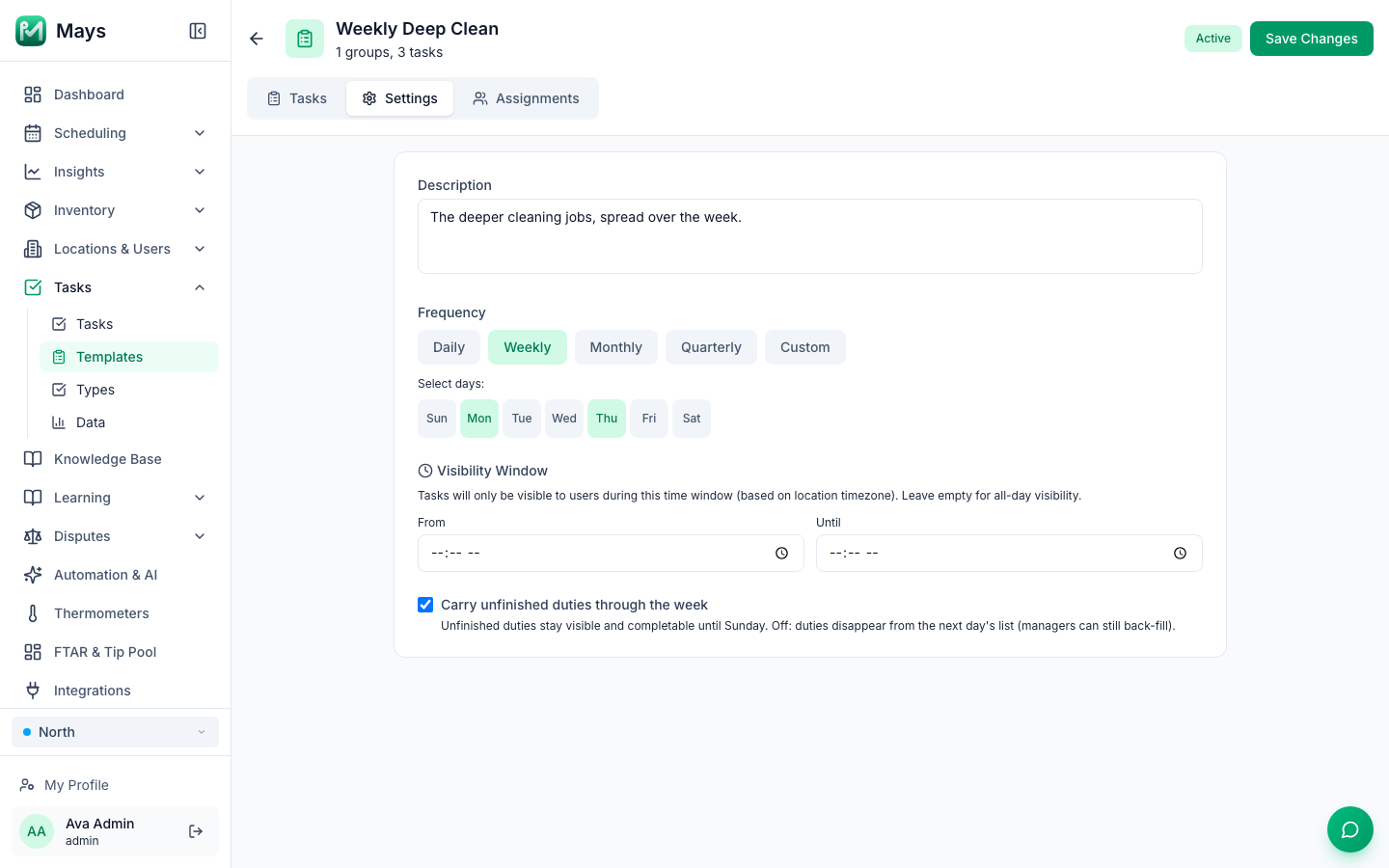
- "Carry unfinished duties through the week" keeps a weekly task on the list and completable until Sunday, instead of letting it disappear the next day. The image at the top of this post shows it turned on for a weekly deep clean.
- Photos are taken in the app's camera, so the picture is from today, not from the camera roll.
- AI photo verification (an organization setting) scores each photo against the task's title and description. You choose whether a weak photo is flagged for the manager or rejected automatically. Checks use AI credits.
- Managers reject a task with a reason, and it goes back on the employee's list to redo.
- A location can require clock-in to see tasks, with a grace period after clock-out for closing duties.
- The dashboard shows today's checklists by location, with progress for each.
Pure Green, a juice-bar chain in South Florida, runs its stores' daily opening and closing checklists in Mays.
Your checklist setup, in order
- Opening and closing lists, each short enough to finish in the time you've scheduled
- Every task starts with a verb and carries its standard (41°F, "to the line")
- Photos only where seeing is the proof; numbers for every reading
- An owner for each list: a role, a shift or a person
- The closing list visible only from closing time
- Weekly jobs on their own list, rolling forward until done
- A manager reviewing exceptions every day, and rejecting with a reason when needed
Build your first checklist today
Copy the sample above into a template, assign it to your openers and closers, and you'll know by tomorrow morning what got done.
Start your free trial: 30 days, every module, no card needed. Or book a walkthrough and we'll build your opening and closing checklists with you.