Staff schedule template for a small café: a weekly grid with roles and coverage rules
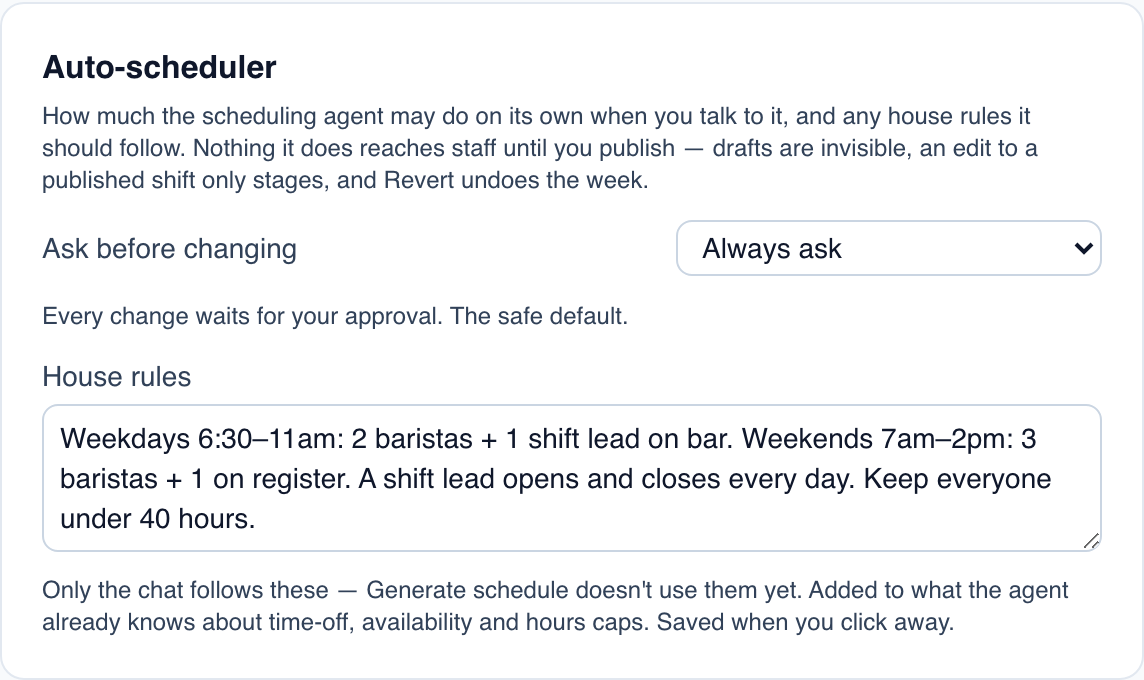
A schedule is a grid, but a good one starts with a few lines written above the grid: how many people each part of the day needs, in which roles. Without them, every week gets built from memory, and Saturday at 9 am is short again.
This post is the grid, ready to copy into a spreadsheet or print. How to build your first schedule step by step, from dayparts to publishing and swaps, is in how to build your first restaurant staff schedule. Here we write the coverage rules down, lay out the week, and check it before it goes up.
This is general information, not legal advice. State and city rules on breaks, overtime, minors and predictive scheduling can go further than the federal rules below.
Step 1: write the coverage rules above the grid
List each daypart and the minimum number of people in each role. These are made-up numbers for a café open 6:30 am to 3 pm:
Daypart | Barista | Register | Food / prep | Shift lead (counts in a role) |
|---|---|---|---|---|
Weekdays 6:30 to 11 | 2 | 1 | 1 | 1 |
Weekdays 11 to 3 | 1 | 1 | 1 | 1 |
Weekends 7 to 2 | 3 | 1 | 1 | 1 |
Weekends 2 to 3 | 1 | 1 | 0 | 1 |
Then add the rules that aren't headcounts:
- A shift lead opens and closes every day.
- Opening shifts start 30 minutes before the doors; closing shifts end 30 minutes after.
- Nobody works a close and the next morning's open.
- Everyone stays under 40 hours unless the owner approves it.
- Employees under 18 only work hours their age allows (see below).
Step 2: the weekly grid
One row per person, one column per day, with each person's roles and hour limit at the start of the row. Made-up names and times:
Name | Roles | Max hrs | Mon | Tue | Wed | Thu | Fri | Sat | Sun | Hours |
|---|---|---|---|---|---|---|---|---|---|---|
Marcus | Shift lead, barista | 40 | 6–2:30 | 6–2:30 | 6–2:30 | — | — | 6:30–3 | — | 34 |
Priya | Shift lead, register | 35 | — | — | 7–3:30 | 6–2:30 | 6–2:30 | — | 6:30–3 | 34 |
Tomás | Barista | 30 | 6:30–11 | 6:30–11 | — | 6:30–11 | 6:30–2 | 7–3 | — | 29 |
Hana | Barista, register | 30 | 11–3:30 | 11–3:30 | 6:30–11 | — | — | 7–2 | 7–2 | 27.5 |
Owen | Food / prep | 40 | 6–2 | 6–2 | 6–2 | 6–2 | — | — | 7–2 | 39 |
Jo (16) | Register | 15 | — | — | — | — | — | 7–2 | 7–10 | 10 |
Hours above are clock hours before any unpaid meal break. Write your own rule for breaks next to the grid, and subtract unpaid meal breaks from the Hours column.
Step 3: count coverage before you post
Under the grid, count people per role for each daypart and compare with Step 1. A short cell is a gap to fill before you post, not after.
Daypart | Needed | Mon | Tue | Wed | Thu | Fri | Sat | Sun |
|---|---|---|---|---|---|---|---|---|
Open, baristas | 2 / 3 weekends | |||||||
Open, register | 1 | |||||||
Open, shift lead | 1 | |||||||
Midday, baristas | 1 | |||||||
Close, shift lead | 1 |
Then check labor against sales: our weekly labor cost review shows how.
Step 4: check the week against the rules
Overtime. "Unless exempt, employees covered by the Act must receive overtime pay for hours worked over 40 in a workweek at a rate not less than time and one-half their regular rates of pay" (DOL, Overtime Pay). The workweek is yours to set, but it's fixed: "An employee's workweek is a fixed and regularly recurring period of 168 hours — seven consecutive 24-hour periods." Hours at two of your locations, or in two roles, add up in the same workweek.
Breaks. "Federal law does not require lunch or coffee breaks." If you give short breaks, "usually lasting about 5 to 20 minutes", they count as hours worked; meal periods "typically lasting at least 30 minutes" don't (DOL, Breaks and Meal Periods). Many states require breaks; check your state's page, for example Florida's pay rules or California's.
Minors aged 14 and 15. Under federal rules, their work is limited to "Outside of school hours", "Not more than 18 hours in any 1 week when school is in session", "Not more than 3 hours in any 1 day when school is in session, including Fridays", "Not more than 8 hours in any 1 day when school is not in session", "Not more than 40 hours in any 1 week when school is not in session", and "Between 7 a.m. and 7 p.m. in any 1 day, except during the summer (June 1 through Labor Day) when the evening hour will be 9 p.m." (29 CFR 570.35). States add their own rules, also for 16- and 17-year-olds; see employing minors in Florida and back-to-school scheduling.
Step 5: post it on the same day every week
Post the next week's grid on a fixed day, with a deadline for swap requests, and keep the posted copy. When something changes, change the grid and tell the people affected, so the copy on the wall is never wrong. Call-outs and no-shows are covered in handling call-outs and no-shows.
Where Mays fits
The grid lives on Scheduling → Schedule on the web, and your team sees their shifts in the iPhone and Android apps once you publish.
- Roles in the grid. Roles view groups the rows by position, so you see each role's coverage at a glance. Overtime warnings show on the people who go over the weekly threshold.
- Start from last week. Copy week copies last week's shifts as drafts into the week you're building, and Common shifts offers the start and end times you use most.
- Start from paper. Already filled in the grid by hand? Parse photo reads a photo of a paper or whiteboard schedule into draft shifts for you to check, using AI credits.
- Print it. The print preview can print only the people with shifts that week, for the wall by the back door.
- Coverage rules for the assistant. On the location's Scheduling tab, the Auto-scheduler card has House rules (the image at the top of this post). The scheduling assistant follows them when you ask it for changes in its chat. Generate schedule, which builds a week from last week's shifts around time off, availability and the weekly hours limit, doesn't use them yet.
- Publish and notify. Nothing reaches staff until you publish, and publishing notifies the people whose shifts changed.
One limit to know: Mays doesn't check your headcount per daypart and role against a minimum, so keep the Step 3 count yourself.
Write the rules, then fill the grid
Coverage rules on top, one row per person, a count underneath. Build it once and every week gets faster.
Start your free trial: 30 days, every module, no card needed. Or book a walkthrough and we'll set up your first week with you.