Scheduling for back-to-school and the end of summer
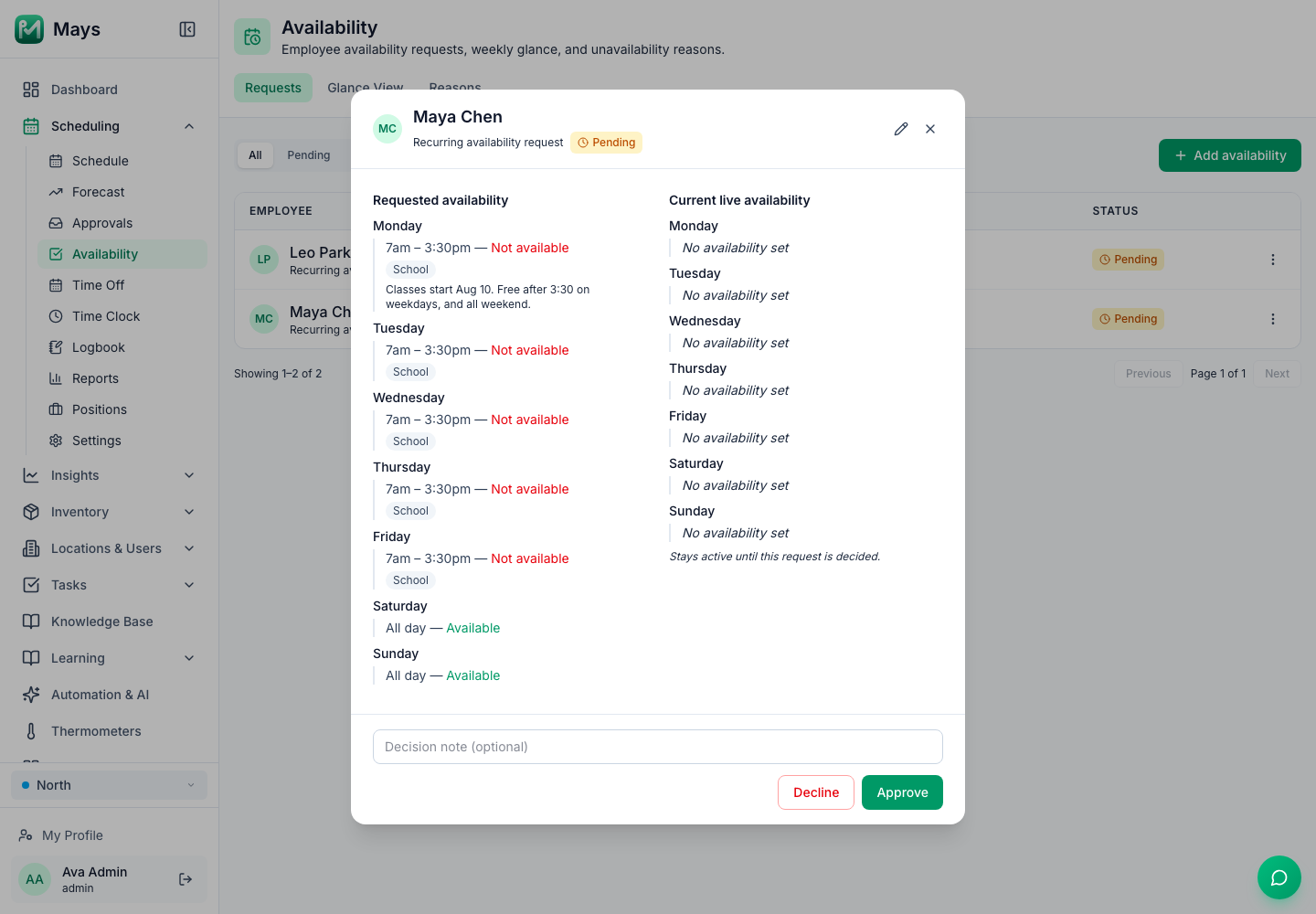
Every August, the schedule that worked all summer stops working. Your high-school barista can't open on weekdays anymore. Two college students leave town the same week. A parent on your team wants school-hours shifts only. And the rush itself can move, with school drop-off traffic in the morning and quieter afternoons.
None of that is a surprise, and all of it can be planned. This guide covers the dates to put on the calendar, collecting new availability early, the hour limits that change for teen workers when school starts, forecasting from last year, turning the forecast into a labor budget, and filling the gaps before they're gaps.
This is general information, not legal advice. Updated September 24, 2026: the Department of Labor and Florida Statutes pages cited below were re-checked.
Put the dates on the calendar
Start with the dates that change who can work and when your customers come:
- The first day of school for each district your staff attend, from the district's own calendar
- College move-in and first-day dates, for students who are leaving or coming back
- Labor Day, Monday, September 7, 2026, which matters for teen workers (below)
- Local events that change traffic: home football games, a campus opening week, a street fair
Put them on the calendar you schedule from, and count back four weeks from the first one.
Ask for fall availability early
Four weeks before school starts, ask everyone, not just students, for their fall availability. Parents, second-job holders and people with evening classes change too.
- Give a deadline, two to three weeks before the first school day.
- Ask for the real schedule: which days, which hours, and from what date. "After 3:30 on weekdays" is more useful than "afternoons."
- Separate the normal week from the exceptions. A semester schedule is the new normal. One exam week is a time-off request.
- Compare it against your coverage as soon as it comes in. If three of your four weekday openers become unavailable before 3:30, you know now, not the first Monday of school.
When you see a gap, fill it while you still have time: extend a current employee's hours, cross-train someone for the opening (our slow-season guide has a cross-training plan), or hire, which takes weeks (see hiring your first restaurant team).
Teen workers: the hours change when school starts
If you hired high-school students for the summer, their legal hours shrink when school starts, and both federal and state rules apply. "When both are applicable, the law with the stricter standard must be obeyed" (DOL Fact Sheet #43).
Federal rules for 14- and 15-year-olds (Fact Sheet #43):
- Outside school hours only
- No more than 3 hours on a school day, including Fridays, and 18 hours in a school week
- No more than 8 hours on a non-school day, and 40 hours in a week when school isn't in session
- Between 7 a.m. and 7 p.m., "except between June 1 and Labor day when the evening hour is extended to 9 p.m."
Sixteen- and 17-year-olds have no federal hour limits.
Florida adds its own (s. 450.081, F.S.):
Ages 15 and under | Ages 16 and 17 | |
|---|---|---|
Time of day when there's school the next day | Not before 7 a.m. or after 7 p.m. | Not before 6:30 a.m. or after 11 p.m. |
Hours on a school day | 3, unless there's no school the next day | Not during school hours; 8 when there's school the next day, except on a holiday or Sunday |
Hours in a week when school is in session | 15 | 30, unless a parent or the school superintendent waives it on the state's form |
Holidays and summer vacation | 7 a.m. to 9 p.m., up to 8 hours a day and 40 a week | |
Days in a row | No more than 6 in a week |
The 16- and 17-year-old limits don't apply to those who have graduated from high school or earned an equivalency diploma, and there are other exceptions in the statute. Put it together for a 15-year-old in Florida: once school starts, the stricter limits are Florida's 15 hours a week, 3 hours on a school day, and no work after 7 p.m. before a school day. After Labor Day, the federal 7 p.m. limit applies every day, weekends included. Our hiring guide covers the tasks teens can and can't do.
Forecast from last year, if you have it
If you were open last August, your own sales are the best forecast you have:
- Pull daily sales by daypart for the four weeks around last year's first day of school.
- Compare them with July. Which dayparts went up, which went down, and on which days?
- Apply the change to this year's recent weeks, not to last year's totals. Your café has grown or changed since then.
If you weren't open last year, use your last four to eight weeks, and plan to adjust after the first week of school. Ask neighboring businesses what they see in September.
A made-up example for a café's weekdays:
Daypart | Sales per hour, late July | Last year's change after school started | This year's plan |
|---|---|---|---|
7–10 am | $180 | +10% | $198 |
10 am–1 pm | $120 | −15% | $102 |
1–4 pm | $70 | −30% | $49 |
The morning needs the same crew or one more person. The afternoon is where the summer hours come off.
Turn the forecast into a labor budget
Labor % is labor cost divided by sales for the same period. Use your own target, then turn it into hours. With made-up numbers:
- Projected weekly sales for the first school week: $9,000
- A 30% labor target: $2,700 in labor
- At a $16 average hourly wage: about 169 hours
Write down your minimum crew per daypart first, since some labor doesn't shrink with sales. Then build the week inside the hours. Our slow-season guide has the method for trimming shifts before cutting people.
Fill the gaps before they're gaps
- Offer open shifts for the hours nobody's available for yet, so people who want more hours can pick them up.
- Let people trade. A student with a new class can swap a Tuesday for a Saturday with a coworker instead of calling out.
- Handle time off separately. End-of-summer trips and move-in weekends are time-off requests, not availability. Decide early which days you can't spare anyone, like the first week of school.
- Publish two weeks ahead, and change as little as possible after you do.
- Treat the first two weeks as a test. Compare sales and staffing by daypart after week one, and adjust week three, not week ten.
Where Mays fits
- Availability: staff send their availability in the app under Schedule → Availability, day by day with times, as Recurring (their new normal) or Temporary for a date range if your location allows it, with a reason such as School from the list an admin sets up. Managers approve or decline under Scheduling → Availability on the web (the image at the top of this post) or in the app's Approvals, and Glance View shows everyone's approved week. Approving doesn't move shifts already on the schedule; the grid and the publish warnings show the clashes.
- Time off and blocked days: staff request whole days off in the app, and Blocked Days stops requests for days you can't spare anyone.
- Forecast: with Square or Union connected, Scheduling → Forecast projects each day from the same weekday over the last 8 weeks, with recent weeks counting more. It doesn't know when school starts, so click a day's projection and type your own number. It needs sales history from your POS: without it, there's nothing to edit. Scheduling → Reports → Actuals compares projected and actual sales afterwards.
- Labor budget: set a Weekly budget on the schedule and watch Scheduled labor as you build. The card turns amber when you go over.
- Building the week: Copy week starts from an existing week, and Auto-schedule builds drafts from last week, working around approved time off, approved availability and weekly hours. It doesn't look at the forecast or the budget, so check both before you publish.
- Open shifts and trades: staff claim open shifts and hand off or swap shifts in the app, and a manager approves each one.
Mays stores birthdays but doesn't track minors' hours, so check teens' shifts against the limits above when you build the schedule.
Your back-to-school checklist
- School, college and local event dates on the calendar, four weeks ahead
- Fall availability collected from everyone, with a deadline
- Gaps found early, and hiring or cross-training started
- Teen shifts checked against the federal and state limits, and again after Labor Day
- A forecast by daypart from last year's change, or from recent weeks
- A weekly labor budget, and a minimum crew per daypart
- Open shifts posted and trades allowed
- The schedule published two weeks ahead, and reviewed after week one
Plan the season change in Mays
Collect fall availability in the app, set a budget for the first school week, and publish early.
Start your free trial: 30 days, every module, no card needed. Building your first schedule? Start with How to build your first restaurant staff schedule.