Your AI already knows your restaurant: let it run Mays
If you run a café or a restaurant and use ChatGPT, Claude or Grok, you've probably done this: exported a timecard report, pasted it into the chat and asked who went over. Taken a screenshot of the schedule and asked what's missing on Saturday. Pasted a staff list and asked for it formatted. Then copied the answer back into whatever tool you actually run the business in.
The AI is good at the thinking. The copying is the part that wastes your evening, and it's where mistakes slip in: last week's export instead of this week's, a row dropped, a name typed wrong on the way back.
Mays can be connected to ChatGPT, Claude and Grok. Once it is, the AI reads your schedule, approvals, timecards, sales and checklists straight from Mays, and, if you allow it, makes changes in Mays for you, each one shown as a preview first. Nothing has to be pasted in or copied back out.
This post introduces our series Run your restaurant with your AI: one real situation per post, with the words you'd type and what happens in Mays.
What changes when the AI is connected
It reads the real thing. Ask "Who's on at Midtown right now?" and the AI reads Midtown's schedule and clock-ins from Mays, as of now. Not a screenshot from this morning.
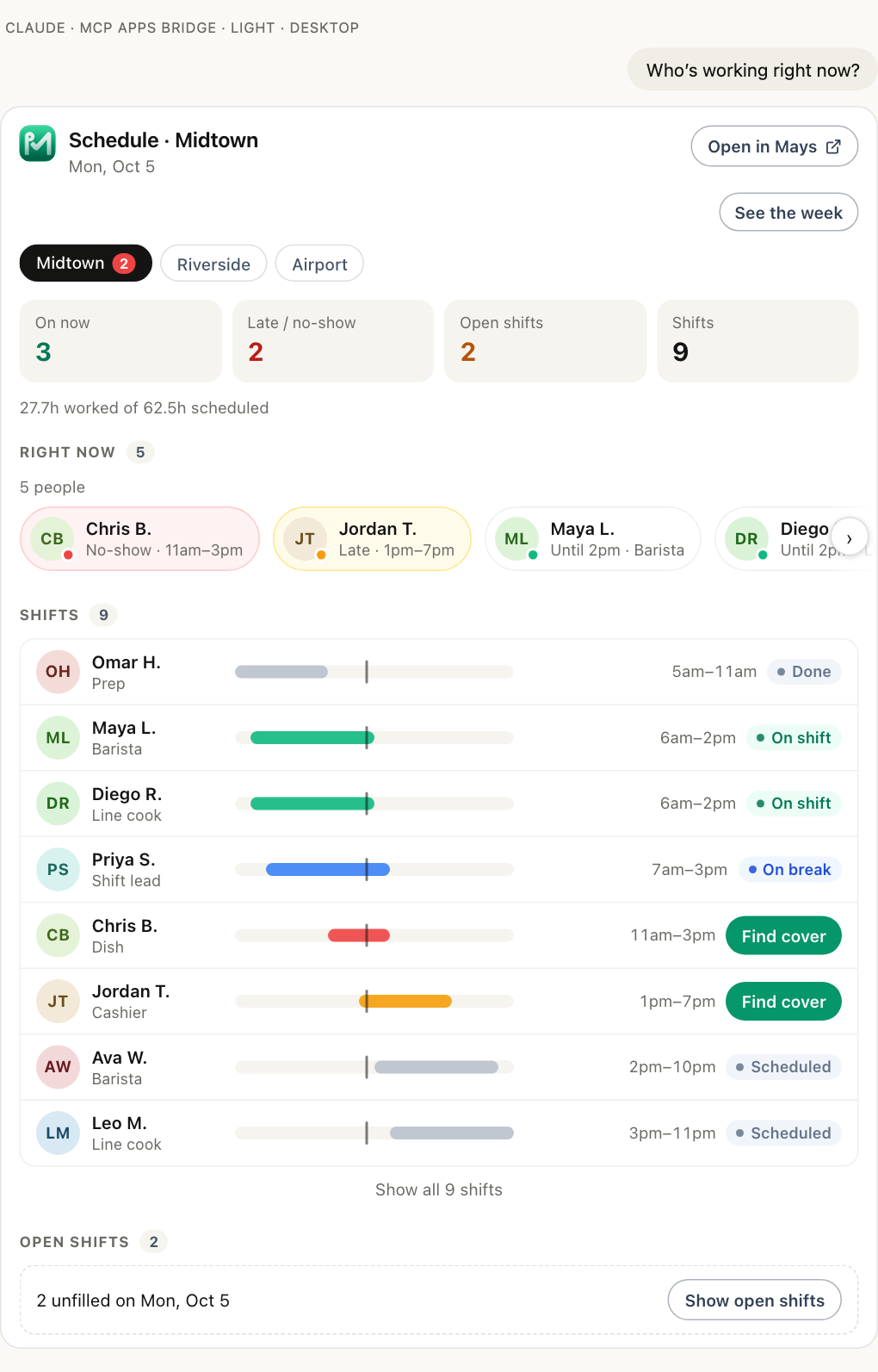
It sees what you see, and nothing more. The AI works in Mays as you: your locations, your role's permissions. People appear as first name and last initial, with no phone numbers, emails or addresses. Wages, labor cost and tips appear only if you can see pay in Mays and choose to include pay when you connect; otherwise they're left out, never guessed.
It changes things only with your yes. If your admin allows actions and you tick make changes when you connect, the AI can add shifts, approve requests, add people, write knowledge-base articles and more. Every change is two steps: Mays sends a preview and changes nothing, and only your yes applies it.
It speaks your language. Mays's screens are in English. The AI isn't limited to English: ask in Turkish, Spanish or Vietnamese, and it answers in that language, from the same data.
It works with the AI you already pay for. ChatGPT, Claude and Grok each run their own current models (GPT-6 in ChatGPT; Claude Opus 5.5, Sonnet 5.5 and Fable 5.1 in Claude; Grok 4.7 in Grok, as of this writing). Mays gives every one of them the same access rules, and connecting doesn't use Mays AI credits. In ChatGPT and Claude, many answers also come with a live Mays card; Grok shows the answer as text.
What you approve when you connect
When you connect, Mays shows you exactly what the AI app will be able to read and what it can't do, and two boxes that are off unless you tick them: making changes, and including pay.
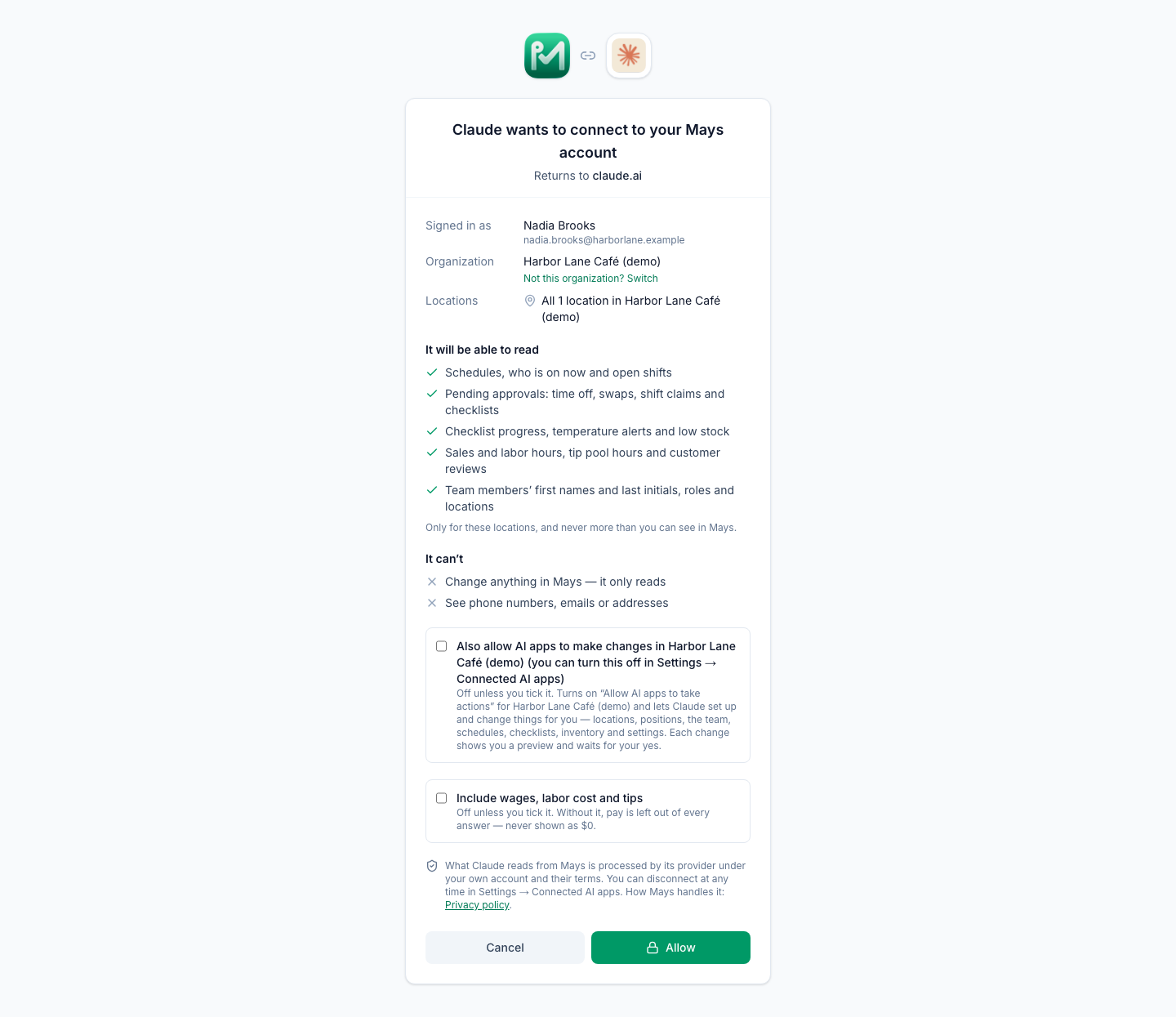
You can see every connection, and everything each one asked Mays, under Settings → Connected AI apps, and disconnect any time.
The series: setup, language, knowledge base and scheduling
Each post is one situation, written from the operator's side.
Getting set up
- Set up a new café from one message: staff list, hours and positions in; Mays checks the whole plan, sets it up under one confirmation and welcomes your team.
- Import your team from a spreadsheet export: up to 100 people, every row previewed as added, skipped or invalid.
- Open your second location by describing the first: the AI reads how location one runs and builds location two from it.
Your language
- Talk to Mays in your own language: run the week in Turkish, Spanish, Portuguese, Vietnamese or Arabic.
- A bilingual kitchen, one schedule: the kitchen manager asks in Spanish, the owner reads in English.
- Your SOPs in your team's languages: translate an SOP and save it to the knowledge base, with a review step.
The knowledge base
- Turn the recipe binder into a knowledge base: articles written from photos of the pages, or the original files uploaded.
Scheduling
- From a photo of your paper schedule to Mays shifts
- Your weekly pattern, written once
- Draft next week against your sales forecast and labor target
- Labor targets in plain words
- Stop overtime before it happens
- "Who can cover Friday's close?"
- Approve requests between rushes
More posts in the series cover inventory, invoices and ordering, food cost, checklists and temperatures, sales by the hour, timecards, tips and reviews.
What it doesn't do
Some honest limits, so you know what to expect:
- Mays doesn't translate, read photos or write your text. The AI app does that part; Mays checks and stores what it sends.
- Nothing reaches your team without a step from you. Shifts are added as drafts until you publish; knowledge-base articles and documents from an AI app wait for an admin to publish them.
- It never acts on instructions written inside notes or reviews. Text your team or your guests wrote is passed to the AI as a quote, to report on, never to follow.
- It doesn't override Mays's rules. A manager changes only their own locations; wages need pay access; overlaps, time off and overtime are warnings you see, never silent changes.
How to connect
mays.app/ai has the setup for ChatGPT, Claude and Grok. The help article Connect Mays to ChatGPT, Claude or Grok covers what you approve, what the AI can see, and how an admin turns on actions (Settings → Connected AI apps → Organization → Allow AI apps to take actions). Managers and admins can connect, each with their own Mays account.
Try Mays free for 30 days, with no credit card, and connect it to the AI you already use.