Set up your restaurant in Mays from Grok: in about 5 minutes
A 30-day free trial with no credit card, and your first location is free for the month. No sales call, no demo: connect Mays as a connector and see it work yourself.
For restaurants and cafés, one location or thousands. Works with Grok 4.7 in Grok.
From sign-up to your first answer
About 5 minutes to sign up, connect and ask your first question. Setting up the whole store takes as long as what you paste in.
Create your free Mays account
Sign up with your name, your business and your first location. Mays texts you a code once to confirm your phone. No card.
You can also do it on the way: when Grok opens the Mays sign-in page, click Create your account under the form, and you go straight back to finish connecting.
Let AI apps make changes
In Mays, turn on Settings → Connected AI apps → Organization → “Allow AI apps to take actions”.
Just signed up? You’re the admin, so you can tick “Also allow AI apps to make changes” on the Mays page when you connect instead. It turns the same switch on.
go.mays.app/settings/connected-apps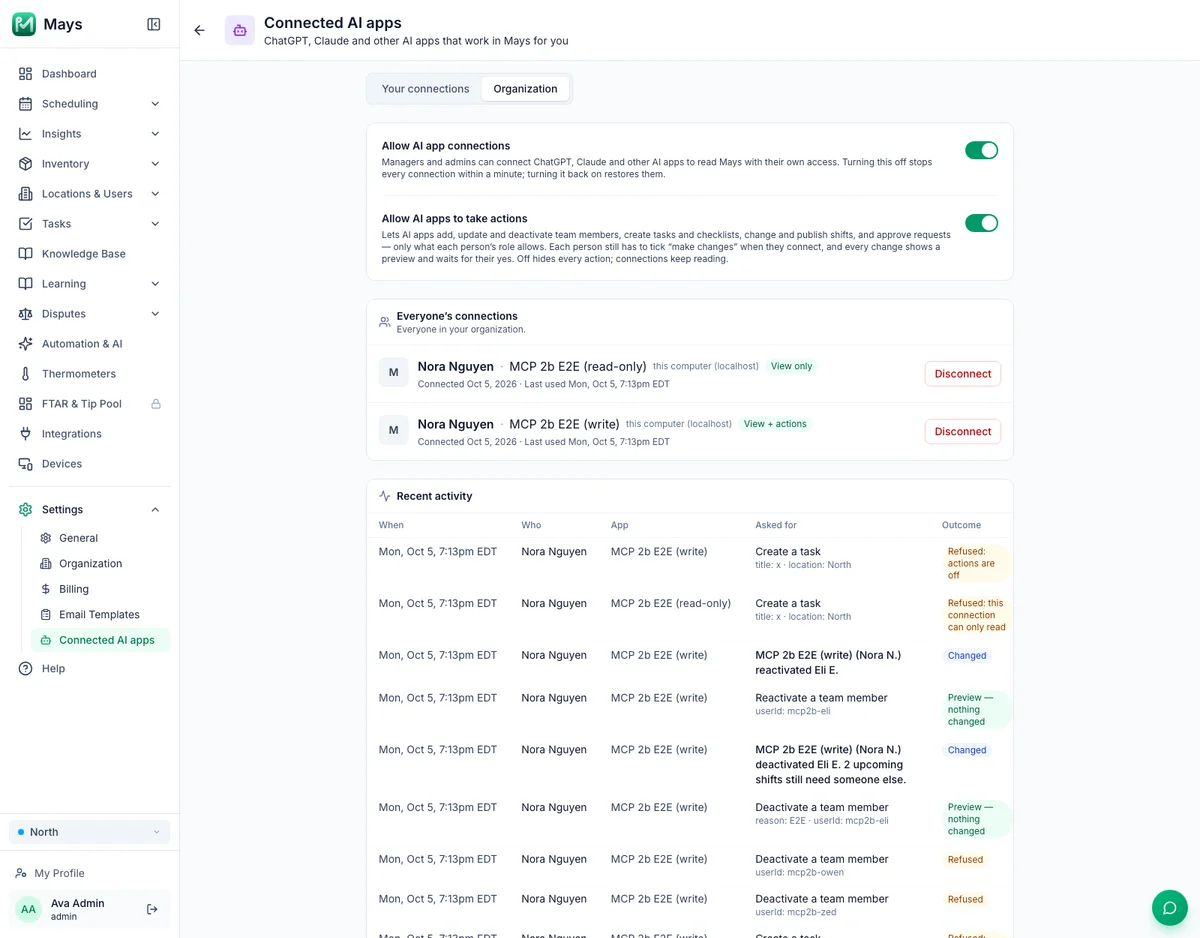
Settings → Connected AI apps → Organization in Mays. Connect Mays in Grok
Today you connect Mays as a connector:
1. Go to grok.com/connectors and click New Connector, then Custom.
2. Paste https://go.mays.app/mcp.
3. Grok opens Mays: sign in (or create your account there), tick “make changes” and click Allow.
Custom connectors need a paid Grok plan. If you don’t see Custom, your plan doesn’t have it yet. On Grok Business and Enterprise, a team admin adds the connector first.
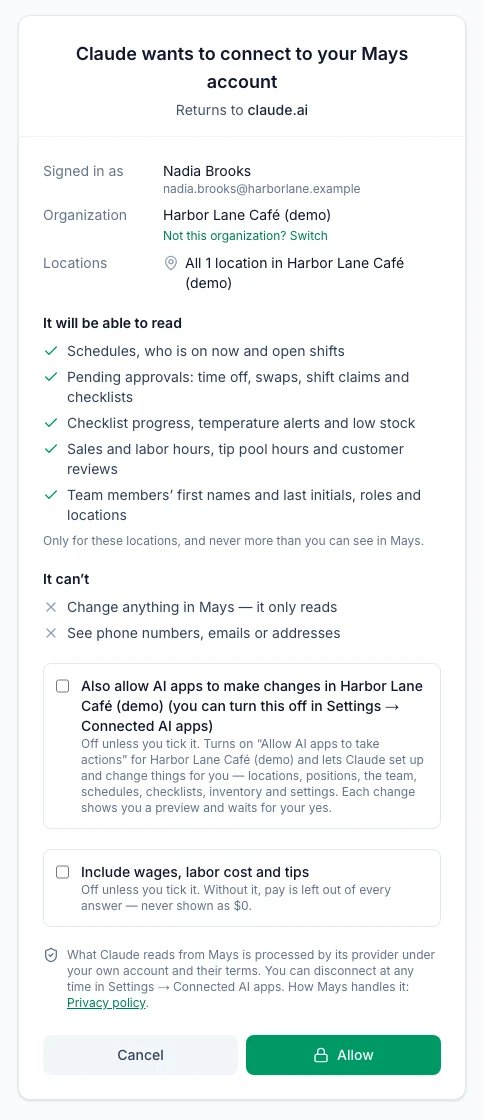
The Mays page you approve. Tick “make changes”, then Allow. Shown here for Claude; for Grok it shows Grok’s name. Tell it about your store
Paste or attach what you have: your staff list, opening hours, menu or price sheet, and your vendor list.
Grok turns it into one plan and Mays checks the whole thing first. Nothing changes yet: you get one preview with every problem to fix. Say yes once and Mays sets up your locations, positions, team invites, the weekly schedule pattern, checklists, vendors and inventory.
Then ask it to put the pattern on next week, publish the schedule and send your team their welcome.
Try: “Here’s my café, Seagrape: two locations in Delray Beach, both on Eastern time. Positions: barista, line cook, cashier. Here’s my staff list. Weekdays we open 6:30 to 2:30 with two baristas. Add an opening checklist and our Gulfstream Dairy items. Set everything up in Mays so my team can start.”
plan_store_setupapply_store_setupapply_weekly_patternpublish_schedule_weeksend_team_welcomeWrite your SOPs and recipes
Ask Grok to write your opening and closing SOPs, recipes or training pages, and they go straight into your Mays knowledge base.
Grok answers in text and can’t show the upload card, so add files you already have in Mays under Knowledge Base, or paste the text and ask Grok to write it as an article.
New articles and documents wait in Pending review, which only admins see, until an admin publishes them. Ask “Publish what’s waiting for review” when they look right.
Try: “Write our closing SOP for the bar and put it in Training.”
create_kb_articlepublish_kb_itemsRun the day from chat
Ask who’s on, what’s waiting for approval, how the checklists are going, whether a fridge is out of range, how sales and labor look, what’s low and what to order.
Every change shows you a preview first and happens only when you say yes.
Grok shows Mays’ answers as text. The live Mays cards show in ChatGPT and Claude.
Ask in your own words
Grok picks the right part of Mays. A few things people ask on day one:
“Who’s on at Midtown right now, and who’s late?”
Today’s shifts, who’s clocked in, no-shows and late arrivals.
get_schedule“Anything waiting for my approval? Approve Sam’s time off.”
Time off, availability, swaps, pickups and checklist reviews. Approving shows a preview first.
get_pending_approvalsdecide_request“Suggest next week’s schedule at Riverside and keep labor near 25%.”
Mays’ own auto-scheduler drafts the week. Add it as draft shifts when it looks right.
suggest_scheduleapply_suggested_schedule“How did sales and labor look yesterday, by location?”
Net sales, orders, labor % and sales per labor hour.
With your POS connected.
get_sales_and_labor“Any fridges out of range today?”
Out-of-range equipment now, recent excursions and sensors that stopped reporting.
With thermometers connected to Mays.
get_temperature_alerts“What do I need to order for Midtown? Send the Sysco order.”
An order from your par levels, per vendor. Sending shows the vendor, the lines and the total first.
build_ordercreate_purchase_ordersend_purchase_order“Add “check the ice machine” to the closing checklist.”
Change a checklist’s items, schedule or who gets it.
update_checklist_template“Write our opening SOP for the café and put it in Training.”
A knowledge-base article, waiting in Pending review until an admin publishes it.
create_kb_article
Let Grok explain it for your business
Grok already knows your business from your chats and files. This prompt asks it to read this page, tell you what to gather, and draft your opening and closing SOPs so they’re ready for Mays. Nothing is sent until you press send.
The prompt
Please read https://www.mays.app/ai/grok. It shows how restaurants and cafés set up Mays, an all-in-one operations app, from Grok. Using what you already know about my business, explain how I would set up Mays with you in about 5 minutes. List what I should gather first: my staff list, opening hours, menu or price sheet, vendors, and any SOPs I already have on my phone or drive. Then offer to draft my opening and closing SOPs now, so they are ready to upload to Mays. End with the link to start the free 30-day trial (no card needed): https://go.mays.app/register?utm_source=grok&utm_medium=ai_prompt&utm_campaign=ai_connectors
Using another AI app? Copy the prompt and paste it there.
Exactly your access. Nothing more.
- It works as you. Your locations and your permissions in Mays, nothing more.
- First name and last initial. The AI app never sees phone numbers, emails or home addresses.
- Pay is opt-in. Wages, labor cost and tips are left out unless you tick “Include wages, labor cost and tips” when you connect.
- Every change is confirmed first. It only reads unless you tick “make changes”, and even then every change shows a preview and waits for your yes.
- Disconnect any time. Settings → Connected AI apps lists every connection and every question and change it made.
- Your data, your account. What the AI app reads from Mays goes to xAI, under your own Grok account and its terms.
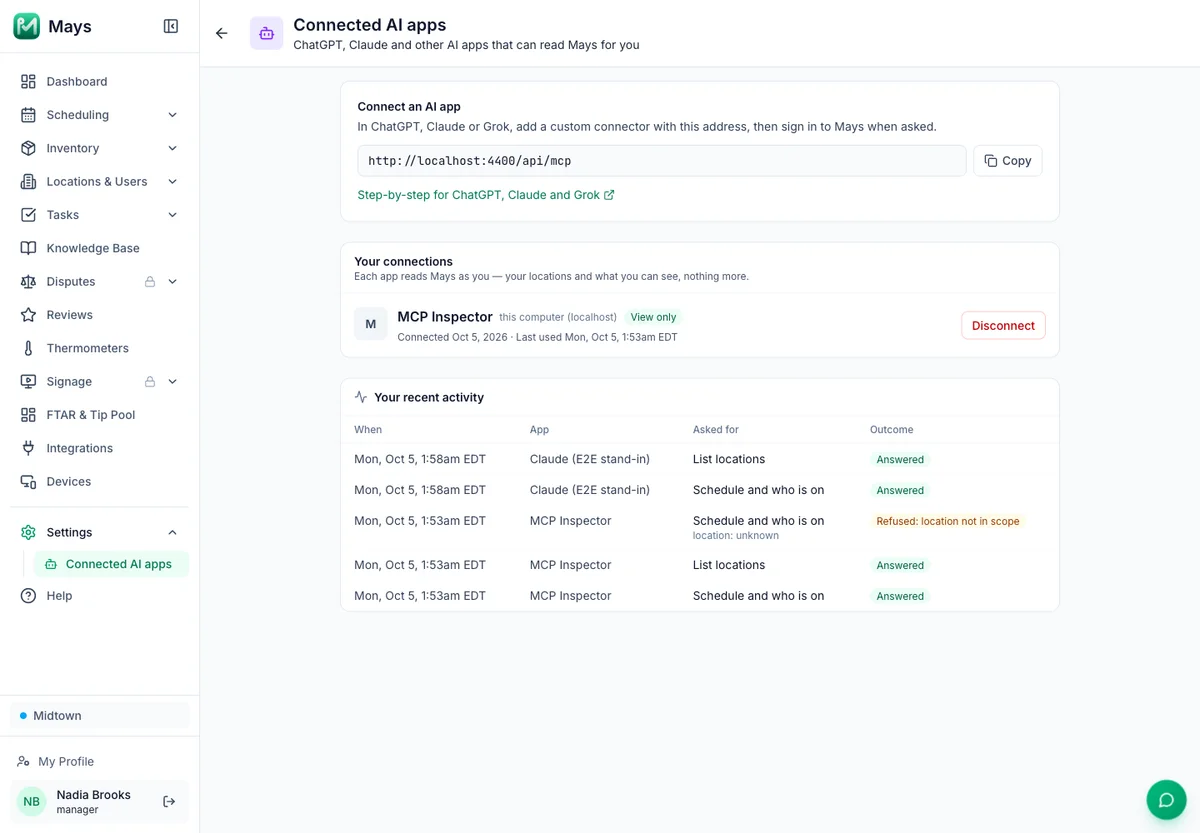
Questions
Which Grok plans does it work on?
Custom connectors need a paid Grok plan. If you don’t see Custom, your plan doesn’t have it yet. On Grok Business and Enterprise, a team admin adds the connector first.
Is it really free?
Yes. Every new account starts with a 30-day free trial of every Basic and Pro module, with no credit card. Your first location is free for that month. Add-ons aren’t part of the trial. When it ends, pick a plan on the pricing page; your data stays.
Do I need to talk to sales or book a demo?
No. Sign up, connect and start. Nobody has to show it to you first. If you’d like a walkthrough, you can book one, but you never need it to start.
Does it work on my phone?
Add the connector on grok.com in your browser. If signing in to Mays fails in a Grok desktop app, use grok.com instead. Grok shows Mays’ answers as text. Your team uses the Mays app on iPhone and Android.
Can I use more than one AI app?
Yes. Connect ChatGPT, Claude and Grok at the same time. Each is its own connection with its own Allow, and each one is listed under Settings → Connected AI apps. Your managers can connect their own, with their own access.
Who can connect, and does it use Mays AI credits?
Managers and admins can connect, on every Mays plan. It doesn’t use Mays AI credits: the AI runs on your own plan with the AI app.
Plans and prices: see the pricing page →
Start free in 5 minutes.
Sign up, connect Grok and ask your first question. One app and one bill when you’re ready.
Use ChatGPT or Claude instead? Mays in ChatGPT → · Mays in Claude →
ChatGPT, Claude and Grok are trademarks of their owners. Mays is not affiliated with OpenAI, Anthropic or xAI. Model names as of October 19, 2026.