A bilingual kitchen, one schedule: the kitchen manager asks in Spanish, the owner reads in English
In a lot of kitchens, the person who knows the line best thinks in Spanish, and the person who signs the checks reads English. The schedule ends up living in two places: the kitchen manager's notebook or group chat, and the "official" one somebody re-types into the system. Every change is a translation, and every translation is a chance to get Saturday wrong.
With Mays connected to ChatGPT or Claude, the kitchen manager and the owner can each talk to the same schedule in their own language. The schedule only exists once.
This post is part of our series Run your restaurant with your AI. For the single-owner version, see talk to Mays in your own language.
The situation
At Harbor Lane Café's Midtown location, Maya L. runs the kitchen. She's a manager in Mays, and she's most comfortable in Spanish. You, the owner, review the week in English on Sunday night.
Before: Maya writes the kitchen's week on paper or in a chat thread in Spanish. Someone re-types it into the schedule in English. When she changes a shift on Thursday, she texts you, you translate it, and you make the change yourself. Two copies, two languages, and neither one is quite right.
Now: each of you connects your own AI app to Mays with your own Mays account. Maya works in Spanish; you read in English. The schedule in Mays is the one copy.
Maya's side, in Spanish
Muéstrame el horario de la cocina en Midtown para la próxima semana. (Show me the kitchen schedule at Midtown for next week.)
The AI reads next week from Mays and answers in Spanish: who's on which shift, by day, with times on Midtown's own clock.
Pon a Jordan en la línea el sábado de 7 a 3. (Put Jordan on the line Saturday from 7 to 3.)
The AI asks Mays to add the shift (create_shift): Midtown, Saturday, 07:00 to 15:00, Jordan R., position Line cook. Mays sends a preview first, including what it does to the week: the hours before and after, coverage gaps it closes, and whether it puts Jordan into overtime. Approved time off, availability or a double-booking come back as warnings, never blocks. The AI explains it in Spanish, and Maya's sí creates the shift.
It's created as a draft, exactly like adding a shift in the Mays schedule builder: nobody is notified, and the team doesn't see it until the week is published.
Your side, in English
On Sunday:
Show me next week at Midtown. What's still a draft?
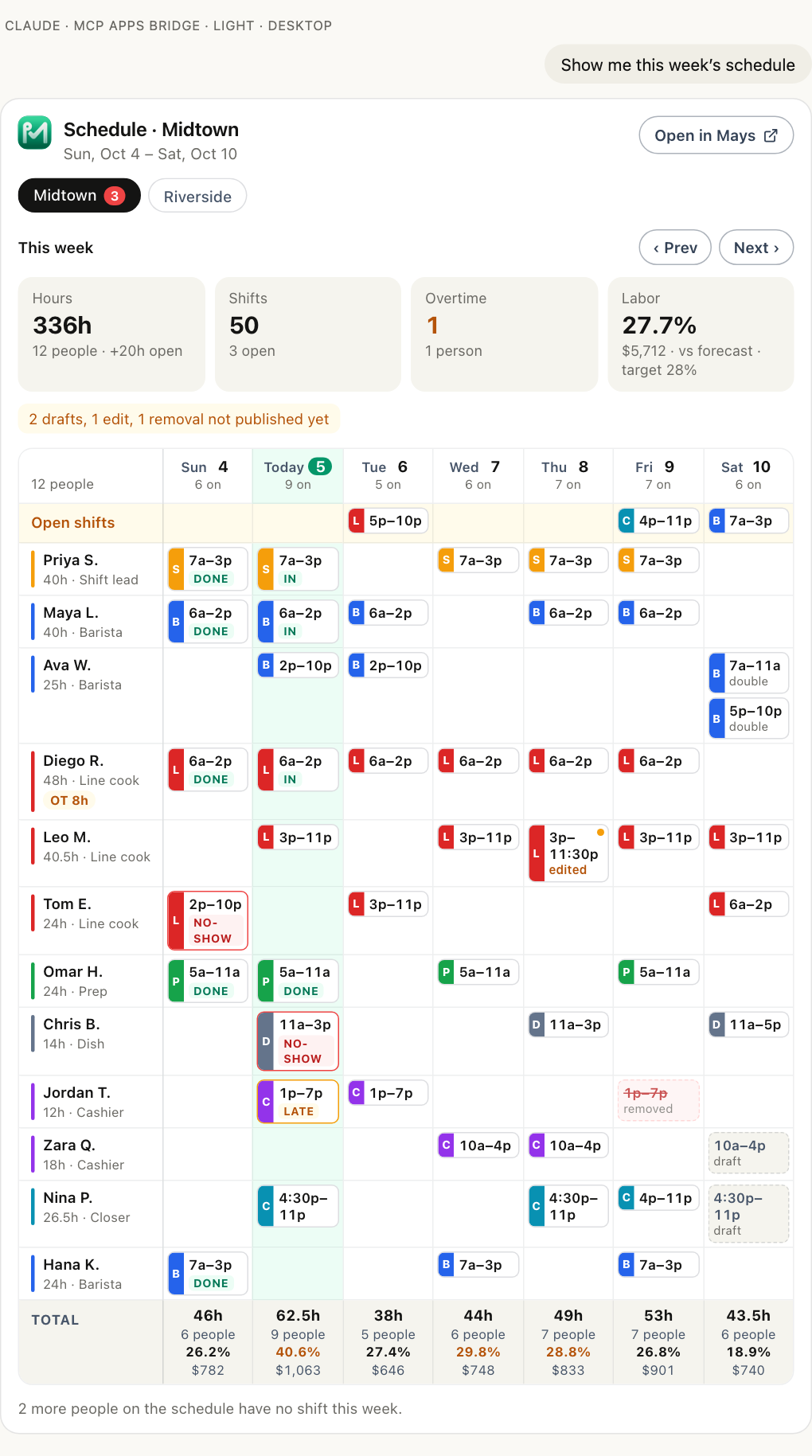
The AI reads the week (get_schedule) and you get it in English, with Maya's changes already in it. In ChatGPT and Claude, the answer comes with the Mays week card: a row per person, a column per day, drafts with a dashed border, edits waiting to be published marked, and an open shifts row on top.
Then:
Looks good. Publish next week at Midtown.
The publish preview lists who gets notified and any double-bookings or overtime. Your yes publishes it (publish_schedule_week), and the team is notified the way Mays always notifies them.
Nobody re-typed anything. Maya's Saturday shift is the same shift you published, not a copy.
Who can do what
The AI works in Mays as the person who connected it, with their role and their locations:
- Maya, as a location manager, sees and changes Midtown's schedule, the same as in the Mays app. She can't see Riverside unless she's assigned there.
- You, as the owner, see every location.
- Pay is per connection. Wages and labor cost appear only for someone who can see pay in Mays and ticked Include wages, labor cost and tips when connecting. Maya can run the line without ever seeing labor cost, if that's how you've set up her role.
What stays the same, and what to decide
- Mays's screens and notifications are in English. The AI translates in the chat; it doesn't change what Mays sends your team.
- What the AI writes is stored as written. A shift note Maya adds in Spanish stays in Spanish. That's often what you want for kitchen notes. For something the whole team reads, pick one language.
- The AI translates, Mays doesn't. Names, times and positions come straight from Mays; the sentences around them are the AI's. For anything formal, have someone who reads both languages check it.
Before you start
- Each person connects their own AI app with their own Mays account. mays.app/ai has the setup for ChatGPT and Claude; Connecting Mays to your AI app has the details. Managers and admins can connect.
- Changes need two switches. An admin turns on Allow AI apps to take actions under Settings → Connected AI apps → Organization, and each person ticks make changes when they connect. Every change is a preview first.
Once the schedule lives in one place, translating the kitchen's SOPs is the natural next step: see your SOPs in your team's languages.
Try Mays free for 30 days, with no credit card, and connect it to the AI you already use.