Turn the recipe binder into a knowledge base with ChatGPT or Claude
Every kitchen has the binder. Recipes in plastic sleeves, an SOP for the fryer with a coffee ring on it, a printed allergen sheet from two menus ago. It's the most important document in the building, and only the people who stand next to it can read it.
The Mays knowledge base puts those pages on your team's phones, searchable. With Mays connected to ChatGPT or Claude, getting the binder in there is a conversation instead of a weekend of typing.
This post is part of our series Run your restaurant with your AI.
The situation
Harbor Lane Café's kitchen binder has about 30 recipes and a dozen SOPs. Some are typed, some handwritten. A few exist as PDFs from your old food supplier.
Before: retype each recipe into a document, save it, upload it, name it, file it in a folder. Or never get around to it.
Now: there are two ways in, and you'll probably use both.
Way 1: the AI writes the articles
Photograph a few pages, share them in the chat, and ask:
These are our house recipes. Write each one as a knowledge-base article in Mays, in a folder called Recipes: title, yield, ingredients with quantities, and numbered steps. Keep our quantities exactly as written.
- The AI reads the photos and writes each recipe as clean text. Reading the pages is the AI app's work.
- It makes the folder if needed (
create_kb_folder), after a preview. - It asks Mays to create each article (
create_kb_article) in Recipes, with a preview for each. Your yes creates it. - Each article waits in review. New articles go into Pending review (AI uploads), a folder only admins can see, until an admin publishes them.
This is the better route for handwritten or messy pages: you end up with text your team can search and read on a phone, instead of a photo of a sleeve. Check the quantities against the page before publishing. A misread "1/2" is easy to miss.
Way 2: upload the files as they are
For PDFs and documents you want to keep as they are:
- In ChatGPT, attach the files and say "Add these to the Recipes folder in Mays." ChatGPT passes the attached files to Mays (
add_kb_documents), which downloads each one and checks its type and size. - In ChatGPT and Claude, the AI can open the Mays upload card (
show_upload_card): you pick the files on your device or drop them on the card, it uploads them, shows Mays's preview, and Confirm adds them.
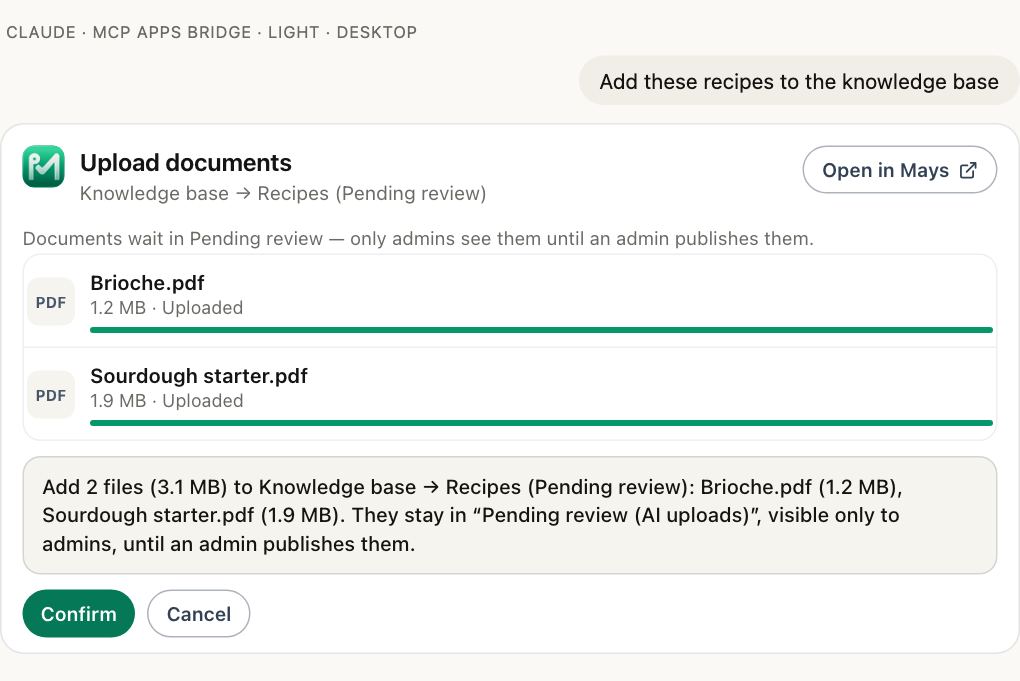
Accepted files: PDF, Word (.docx), CSV, text, JPEG, PNG, WebP and HEIC, up to 25 MB each. Excel files aren't accepted; save the sheet as CSV or PDF. Each connection can upload up to 50 files and 250 MB a day.
Uploaded documents also wait in Pending review (AI uploads).
Publishing: the admin's step
Nothing from an AI app reaches your team until an admin publishes it. In the chat:
What's waiting for review in the knowledge base?
The AI lists what's pending (list_pending_kb_items): each article or document, who added it and the folder it's meant for. Then "Publish the recipes" (publish_kb_items) moves each one into its folder after a preview. Everyone who can see the Recipes folder can now read it in the Mays app, and the Mays AI Assistant in the app's Chat tab can answer questions from it ("What's the yield on the cold brew batch?").
You can also publish in Mays by moving each item to its folder.
What Mays doesn't do here
- It doesn't cost your recipes. A knowledge-base article is for reading. Food cost comes from recipes set up under Inventory, with ingredients linked to your items and prices. See Recipes and costing.
- It doesn't read the photos for you on Way 1. The AI app does. Mays stores what the AI wrote, so check it.
- It doesn't skip review. New articles and uploaded documents always wait for an admin.
- It doesn't take files in every app the same way. Attaching files works in ChatGPT; the upload card works in ChatGPT and Claude. Otherwise, upload the files in Mays itself.
Before you start
- Connect Mays to your AI app. mays.app/ai has the setup for ChatGPT and Claude; Connecting Mays to your AI app has the details.
- Adding articles and files is a change. An admin turns on Allow AI apps to take actions under Settings → Connected AI apps → Organization, and you tick make changes when you connect. You also need to be able to manage the knowledge base in Mays.
Your SOPs need to be in more than one language? See your SOPs in your team's languages.
Try Mays free for 30 days, with no credit card, and connect it to the AI you already use.