Receiving log and delivery checklist: temperatures, rejections, shorts and credits
The ten minutes when a delivery comes through the back door decide two things: whether the food that goes into your walk-in is safe, and whether you pay for what you actually got. A driver in a hurry, a busy line and a stack of boxes on the floor is how a warm case of chicken, a missing case of lemons and a price you never agreed to all end up in the same week.
This post gives you a receiving routine, the temperatures and conditions to check, what to do when something is wrong, and a receiving log to copy. How to set par levels and place the order in the first place is in café inventory from day one.
This is general information, not legal advice. Your health department and your vendor agreements have the final word.
What the Food Code asks for at the door
Section numbers are from the 2022 FDA Food Code. The FDA has since published a 2026 edition; the rules quoted here haven't changed in substance in it.
- Someone actually looks. The person in charge ensures that employees are "visibly observing FOODS as they are received to determine that they are from APPROVED sources, delivered at the required temperatures, protected from contamination, unADULTERATED, and accurately presented" (§2-103.11(E)).
- Cold food arrives cold. Refrigerated time/temperature control for safety (TCS) food "shall be at a temperature of 5°C (41°F) or below when received" (§3-202.11(A)). Where a law sets a different temperature, "such as LAWS governing milk and MOLLUSCAN SHELLFISH", the food may be received at that temperature (§3-202.11(B)).
- Eggs: raw eggs are received in refrigerated equipment that "maintains an ambient air temperature of 7°C (45°F) or less" (§3-202.11(C)).
- Hot food arrives hot: cooked TCS food received hot "shall be at a temperature of 57°C (135°F) or above" (§3-202.11(D)).
- Frozen stays frozen: food "labeled frozen and shipped frozen by a FOOD PROCESSING PLANT shall be received frozen" (§3-202.11(E)), and on receipt, TCS food "shall be free of evidence of previous temperature abuse" (§3-202.11(F)).
- Packages intact: "FOOD packages shall be in good condition and protect the integrity of the contents" (§3-202.15).
- Real suppliers: "FOOD shall be obtained from sources that comply with LAW" (§3-201.11(A)).
- Shellfish tags: keep the tags or labels for "90 calendar days" from the date the last shellfish from the container was sold or served (§3-203.12(C)).
- Deliveries when you're closed: if a vendor drops product after hours, employees verify it came from approved sources and is put away "such that they are maintained at the required temperatures" (§2-103.11(F)). A key drop doesn't skip the check; it moves it to the opener.
The receiving routine, step by step
- Schedule it. Ask vendors for a delivery window outside your rush, and have one trained person on receiving for that window.
- Get ready before the truck. Clear space in the walk-in, have the order (or purchase order) printed or on your phone, and put a clean, sanitized probe thermometer and a pen at the door.
- Cold and frozen first. Check the refrigerated and frozen items before anything else, and put them away first.
- Probe, don't trust the truck. Probe between packages, or open one case and probe the product. Frozen food should be hard frozen, with no ice crystals or liquid stains that suggest it thawed and refroze.
- Look at every case. Torn, crushed, leaking or wet boxes, swollen or dented cans, broken seals and signs of pests are all reasons to refuse.
- Count and weigh against the order, not just against the invoice. The invoice tells you what you're being charged for; the order tells you what you asked for.
- Write down everything that's wrong on the invoice before you sign it, and have the driver initial it.
- Put it away the right way: dated, oldest stock in front, raw animal food below ready-to-eat (our walk-in organization chart shows the shelf order).
When to refuse product
Problem | Refuse? | What to record |
|---|---|---|
Refrigerated TCS food above 41°F (unless a law sets another temperature for it) | Yes | Item, temperature, time |
Frozen food thawed, or signs it thawed and refroze | Yes | Item and what you saw |
Torn, leaking or wet packaging; dented or swollen cans | Yes | Item and a photo |
Signs of pests (droppings, gnawed boxes, live insects) | Yes, and tell the vendor | Photo |
Shellfish without a tag or label | Yes | Item |
A substitute you didn't approve | Your call | What came instead, and the price |
Wrong count or weight | Accept what's right | The short, on the invoice |
When you refuse something, it goes back on the truck. Don't let it sit in your walk-in "until the rep calls."
Shorts, substitutions and credits
Most receiving problems aren't safety problems; they're money problems. Three habits keep them from leaking:
- Mark shorts on the invoice before signing. "2 cases ordered, 1 received" with the driver's initials is the record you'll need for the credit.
- Ask for the credit the same day. Email or call your rep with the invoice number, the item and the photo. Write down the credit memo number when it comes.
- Check the price, not just the count. Compare each price with the last invoice for your top items. A few cents on a case of cheese every week adds up; our post on food cost and plate costing shows how much one price change moves a plate.
Then close the loop: a credit you asked for but never received is still money you lost. Check open credits against the next statement. Weekly purchases are half of the cost-of-goods side of prime cost, so an unreceived credit shows up there.
The receiving log
One line per delivery. Keep it next to the invoices, for the same period.
Date and time | Vendor | Invoice # | Received by | Cold items (°F) | Frozen OK? | Packaging OK? | Refused or short | Credit requested | Credit memo # |
|---|---|---|---|---|---|---|---|---|---|
Tue 7:40 am | Produce vendor | 48211 | Opener | 38 (leafy greens) | n/a | Yes | Lemons short 1 case | Yes, 7:55 am | CM-1093 |
Tue 10:15 am | Broadline | 77304 | Kitchen lead | 37 (chicken), 39 (dairy) | Yes | One case of yogurt crushed | Yogurt refused | Yes, 10:30 am | pending |
Thu 6:00 am (key drop) | Bakery | 1150 | Opener at 6:30 | n/a | n/a | Yes | none | n/a | n/a |
The numbers and vendors above are made up to show the format. The receiving checklist, for the person at the door:
- [ ] Order or purchase order in hand; walk-in space cleared
- [ ] Probe thermometer clean, sanitized and checked
- [ ] Refrigerated TCS food at 41°F or below (or the temperature a law sets for it)
- [ ] Frozen food hard frozen, no signs of thawing
- [ ] Cases and cans undamaged; no signs of pests
- [ ] Counts and weights checked against the order
- [ ] Shorts, refusals and substitutions written on the invoice, initialed by the driver
- [ ] Cold and frozen items put away first, dated, oldest in front
- [ ] Shellfish tags kept
- [ ] Credit requested for anything short or refused
Where Mays fits
Mays runs ordering and invoices on the web, so the paper trail from the order to the invoice to the credit stays in one place.
- The order is the baseline. Build orders under Inventory → Orders. When the delivery comes, that's what you count against.
- The invoice goes in the same day. Under Inventory → Invoices, Capture invoice takes a photo or a PDF and the AI reads it into a draft. Each location also has its own address for vendors to email invoices to (Email invoices). In the iPhone and Android apps, Add invoice scans a paper invoice at the back door; the lines are then checked and posted on the web.
- Shorts and refusals are fixed on the draft. Before posting, change a line's quantity to what actually arrived, or mark it backordered if it's on the invoice but didn't come. Post & receive adds only what you received to stock, and updates the vendor's price for that location.
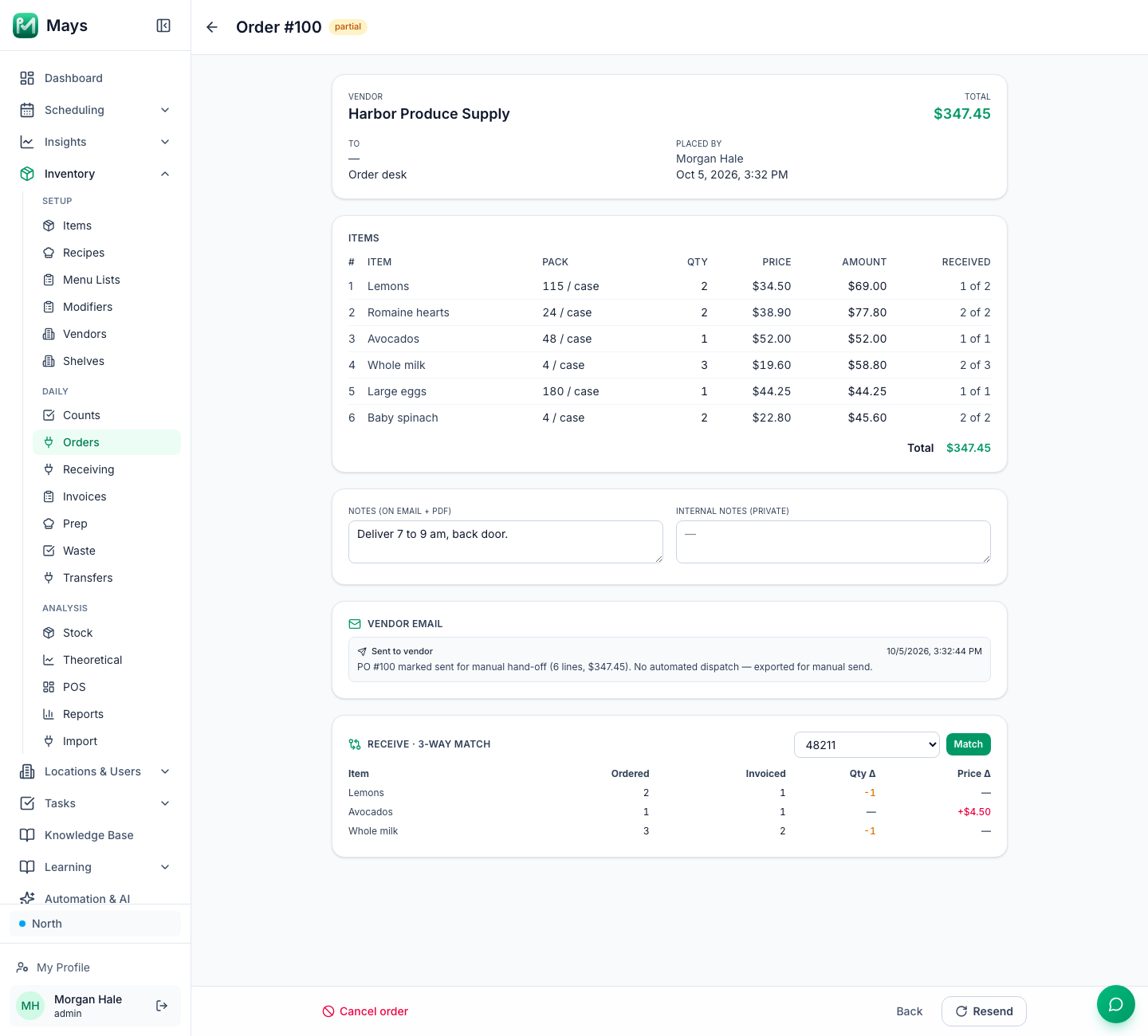
- Check it against the order. Open the order, and under Receive · 3-way match pick the posted invoice and click Match. Mays lists every item where the quantity or price differs from what you ordered, and marks the order partial if anything came in short (the image at the top of this post: a case of lemons and a case of milk short, avocados $4.50 a case higher). That table is your credit request.
- Price changes flag themselves. Under Insights → Alerts & Reports, a Vendor Price Change alert with a Threshold (%) notifies the people you pick when a posted invoice moves a price past it.
- Credits: a credit memo goes in like an invoice, and a line with a negative quantity takes those items back out of stock when it's posted, without changing the vendor's price.
- The week at a glance. Inventory → Receiving shows each day's expected orders next to the invoices that actually arrived.
- The temperatures at the door. Under Tasks → Types, the Delivery checklist preset starts a receiving form (truck temperature, packaging, counts against the invoice, a photo, notes). Add a Temperature field with a pass range for each cold item you probe; readings outside it show Out of range as they're entered. The form is filled in in the iPhone or Android app.
Two things to know: Mays doesn't record temperatures or refused items on the order or invoice itself, so those live on the receiving form; and the 3-way match is run from the order, after the invoice is posted.
Receive it once, right
Check it at the door, write down what's wrong before you sign, and chase every credit.
Start your free trial: 30 days, every module, no card needed. Or book a walkthrough and we'll set up your vendors and receiving with you.