Tasks → Data lists every answer submitted on a custom form, like a cash count or a temperature log, one row per submission, and downloads them as a CSV file.
Who: admins, and managers for the locations they manage. In a custom role, this is the View task data reports permission. It's part of every plan, on the web app only.
Task Data shows custom forms only. To build one, see Building custom forms.
See the answers
- Go to Tasks → Data. The page is called Task Data.
- Pick the form on the left. The forms are listed A to Z, and the first one opens to start with.
- Check the location at the bottom of the sidebar. Task Data shows one location at a time; switch there to see another.
- Set the dates in the two date boxes at the top. It starts on the last 14 days, today included.
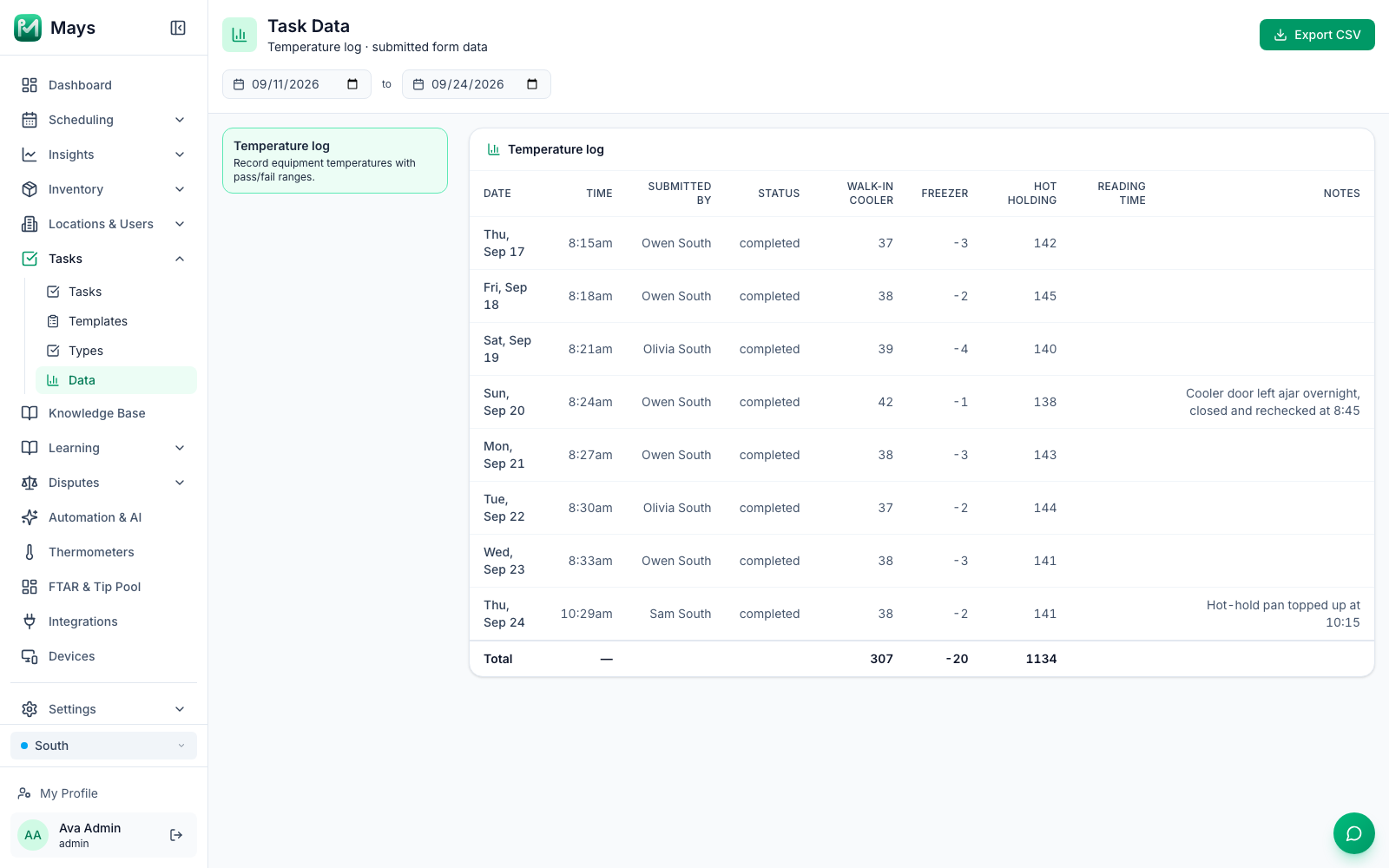
Each row is one submission, oldest first:
- Date, Time, Submitted by and Status (completed, or review when it's waiting for a manager). Rejected tasks aren't listed.
- Then a column for each field on the form, named like the field. Money shows with $, yes/no answers as Yes or No, and people, areas, items and vendors by name. A repeating section shows how many rows it had.
- Photos, signatures and GPS locations aren't in the table, and neither are headings and instructions.
The Total row adds up every number and money column. For readings like temperatures, ignore it.
Download a CSV
Click Export CSV. You get a file named after the form and the dates, for example temperature-log-2026-09-11_2026-09-24.csv, that opens in Excel, Numbers or Google Sheets.
- It has exactly what's on the screen, Total row included.
- Money has no $ sign, and dates look like 2026-09-24.
- The Time column includes the date, in your computer's time zone.
- A cash count exports its total, not how many of each bill and coin.
Good to know
- The date is the location's day, the time is yours. Date follows the location's time zone, but Time is shown in your computer's time zone, always in 12-hour format. If you're in a different time zone from the location, the two can seem out of step.
- Up to 5,000 submissions. Past that, the page says Showing the first 5,000 submissions — totals cover only these rows. and leaves out the newest ones. Narrow the dates. A CSV of a cut-off list doesn't warn you.
- Changed a form? The columns follow its newest version. A field you removed doesn't get a column, even for older answers.
- Deleted forms leave the list, and their answers with them.
- Want to know right away when a reading is out of range? Set a Task Form Field Threshold alert. See Alerts and scheduled reports.
- Mays AI can answer questions about your form answers too; see Asking Mays AI on the web.
- Sensor temperatures from Govee thermometers aren't here. Download them from each thermometer instead, see Health-department temperature logs.