Café inventory from day one: par levels, counts and ordering
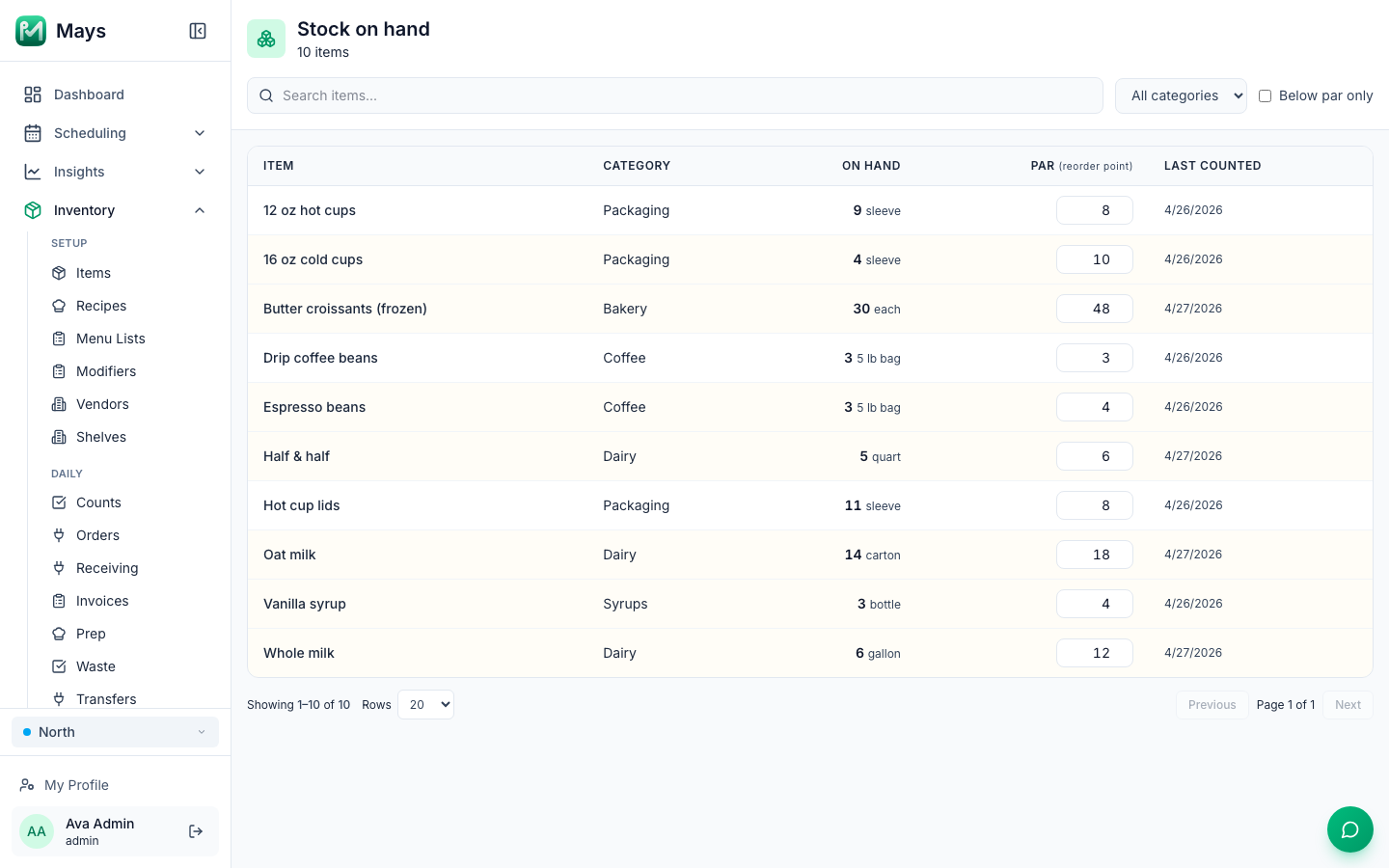
A new café's inventory problems show up fast. You run out of oat milk at 10 am on a Saturday. Meanwhile there are six sleeves of the wrong lids in the back and a case of croissants nobody remembers ordering. Nothing is wrong with the product. There's just no routine yet.
Inventory for a small café isn't accounting. It's five habits: count, compare to par, order, rotate, and write down what you throw away. This guide sets up each one, with a worked par example you can copy, and ends with the basics of theoretical vs. actual usage for when you're ready for it.
This is general information, not legal advice. The food-safety rules below come from the FDA Food Code. Your inspector and your local rules have the final word.
Start with a short list
Don't try to count everything in week one. Start with the 20 to 40 items that cost the most or run out most often. For a café that's usually:
- Dairy and alternatives: whole milk, oat milk, almond milk, half & half
- Coffee and tea: espresso beans, drip beans, cold brew, chai concentrate
- Bakery: croissants, muffins, anything you bake off or buy in
- Packaging: hot cups, cold cups, lids, sleeves, bags
- Syrups and sauces: vanilla, caramel, mocha
For each item, decide the unit you count in (a carton, a 5 lb bag, a sleeve of 50) and how many come in a case. Count in the unit that sits on the shelf, and order in cases. Mixing the two ("was that 4 cases or 4 cartons?") is where most early count errors come from.
Then list the items in the order you walk the store: walk-in, then dry storage, then the bar, then front of house. A count that follows the room gets done faster and skips less.
Set par levels
A par level is the amount you want on hand to carry you until the next delivery arrives, plus a small buffer. When you order, you order up to par: par minus what you have now, rounded up to full cases.
The par has to cover more than the gap between deliveries. It also has to cover the time between placing the order and the truck showing up. So:
Par = average daily use × (days from this order until the delivery after next) + safety buffer
A worked example (made-up numbers)
Say your dairy vendor delivers on Monday and Thursday, and you order the day before each delivery. You want a par for oat milk.
Step | Oat milk |
|---|---|
Average daily use (from two weeks of counts) | 6 cartons |
You order on | Wednesday, for Thursday |
That order has to last until | Monday's delivery arrives |
Days to cover | 1 (Wed → Thu) + 4 (Thu → Mon) = 5 days |
Safety buffer | 1 day = 6 cartons |
Par | 6 × 5 + 6 = 36 cartons |
On hand at Wednesday's count | 14 cartons |
Needed | 36 − 14 = 22 cartons |
Case size | 6 cartons |
Order | 22 ÷ 6 = 3.7 → 4 cases (24 cartons) |
Two notes. Sunday's order (for Monday's delivery) only has to last until Thursday, 4 days instead of 5, so the same par leaves you a little extra in the middle of the week. That's fine for a start. Once your numbers settle, you can use a lower par for that order. And a par isn't permanent. Look at it every few weeks, and change it when your sales change, when the menu changes or when a vendor changes its delivery days.
Where do you get "average daily use" before you have history? Guess from your opening order, count every day for two weeks, and replace the guess with real numbers.
Decide what to count, and how often
Counting everything every day wastes an hour you don't have. Counting only once a month means you learn about a problem four weeks late. Split it:
Cadence | What | Why |
|---|---|---|
Daily (at close) | Your top 5 to 10 items: milks, espresso beans, pastries | They move fast, spoil fast or cost the most |
Before each order | Everything from that vendor | So the order is based on today's shelf, not last week's |
Weekly (same day, same time) | The full list | Catches slow leaks, keeps pars honest |
Monthly (last day of the month) | The full list, carefully | Your food cost for the month starts and ends here |
A few rules make counts trustworthy:
- Count before the delivery is put away, not in the middle of it.
- Same person or same pair, at least for the weekly count, until the routine sticks.
- Count what's there. Don't copy last week's number because "it never moves."
- Open cases count as partials, in the count unit (8 cartons, not "most of a case").
Receive and rotate: FIFO and date marking
First in, first out (FIFO) means the oldest product gets used first. When a delivery comes in, new stock goes to the back, and older stock moves to the front. It sounds obvious, and it's the first thing to slip on a busy morning.
Receiving is also a food-safety step:
- Check the delivery against the order and the invoice before the driver leaves: quantities, substitutions, damaged cases.
- Probe the cold items. Refrigerated time/temperature control for safety (TCS) food has to arrive at 41°F or below, with exceptions for foods that have their own rules, such as milk and shellfish (2017 FDA Food Code, §3-202.11). The temperature log guide covers probing and logging.
- Buy from real suppliers. Food has to come from sources that comply with the law, and food prepared in a private home can't be used (§3-201.11).
Date marking is the rule inspectors check on the shelf. Ready-to-eat TCS food that you prepare and hold for more than 24 hours has to be marked with the date by which it must be used or thrown out, and it can be held at 41°F or below for 7 days at most. The day you make it counts as day 1 (§3-501.17(A)). For a commercially packaged item like a pack of sliced deli ham, the clock starts the day you open it, and your date can't go past a use-by date the manufacturer set for safety (§3-501.17(B)). Florida enforces the 2017 edition of the Food Code (Rule 61C-1.001, F.A.C.).
Put a roll of date labels and a marker at every station, and make "oldest in front, labels on everything" a task on the opening and closing checklist.
Keep a waste log
Your counts tell you what's gone. A waste log tells you why. Without one, a spoiled case of milk and a stolen case of milk look exactly the same.
Log every item you throw away, with:
- What and how much, in the count unit
- Why: spoiled, expired, damaged, made too much, or something else, with a note
- Who logged it
Make it part of closing: leftover pastries get logged as waste or wrapped and labeled, every night. Then look at the week's log once a week. If the same item is at the top every week, the fix is usually a lower par, a smaller bake or a smaller prep batch, not a talk with the team.
Vendors and delivery days
Write down, for every vendor:
- Delivery days and the order cutoff (day and time)
- Lead time: how many days from order to delivery
- Minimum order, if there is one
- The rep's name and number, and how orders are sent (email, portal, phone)
Then put the order days on the schedule, with a name next to each. "Whoever's closing" isn't a name. The worked example above only works if someone counts and orders on Wednesday, before the cutoff, every week.
Theoretical vs. actual usage: the basics
Once you have a month or two of clean counts, you can ask a sharper question: did we use what our sales say we should have used?
- Actual usage = opening count + deliveries received − closing count
- Theoretical usage = what you sold × how much each item is supposed to use (the recipe)
- Variance = actual − theoretical
A made-up example for espresso beans over one month:
Espresso beans | |
|---|---|
Opening count | 18 lb |
Received | 20 lb |
Closing count | 12 lb |
Actual usage | 18 + 20 − 12 = 26 lb |
Espresso drinks sold | 600, at 18 g of coffee each |
Theoretical usage | 600 × 18 g = 10,800 g ≈ 23.8 lb |
Variance | 26 − 23.8 = 2.2 lb, about 9% over |
Some variance is normal: dialing in the grinder every morning, remade drinks, spills. A variance that keeps growing points to heavy dosing, unlogged waste or product walking out the door. Start with your five most expensive items. Doing it by hand for those will teach you more than a report on everything.
Where Mays fits
Mays runs inventory from the web app, with counting on the iPhone and Android apps.
- Items have a count unit and alternate units (a case of 24, for example), plus each vendor's SKU, pack size and pack price.
- Par levels are per location. You set them on the Stock on hand page, next to what's on hand and when it was last counted, and filter to Below par only before you order. The image at the top of this post shows it.
- Counts: a Full audit or a Partial audit (chosen categories or items) on the web, and Submit count updates on-hand. Managers and admins can also count on their phone, in Quick mode or Guided shelf by shelf. They can scan barcodes, say the count out loud, or take a photo of a shelf for the AI to read.
- Vendors: for each location, you set the delivery days, cutoff day and time, lead time and minimum order.
- Orders: Order to par fills in par minus on hand, rounded up to full packs, and makes one draft per vendor. The order form shows how close each vendor's order is to its minimum and when its cutoff is. For a vendor set up for email, sending the order emails the vendor a PDF purchase order.
- Invoices: take a photo or upload a PDF, and the AI reads it into a draft. Each location also gets its own email address for vendor invoices. Post & receive adds the stock and updates the vendor's price, and a price-change alert can flag any price that moves by more than the percentage you set.
- Waste log: item, quantity and a reason (Spoiled, Expired, Damaged, Prepared too much or Other). Logging waste takes it out of stock, and the log totals what you've thrown away.
One thing Mays doesn't do: it doesn't track expiry dates or lots. Date labels stay on the product, and the "oldest in front" check stays on your checklist.
Your inventory setup checklist
- A list of your top 20 to 40 items, in walking order, each with a count unit and a case size
- A par for each item, based on daily use, delivery days and a small buffer
- Daily counts of your top items, a count before each order, and a full count every week
- New stock to the back, dates on everything, and 7 days as the limit for anything you prepare and hold
- Deliveries checked against the invoice, and cold items probed at 41°F or below
- A waste log filled in at every close and reviewed once a week
- Every vendor's delivery days, cutoff and minimum written down, with a named person ordering
Start counting in Mays
Add your top items, set a par for each and run your first count from your phone this week.
Start your free trial: 30 days, every module, no card needed. New to the series? The first 90 days playbook shows where inventory fits alongside checklists, schedules and food-safety logs.