Customer feedback card and QR survey template: five questions, one scale and a follow-up rule
Not every unhappy guest complains. Some just don't come back, and some write a review on the way out. A feedback card gives them a quieter place to say it, while you can still fix it, and gives the happy ones a way to tell you what to keep doing.
This post is a card that works on paper and as a QR survey, the rule for following up on low scores, and a tally to read once a week. For what to do when a guest complains in person, see handling customer complaints. For public reviews, see your first 50 Google reviews.
Five rules for the card
- Five questions or fewer. The card should take under a minute. Every extra question costs answers.
- One scale, with words on it. 1 to 5, labeled at both ends, used for every rated question. Mixing a 1 to 10 with stars confuses people and your tally.
- One open question. "What's one thing we should change?" gets more useful answers than "Any comments?"
- Contact is optional. Ask for a name and an email or phone only if they'd like a reply, and say what you'll use it for.
- Date, time and location on every card. Pre-print them or add a box. A complaint about "slow service" is only useful if you know it was Saturday at 11.
The card
Print it on a half-sheet or a table tent with the QR code on the back.
Question | Answer |
|---|---|
How was your visit today? Location, date and time | __________ |
1. How was your food or drink? | 1 (poor) ☐ 2 ☐ 3 ☐ 4 ☐ 5 (excellent) ☐ |
2. How was the service? | 1 ☐ 2 ☐ 3 ☐ 4 ☐ 5 ☐ |
3. How long did you wait? | 1 (too long) ☐ 2 ☐ 3 ☐ 4 ☐ 5 (no wait) ☐ |
4. How clean was the café? | 1 ☐ 2 ☐ 3 ☐ 4 ☐ 5 ☐ |
5. How likely are you to come back? | 1 (not likely) ☐ 2 ☐ 3 ☐ 4 ☐ 5 (very likely) ☐ |
What's one thing we should change? | __________ |
Would you like us to get back to you? (optional) | Name, email or phone. We'll use it only to reply to this card. |
Swap a question for one that matters to you this month: a new menu item, the new pickup shelf, the music. Keep five.
The QR version
The same five questions work as an online form, built in whatever form tool you use. A few things make it work:
- Put the location in the link, one QR code per store, so you don't need to ask where they were.
- Test it on a phone on the café's own Wi-Fi and on cellular, before printing 500 table tents.
- Place it where people wait: the pickup counter, the receipt, the table tent, the menu screen.
- Same scale, same order as the paper card, so both go into one tally.
If the contact box collects emails or phone numbers, use them only for the reply you promised. Adding them to a marketing list needs consent first; our email and SMS list post explains the rules.
The follow-up rule
Card | Who | When | What |
|---|---|---|---|
Any score of 1 or 2, with contact details | Manager on duty or the GM | Within 24 hours | Thank them, apologize for the specific thing, say what you changed, invite them back. Don't argue the score |
Any score of 1 or 2, no contact | Manager | Same day | Log it; check the shift (who was on, what ran out, what broke) |
Mentions illness or an allergic reaction | Manager | Right away | Call if there's a number; follow your incident procedure and call the health department |
All 4s and 5s | Anyone | Weekly | Read the open answers to the team at the pre-shift; name the people guests named |
A reply that works: "Thank you for telling us about Saturday's wait. We were a barista short that morning, and we've added one for weekend mornings. I'd love to make you a coffee on us next time you're in. Dana, owner." The coffee is for the bad visit, not for a review; never tie an offer to a review (below).
Illness complaints go on our incident report form, not just the feedback tally.
The weekly tally
Each Monday, per location:
Question | Cards | Average | Scores of 1 or 2 | Last week's average |
|---|---|---|---|---|
Food or drink | 38 | 4.5 | 1 | 4.4 |
Service | 38 | 4.1 | 4 | 4.3 |
Wait | 38 | 3.6 | 7 | 3.9 |
Clean | 37 | 4.6 | 0 | 4.6 |
Come back | 36 | 4.4 | 2 | 4.4 |
Made-up numbers. Then three lines: the top theme in the open answers, the one change you'll make, and who's doing it. In this example the wait score is sliding for the second week, which is a staffing question for the weekly manager meeting.
Feedback cards and the FTC review rule
The FTC's rule on consumer reviews (16 CFR Part 465) defines a consumer review as an evaluation "that is published to a website or platform dedicated in whole or in part to receiving and displaying such evaluations" (§465.1(d), eCFR). A private card you read in the office isn't published anywhere. Two lines still matter:
- If you ever ask guests to post a review, don't tie a reward to what they say. The rule bans "compensation or other incentives in exchange for, or conditioned expressly or by implication on, the writing or creation of consumer reviews expressing a particular sentiment, whether positive or negative" (§465.4).
- Don't use the card to decide who gets asked for a Google review. Google's policy against selectively soliciting positive reviews is in our Google reviews post.
Where Mays fits
Mays doesn't have a guest survey or a QR form, so the form itself lives in your form tool. Mays helps with getting it in front of guests and acting on what comes back:
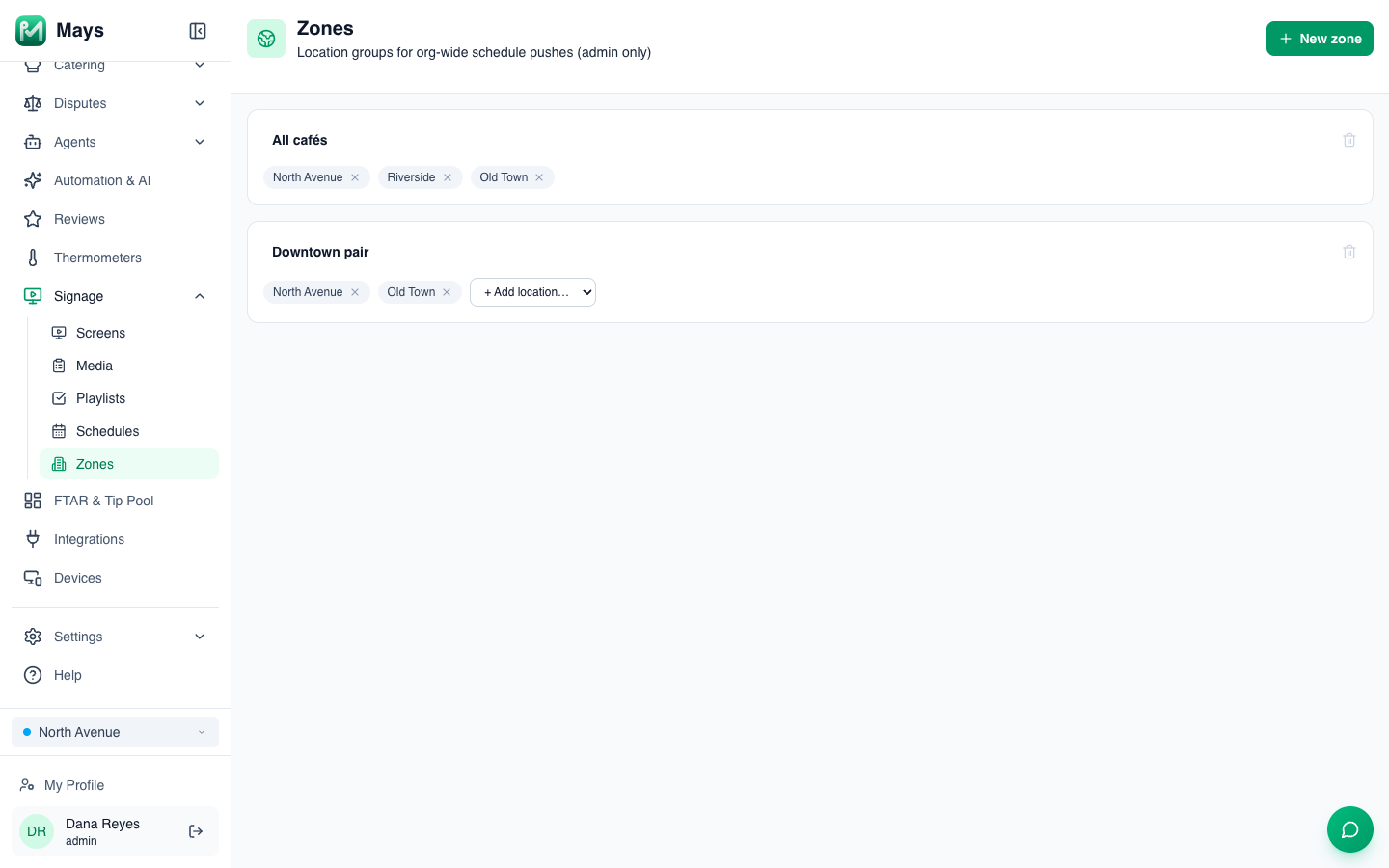
- The QR code on every screen. With digital signage, upload a "Tell us how we did" board with your QR code as an image, add it to a playlist, and schedule it. With one QR code per store, schedule each store's board on its own location. With one code for every store (and a location question on the form), admins can group locations into Zones (the image at the top of this post) and schedule one All locations playlist for every store in the zone at once. See Signage schedules and zones.
- Paper cards into numbers. Build a "Feedback card" form under Tasks → Types with a Rating field per question and a Text field for the open answer; a manager enters the day's cards from the app at close, and Tasks → Data keeps them for the weekly tally. See Building custom forms.
- A nudge on a low score. A Task Form Field Threshold alert on a rating field, At or below 2, notifies the managers you pick each time a card like that is entered. See Alerts and scheduled reports.
- The public side. The Reviews page lists Google reviews for every linked location, with ≤ 3 stars and Unanswered filters, and your replies post to Google. See Google reviews.
What Mays doesn't do: guests can't fill in a Mays form, so the QR survey's answers don't flow into Mays on their own.
Read every card
A card nobody reads is worse than no card: the guest told you and nothing changed. Pick the person, the day and the 24-hour rule, and the cards become the cheapest consultant you'll hire.
Start your free trial: 30 days, every module, no card needed. Or book a walkthrough and we'll set up the feedback form and the signage board with you.