Your first 50 Google reviews: replying when you're new
Your first Google reviews arrive within weeks of opening, usually before you've worked out the Saturday rush. With a dozen reviews on your profile, one unanswered 1-star is a twelfth of your story. By the time you have 50, how you replied to the first ones is part of what new customers read.
This guide covers why replies matter, how to answer 5-star, 3-star and 1-star reviews (with templates you can adapt), when to reply, how to turn a complaint into an actual fix, and what you're not allowed to do to get reviews.
This is general information, not legal advice. The policy and rule summaries below link to the official pages.
Why replies matter when you're new
A reply isn't a private message. On Google, your reply is posted publicly under the review, it shows as coming from your business, and the reviewer gets a notification. Customers can still change their review after reading your reply (Google Business Profile Help: manage customer reviews).
So every reply has two readers: the person who wrote the review, and everyone deciding whether to try your café. Google's own advice is to keep replies professional, short and specific, to respond in a timely manner, and to address people by name (Google: tips to get more reviews).
Before you can reply at all, your Business Profile has to be verified. Google also checks each reply against its content policies before it's posted. That usually takes up to 10 minutes, and sometimes up to 30 days (same Help page).
Decide who replies
Pick one voice: the owner, or one manager, signing with a first name. It keeps the tone consistent and makes sure nothing is answered twice or not at all. Check reviews at a set time every day, for example after the lunch rush, instead of whenever someone remembers.
How to reply to a 5-star review
Short, personal, and not a copy-paste. Google suggests focusing on replies that add something, not the same "thank you" for everyone.
Template: Thanks, [name]! [One specific detail from their review.] [One line that invites them back.] — [Your name]
Thanks, Marcus! Glad the oat latte hit the spot, and that Jess remembered your order. See you next time. — Ava
Skip the promotions. Google's tips say to be "conversational, not promotional" and to avoid offering deals in replies.
How to reply to a 3-star review
A 3-star review often comes from a fair customer with one real complaint. That makes it one of the most useful reviews you'll get.
Template: Thanks for telling us, [name]. [Agree with the specific point, without excuses.] [What you changed.] [An invitation back.] — [Your name]
Thanks for telling us, Dana. You're right: the tables weren't wiped between customers at lunch. We've added a table and trash check every hour to the shift checklist. We hope you'll give us another try. — Ava
Only say you changed something if you actually changed it.
How to reply to a 1-star review
This is the one that stings, and the one other people read most carefully. Before you type anything:
- Read it twice, then wait an hour if you're angry.
- Check the facts: the receipt, the schedule, the order history. Was it really that day and that location?
- Decide what you'd do if they walked back in. That's the reply.
Template: [Name], we're sorry. [Name what went wrong, in their words.] [What you're doing about it.] [A way to reach you directly.] — [Your name], [role]
Chris, we're sorry about that. You ordered a large and got a small, and you should get what you paid for. Please call the store and ask for me, and I'll refund the difference. — Ava, owner
What makes it work: it's specific, it doesn't argue, and it moves the fix off the page. Google's tips say the same: never share a reviewer's private information, avoid personal attacks, and when a situation is complex, ask the reviewer to contact you by phone or email.
If the review breaks Google's rules (someone who was never a customer, a competitor, harassment), don't argue about it in a reply. Flag it for Google to review from your Business Profile.
When to reply
Review | Reply within | Why |
|---|---|---|
1 or 2 stars | A day | Other customers see the complaint and the silence |
3 stars | A day or two | It's usually a fixable, specific problem |
4 or 5 stars | A few days | A thank-you still counts late, but not months late |
These are our suggestions, not Google rules. The point is a routine that never lets a low rating sit for a week.
Turn complaints into fixes
A reply without a fix just repeats itself: the same complaint comes back next month from someone else. For every 1-, 2- or 3-star review:
- Log it: date, location, what went wrong.
- Find the cause. Was the shift short-staffed? Is the recipe unclear? Did a cleaning task get skipped?
- Make one change where the team will see it: a task on the opening or closing checklist, a line in your SOPs and training, or one more person on the schedule at that hour.
- Give it an owner and a date, like any other task.
- Reply once the fix is real, and say what changed.
- Check back in two weeks. If the same complaint shows up again, the fix didn't work.
What you can't do: Google's policy and the FTC rule
Two sets of rules apply to reviews on Google. They overlap, and Google's is stricter.
Google's policy for Maps reviews (Prohibited and restricted content) says a review has to reflect a genuine, unbiased experience. Under it:
- No incentives. Businesses may not offer "payment, discounts, free goods and/or services" in exchange for posting a review, or for changing or removing a negative one.
- No filtering. Businesses may not "discourage or prohibit negative reviews, or selectively solicit positive reviews from customers." Asking only the happy regulars counts.
- No pressure. Don't require or pressure customers to leave a rating or review while they're on the premises, and don't ask them to include specific content.
- No staff quotas. Don't ask staff to collect a certain number of reviews, or reviews with specific content, including a staff member's name.
- No conflicts of interest. Reviews from current or former employees or family members, for example, aren't allowed.
Reviews that break these rules are removed. You're allowed to ask customers for genuine reviews, as long as you don't offer anything for them or try to influence the rating or what they write.
The FTC's Rule on the Use of Consumer Reviews and Testimonials (16 CFR Part 465) went into effect on October 21, 2024, and it lets courts impose civil penalties for knowing violations (FTC: questions and answers on the rule; rule text on eCFR). For a café, the parts that matter are:
- No fake reviews. A business can't write, create or sell a review that misrepresents the reviewer or their experience, or buy one it knew or should have known was fake (§465.2).
- No paying for a particular sentiment. A business can't offer compensation or incentives in exchange for, or conditioned on, reviews that express a particular sentiment, positive or negative (§465.4). The FTC's example of an implied condition: "Tell us how much you loved your visit… and get a $5 coupon."
- Insider reviews need disclosure. An owner or manager who asks employees or relatives for reviews has to tell them to clearly disclose their relationship to the business (§465.5). On Google, those reviews are a conflict of interest anyway.
- No review suppression. You can't use groundless legal threats, physical threats, intimidation or public false accusations to stop a review or get one removed (§465.7). You can reply publicly, and you can contact the customer to resolve the problem.
Put simply: on Google, no incentives of any kind, no reviews from staff or family, no staff quotas, and ask everyone, not just the people you expect to be happy.
Updated September 24, 2026: the Google and FTC wording quoted here was re-checked against their current pages.
Getting to 50 reviews, the honest way
Most happy customers never think to leave a review. Asking is allowed, and it works best when it's easy and applies to everyone:
- Use Google's review link or QR code from your Business Profile, on the receipt, a table card or the pickup counter (Google: tips to get more reviews).
- Ask everyone the same way, with no offer attached and no "if you loved it" wording.
- Reply to every review, so people who leave one see that someone reads them.
Where Mays fits
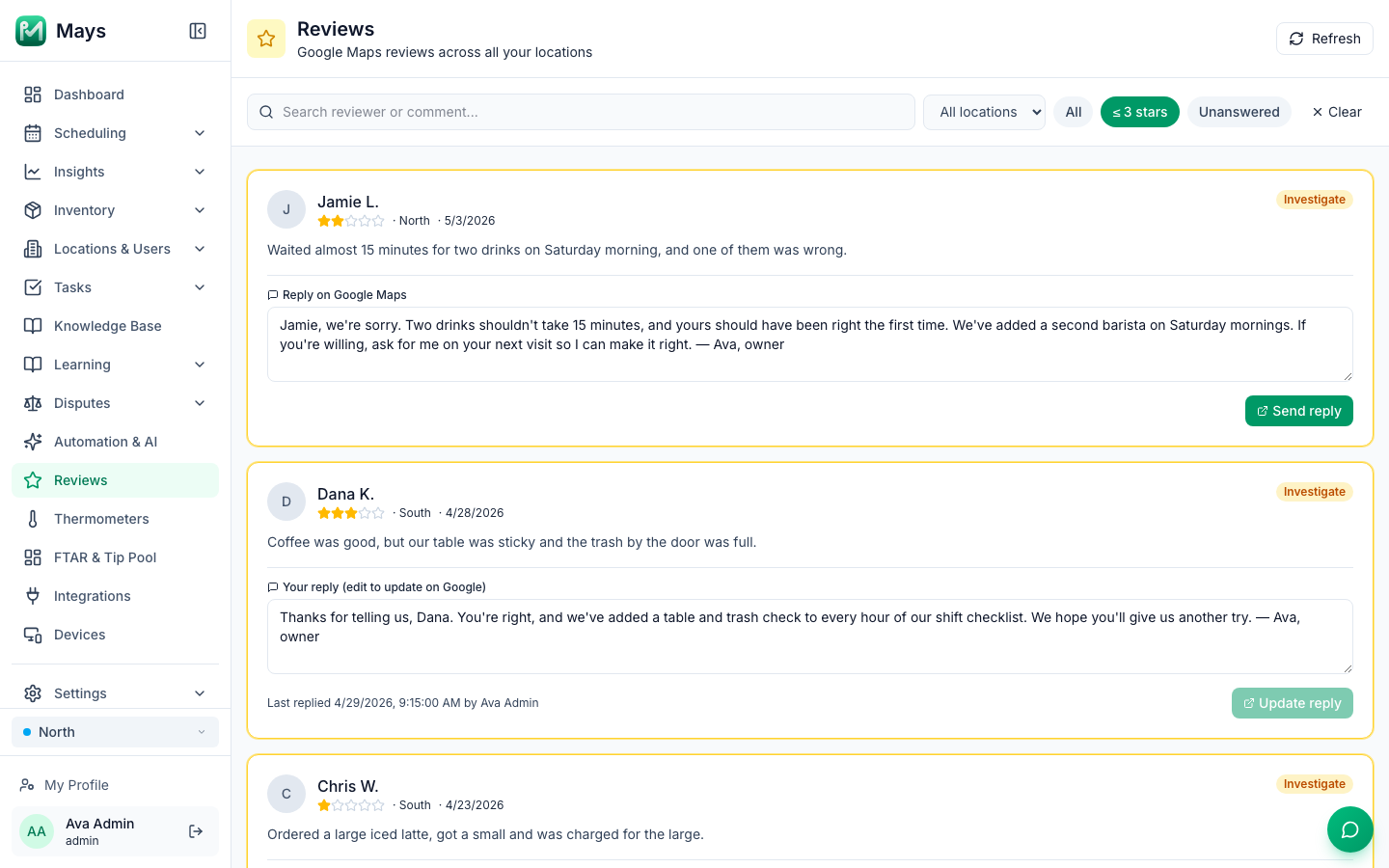
- One list for every location. The Reviews page in Mays shows your Google reviews, newest first, with the reviewer, stars, location and date. You can search by reviewer or comment and filter by location, ≤ 3 stars or Unanswered. Reviews of 3 stars or below are highlighted and tagged Investigate.
- Reply without leaving Mays. Write your reply on the review and press Send reply, and it's posted to your Google Business Profile. You can edit it later with Update reply, and the review shows who replied last and when. The image at the top of this post shows the page with sample reviews from our test account.
- Turn the complaint into a task. Create a one-off task for the manager from the web or the phone app, and add the lasting fix to the checklist template, so the whole team does it every day.
- Setup: an admin connects your Google Business Profile from Integrations. Linking each Mays location to its Google listing is done with our team today, so book a walkthrough and we'll connect it with you.
Mays doesn't write replies for you, and it doesn't send review requests to customers. The replies stay in your own voice, and the asking happens at the counter.
Your review-reply checklist
- Business Profile verified, and one person responsible for replies
- A daily time to check new reviews
- Low ratings answered within a day, with a specific fix and a way to reach you
- Every complaint logged, with an owner and a change the team can see
- No incentives, no staff quotas, no reviews from staff or family
- A review link or QR code offered to every customer, the same way
Reply to your next review from Mays
See every location's reviews in one place and reply without switching apps.
Start your free trial: 30 days, every module, no card needed. Or book a walkthrough and we'll connect your Google Business Profile with you. Still in your first weeks? The first 90 days playbook shows where reviews fit alongside checklists, schedules and training.