Vendor contact sheet and order guide: reps, cutoffs, order days, minimums and delivery windows
Most ordering mistakes aren't about what to order. They're about when and how: the produce order sent at 3 pm when the cutoff was 2, the dairy order that missed the $150 minimum, the rep's cell number that left with the last manager. A one-page sheet per vendor, plus a weekly calendar, fixes most of that.
This post is that binder: a contact sheet for each vendor, a weekly ordering calendar, and an order guide for the items you buy. Negotiating terms, minimums and credits is in vendor payment terms for a new café; how much to order is in our par levels and ordering guide; checking what arrives against the invoice is in the receiving log.
This is general information, not legal or tax advice.
Part 1: the vendor contact sheet
One page per vendor. Fill in every line the first week, and ask the rep for anything you don't know.
Field | Example |
|---|---|
Vendor | Bayline Produce Co. (made-up) |
What we buy from them | Produce, eggs, fresh herbs |
Our account number | |
Rep: name, cell, email | Kendra, (555) 310-2200 |
Orders go to | Email / portal / text the rep / phone |
Order days and cutoff | Monday by 2:00 pm for Tuesday; Thursday by 2:00 pm for Friday |
Delivery days and window | Tuesday and Friday, 7 to 10 am |
Lead time | 1 day |
Minimum order | $250 |
Delivery fee or fuel charge | Below minimum, or always? |
Payment terms | Net 7 / net 15 / COD |
Shorts, substitutions and credits | Who to call, how fast the credit shows up, whether substitutions need your OK |
Returns | What they take back, and by when |
After-hours or emergency contact | |
Who at our place orders | A name, not "whoever's closing" |
Two lines people skip and regret: the delivery window (so someone who can check the order is there) and the credit policy (so a short case becomes a credit memo, not a loss). Our receiving log covers how to write up shorts.
Part 2: the weekly ordering calendar
Turn the contact sheets into one grid on the office wall. Each cell says who orders what, by when, for which delivery.
Day | Order (by) | For delivery | Who orders |
|---|---|---|---|
Mon | Produce (2:00 pm) | Tue 7 to 10 am | Opening manager |
Tue | Dairy (call by noon) | Wed | Opening manager |
Wed | Broadline: dry goods, paper, proteins (5:00 pm) | Thu | Owner |
Thu | Produce (2:00 pm) | Fri 7 to 10 am | Opening manager |
Fri | Dairy (call by noon) | Sat | Opening manager |
Sat | — | ||
Sun | Count for Monday's orders | Closing lead |
Put the count before the order: Monday's produce order is only as good as Sunday night's count. Give every cutoff an internal deadline an hour earlier, so a busy lunch doesn't push you past it.
Part 3: the order guide
The order guide lists everything you buy from one vendor, in the order you walk the storage areas, so whoever orders doesn't have to remember item numbers.
Item | Vendor item # | Pack | Price (as of) | Count unit | Par | Order day | Substitute OK? |
|---|---|---|---|---|---|---|---|
Romaine hearts | Case of 24 | head | Mon, Thu | Green leaf, ask first | |||
Lemons | Case of 115 | each | Mon | Yes | |||
Eggs, large | 15 dozen | dozen | Mon, Thu | No | |||
Avocados | Case of 48 | each | Mon, Thu | Riper or greener OK |
- Write prices with the date you saw them, and compare with each invoice. A price that creeps up 5% a month is how food cost drifts without anyone changing a recipe.
- Mark the items you can't run out of. For each one, write a second source (another vendor, a cash-and-carry) on the guide.
- Review the guide every quarter, and whenever the menu changes. Items you no longer use stay on guides for years.
What the rules say about vendors and paperwork
Section numbers are from the 2022 FDA Food Code; the 2026 edition keeps the same rules.
- Approved sources only. "FOOD shall be obtained from sources that comply with LAW" and "FOOD prepared in a private home may not be used or offered for human consumption in a FOOD ESTABLISHMENT" (§3-201.11(A) and (B)). The vendor sheet is a good place to note each supplier's license or inspection, if your health department asks for it.
- Cold delivered cold. Refrigerated time/temperature control for safety food "shall be at a temperature of 5oC (41oF) or below when received" (§3-202.11(A)), with exceptions where the law allows another temperature, such as milk and shellfish. That's why the delivery window matters: someone with a thermometer has to be there.
- Keep the invoices. Under "Documents for purchases include the following", the IRS lists canceled checks or other proof of payment, cash register tape receipts, credit card receipts and statements, and invoices (IRS, What kind of records should I keep). Keep each credit memo with the invoice it corrects.
Where Mays fits
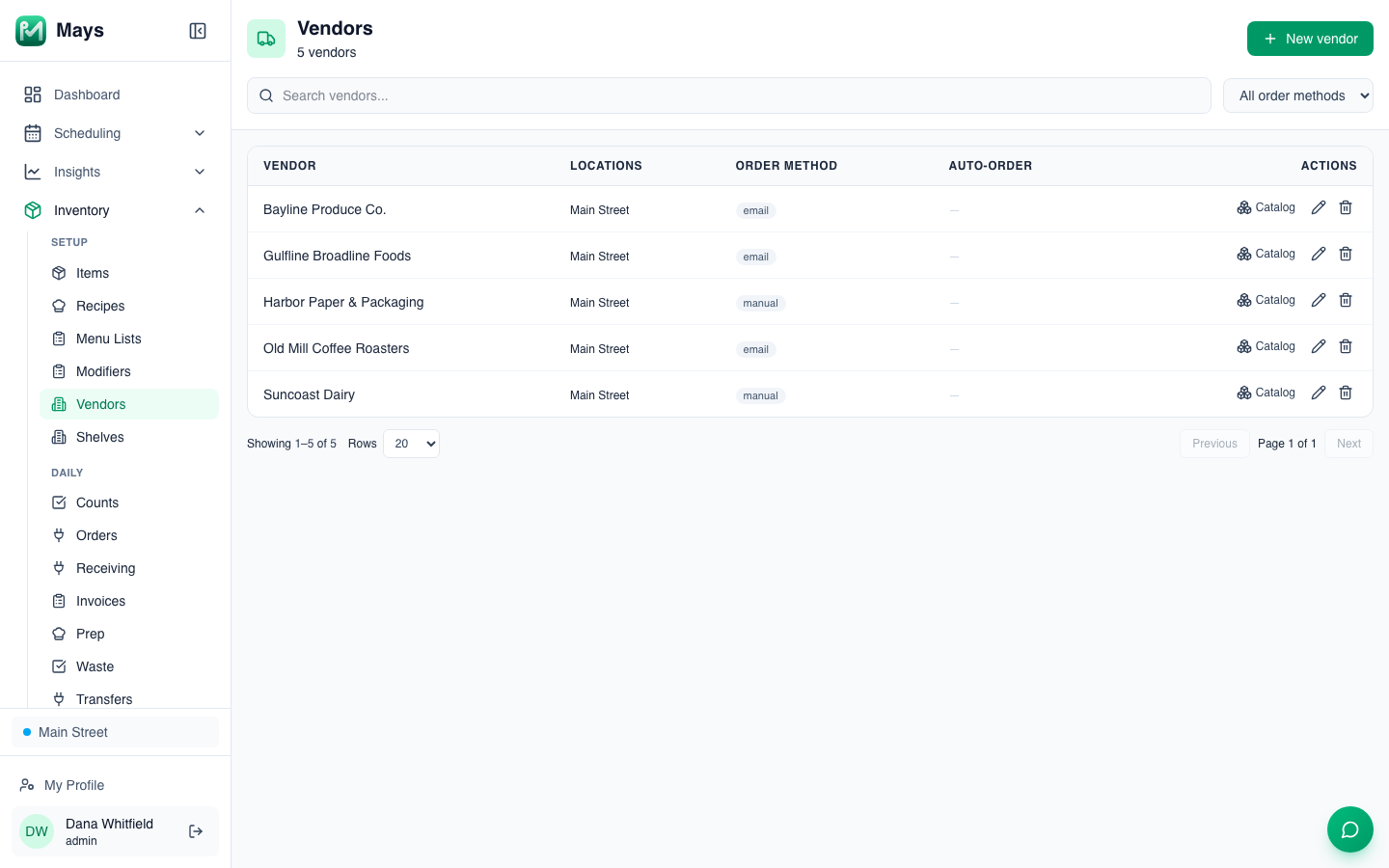
Mays keeps your vendors on one list (the image at the top of this post), with the contact sheet and the calendar on each vendor, by location:
- An admin goes to Inventory → Vendors, clicks New vendor, and enters the name, contact, phone, email, address and Order method: email sends orders as a PDF purchase order to the Order email.
- Under Locations that order from this vendor, tick each location and set its Delivery days, Cutoff day and Cutoff time, Lead time (days), Minimum order $, and that location's Rep name, Rep phone and Order email(s). A vendor with no fixed schedule can be marked On-demand.
- A manager can update their own location's schedule, minimum and rep; the vendor's shared details stay with admins.
Then the order form does the remembering:
- Order to par fills in par minus on hand, rounded up to full packs, and makes one draft per vendor.
- For each vendor, the order form shows the next delivery you can still make and the deadline to order for it, notes a nearer delivery whose order window has already closed, and shows how far the order is from the minimum, for example Add $24.40 to reach $150.00 minimum.
- Invoices go in from a photo, a PDF or the location's invoice email address, on the web or with Add invoice in the iPhone and Android apps, and the AI reads them into a draft. Posting one adds the stock and updates the vendor's price. Insights → Vendor Spend totals what you spent with each vendor and flags items whose price moved.
What Mays doesn't keep yet: there's no field for payment terms or your account number, no delivery time window (only the days), and one cutoff day and time per vendor and location, so the deadline for each delivery is the last cutoff day before it. Keep those on the contact sheet.
Write it down once
A page per vendor, a calendar on the wall and an order guide in walking order turn ordering from memory into a routine anyone can run.
Start your free trial: 30 days, every module, no card needed. Or book a walkthrough and we'll set up your vendors and order days with you.