See what a location has on hand right now, set each item's par level and spot what's below par. Counts, deliveries, waste, sales and transfers keep it current.
Where: Inventory → Stock on the web (the page is Stock on hand), for the location picked in the sidebar. Admins, and managers at their own locations.
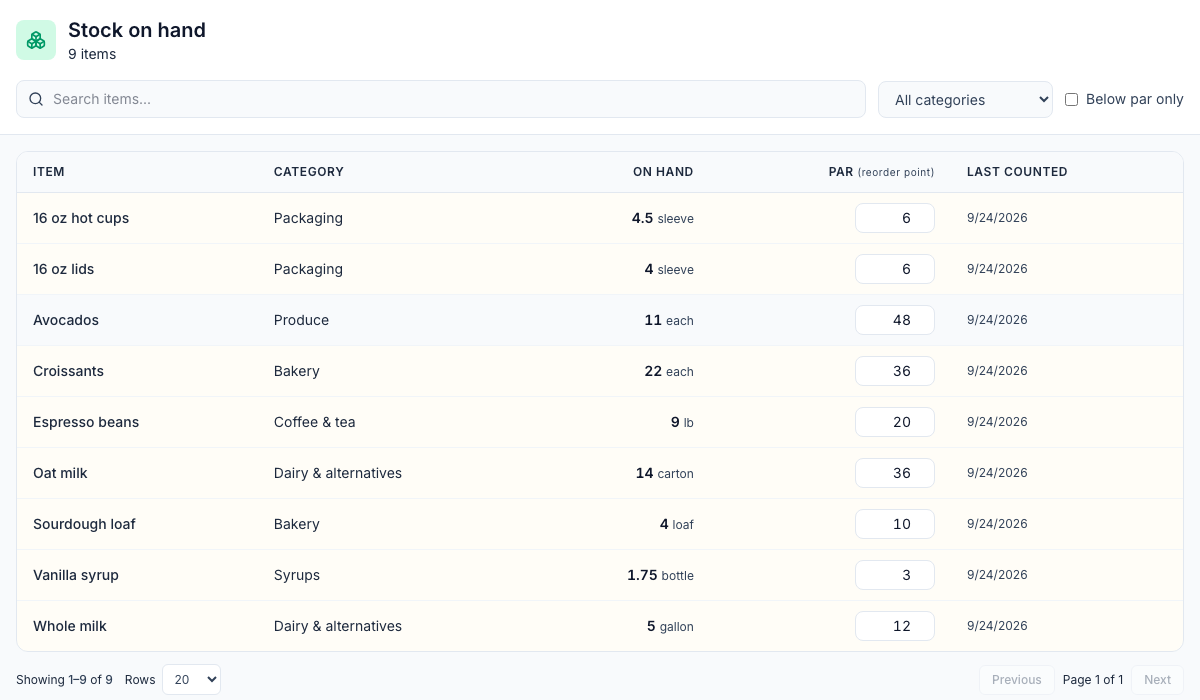
Column | What it shows |
|---|---|
On hand | What Mays expects is on the shelves now, in the item's count unit. |
Par (reorder point) | The level you want to stay above. Rows below par are shaded. |
Last counted | The day the item was last counted. |
Narrow the list with Search items..., All categories and Below par only. Clear resets them.
Set par levels
- Click an item's Par box and type the level, in the item's count unit.
- Press Enter or click away. It saves straight away.
To remove a par, empty the box. Par levels are what Order to par and Suggested orders order up to. See Placing purchase orders.
What changes on hand
When you… | On hand… |
|---|---|
Submit a count | Is set to what you counted, for each item you counted |
Post a vendor invoice | Goes up by what was delivered |
Log waste | Goes down by the amount wasted |
Sell through Square or Union | Goes down overnight, by each mapped recipe's ingredients |
Post a transfer | Goes down at one location and up at the other |
You can't type a new on-hand number here. To correct one, count the item. See Running stock counts.
Good to know
- An item appears here once something has happened to it at this location: a count, a delivery, waste, a transfer or a sale. Until then it isn't listed, so you can't set its par. Count it first.
- On hand can go below zero when sales use more than your last count showed. The next count sets it right.
- Last counted changes only when the item is counted. Deliveries and sales don't change it.
- Deleted items stay listed with their last on hand and par.
- Each location has its own stock and par levels, including items shared with all locations.
- To see what the stock is worth, open On-hand value in Inventory reports.