Daily temperature log sheet for hot and cold holding: a printable template with corrective actions
Most temperature logs fail in the same three ways: a column of identical 38s written at the end of the shift, a 46 with nothing next to it, and a sheet nobody signed. This post is a one-page daily sheet built to avoid all three.
Why logs matter, what inspectors look for and how often to check are in our guide to food temperature logs. Hot holding and cooling, the two steps cafés get wrong most, are in hot-holding and cooling. This post is just the sheet.
This is general information. Your health department may ask for a particular form or more frequent checks; use theirs if they do.
The two numbers on the sheet
The FDA Food Code says time/temperature control for safety (TCS) food "shall be maintained" "At 57°C (135°F) or above" when held hot (roasts cooked as the Code describes may be held at 130°F), or "At 5°C (41°F) or less" when held cold (§3-501.16(A)). The 2026 edition keeps both numbers.
The sheet also has a thermometer check because the Code asks for food thermometers that are "accurate to ±2°F in the intended range of use" when scaled in Fahrenheit (§4-203.11(B)) and "calibrated in accordance with manufacturer's specifications as necessary to ensure their accuracy" (§4-502.11(B)).
How to fill it in
- Probe the food, not the air, for anything in a hot well, steam table or cold well. For a cooler, write the unit's air temperature and probe one TCS item from the warmest spot.
- Write the real number at the real time. If the 11 am check happened at 11:40, write 11:40.
- Out of range? Act, then write the code from the table below, and check again. A corrective action without a re-check is half done.
- Initial every entry. The person who probed it signs it.
- The manager signs at close, after reading the sheet, not just next to it.
The sheet
Print one per location per day. The units and check times below are examples; change them to match your kitchen and your plan.
Location: ______________ Date: ______________ Person in charge: ______________
Cold holding (41°F or below)
Unit or item | Check 1, time | °F | Init. | Check 2, time | °F | Init. | Check 3, time | °F | Init. | Action code |
|---|---|---|---|---|---|---|---|---|---|---|
Walk-in cooler (air) | ||||||||||
Walk-in: probe item (e.g. sliced turkey) | ||||||||||
Reach-in (line) | ||||||||||
Sandwich or salad cold well | ||||||||||
Pastry or grab-and-go case | ||||||||||
Milk fridge (bar) |
Hot holding (135°F or above)
Item | Check 1, time | °F | Init. | Check 2, time | °F | Init. | Check 3, time | °F | Init. | Action code |
|---|---|---|---|---|---|---|---|---|---|---|
Soup of the day | ||||||||||
Steam table: item 1 | ||||||||||
Steam table: item 2 | ||||||||||
Breakfast hot hold (eggs, potatoes) |
Freezers
Unit | Opening °F | Init. | Closing °F | Init. | Note |
|---|---|---|---|---|---|
Walk-in freezer | |||||
Reach-in freezer |
Thermometer check (once a day)
Thermometer | Method (as the manufacturer says) | Reading | Adjusted or replaced? | Init. |
|---|---|---|---|---|
Probe 1 | ||||
Probe 2 |
Corrective-action codes
Code | What was done |
|---|---|
R | Reheated to the required temperature, then back to hot holding (write the temperature reached) |
C | Moved to a colder unit or put on ice; re-checked in 30 minutes |
A | Adjusted the unit's thermostat; re-checked in 30 minutes |
D | Discarded (write the item and quantity) |
M | Maintenance called (write who and when) |
O | Other: explain in the notes |
Notes: ______________________________________________
Manager sign-off at close: I've read this sheet and every out-of-range entry has an action. Name ______________ Signature ______________
A filled-in row, and a bad one
Made-up examples:
Unit or item | Time | °F | Init. | Action code |
|---|---|---|---|---|
Soup of the day | 11:10 | 148 | JM | |
Soup of the day | 2:15 | 128 | AG | R, reheated to 168°F at 2:30, back in the well |
Reach-in (line) | 2:05 | 44 | AG | C, door propped during the delivery; 39°F at 2:35 |
The 128 has an action and a second number. That's what an inspector looks for. The bad version is the same 128 with no code, or a 44 crossed out and replaced with 40.
Two cases need their own sheet. Food you hold using time instead of temperature (the Food Code's time as a public health control, §3-501.19) is tracked by the time it left temperature control and when it must be discarded, not by readings. And cooling needs a cooling log with the 2-hour and 6-hour checkpoints, which our hot-holding and cooling post includes. The pre-service line check template checks the same units station by station, with pars and labels too.
Keep them
File the sheets by week and keep them as long as your health department asks; when in doubt, keep them at least until your next inspection after the date. Put a red tab on any day with a discard, so you can find it if a guest calls about an illness.
Where Mays fits
- Coolers that log themselves. With Govee thermometers connected, Mays reads each sensor about every five minutes and creates a task at the location when a unit stays out of range past its alert delay. See Temperature thresholds and alerts.
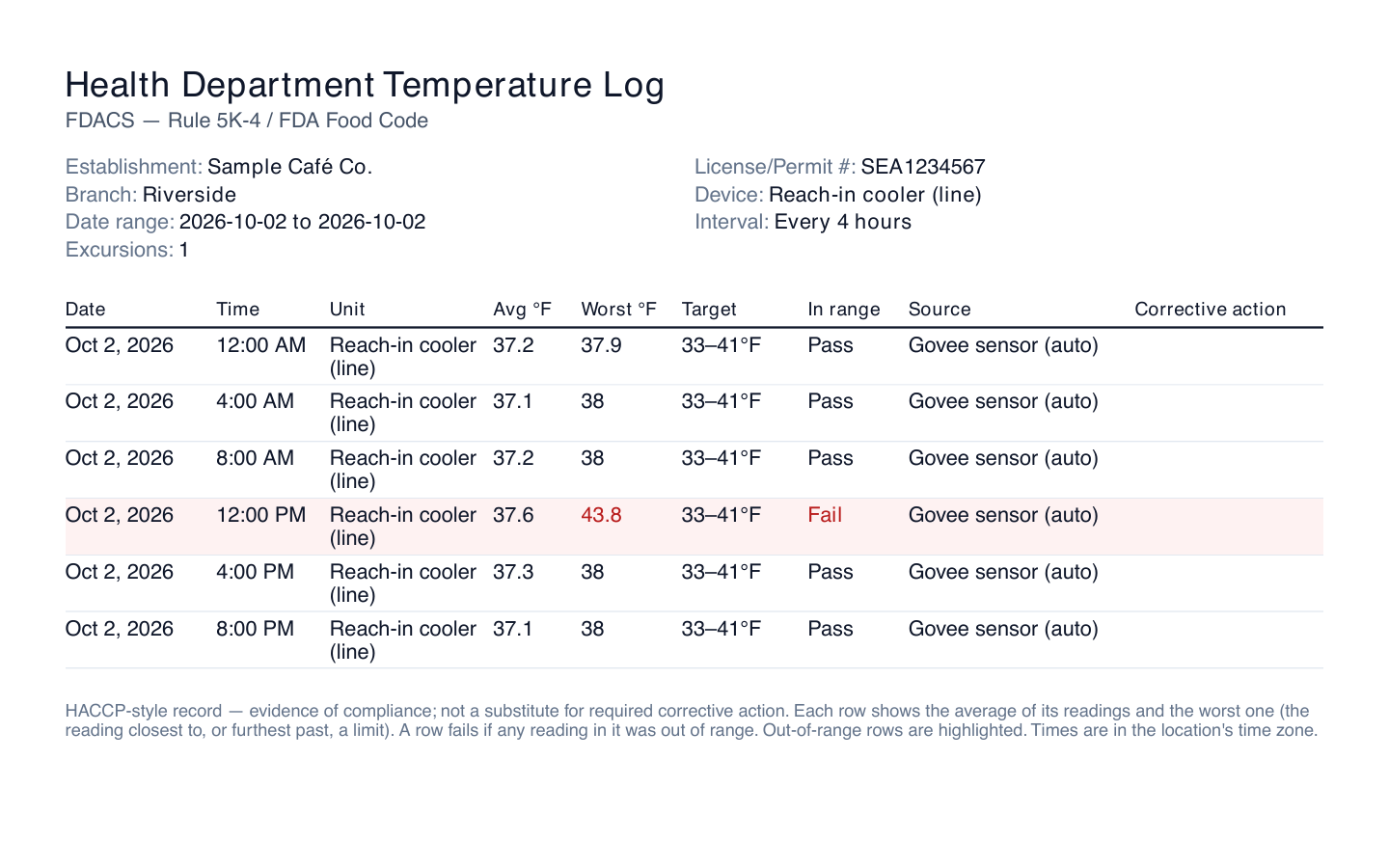
- The printed log. A thermometer's page has a Health-department log export for any dates: one row per hour, every 4 hours or every reading, with the location's license number, the target, the average and worst reading and a Pass or Fail on each row, as a PDF or CSV (the image at the top of this post). The Corrective action column prints empty, so write the action on the printout or keep the completed alert task as the record. See Health-department temperature logs.
- Probe checks on the phone. Hot-holding items and probe checks don't come from a sensor. Build a custom form under Tasks → Types with a Temperature field per item; give each one a pass range so an out-of-range number is flagged, and add it to your opening and mid-shift checklists. Each submission lands in Tasks → Data, with Export CSV. See Building custom forms and Exporting task data.
- A nudge on a bad number. A Task Form Field Threshold alert under Insights → Alerts & Reports notifies the people you pick when a temperature on the form is at or below, or at or above, your limit. See Alerts and scheduled reports.
What Mays doesn't do: probe readings from forms aren't in the thermometer's PDF log, and the log's authority line names Florida's FDACS rule even for restaurants. Check with your inspector which record they want.
One sheet, every day, signed
A temperature log isn't paperwork for the inspector. It's how the person in charge sees that the soup dropped to 128 at 2:15 and someone fixed it.
Start your free trial: 30 days, every module, no card needed. Or book a walkthrough and we'll turn this sheet into a form on your team's phones.