Food temperature logs for a new café: what inspectors look for, and how to stop doing them on paper
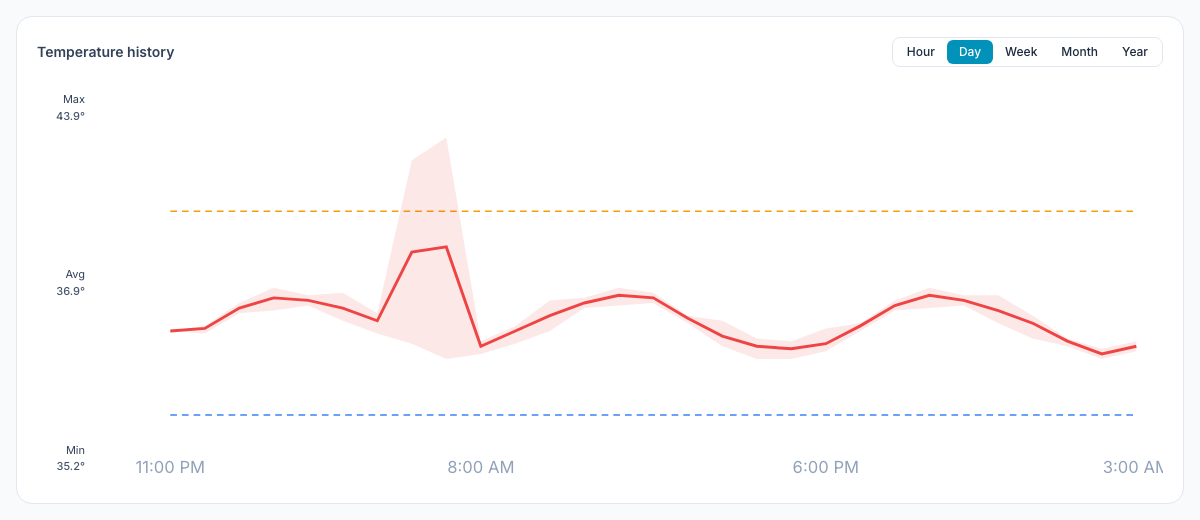
Most new cafés start temperature logs the same way: a clipboard taped to the walk-in door, a pen on a string, and a column of numbers that looks suspiciously identical from one day to the next. Then the inspector arrives, probes the milk, and asks how you know the cooler held overnight.
This guide covers the temperatures that matter, what a useful log records, how often to check, what's specific to Florida, and when it makes sense to let sensors do the logging. It's written for first-time owners of small cafés, bakeries and juice bars.
This is general information, not legal advice. Your inspector and your local rules have the final word.
The numbers that matter
Health departments base their rules on the FDA Food Code. Florida enforces the 2017 edition (more on that below), so the section numbers here come from the 2017 FDA Food Code. The core temperatures haven't changed in later editions, which are all listed on the FDA Food Code page.
The rules apply to time/temperature control for safety (TCS) foods: the foods bacteria grow in, like milk and cream, meat and eggs, cooked rice and potatoes, and cut melons, tomatoes and leafy greens.
What | The rule | Food Code |
|---|---|---|
Cold holding | 41°F or below | §3-501.16(A)(2) |
Hot holding | 135°F or above | §3-501.16(A)(1) |
Cooling cooked food | From 135°F to 70°F within 2 hours, and to 41°F or below within 6 hours in total | §3-501.14(A) |
Cooling food made from room-temperature ingredients | To 41°F or below within 4 hours | §3-501.14(B) |
Reheating for hot holding | All parts to 165°F for 15 seconds, taking no more than 2 hours | §3-403.11(A), (D) |
Reheating commercially packaged ready-to-eat food | To at least 135°F | §3-403.11(C) |
Food thermometers | Accurate to ±2°F | §4-203.11(B) |
Air thermometers in coolers | Accurate to ±3°F | §4-203.12(B) |
Two practical notes. The cooling rule has two checkpoints, and a deep pot of soup has a hard time making the first one, which is why the Food Code lists methods like shallow pans, smaller portions and a stirred ice-water bath (§3-501.15). And a cooler's own thermometer has to sit in the warmest part of the unit (§4-204.112), so find out where that is in yours.
What Florida inspectors look for
In Florida, restaurants and cafés are inspected by the Division of Hotels and Restaurants at the Department of Business and Professional Regulation (DBPR). The division adopted the 2017 FDA Food Code effective November 1, 2019 (DBPR inspections page), and the adoption is written into Rule 61C-1.001, Florida Administrative Code. Chapter 3 of the Food Code, which holds the temperature rules above, is part of what's adopted.
The same DBPR page explains how inspections work:
- Every licensed food service establishment gets 1 to 4 unannounced inspections a year. The number depends on risk: what food you use, how you prepare it and your compliance history. A place that cooks raw animal food and cools cooked food is in a higher category than one that doesn't.
- Violations come in three classes: high priority, intermediate and basic. High priority violations are the ones that "could contribute directly to a foodborne illness or injury."
- Temperature is all over the high priority list: receiving and holding food cold (03a) and hot (03b), cooling (03d) and reheating for hot holding (03e). "Food and food equipment thermometers provided and accurate" (05) is on the intermediate list.
In practice, an inspector checks three things:
- Is the food at temperature right now? They bring their own probe thermometer. A log full of 38s doesn't help if the milk reads 46°F.
- Do you have the right thermometers? That means one in every cooler and hot-holding unit, plus a probe thermometer staff can actually find (§4-204.112 and §4-302.12).
- Is anyone watching? The Food Code makes the person in charge responsible for making sure employees keep hot and cold food at temperature "through daily oversight of the employees' routine monitoring of food temperatures" (§2-103.11(I)), and the same goes for cooling (§2-103.11(H)). DBPR calls this "active managerial control."
For everyday hot and cold holding, the Food Code sets the temperatures and the monitoring duty, but it doesn't prescribe a log form. A log is simply the easiest way to show the monitoring happens. Ask your inspector what they expect to see.
What a useful temperature log records
A log that only says "38" isn't much evidence. Each entry should answer five questions:
- When: date and time.
- What: the unit (walk-in, pastry case, hot well) or the food item.
- The reading, in °F.
- Who took it.
- What happened if it was out of range: the corrective action, who took it, and the re-check.
Here's what a few rows might look like for a café (made-up entries):
Date / time | Unit or item | Reading | By | In range? | Corrective action |
|---|---|---|---|---|---|
Mon 6:40 am | Walk-in cooler | 37°F | Opener | Yes | — |
Mon 6:42 am | Pastry case | 39°F | Opener | Yes | — |
Mon 11:00 am | Soup, hot well | 131°F | Shift lead | No | Reheated to 165°F, re-checked 140°F at 11:20 |
Mon 2:30 pm | Walk-in cooler | 44°F | Barista | No | Door had been propped for a delivery. Closed it, moved dairy to the reach-in, re-checked 40°F at 3:05 |
Write your corrective actions down before you need them, so a new hire at 6 am knows what "out of range" means for each unit and who to tell. Your inspector or your certified food protection manager's course material is a good place to start.
Cooling needs its own log. If you cook and cool anything (soup, oatmeal, rice, a batch of hard-boiled eggs), record the temperature when cooling starts, at the two-hour mark (must be 70°F or below) and when it reaches 41°F (within six hours in total).
How often to check
There's no single federal schedule for routine holding checks, so set one you can keep. A simple starting cadence for a small café:
- Coolers and freezers: at opening, mid-shift and at closing.
- Hot-held food: every time you'd have a chance to fix it, not once a day. If you only check at close, you've only learned about the problem.
- Deliveries: probe cold items when they arrive, before they go on the shelf.
- Cooling: at every checkpoint above, for every batch.
The real risk sits between the checks: a cooler that fails at 11 pm and is found at 6 am. No clipboard catches that.
Paper, app or sensor?
Paper log | Checklist app | Wireless sensors | |
|---|---|---|---|
Cost | Almost nothing | A subscription | Sensors plus the software |
Proves who and when | Only if everyone writes it honestly | Timestamp and name on every entry | Automatic, every few minutes |
Covers nights and weekends | No | No | Yes |
Alerts you when a unit fails | No | No | Yes |
Measures the food itself | Yes, with a probe | Yes, with a probe | No: it reads the air in the unit |
At inspection time | Find the right sheet | Export | Export |
That fifth row matters. A wireless sensor tracks the unit, around the clock. Hot holding, cooling and deliveries still need someone with a probe thermometer. Most cafés end up with both: sensors in the coolers and freezers, and manual checks on a checklist for everything else.
Where Mays fits
Manual checks go into your checklists. In Mays, a task can ask for a number (the hot-well reading) or a photo (the cooler display), so every entry carries the name of the person and the time it was actually entered. Opening and closing checklists are the natural home for them; the first 90 days playbook shows where they fit in a new café's first weeks.
Sensors log the coolers for you. Mays works with Govee smart thermometers (bought separately). Once they're connected:
- Mays records a reading from each sensor every five minutes.
- Each unit gets its own safe range in °F and an alert delay, so a door opened for a delivery doesn't wake anyone, but a unit that stays out of range does.
- When a unit stays out of range, Mays creates a task for whoever is on shift at that location and sends them a push notification. The task asks them to check the unit and write down the corrective action. If nobody is on shift, it goes to the location's managers.
- Each unit has a temperature history chart by hour, day, week, month or year, like the one at the top of this post.
The export is ready for an inspection. The Health-department log export on each thermometer creates a PDF or CSV for a date range: date, time, unit, reading, target range and a pass/fail column, with your license number in the header (add it once on the location). You choose one row per hour, one every four hours, or every reading. Hourly rows are averages, so choose every reading when you need every short excursion to show.
One thing to know: the export covers sensor readings. Manual checks from your checklists stay with the checklist, so keep both records.
Your temperature-log setup checklist
- A thermometer in the warmest part of every cooler and hot-holding unit
- A calibrated probe thermometer where staff can find it
- A written safe range and corrective action for each unit, in the checklist task itself
- Opening, mid-shift and closing checks on the checklist, with a number or photo answer
- A cooling log for anything you cook and cool
- Sensors in the coolers and freezers, with alerts going to whoever's on shift
- Your license number on the location, so exports are ready for the next inspection
Stop doing it on paper
Put the manual checks on your checklists, let sensors watch the coolers overnight, and export the log when the inspector asks.
Start your free trial: 30 days, every module, no card needed. Or book a walkthrough and we'll set up your first checklist and thermometers with you.