Line check template: temperatures, pars and labels before service
A line check is the ten minutes before service when the chef or kitchen lead walks every station and asks four questions: is the food at the right temperature, is there enough of it, is it labeled and in date, and is the station ready to cook. It's the last chance to fix a lowboy running warm or a half-empty sauce before the first ticket prints.
This template is for a small restaurant with four stations: grill, fry, sauté and cold (salads and sandwiches), plus the expo window. Rename them to match your line.
This is general information, not legal advice. Your health department and your equipment manuals have the final word.
The rules a line check covers
Section numbers are from the 2022 FDA Food Code; check which edition your state enforces. The FDA has since published a 2026 edition; the rules quoted below haven't changed in substance in it.
- Cold and hot holding. Time/temperature control for safety (TCS) food is kept "At 57°C (135°F) or above" or "At 5°C (41°F) or less" (§3-501.16(A)). A line check probes the food, not just the unit's dial.
- Date marks. Ready-to-eat TCS food made in-house and held more than 24 hours is marked with the date it must be used or thrown out, "for a maximum of 7 days. The day of preparation shall be counted as Day 1" (§3-501.17(A)). Food past its date, or with no date, is discarded (§3-501.18(A)).
- Labels. Working containers of ingredients taken out of their packages, "such as cooking oils, flour, herbs, potato flakes, salt, spices, and sugar shall be identified with the common name of the FOOD" (§3-302.12), unless the food is unmistakable, like dry pasta.
- Thermometers. A Fahrenheit-only probe "shall be accurate to ±2°F in the intended range of use" (§4-203.11(B)), and probes "shall be calibrated in accordance with manufacturer's specifications as necessary to ensure their accuracy" (§4-502.11(B)).
- Sanitizer. "Concentration of the SANITIZING solution shall be accurately determined by using a test kit or other device" (§4-501.116), at the concentration on the product's label.
- Utensils. Cutting boards and tongs used with TCS food are cleaned "throughout the day at least every 4 hours" (§4-602.11(C)), so the line check is a good moment to swap them.
How to log temperatures over the day, and when sensors beat a clipboard, is in food temperature logs for a new café. Hot-holding and cooling mistakes are in hot-holding and cooling. What each station should look like when a new cook takes it over is in the station training checklist for hiring a line cook.
The template
Proof is a temperature for every reading, yes/no for labels and pars, and a photo where it helps the chef check from the pass.
Before you start (kitchen lead)
Check | Proof |
|---|---|
Probe thermometer checked against the maker's calibration method; reads within ±2°F | Yes / No |
Probe cleaned and sanitized | Yes / No |
Sanitizer buckets at every station made and tested | Number (ppm) |
Handwash sinks: soap, towels, nothing stored in them | Yes / No |
Station by station
Station | Check | Target | Proof |
|---|---|---|---|
Grill | Raw burger patties in the lowboy drawer (probe the food) | 41°F or below | Temperature |
Grill | Raw chicken stored below and away from ready-to-eat food | Separate | Yes / No |
Grill | Sliced cheese, tomatoes, onions at par, labeled and dated | At par | Yes / No |
Fry | Fryer oil level and quality; oil changed if dark or foaming | OK | Yes / No |
Fry | Battered and breaded items at par; batter dated | At par | Yes / No |
Sauté | Mise en place (shallots, garlic, herbs, sauces) labeled and dated | All labeled | Yes / No |
Sauté | Soup or sauce in the bain-marie (probe the food) | 135°F or above | Temperature |
Cold | Salad and sandwich cold well (probe the food) | 41°F or below | Temperature |
Cold | Cut greens, dressings, deli meats dated; nothing past Day 7 | In date | Yes / No |
Expo | Steam table or hot well (probe each pan) | 135°F or above | Temperature |
Expo | Plates, ramekins, garnish and tickets rail ready | Ready | Photo |
Taste and finish
Check | Proof |
|---|---|
Sauces, soups and dressings tasted; seasoning adjusted | Yes / No |
86 list agreed with the front of house before doors open | Text |
Line check signed by the kitchen lead | Signature |
When a reading fails
Write down the reading, then what you did. That second line is what an inspector looks for.
Problem | Do this now |
|---|---|
Cold item above 41°F | Check how long it may have been warm. If you can't show it was cold recently, discard it. Fix or empty the unit before restocking. |
Hot item below 135°F | Reheat or discard per your hot-holding procedure; don't top up a cold pan with hot product. |
No date, or past Day 7 | Discard. Re-prep and date it. |
Unlabeled container | Label it with the common name, or throw it out if nobody can say what it is. |
Below par | Add it to the prep list, and tell the front of house if it may run out. |
Probe reads off | Recalibrate per the maker's instructions, or switch to a backup probe. |
For tracking what you throw away, see the waste log. For how much to prep, see par levels, counts and ordering.
Run it as a form, not a checklist
A plain checklist accepts "41" and "48" equally. The line check works better as a form that knows the targets.
In Mays, build it once under Tasks → Types (the Task Types page):
- Click New task type and name it Line check. You can start from the Temperature log preset and add to it.
- Click Add field for each row. Use a Section header per station, a Temperature field for every reading, Yes / No for labels and pars, Photo, Text for the 86 list and Signature at the end.
- On each Temperature field, set the Pass range: min OK 33 and max OK 41 for cold items, min OK 135 for hot. A reading outside the range shows Out of range as the cook enters it. On iPhone the label appears only when both ends are set, so give hot items a high max OK too (for example 212).
- Click Create.
Then put it on a schedule: in a checklist template under Tasks → Templates, add a task Line check before lunch, set its answer type to Custom form and pick Line check under Task Type in the task's Edit Task window. Set the template to Daily with a Visibility Window of, say, 10:30 to 11:15 AM, and add a second task for dinner if you have one. Picking a form needs access to Tasks → Types, which admins have by default.
Where Mays fits
- Out-of-range readings stand out while the cook fills in the form, on the phone, before service.
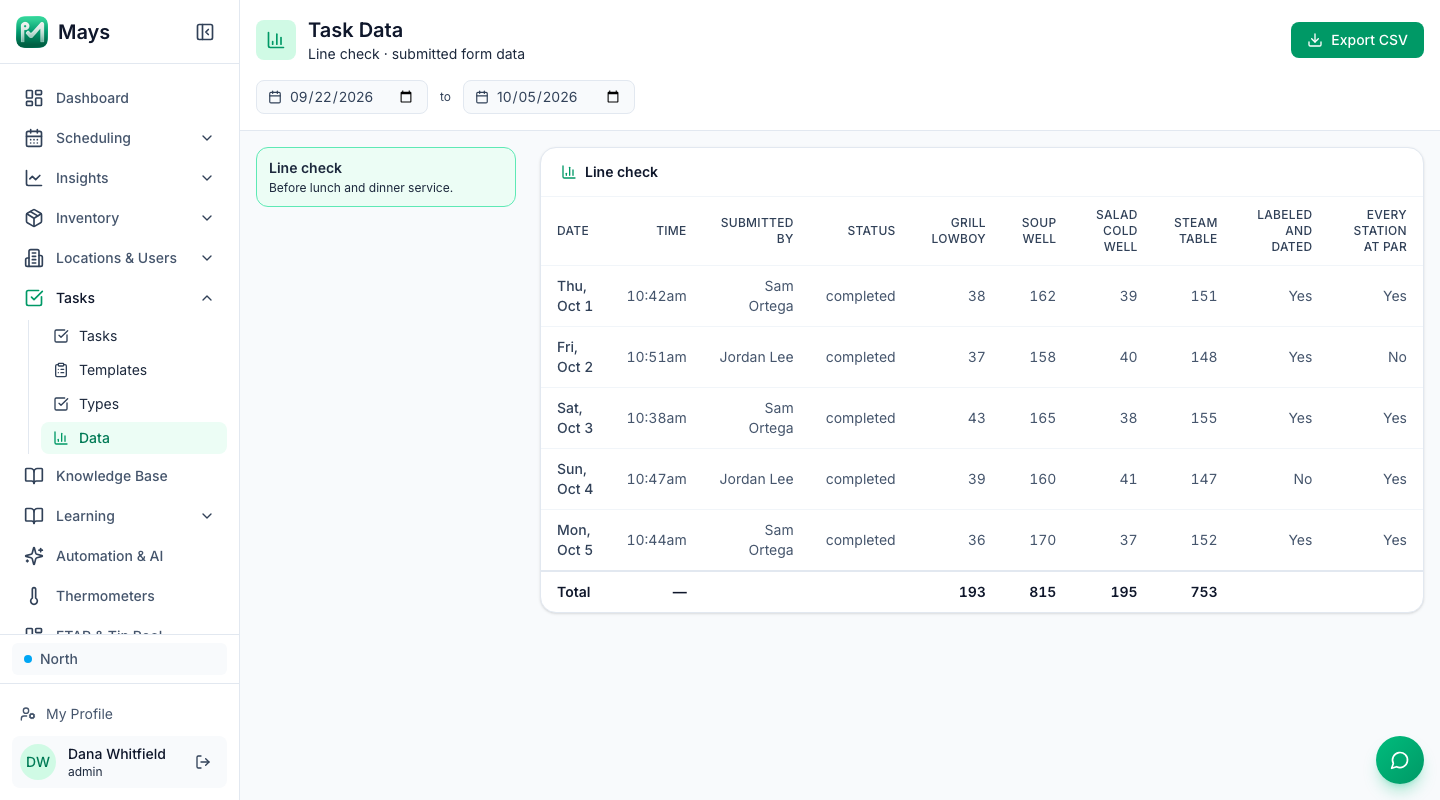
- Every line check is kept. Tasks → Data (Task Data) lists each submitted form, one column per field (photos and signatures aside), for the dates you pick, and Export CSV downloads it for an inspector.
- Alerts for the readings that matter. Under Insights → Alerts & Reports, a Task Form Field Threshold alert notifies people when a temperature on the form is at or above (or at or below) your limit, every time a form crosses it.
- Coolers between line checks. Wireless thermometers record the walk-in and reach-ins every five minutes and alert your team when one runs warm. See temperature alerts.
Two limits to know: a plain Number answer on a checklist task isn't checked against its Min Value and Max Value, which is why the temperatures go in a form; and a new form is filled in in the iPhone or Android app, not on the web.
Walk the line every day
Build the form, put it on the daily list, and the chef can see the morning's line check from the pass before the first ticket.
Start your free trial: 30 days, every module, no card needed. Or book a walkthrough and we'll build your line check form with you.