Prep list template by station: the daily sheet, with prep pars, labels and a handoff
One long prep list for the whole kitchen works until the second cook starts. Then two people chop onions, nobody makes the dressing, and the grill finds out at 11:45. Splitting the list by station fixes that: each station has its own sheet, its own pars and one name on it.
This post is the daily sheet. How to set ordering pars is in our inventory and par levels guide, and hiring and training a prep cook is in the prep cook post. Here we write the sheet each station works from every morning.
This is general information, not legal advice. Your health department enforces its own edition of the Food Code.
Prep pars aren't order pars
An order par is what you keep in the building until the next delivery. A prep par is what a station needs ready for one service, plus a small buffer: how many quarts of sliced cucumbers the cold station goes through between open and close on a normal day.
Set prep pars from what each station actually uses:
- For two weeks, write down what's left of each prepped item at close.
- Use = what was ready at open + anything made during the day − what's left at close.
- Set the prep par at the average day's use plus about 10%, and a separate, higher par for your busiest day if it's clearly different.
- Check the waste log every week. An item thrown out at its date again and again has a par that's too high, and an item that runs out by 1 pm has one that's too low.
The daily sheet
Every station gets the same columns. Make = prep par − on hand, never below zero. Shelf life is how long that item may be held, from your recipe card and the date-marking rule below.
Grill
Item | Prep par | On hand | Make | Unit | Shelf life | Label date | Initials |
|---|---|---|---|---|---|---|---|
Grilled chicken, sliced | 6 | lb | 4 days | ||||
Turkey, sliced | 4 | lb | 4 days | ||||
Roasted peppers | 2 | qt | 5 days |
Cold station
Item | Prep par | On hand | Make | Unit | Shelf life | Label date | Initials |
|---|---|---|---|---|---|---|---|
Romaine, chopped | 8 | lb | 2 days | ||||
Cucumbers, sliced | 3 | qt | 2 days | ||||
Shredded carrots | 2 | qt | 3 days | ||||
Red onion, shaved | 1 | qt | 3 days | ||||
Hard-boiled eggs | 24 | each | 5 days | ||||
Lemon-herb dressing | 2 | qt | 5 days |
Pastry
Item | Prep par | On hand | Make | Unit | Shelf life | Label date | Initials |
|---|---|---|---|---|---|---|---|
Scone dough, portioned | 36 | each | 2 days | ||||
Cookie dough balls | 48 | each | 3 days | ||||
Blueberry muffin batter | 4 | qt | 1 day |
The pars and shelf lives above are made-up examples for a small café. Use your own recipe cards; never use a longer shelf life than the date-marking rule allows.
At the bottom of every sheet
Line | Fill in |
|---|---|
Counted by, and when | Name, time (the on-hand column is only as good as this count) |
Cooling started | Item, time it left 135°F, time it reached 70°F, time it reached 41°F |
Not made, and why | "Out of romaine, delivery short" |
86 or low for service | What the line should know before open |
Handed to | The lead who checks the sheet before service |
The Food Code rules the sheet has to respect
Section numbers are from the 2022 FDA Food Code. We checked each rule against the 2026 edition: the substance is the same, and the 2026 text spells the numbers out ("two hours", "seven days").
- Date marking. Refrigerated, ready-to-eat, time/temperature control for safety food "prepared and held in a FOOD ESTABLISHMENT for more than 24 hours shall be clearly marked to indicate the date or day by which the FOOD shall be consumed on the PREMISES, sold, or discarded when held at a temperature of 5ºC (41ºF) or less for a maximum of 7 days. The day of preparation shall be counted as Day 1." (§3-501.17(A)). That's why the sheet has a label date column: the date goes on the container the day it's made.
- Cooling. Cooked food that needs time and temperature control "shall be cooled: (1) Within 2 hours from 57ºC (135ºF) to 21ºC (70°F); and (2) Within a total of 6 hours from 57ºC (135ºF) to 5ºC (41°F) or less" (§3-501.14(A)). So anything cooked and cooled, like the grilled chicken, gets made first, and its times go on the cooling line. Our hot-holding and cooling guide has the methods.
- Container labels. Working containers of ingredients taken out of their original packages, "such as cooking oils, flour, herbs, potato flakes, salt, spices, and sugar shall be identified with the common name of the FOOD" (§3-302.12), unless the food is unmistakable, like dry pasta.
Cold storage order matters too: prepped ready-to-eat food goes above raw proteins. Our walk-in cooler organization chart shows a shelf order you can post.
How the morning runs
- The closer counts the prepped items left in each station's cooler and writes the on-hand column for tomorrow.
- The opener fills in Make for each line before anyone picks up a knife.
- Work in this order: anything that has to cook and cool, then sauces and dressings, then produce, then garnishes and portioning.
- Label as you go, with the item, the date and your initials, and write the same date on the sheet.
- The lead checks the sheet against the cooler before service: every line made or explained, every container labeled.
- Unfinished lines get passed on, with a reason, not left blank.
Before service, the line check confirms the station is set. Our line check template picks up where this sheet ends.
Where Mays fits
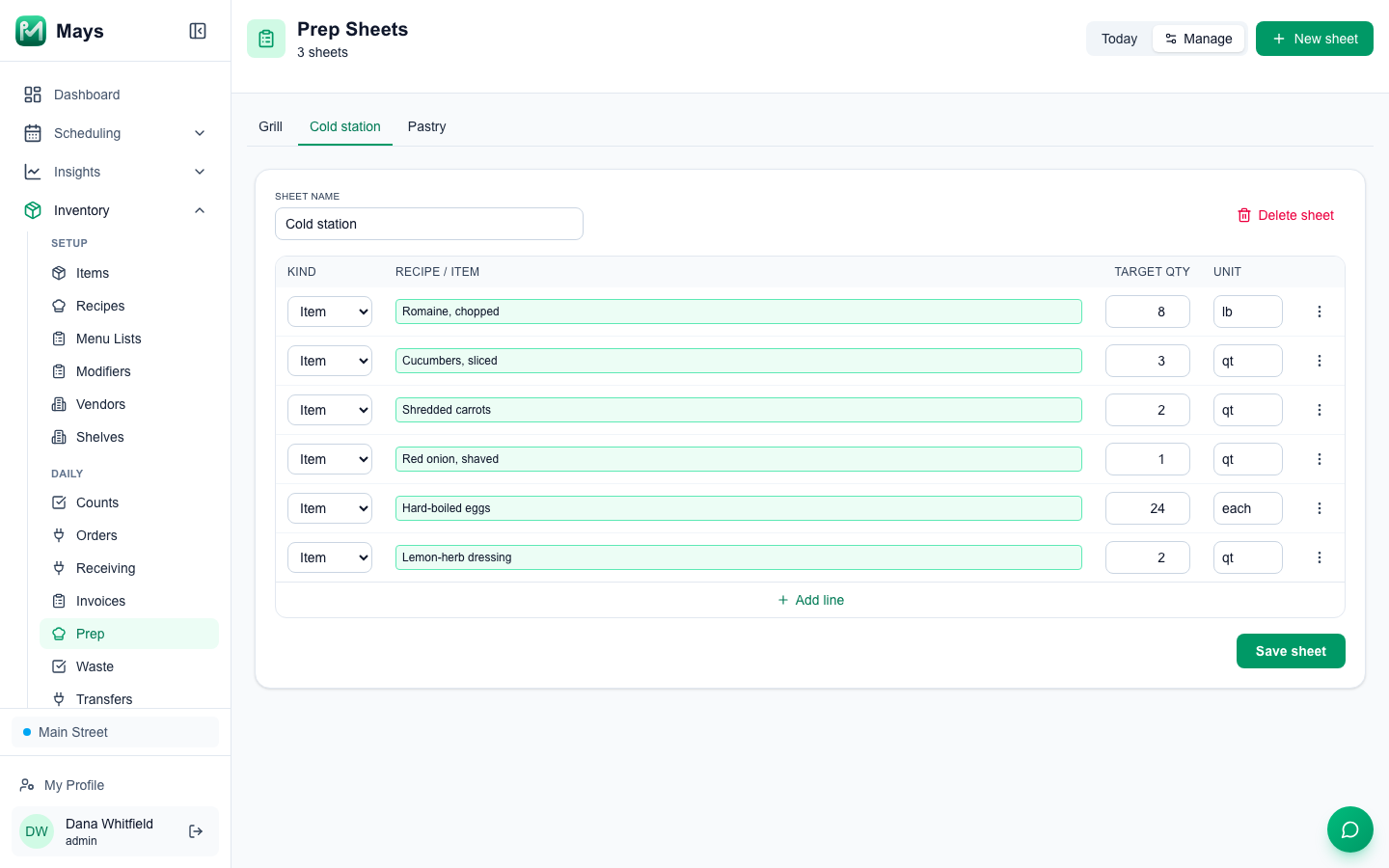
Prep sheets in Mays are lists of prep targets for one location, and you can keep one per station (the image at the top of this post):
- Go to Inventory → Prep, click New sheet and name it after the station, for example Cold station.
- In Manage, click Add line for each item, pick it, and enter its Target qty and Unit. A line can be an Item you stock and count, or a Recipe.
- Each sheet becomes a tab, so the grill, cold station and pastry each have their own.
- Each morning, open Today and pick the station's tab. Mays shows the target, what's on hand at the location and a Suggested amount: the target minus what's on hand, never below zero.
- Print gives the station a paper copy with the sheet's name and the date.
- On hand comes from your counts. It's your last stock count plus deliveries, minus waste and sales since, so count before you prep. See stock counts.
- Use the item's count unit on item lines. On hand is always in the count unit, and a target in another unit gives a wrong suggestion.
- Labeling as a task. Put "every container labeled and dated, nothing past its date" on the opening checklist under Tasks → Templates, with a Photo answer for the cooler shelf.
What Mays doesn't do yet: a recipe line always suggests its full target, because Mays doesn't track stock of things you make; there's nothing to tick off on a sheet in Mays, and prepping doesn't change stock; it doesn't keep shelf lives or print labels; and prep sheets are on the web only. Keep the initials, label dates and cooling times on the printed sheet.
One station, one sheet, one name
Split the list by station, set pars from real use, and let the closer's count drive the morning.
Start your free trial: 30 days, every module, no card needed. Or book a walkthrough and we'll set up your station prep sheets with you.