A morning briefing for your café in one question
Most owners have a morning ritual, and it's a tour of apps. The scheduling app to see who's on, the checklist app to see whether opening got done, the thermometer dashboard, the POS report for yesterday's sales, the texts from staff asking for time off, and a look at the walk-in (or a call to whoever's there). Ten minutes on a good day, and it's the same ten minutes every day.
If your operation runs on Mays, all of that is in one place already. Connect Mays to your AI app, and the tour becomes one question.
Part of our series Run your restaurant with your AI: one real situation per post, with the words you type and what happens in Mays. The prompts and results are illustrative examples.
What the owner types
At 6:50 am, the owner of Harbor Lane Café writes:
"Morning briefing for Midtown and Riverside: who's on and is anyone late, how's opening going, any fridge problems overnight, how did yesterday go, anything waiting for me, and anything we're about to run out of?"
What the AI does in Mays
That one sentence turns into six reads from Mays. Each is a separate, read-only question that changes nothing:
You asked | What Mays answers |
|---|---|
Who's on, anyone late | Today's published shifts per location with each one's status: on shift, on a break, late, no-show, done, plus who's on right now and how many open shifts are left |
How's opening going | Today's checklists per location: tasks done out of the total, how many are overdue, which checklists wait for your review, and anything rejected with the reviewer's note |
Fridge problems | Thermometers out of range right now (since when), excursions in the last 24 hours with their peak and duration, and sensors that stopped reporting |
How did yesterday go | Net sales, orders, average ticket, scheduled and worked hours, sales per labor hour, and (with pay) labor cost and labor % against the location's target |
Anything waiting for me | Time off, availability changes, swaps, shift pickups and checklists to review |
About to run out | Items at or below par, biggest shortfall first |
Times come back on each location's own clock, so a location in another time zone reads correctly.
What you see
The AI writes the briefing in a few lines, leading with what needs you, for example (illustrative):
"Midtown: 4 on, Jordan R. is 12 minutes late for the 6:30 open. Opening checklist 14/22, 2 overdue. Riverside: all on time, opening 100%. No fridge out of range now, but the Riverside walk-in went to 44°F for 25 minutes at 2:10 am. Yesterday: $6,840 across both, labor 29.1% against a 28% target at Midtown. Two time-off requests waiting. Oat milk and to-go lids are below par at Midtown."
In ChatGPT and Claude, Mays cards appear under the answer, with Open in Mays buttons: the schedule, the checklists, the temperatures and the sales.
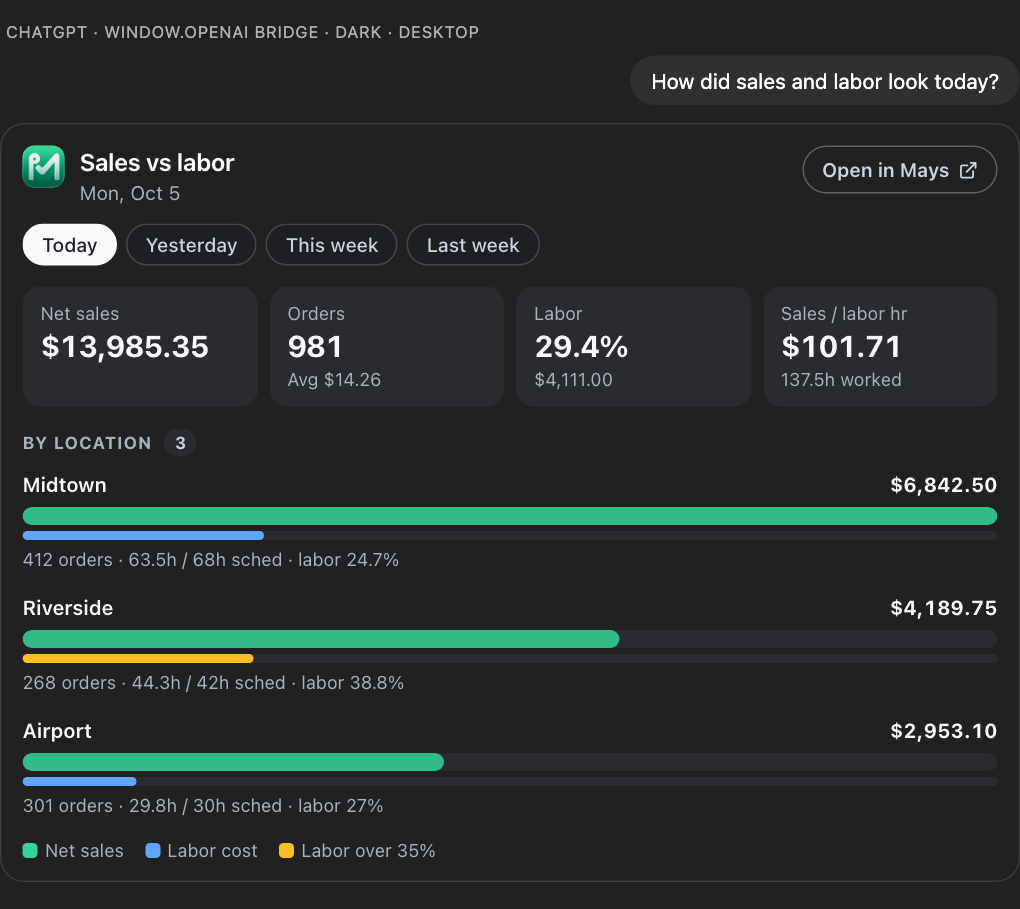
On the sales card you can switch between Today, Yesterday, This week and Last week without asking again.
Then act on it, in the same chat
A briefing is only useful if it leads somewhere. With actions allowed for your connection, the follow-ups are one message each, and each one shows you a preview and waits for your yes:
- "Approve Maya L.'s time off."
- "Who could cover Jordan's shift at Midtown without going into overtime?"
- "Add a task for the Riverside opener: check the walk-in door seal today."
- "What do I need to order from Sysco for Midtown?"
What it replaces
The tour of apps, and the copying that comes with it: the sales number copied from the POS into a group text, the late arrival screenshotted from one app and sent through another, the low-stock list written on a sticky note. The AI reads it all from Mays, so it's one source and one answer.
What it needs
- The parts you use in Mays. The briefing only covers what's set up: thermometers need connected devices, sales need a connected POS, stock needs par levels and counts.
- Your access. The AI sees what your role sees in Mays, for your locations only. Labor cost appears only if you can see pay and chose to include pay when you connected.
- People as names, not contacts. People appear as first name and last initial. The AI never gets phone numbers or emails.
What Mays doesn't do here
- It doesn't send you the briefing on a schedule. You ask, and it answers. Mays's own alerts and scheduled reports do that part.
- It doesn't decide for you. Reading changes nothing; every change needs your yes on a preview.
Make it a habit
- Connect Mays to ChatGPT, Claude or Grok: mays.app/ai (ChatGPT, Claude, Grok), and Connect Mays to ChatGPT, Claude or Grok for the details.
- Keep the question above handy, and change it to fit your morning.
- Ask it every morning, and act on the first line.
Try Mays free for 30 days, with no credit card, and connect it to the AI you already use.