Food safety self-inspection checklist: a monthly walk-through by Food Code area
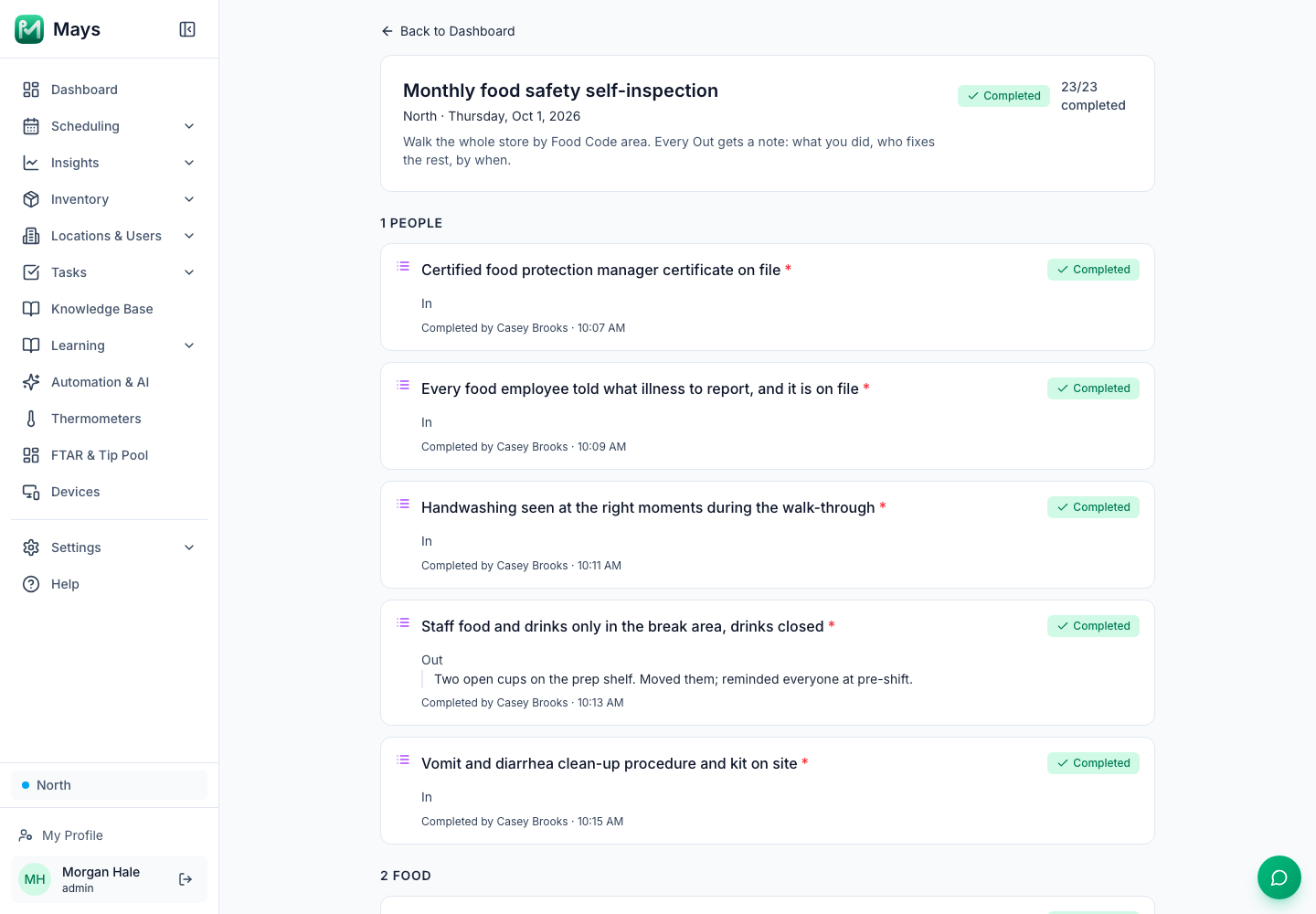
Your opening and closing lists cover the things that change every day: cooler temperatures, sanitizer buckets, handwashing sinks. A monthly self-inspection covers the rest of what an inspector can write up. That includes the manager certificate that expired last week, the backflow preventer nobody has had serviced, the gap under the back door and the oven cleaner on the shelf above the flour.
This template walks the whole operation once a month in the same order the FDA Food Code is written: people, food, equipment, water and waste, the building, and chemicals. If you're in Florida, our health inspection prep guide has a shorter weekly walk-through keyed to DBPR's violation categories. Use that one every week and this one once a month.
This is general information, not legal advice. Your health department enforces its own edition of the Food Code, and your inspector has the final word.
How to run it
Section numbers below are from the 2022 FDA Food Code. States adopt the Food Code on their own timetable, so check which edition yours enforces. The FDA has since published a 2026 edition. We checked every rule quoted here against it: they haven't changed in substance, and the one section that was renumbered is noted.
- Who: the owner or the certified food protection manager, not the shift lead who runs the opening list. Fresh eyes find more.
- When: once a month, on a different day and time each month, so you see the slow Tuesday morning and the Saturday rush.
- What to carry: a probe thermometer, sanitizer test strips, a flashlight and your phone for photos.
- How to score: each line is In, Out or N/A. Every Out gets a note, a photo where it helps, a name and a date to fix it by.
- How long: 45 to 60 minutes for a small restaurant. Don't rush it, and don't do it during the busiest hour.
The template
Proof is In / Out / N/A for every line, plus a number for readings and a photo where seeing is the proof.
1. People (Food Code chapter 2)
Check | What "In" looks like | Proof |
|---|---|---|
Certified food protection manager | The person in charge has a current certificate on file. The Food Code says "The PERSON IN CHARGE shall be a certified FOOD protection manager" (§2-102.12(A)). | In / Out |
Illness reporting | Every food employee has been told, in a way you can show, what to report. The person in charge ensures employees are "informed in a verifiable manner of their responsibility to report" (§2-103.11(P)). | In / Out |
Handwashing watched, not assumed | You saw hands washed at the right moments during the walk-through (§2-103.11(D)). | In / Out |
Staff food and drinks | Eaten only in a designated area; drinks in closed containers (§2-401.11). | In / Out |
Vomit and diarrhea clean-up | A written procedure and a kit on site. "A FOOD ESTABLISHMENT shall have written procedures for EMPLOYEES to follow when responding to vomiting or diarrheal events" (§2-501.11; §2-502.11 in the 2026 edition). | Photo |
2. Food (chapter 3)
Check | What "In" looks like | Proof |
|---|---|---|
Approved sources | Every invoice is from a licensed supplier: "FOOD shall be obtained from sources that comply with LAW" (§3-201.11(A)). Nothing made at home. | In / Out |
Cold holding | Probe one item in every cooler: 41°F or below (§3-501.16(A)(2)). | Number |
Hot holding | Probe each hot-held item: 135°F or above (§3-501.16(A)(1)). | Number |
Date marking | Ready-to-eat TCS food held over 24 hours is dated, nothing past Day 7 (§3-501.17). | In / Out |
Storage order | Raw animal food below ready-to-eat food and produce. | Photo |
Bare-hand contact | Ready-to-eat food handled with "deli tissue, spatulas, tongs, single-use gloves, or dispensing EQUIPMENT" (§3-301.11(B)). | In / Out |
Allergen information | The allergen list matches the current menu and recipes. | In / Out |
3. Equipment (chapter 4)
Check | What "In" looks like | Proof |
|---|---|---|
Probe thermometers | "FOOD TEMPERATURE MEASURING DEVICES shall be provided and readily accessible" (§4-302.12(A)), and they read correctly in ice water. | In / Out |
Sanitizer | The test kit is there and the bucket or machine reads the strength on the label. | Number |
Dish machine or three-compartment sink | Cleaned "At least every 24 hours" when in use (§4-501.14(C)), and the final rinse or sanitizer reading is in range. | Number |
Gaskets, doors and hinges | "EQUIPMENT components such as doors, seals, hinges, fasteners, and kick plates shall be kept intact, tight, and adjusted" (§4-501.11(B)). | Photo |
Ice machine, grinders, beverage nozzles | Cleaned on the maker's schedule, or often enough "to preclude accumulation of soil or mold" (§4-602.11(E)(4)). Check the date of the last cleaning. | In / Out |
4. Water, plumbing and waste (chapter 5)
Check | What "In" looks like | Proof |
|---|---|---|
Handwashing sinks | Accessible "at all times for EMPLOYEE use", and a handwashing sink "may not be used for purposes other than handwashing" (§5-205.11(A), (B)). | Photo |
Water filters and backflow preventers | Serviced on schedule, with records kept by the person in charge (§5-205.13). | In / Out |
Trash and recycling | Receptacles covered once full, and outside bins have "tight-fitting lids or doors" (§5-501.113(B)). | In / Out |
Leaks and drains | No drips under sinks, no standing water, floor drains clear. | In / Out |
5. The building (chapter 6)
Check | What "In" looks like | Proof |
|---|---|---|
Handwashing signs | A sign at every handwashing sink that staff use (§6-301.14). | In / Out |
Pests | No droppings, live or dead insects, or gnawed packaging. The Food Code asks you to keep pests out by "Routinely inspecting the PREMISES for evidence of pests" (§6-501.111(B)). | In / Out |
Doors, windows and gaps | Holes and gaps filled, windows closed and tight-fitting, and "Solid, self-closing, tight-fitting doors" (§6-202.15(A)). | Photo |
Floors, walls and ceilings | Clean behind and under equipment, no missing ceiling tiles. | In / Out |
Lighting and ventilation | Lights work and are shielded over food; hood filters in place and clean. | In / Out |
6. Chemicals (chapter 7)
Check | What "In" looks like | Proof |
|---|---|---|
Storage | Separated from food and never stored "above FOOD, EQUIPMENT, UTENSILS, LINENS, and SINGLE-SERVICE or SINGLE-USE ARTICLES" (§7-201.11(B)). | Photo |
Labels | Every spray bottle labeled with what's in it. | In / Out |
Rodent bait | If there's any, it's in "a covered, tamper-resistant bait station" (§7-206.12). | In / Out |
First-aid kit and staff medicines | Labeled and stored away from food. | In / Out |
Score it, then close it out
Count the Out lines, but don't stop at the number. The score is only useful if every Out turns into a fix with a name on it:
Out item | What we did now | Who fixes the rest | By when | Fixed? |
|---|---|---|---|---|
Walk-in door gasket torn at the bottom | Photographed; service called | Owner | Repair visit Friday | |
Oven cleaner on the shelf above the dry goods | Moved to the chemical shelf on the spot | Manager | Done | Yes |
Then compare this month with last month. The same line out two months running isn't a mistake, it's a missing routine. Put it on the opening or closing list, or on your cleaning schedule.
Readings that need fixing in the moment, like a cooler running warm, are covered in our line check template. Keep the daily records an inspector asks for too: the temperature logs, and the manager shift log for anything that happened between walk-throughs.
Where Mays fits
Build the walk-through once as a checklist template, and it shows up on the manager's phone on the same date every month:
- Go to Tasks → Templates, click Create Template and name it Monthly food safety self-inspection.
- Add one task group per area (1 People, 2 Food and so on) and one task per line of the template above.
- Make the In/Out lines Multiple Choice tasks with three options, In, Out and N/A, and the readings Number tasks.
- On the Settings tab, set Frequency to Monthly, tick the day of the month, and turn on Carry unfinished duties through the week so a walk-through that runs long can be finished later in the week.
- On the Assignments tab, pick your location, choose Specific people and pick the manager who walks it.
On the phone, each answer has a Notes (optional) box. That's where the Out lines get what you did and who fixes the rest. From the Dashboard, a manager opens the checklist to see every answer, reading and note in one place, with who completed each line and when (the image at the top of this post).
- Fixes become tasks. For each Out line that needs someone else, create a one-off task under Tasks → Create Task → Custom Task, assigned to one person, who gets a notification. A task created on the web is due the same day, so tick Carry unfinished duties through the week if the fix will take a few days.
- Redo what wasn't done right. A manager can Reject & Resend a task with a reason, and it goes back on that person's list.
- Coolers between walk-throughs. Wireless thermometers (bought separately) record each cooler every five minutes and alert your team when one runs warm. See temperature alerts.
Two limits to know: a monthly template runs on the dates you tick, not on "the first Monday", and an Out answer isn't flagged or counted for you, so read the notes on the checklist page.
Walk it once a month
Build the self-inspection once, put it on the calendar, and the Out lines turn into fixes with names and dates.
Start your free trial: 30 days, every module, no card needed. Or book a walkthrough and we'll build your monthly self-inspection with you.