Restaurant cleaning schedule template: daily, weekly and monthly, by area
An opening or closing checklist covers one shift. A cleaning schedule covers the whole building over a month: the fryer that gets boiled out on Sunday, the walk-in shelves that come out every month, the hood filters, the ice machine. Without one, those jobs depend on whoever remembers.
This template is for a small full-service restaurant: a cook line, a prep and dish area, a walk-in, a dining room with a small bar, two restrooms. It's split by area (so each part of the building has an owner) and by frequency (so the daily list stays short). If you run a café, bakery, pizza shop, juice bar or food truck, start from the opening, closing and cleaning lists by business type and use this post for the weekly, monthly and quarterly layers.
This is general information, not legal advice. Your health inspector, fire marshal and equipment manuals have the final word.
What the Food Code says about how often
Section numbers below are from the 2022 FDA Food Code. States adopt the Food Code on their own timetable (Florida, for example, enforces the 2017 edition), and the FDA has since published a 2026 edition; we checked the rules quoted here against it and they haven't changed in substance. The Food Code mostly says "as often as necessary", with a few hard limits:
- Food-contact surfaces used with TCS food (cutting boards, slicers, tongs, prep tables) are cleaned "throughout the day at least every 4 hours" (§4-602.11(C)).
- Cooking and baking equipment: food-contact surfaces "shall be cleaned at least every 24 hours", and "The cavities and door seals of microwave ovens shall be cleaned at least every 24 hours" (§4-602.12).
- Ice bins, ice makers, beverage nozzles, syrup lines, coffee grinders: "At a frequency specified by the manufacturer", or without instructions, often enough "to preclude accumulation of soil or mold" (§4-602.11(E)(4)).
- Everything else on equipment (the outside of the fryer, the shelves under the line): "at a frequency necessary to preclude accumulation of soil residues" (§4-602.13).
- Floors, walls and ceilings: "PHYSICAL FACILITIES shall be cleaned as often as necessary to keep them clean", and apart from spills, cleaning is done "during periods when the least amount of FOOD is exposed such as after closing" (§6-501.12).
- Hood filters and ducts: "Intake and exhaust air ducts shall be cleaned and filters changed so they are not a source of contamination by dust, dirt, and other materials" (§6-501.14(A)).
- Chemicals: stored so they can't contaminate food, in an area "that is not above FOOD, EQUIPMENT, UTENSILS, LINENS, and SINGLE-SERVICE or SINGLE-USE ARTICLES" (§7-201.11(B)).
And from OSHA's hazard communication rules: "All employers with hazardous chemicals in their workplaces must have labels and safety data sheets for their exposed workers, and train them to handle the chemicals appropriately" (OSHA, Hazard Communication). Degreasers, oven cleaner and drain cleaner are the usual ones in a kitchen; the chemical training and the dish station's own closing list are in hiring a dishwasher or porter.
The "as often as necessary" parts are where a written schedule earns its keep: it turns a judgment call into a date.
The template
Who is a role, not a name. Proof is a photo where seeing is the proof, a number where there's a reading, and a checkbox for the rest.
Daily
Area | Task | Who | Proof |
|---|---|---|---|
Line | Flat-top scraped, seasoned; grill grates brushed | Line cook | Checkbox |
Line | Fryer oil filtered; baskets washed | Line cook | Checkbox |
Line | Microwave cavity and door seal cleaned | Line cook | Checkbox |
Line | Line shelves, rails and reach-in handles wiped and sanitized | Line cook | Checkbox |
Prep and dish | Cutting boards, slicer and prep tables washed, rinsed, sanitized | Prep cook | Checkbox |
Prep and dish | Dish machine drained, curtains and screens cleaned | Dishwasher | Photo |
Prep and dish | Final rinse temperature or sanitizer reading at close | Dishwasher | Number |
Prep and dish | Floor drains cleared; floor swept and mopped | Dishwasher | Checkbox |
Walk-in and storage | Spills wiped; nothing on the floor | Closing cook | Checkbox |
Dining room and bar | Tables, chairs and booths wiped; high chairs sanitized | Server | Checkbox |
Dining room and bar | Bar mats, speed rails and drain boards washed | Bartender | Checkbox |
Dining room and bar | Soda gun nozzles soaked and wiped | Bartender | Checkbox |
Restrooms | Toilets, sinks, mirrors; soap, towels and paper restocked | Closer | Photo |
Outside | Trash and recycling out; dumpster lid closed | Closer | Checkbox |
Weekly
Area | Task | Who | Proof |
|---|---|---|---|
Line | Fryer boiled out with the maker's cleaner | Line cook | Checkbox |
Line | Oven interiors cleaned | Line cook | Checkbox |
Line | Hood filters run through the dish machine or soaked | Closing cook | Photo |
Prep and dish | Reach-in gaskets cleaned; under and behind the reach-ins | Prep cook | Checkbox |
Walk-in and storage | Dry storage shelves wiped; oldest stock in front | Prep cook | Checkbox |
Dining room and bar | Beer and soda line cleaning date checked against the schedule | Bartender | Checkbox |
Dining room and bar | Baseboards, window sills and menu covers | Server | Checkbox |
Restrooms | Walls, partitions and floor scrubbed | Closer | Checkbox |
Outside | Entrance and patio power-washed or scrubbed | Closer | Photo |
Monthly
Area | Task | Who | Proof |
|---|---|---|---|
Line | Behind and under the line: equipment pulled out, floor and walls | Kitchen manager | Photo |
Walk-in and storage | Walk-in emptied shelf by shelf; shelves, walls and floor washed | Prep cook | Photo |
Walk-in and storage | Walk-in and freezer door gaskets and fan guards cleaned | Prep cook | Checkbox |
Prep and dish | Ice machine cleaning date checked against the maker's schedule | Kitchen manager | Checkbox |
Dining room and bar | Light fixtures, vents and ceiling fans dusted | Server | Checkbox |
All areas | Chemicals: every bottle labeled, nothing above food, SDS binder current | Manager | Checkbox |
All areas | Pest check: droppings, gaps, door sweeps; pest log reviewed | Manager | Checkbox |
Quarterly
Area | Task | Who | Proof |
|---|---|---|---|
Line | Hood and duct cleaning date checked; next service booked | Owner | Checkbox |
Line | Gas line connections and fire suppression tag dates checked | Owner | Photo |
Walk-in and storage | Condenser coils cleaned (or service booked) | Owner | Checkbox |
All areas | Ceiling tiles, walls and corners above eye level | Kitchen manager | Checkbox |
A few notes on the timing:
- The 4-hour rule doesn't fit a daily list. Put "cutting boards and prep tables washed and sanitized" on the opening, mid-shift and closing lists, not here.
- Your manuals win. Fryer boil-outs, ice machine sanitizing and beer line cleaning follow the manufacturer. Hood and duct cleaning by a contractor follows your fire marshal's schedule.
- The pest check is not a pest control contract. The Food Code asks you to keep pests out by "Routinely inspecting the PREMISES for evidence of pests" (§6-501.111(B)); a licensed company handles treatment.
Adapt it to your restaurant
- No bar? Drop the bar rows and give the dining room's monthly jobs to the closing server.
- Small team? Spread the weekly list over two days (Monday and Thursday) so no single close gets all of it.
- Open seven days? Put the monthly walk-in clean on your slowest day, and schedule it as part of that shift, not after it.
Load it into Mays
Each frequency is one template. In Mays:
- Go to Tasks → Templates and click Create Template. Name it, for example Kitchen daily clean, and click Continue.
- Click Add Task Group and rename the group to an area (Line, Prep and dish). Type each task into Add a task (press Enter) and press Enter.
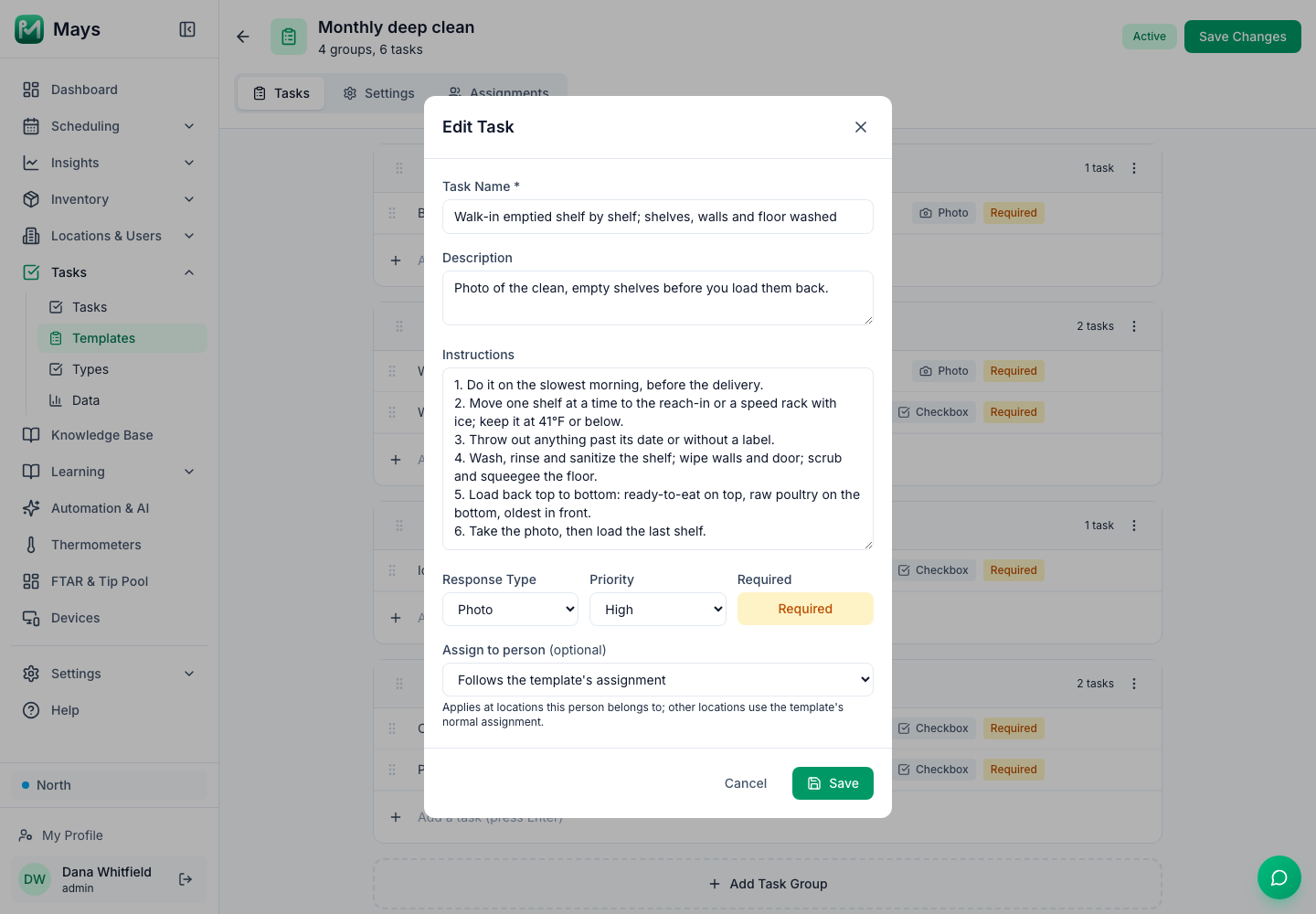
- Click each task's answer type (it starts as Checkbox) and pick Photo or Number to match the Proof column. For the big jobs, like the monthly walk-in clean, hover over the task, click the pencil and write the steps under Instructions in the Edit Task window; they show on the task in the app. Changes there stick once you click Save Changes (or Create Template).
- On the Settings tab, pick the Frequency:
- Daily for the daily list.
- Weekly, with the days ticked under Select days:.
- Monthly, with the dates ticked (several are allowed). A month without a 29th, 30th or 31st skips that date, so use the 1st to the 28th.
- Quarterly, with a date and a Starting quarter (for example Jan / Apr / Jul / Oct).
- Tick Carry unfinished duties through the week for the weekly and monthly lists. An unfinished task stays on the list, and anyone can still complete it, until Sunday. Carry-over ends with the week, not the month, so a monthly job dated the 1st has the most slack when the 1st falls early in the week.
- On the Assignments tab, pick the location, then A role or department (your kitchen or front-of-house department) so it's one shared list per location. Click Create Template.
# Kitchen daily clean
[Line]
Flat-top scraped, seasoned; grill grates brushed
Fryer oil filtered; baskets washed
Microwave cavity and door seal cleaned
Line shelves, rails and reach-in handles wiped and sanitized
[Prep and dish]
Cutting boards, slicer and prep tables washed, rinsed, sanitized
Dish machine drained, curtains and screens cleaned
Final rinse temperature or sanitizer reading at close
Floor drains cleared; floor swept and mopped
[Walk-in and storage]
Spills wiped; nothing on the floor

# Monthly deep clean
[Line]
Behind and under the line: equipment pulled out, floor and walls
[Walk-in and storage]
Walk-in emptied shelf by shelf; shelves, walls and floor washed
Walk-in and freezer door gaskets and fan guards cleaned
[Prep and dish]
Ice machine cleaning date checked against the maker's schedule
[All areas]
Chemicals: every bottle labeled, nothing above food, SDS binder current
Pest check: droppings, gaps, door sweeps; pest log reviewed
The box takes one task at a time: pasting several lines at once puts them all into a single task. Admins can instead click Import from Document on the Task Templates page and give the whole block to Mays AI, which drafts the templates for review (it uses AI credits).
Where Mays fits
- The schedule runs itself. Each template appears on the team's task list on the days it's due, at each location you picked. A new template, or a change, shows from the next day.
- Photos come from the app's camera, so the photo of the clean walk-in is from today, not the camera roll.
- Managers reject a task with a reason when the photo shows a dirty corner, and it goes back on the list.
- One shared list per location: anyone in the chosen department can pick up a task, and the dashboard shows each location's progress for today.
For writing tasks people do the same way, see checklists your staff will actually follow. To check the result the way an inspector would, use the self-inspection checklist.
Put the schedule on the calendar
Build the four templates once, and the monthly walk-in clean shows up on the right day without anyone keeping a calendar.
Start your free trial: 30 days, every module, no card needed. Or book a walkthrough and we'll load your cleaning schedule with you.