Catering order form and event sheet template: headcount, allergens, timeline, pickup or delivery
A catering order goes wrong in one of two places: when it's taken, and when it's handed off. The caller said "about 25" and "one person can't have nuts," and by the morning of the event the kitchen has a sticky note that says "25 boxes, Thursday." Two pages prevent that: an order form filled in while the customer is on the phone, and an event sheet the kitchen and the driver work from.
How to price catering, take deposits and decide what you'll offer is in starting a catering side business; handling the calls is in catering and phone orders without a host. This post is the paperwork in between.
This is general information, not legal advice. Check your license and your health department's rules for off-site catering.
Page 1: the order form
Fill in every line before you hang up or send the quote. A blank line is a question you'll have to call back about.
Field | Example |
|---|---|
Customer name, phone, email | Name, cell for the day of the event |
Company or occasion | Quarterly staff lunch |
Event date | Thursday |
Ready time (pickup) or drop-off time (delivery) | Drop-off 11:15, lunch at 11:30 |
Headcount, and when it's final | 24, final by Tuesday noon |
Menu or package | Boxed lunch: sandwich or salad, side, cookie, drink |
Choices per guest | 14 turkey, 6 chicken salad, 4 vegetarian |
Allergies and diets | Names or counts per item (see below) |
Pickup or delivery | Delivery |
Address, floor, suite, parking, contact on site | 3rd floor reception; loading zone in front |
Setup | Drop and go / set up on a table / full service |
Extras | Plates, napkins, cutlery, serving utensils, ice, coffee setup |
Price, tax, delivery fee, total | From the quote |
Deposit or payment, and cancellation terms | As on your written quote |
Taken by, date |
Allergens: ask every time, write down names or counts
The Food Code defines the major food allergens as "Milk, EGG, FISH (such as bass, flounder, cod, and including crustacean shellfish such as crab, lobster, or shrimp), tree nuts (such as almonds, pecans, or walnuts), wheat, peanuts, soybeans and sesame", and foods with protein derived from them (§1-201.10, 2022 FDA Food Code; the 2026 edition has the same list). Read the nine back to the customer and ask which apply:
Allergen or diet | Guests | Their name on the box? | Notes |
|---|---|---|---|
Milk | |||
Egg | |||
Fish | |||
Crustacean shellfish | |||
Tree nuts | 1 | Yes | Severe; no almond milk in the coffee setup |
Peanuts | |||
Wheat | 2 | Yes | Gluten-free bread, separate prep |
Soybeans | |||
Sesame | |||
Vegetarian, vegan or other | 3 |
Use your allergen matrix to check every item on the order, including the dressing, the cookie and the bread. Then pack and label the allergy boxes separately, with the guest's name or the allergen on the label.
Page 2: the event sheet
This is what the kitchen and the driver work from. Copy it from the order form and work the times back from the drop-off.
The timeline
Time | What | Who |
|---|---|---|
Day before, by 2 pm | Headcount final; order extra product before the vendor cutoff | Manager |
Day before, close | Prep anything that keeps: dressings, cookie dough, sliced vegetables; label and date | Closing cook |
Event day, 8:30 | Bake, cook and assemble | Two cooks |
10:00 | Allergy boxes made first, on a cleaned station, and set apart | Lead cook |
10:30 | Pack and check against the order form; take temperatures | Lead |
10:45 | Leave | Driver |
11:15 | Drop off, set up, get a signature or a photo | Driver |
Put the prep and delivery time on the schedule as real shifts, so the café still has its normal crew. Our holiday and event staffing guide covers planning around big orders.
Holding temperatures and time
Section numbers are from the 2022 Food Code.
- Hot food stays hot and cold food stays cold. Time/temperature control for safety food must be held "At 57°C (135°F) or above" or "At 5°C (41°F) or less" (§3-501.16(A)), including in the car. Use insulated carriers, and probe and write down temperatures when you pack.
- Time instead of temperature, only with written rules. If you use time as the control, the Food Code requires written procedures in advance, a mark showing the time "that is 4 hours past the point in time when the FOOD is removed from temperature control", and the food "shall be cooked and served, served at any temperature if READY-TO-EAT, or discarded, within 4 hours" (§3-501.19(B)). Many health departments want to approve this first; ask yours. The 2026 edition keeps the four-hour rule.
More on keeping food hot and cooling it safely is in our hot holding and cooling guide.
The pack-out and handoff
Check | Done |
|---|---|
Count every item against the order form, by choice | |
Allergy boxes labeled and packed separately | |
Hot items at 135°F or above, cold at 41°F or below, temperatures written here | |
Time marks on anything held by time | |
Utensils, plates, napkins, serving tools, ice | |
Receipt or invoice, and the customer's day-of contact | |
Photo of the packed order | |
Handed to (customer name or delivery contact), time, signature or photo |
After the event
Call or email the next day. Ask how it went, whether the headcount was right, and whether they'd order again. Write the answers on the order form and file it with the event sheet. Next time the same customer calls, you'll know their usual order and their allergy.
Where Mays fits
Mays catering covers the order from the first call to delivery. It's configured with our team, and payment runs through a connected Square account.
- Leads move through Pending assignment, Quote sent, Quote accepted, Paid, In prep, Ready and Delivered. Calls to the catering hotline are answered by the AI, which takes the event date, time, guest count and ZIP code and texts the caller a link to add their address and dietary notes.
- Packages carry the price per serving, minimum and maximum guests, what's included and dietary tags.
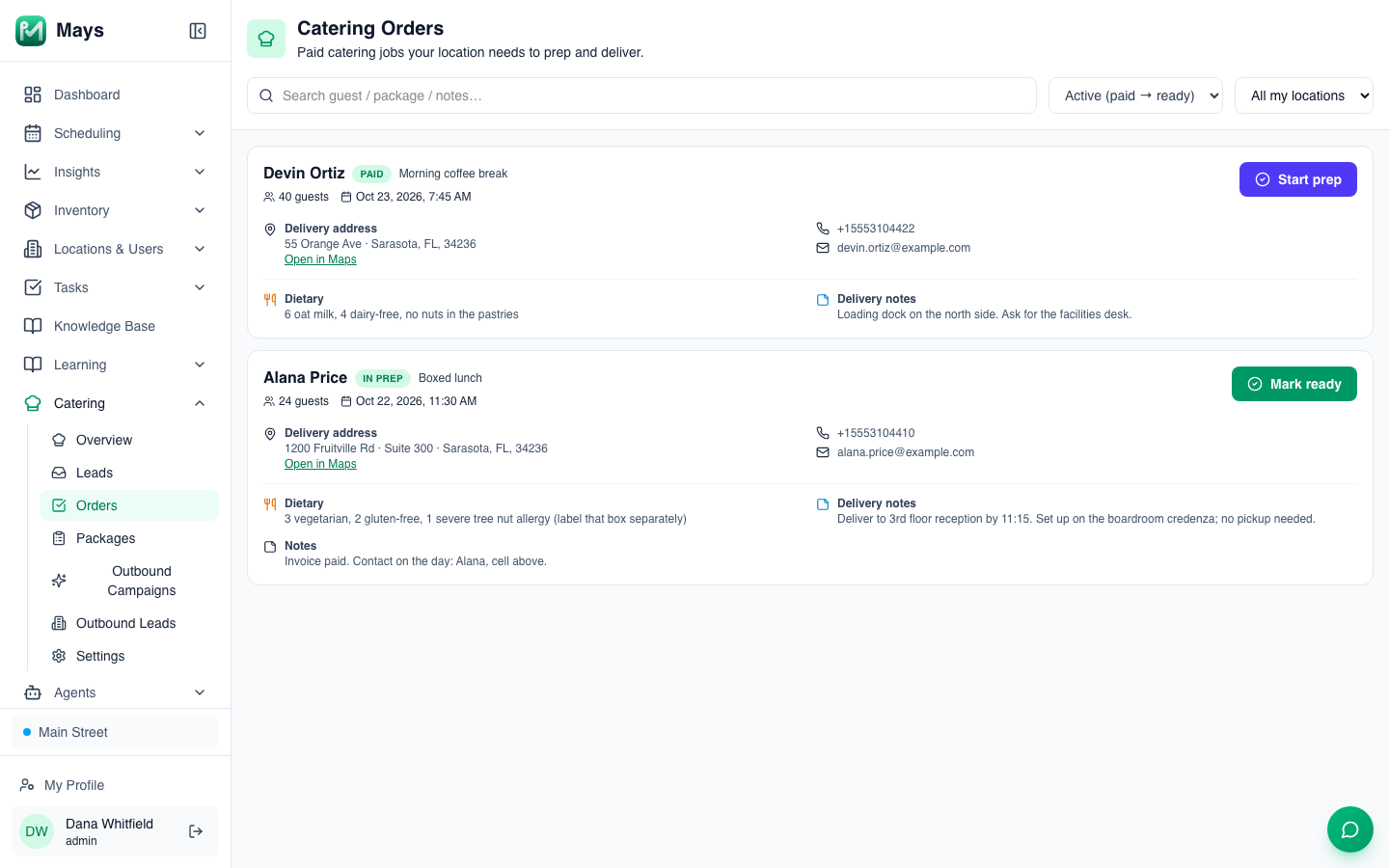
- Catering → Orders (the image at the top of this post) lists each location's paid jobs with the guest count, event time, delivery address, phone, email, dietary notes and delivery notes, and moves each one through Start prep, Mark ready and Mark delivered.
- The schedule: add the order to the Events row on the day, and the prep and delivery as shifts or open shifts.
- The pack-out checklist: build it once under Tasks → Templates, with Number answers for the temperatures and a Photo of the packed order, and send it with Tasks → Create Task → From Template on event days.
Know the limits: dietary needs are one free-text note per order, not a count per allergen, so copy them onto the event sheet; and catering orders don't appear on the schedule by themselves.
Two pages, every order
Take the order on page 1, run it from page 2, and keep both together.
Start your free trial: 30 days, every module, no card needed. Catering is set up with our team, so book a walkthrough and we'll connect it with you.