Starting a catering side business from your café (Florida)
Once you've been open a few months, the requests start: "Do you do catering?" An office wants breakfast for 30 on Thursday. A parent wants 50 cookies for a school event. A realtor wants coffee for an open house.
Catering can be the biggest ticket of your week, and it uses the kitchen, the staff and the recipes you already have. It also adds new risks: food that travels, deposits and invoices, and a crew that's out of the building during service.
Our earlier guide to catering and phone orders covers taking catering calls during the rush. This one is about turning catering into a real side business: what Florida requires, keeping food safe on the road, pricing it, getting paid, and staffing the day.
This is general information, not legal advice. Check your own situation with DBPR and your county. Updated September 24, 2026: the DBPR, Florida rule and FDA pages cited below were re-checked.
Step 1: Check what your license covers
In Florida, restaurants and cafés are licensed by the Department of Business and Professional Regulation (DBPR), Division of Hotels and Restaurants. Its catering guide (form HR 5030-037, November 2020) is the place to start (DBPR: Guide to Public Food Service Catering Establishments):
- What counts as catering: food or drink "prepared for service elsewhere in response to an agreed upon contract, function, or event."
- Your license already covers it: any public food service establishment licensed by the Division "can provide catering services without holding a separate catering license from the Division."
- Only in a licensed kitchen: "All food storage and food preparation operations must be conducted in an approved, licensed food service establishment. No food operations can be conducted in a private residence." So no baking at home for a big order.
- Sharing a kitchen is different: an independent caterer who uses another licensed establishment's premises needs its own license.
- Your catering van isn't a food truck: a vehicle that drives around selling food to the public must be licensed as a Mobile Food Dispensing Vehicle.
The current rule says the same thing: "A licensed public food service establishment that also provides catering services is not required to hold a separate catering license from the division" (Rule 61C-1.002, F.A.C., (6)(a)4., effective October 20, 2024).
Two more calls before your first order: ask your insurance agent whether your policy covers food you serve off-site and staff driving for work, and ask your accountant how sales tax applies to catering and delivery charges.
Step 2: Keep food safe on the road
Florida's restaurants are inspected under the 2017 FDA Food Code, adopted effective November 1, 2019 (DBPR: inspections). The Food Code's definition of a food establishment includes a "catering operation if the operation provides FOOD directly to a CONSUMER" (2017 FDA Food Code, §1-201.10(B)), so the same temperature rules follow your food out the door:
Rule | 2017 Food Code |
|---|---|
Hot food held at 135°F or above | §3-501.16(A)(1) |
Cold food held at 41°F or below | §3-501.16(A)(2) |
Cooked food cooled from 135°F to 70°F within 2 hours, and to 41°F within 6 hours total | §3-501.14(A) |
Food cooked, cooled and reheated for hot holding reaches 165°F for 15 seconds | §3-403.11(A) |
Time instead of temperature: up to 4 hours out of temperature control, with written procedures, marked times, and discarded after | §3-501.19 |
Florida lets operators use DBPR's form HR 5022-090 for those written time-control procedures, kept on site for the person in charge and for inspectors (Rule 61C-4.010, F.A.C., (1)(a)1.).
In practice, for a café:
- Hot food goes in insulated carriers, packed hot, straight from the oven or hot-holding.
- Cold food goes in coolers with ice packs, or in a refrigerated vehicle for long drives.
- Take temperatures at pack-out and on arrival, and write them down. Our guide to food temperature logs covers logging.
- Keep the drive short. Deliver as close to the serving time as the customer allows.
- Label everything with the item name and allergens, and pack serving utensils for each dish.
If the customer serves the food themselves hours later, say in writing how long it can sit out and what to do with leftovers.
Step 3: Decide what you'll cater
The easiest catering menu is the one your team already makes every day. Start with three to five packages:
- Breakfast: coffee boxes, pastries, a fruit platter
- Boxed lunches: a sandwich, a side and a cookie, labeled per person
- Platters: sandwiches, salads, cookies
- One dietary option: vegan, gluten-free or both, clearly labeled
Then set the limits, and write them down:
Limit | Example |
|---|---|
Minimum order | 10 guests |
Lead time | 48 hours; 5 days for 50+ guests |
Delivery radius | 10 miles, or a delivery fee beyond it |
Daily capacity | One large order (50+) per morning, with the normal crew |
Final headcount | Due 3 business days before the event |
Capacity matters most. An order for 80 boxed lunches is 80 sandwiches built before your lunch rush, not during it.
Step 4: Price per person, with everything in it
Catering prices are usually per person, and the price has to cover more than food. With made-up numbers, a boxed lunch for 25 people at $16 a person:
Line | Made-up amount |
|---|---|
Sales: 25 × $16.00 | $400.00 |
Food at 30% | −$120.00 |
Boxes, labels, napkins, utensils ($1.50 a box) | −$37.50 |
Prep labor: 3 hours at $18 | −$54.00 |
Delivery and setup: 1.5 hours at $18 | −$27.00 |
Left toward rent, overhead and profit | $161.50 |
Plus mileage, if you use your own car. Charge a delivery fee on top, or build it into the per-person price, but don't forget it. Our guide to plate costing shows how to get the food line right.
Check two things before you publish prices:
- The minimum order still pays. Ten boxed lunches take nearly as much delivery time as 25.
- Add-ons are priced: extra coffee, a second dessert, rush orders, and setup at the venue.
Step 5: Quotes, deposits and invoices
Put every order in writing before you shop for it:
- The quote: the package, price per person × guests, sales tax, delivery fee, what's included, the date and time, and how long the quote is valid.
- Deposit and balance: there's no standard, so choose one and put it on every quote. For example, a deposit to hold the date and the balance due before the event, or full payment upfront for small orders.
- Headcount changes: the date after which the guest count can only go up.
- Cancellation: until when the customer can cancel, and what happens to the deposit after that.
- The invoice: the same numbers as the quote, with a clear due date and how to pay.
Nothing goes on the prep list until the quote is accepted in writing.
Step 6: Staff the event day
A catering order is a second shift running inside your normal day:
- Prep goes on the schedule as its own shift, the day before or before the doors open, not squeezed into the rush.
- Delivery and setup is its own shift too, with someone who has a license, a car and a thermometer.
- Service stays covered. If two people leave for an hour, the café still needs its normal crew.
- One person owns the order from prep to handoff, with the customer's phone number.
Large orders can push people into overtime. Check the week's hours before you publish. Our holiday and event staffing guide has the overtime rules and a planning method.
Step 7: The pack-out checklist
Before the order leaves the building:
- Count every item against the quote
- Temperatures taken and written down, hot and cold
- Labels on every item, with allergens
- Serving utensils, plates, napkins and cups, if they're included
- Sugar, milk and stirrers for coffee service
- The invoice or receipt, and the customer's contact
- A photo of the packed order, in case there's a question later
Afterwards, send a thank-you and ask how it went. If they're happy, share your review link, the same way you would with any customer and with no incentive. The Google reviews guide covers the rules.
Where Mays fits
Catering: set up with our team
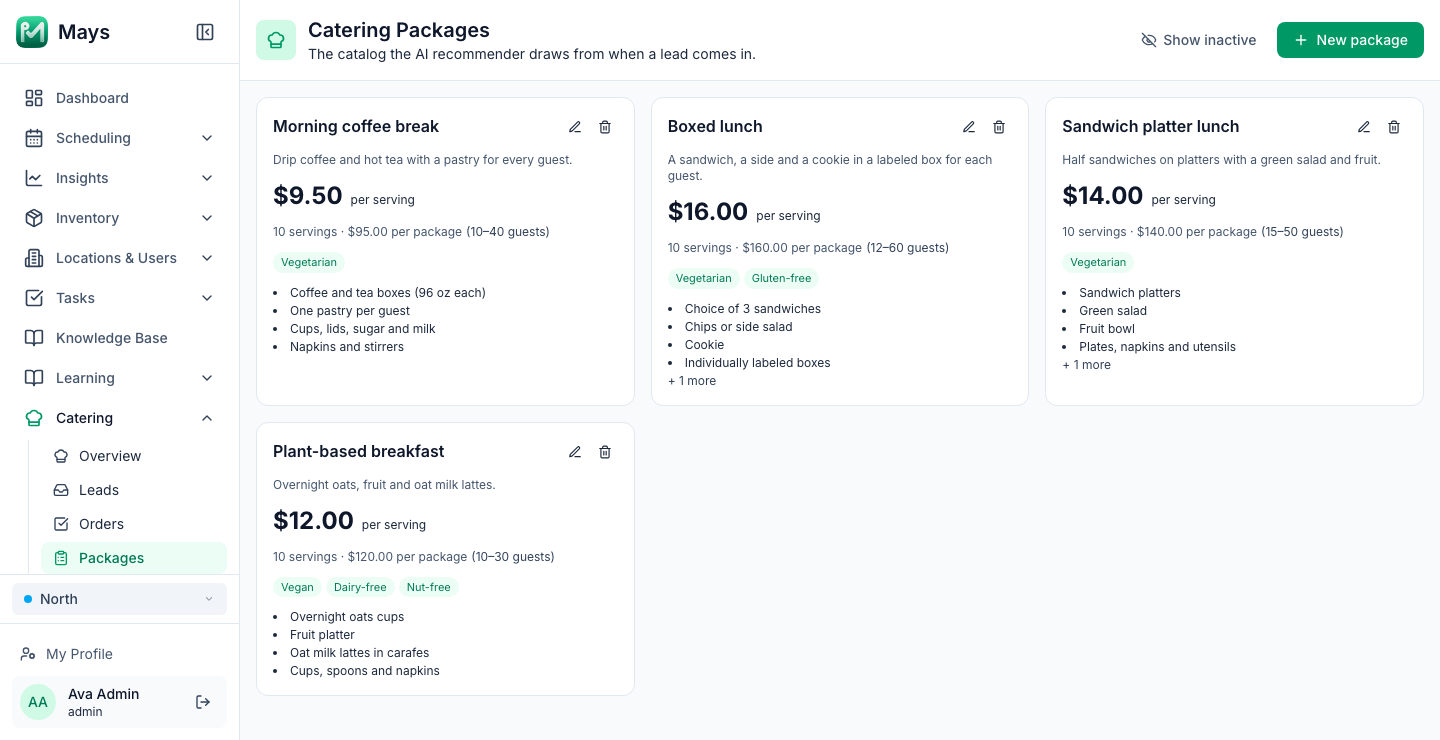
- Packages (Catering → Packages, the image at the top of this post): each has a price per serving, a serving size, minimum and maximum guests, what's included and dietary tags such as vegan or gluten-free.
- Leads: calls to the catering hotline are answered by the AI, which collects the event details and texts the caller a link to add their address and dietary needs. Each lead moves through Pending assignment, Quote sent, Quote accepted, Paid, In prep, Ready and Delivered, and Suggest packages picks two from your catalog.
- The quote page: the customer sees the options with the price per serving × guests plus the sales tax you set in Catering → Settings, and chooses one.
- Payment through Square: accepting a quote creates a Square invoice for the full amount, due the day before the event. There's no separate deposit step and no delivery-fee field, so build delivery into your package prices.
- Orders: each location's queue lists paid jobs with the event time, delivery address and dietary notes, and moves them through Start prep, Mark ready and Mark delivered.
Catering needs a connected Square account, and the hotline, texting and email are configured by our team, so book a walkthrough to set it up.
The rest of the event day
- On the schedule: add the order to the Events row with +, with a note like "Boxed lunch ×25, deliver 11:30." Staff with a published shift that day get a morning reminder. Catering orders don't appear there on their own, so add them yourself.
- Prep and delivery shifts: add them as shifts, or as open shifts for people who want the hours.
- The pack-out checklist: build it once in Tasks → Templates, with Number answers for the temperatures and a Photo of the packed order. On event days, Tasks → Create Task → From Template sends it to the person running the order.
Your catering checklist
- Your DBPR license checked against the catering guide; all prep in your licensed kitchen
- Insurance and sales tax questions answered
- Insulated carriers, coolers and a thermometer for transport
- Three to five packages, with minimums, lead times and a delivery radius
- Per-person prices that cover food, packaging, labor and delivery
- Written quotes with deposit, headcount and cancellation terms
- Prep and delivery on the schedule as real shifts
- A pack-out checklist used on every order
Add catering without adding chaos
Put your packages, prep shifts and pack-out checks in one place.
Start your free trial: 30 days, every module, no card needed. Catering is set up with our team, so book a walkthrough and we'll connect Square and your catering hotline with you.