Wi-Fi, laptops and seating at a café: choosing a policy, wording the signs and what staff say
Every café owner gets the question in the first week: "What's the Wi-Fi password?" Behind it is a bigger one. Is your café a place to work for three hours, a place to grab a coffee and go, or something in between?
There's no right answer for every café. A quiet neighborhood café with empty afternoons may love its laptop regulars. A small room near offices may need every seat at lunch. What matters is that you decide on purpose, write it down, and make it easy for staff to apply it the same way to everyone.
This is the fifth post in our series on the guest experience at a new café. The earlier posts covered the counter, the morning rush, accuracy and consistency. This one covers what happens after the guest sits down.
The trade-offs
Laptop guests aren't good or bad for business. It depends on when they come and what they buy.
Welcoming laptops | Limiting laptops | |
|---|---|---|
Slow hours | Fills seats that would be empty, makes the room feel alive | Room may feel empty |
Peak hours | Seats are taken by one guest for hours while others leave | Tables turn, more guests can sit |
Regulars | Builds a loyal daily crowd | Some regulars will go elsewhere |
Spend | Some buy several drinks and food over a visit; some buy one drink | More guests can use each seat at busy hours |
Outlets and noise | Cords across walkways, video calls at full volume | Fewer of both |
Staff | Fewer awkward conversations | Staff must apply the rule, politely |
Before you decide, watch your own room for two weeks. Note how full you are at each hour, how many tables have laptops, and whether guests walk out because there's nowhere to sit. Your own numbers beat any rule of thumb.
Options between "always" and "never"
Most cafés end up somewhere in the middle:
- Laptop-free hours. Laptops welcome except at your busiest times, for example weekday lunch. The simplest rule to explain.
- Laptop-free tables. A few tables, often the best ones by the window, stay screen-free all day.
- A laptop zone. Laptops welcome at the bar counter or the long table with outlets, not at the two-tops.
- A time guide at peak. "We ask laptop guests to limit visits to 90 minutes at lunch." Softer than a hard rule, and harder to enforce.
- Wi-Fi with a purchase. The password is on the receipt, and changes regularly.
- No Wi-Fi. A clear choice for a small, fast café. Say it on the menu board so nobody has to ask.
Whatever you pick, write it in one or two sentences. If staff can't explain it in one breath, guests won't understand it either.
Set up guest Wi-Fi safely
Your guest network should never be the network your POS, card readers or office computer use. The FTC's small-business guidance is direct about it: "If you offer Wi-Fi on your business premises for guests and customers, make sure it's separate from and not connected to your business network." (FTC: Cybersecurity for Small Business)
The same page also says:
- Secure the router: "After you set up a router, change the default username and password, turn off remote management, and log out of the administrator account."
- Use encryption: "Make sure your router offers WPA2 or WPA3 encryption, and that it's turned on."
- Keep business devices separate: "Limit your primary business network to business-owned, operated, or managed devices."
In practice, that means two networks with two names and two passwords, set up by whoever installs your internet, and a guest password you can change without touching the POS. Ask your internet provider or POS company to check the setup before you open.
Word the signs politely
A sign does the asking so staff don't have to. It should sound like you, explain the reason when there is one, and say what is welcome, not just what isn't.
Instead of | Try |
|---|---|
"NO LAPTOPS" | "Laptop-free tables 11:30 to 1:30 on weekdays, so everyone can find a seat at lunch. Laptops welcome the rest of the day." |
"Wi-Fi for customers only" | "Wi-Fi password is on your receipt. Enjoy!" |
"2 hour limit" | "On busy afternoons we may ask laptop guests to share their table. Thanks for understanding." |
"Don't save tables" | "Please order before you find a seat, so tables are free for guests with food." |
(nothing about outlets) | "Outlets are on the back wall." |
"No calls" | "Please use headphones for calls and videos." |
Put the rule where people see it before they sit: at the door, on the menu board, at the register. A sign on the table is too late; the guest has already unpacked.
Give staff a script
Even with signs, someone has to talk to the guest at the table. Make it easy, and the same for everyone.
When laptop-free hours start: "Hi, just a heads-up, we keep these tables laptop-free from 11:30 to 1:30 so lunch guests can sit. You're welcome at the counter seats, and laptops are back from 1:30."
When a guest has stayed a long time at a busy hour: "Hi, we're getting busy and need a few tables for lunch. Would you mind moving to the counter or sharing this table? Thank you."
When a guest is saving several tables: "Hi, we need these for guests with food. Could we keep it to one table per group?"
When a video call is loud: "Sorry to interrupt, could you use headphones for calls? Thanks so much."
The rules behind the scripts:
- Same rule for everyone. Don't apply the policy to some guests and not others.
- Say the reason, then the option. "So lunch guests can sit" and "the counter is open" are what make it feel fair.
- Don't argue. If a guest refuses, the shift lead or manager handles it. Our post on handling customer complaints covers guests who won't calm down.
- Thank them. Every time.
Add the scripts to your service standard, and practice them once with the team, out loud. It's much easier to say the first time if you've said it before.
Tell guests before they arrive
Put your policy where people look it up. Your Google Business Profile has attributes for things like Wi-Fi; our Google Business Profile post shows how to set them. If you post your hours on Instagram or your website, add one line about laptops. A guest who knows the rule before they arrive rarely needs the script.
Review it after a month
Look back after four weeks:
- Are guests leaving at peak because there's nowhere to sit? Tighten the hours.
- Are afternoons empty? Loosen them.
- Do reviews mention the policy? Read them; our guide to replying to your first 50 Google reviews covers answering them.
- Do staff avoid the conversation? Revisit the script and who handles refusals.
Where Mays fits
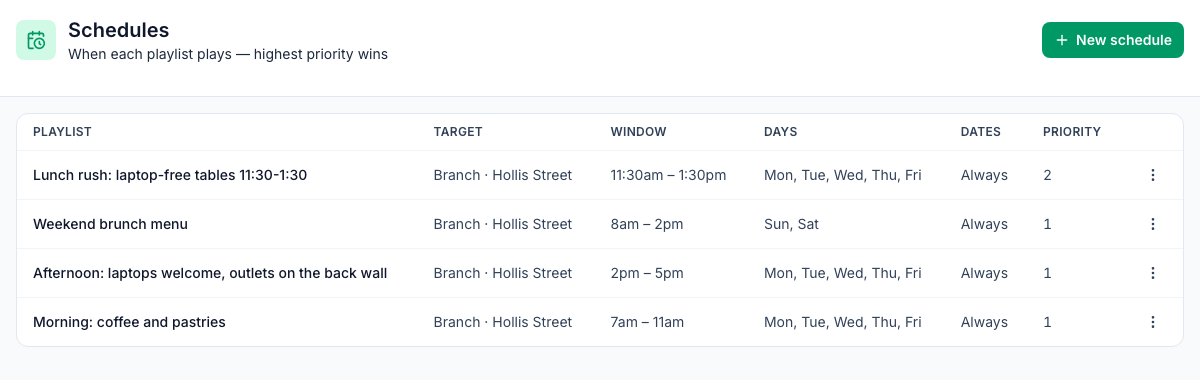
- Signs that change with the time of day: with the digital signage add-on, Signage → Schedules plays a playlist in a time window on the days you pick, at the whole location or one screen (the image at the top of this post). A "laptop-free tables" board can show from 11:30 to 1:30 on weekdays and a "laptops welcome" board in the afternoon. The times follow the location's time zone, and when two schedules overlap, the higher priority wins.
- Scripts staff can find: put the policy and the scripts in a Knowledge Base article, and add a question about them to your service-standard quiz in Learning.
- The phone question: if you use the AI receptionist add-on, add an FAQ with your Wi-Fi and laptop answer, and trigger phrases in the words callers use ("Wi-Fi", "internet", "laptop"), so the receptionist can answer it without anyone picking up.
Your Wi-Fi and seating checklist
- Two weeks of watching the room: seats, laptops and walk-outs by hour
- A policy you can say in one or two sentences
- Guest Wi-Fi on its own network, with WPA2 or WPA3 and a changed router password
- Signs at the door and the register that say what's welcome
- Four scripts, practiced, and the shift lead handling refusals
- The policy on your Google profile and website, and a review after a month
Set the room up with Mays
Schedule the right sign for the right hour, and keep the scripts where the team can find them.
Start your free trial: 30 days, no card needed. Next in this series: accessibility basics for a café under the ADA, from the entrance to the counter, service animals and your website.