The AI phone receptionist answers callers from a list of questions and answers that you write. Add answers, test what callers might say, and turn the questions it missed into new FAQs.
Who: admins, and managers for their own locations, on the web. Where: the location's IVR (AI Receptionist) tab, under FAQ and Missed questions. You need the AI phone receptionist add-on for the location.
How the receptionist picks an answer
- The receptionist turns what the caller says into text and picks out the keywords. Small words such as is, there, the, do, where, what and you don't count, and word endings don't matter (park, parking and parked count as the same word).
- One strong hit is enough. An FAQ matches when the caller says:
- one of its trigger phrases, with all the phrase's keywords in any order (uber eats needs both uber and eats), or
- the keywords of its question. Some of them can be enough: one of two is, one of three isn't.
- Extra words don't stop a match. Is there parking nearby, is there somewhere to park and where do I park all match Where can I park? with the trigger phrase parking.
- If several FAQs match, the one that shares the most keywords with the caller is read out. What time can I book a table goes to Do you take reservations? (trigger phrase book a table) rather than What are your hours? (trigger phrase time), because it shares two keywords instead of one. On a tie, an FAQ for this location wins over an Org-wide one.
- If none matches, the caller is put through to your fallback phone, or told to call back if you haven't set one.
Tips for trigger phrases
- Add the words your callers really use, such as parking, valet and garage, then try them under Test phrase.
- Use one word for a strong signal. A one-word trigger phrase matches whenever the caller says that word.
- Use two words for a common word. Lot alone would match I'd like a lot of food; parking lot only matches when the caller says both.
- Small words alone do nothing. A trigger phrase like when or where has no keywords, so it never matches.
- Don't reuse a word across FAQs unless you want them to compete. If two FAQs share a caller's only keyword, the one listed first for this location wins.
The trigger phrases also help the phone line recognize words that are special to you, such as menu items.
The starter FAQs
When a location subscribes, Mays adds six starter FAQs, marked Default. Edit their answers before customers call:
Question | Starter answer | What to change |
|---|---|---|
What are your hours? | Check our website for up-to-date hours. | Your real opening hours. |
Where are you located? | Find us on our website or a delivery app. Press 1 for our address by text. | Add a landmark or parking tip. |
What is your phone number? | Please leave your message after the tone, or call back later. | Rewrite it. The receptionist doesn't take messages. |
Do you deliver? | Order on our website or a delivery app. | Name the apps you use. |
Is there parking? | Yes, parking is available near our location. | Say where. |
Are you open today? | Check our website for today's hours. | Your hours, or holiday closures. |
You can edit a default FAQ or switch it off, but not delete it.
Add or edit an FAQ
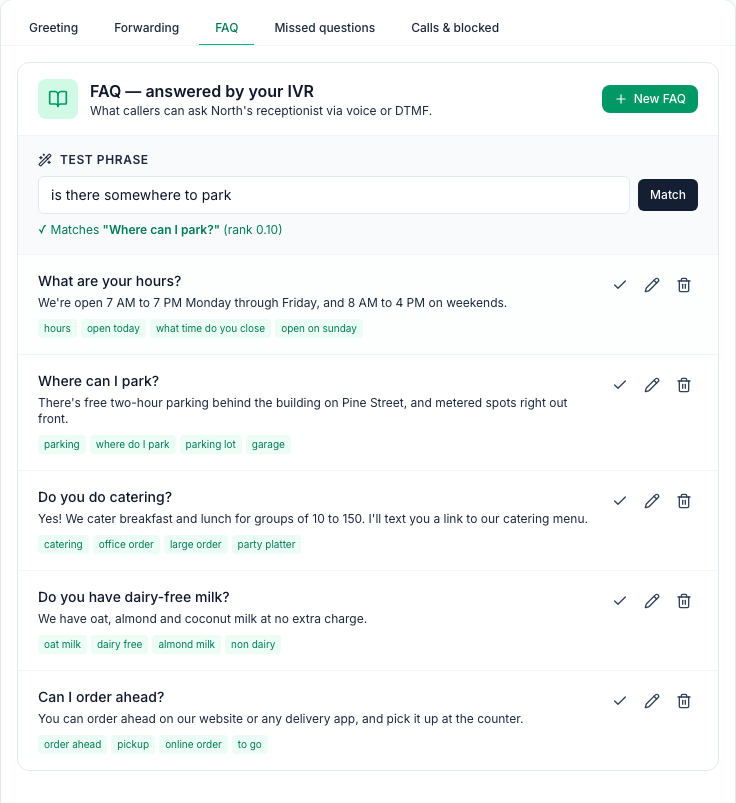
- On the IVR (AI Receptionist) tab, open FAQ.
- Click New FAQ, or the pencil on an FAQ.
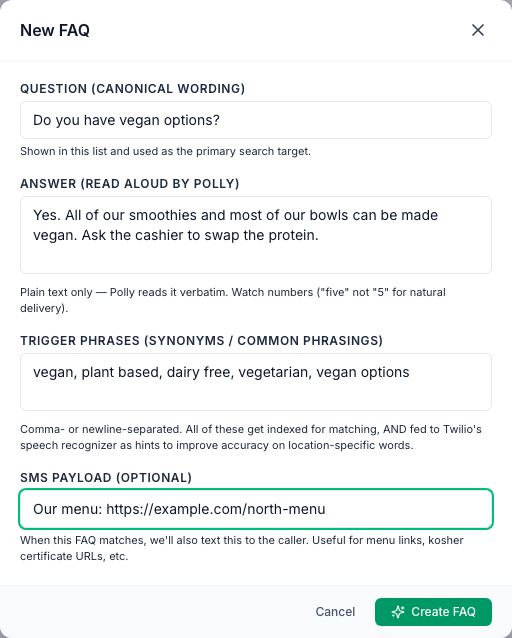
- Question: how you'd write the question, such as Do you have vegan options?
- Answer: what the receptionist says. A computer voice reads it word for word, so use plain sentences and write numbers as words ("seven", not "7").
- Trigger phrases: other words and phrases callers use, separated by commas or new lines, such as vegan, plant based, dairy free.
- SMS payload (optional): a text sent to the caller when this FAQ is answered, such as a link to your menu.
- Click Create FAQ (or Save changes).
- Switch an FAQ off with the tick button next to it. It's crossed out, marked Off, and isn't used until you switch it back on.
- Delete one of your own FAQs with the bin button.
- New FAQs are for this location only. An FAQ marked Org-wide is used by all your locations, so changing it changes it everywhere. Only an admin can change, turn off or delete one; a manager sees it with Set by an admin.
Test a phrase
Under Test phrase, type something a caller might say and click Match. You see either ✓ Matches "…" with the FAQ that would be read out, or No match — add this as an FAQ?, which opens an empty New FAQ window.
The rank is 0.10 for each keyword the caller shares with the FAQ when they said a whole trigger phrase or the whole question: 0.10 for one keyword, 0.20 for two. A match on only part of the question ranks lower. Below 0.10 it still counts, but it's also listed under Missed questions, so add a trigger phrase to make it strong.
Missed questions
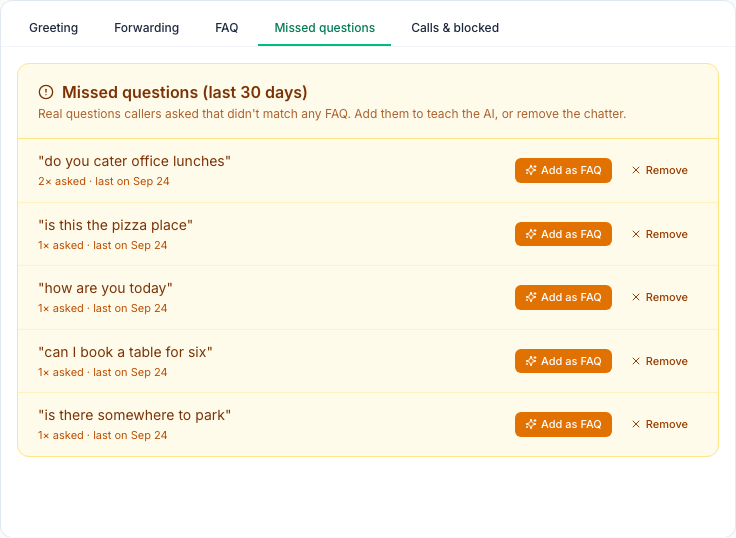
Missed questions lists what callers asked in the last 30 days that no FAQ answered. It also lists questions that only matched an FAQ weakly (rank below 0.10), so check what the caller heard in the call log. The same wording is grouped with a count, such as 2× asked.
To answer a missed question:
- Click Add as FAQ next to it.
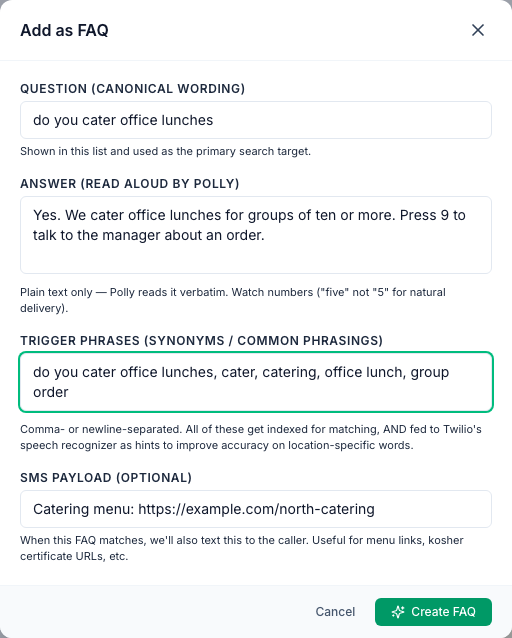
- The question and a first trigger phrase are filled in. Write the Answer, and add the other words callers might use.
- Click Create FAQ. The question leaves the list.
If the location already has an FAQ with the same question, Mays doesn't add a second one. It tells you so, and takes the question off the list. To change that FAQ's answer, edit it on the FAQ tab.
To clear chatter such as how are you today, click Remove and confirm. That wording won't be listed for this location again.
Good to know
- Remove can't be undone from the tab.
- The receptionist reads only your answers. It doesn't combine them, and it doesn't use your Knowledge Base.
- Texts from the SMS payload come from Mays's texting number, not the receptionist's number.
- Changes work on the next call. There's nothing to publish.