The opening checklist isn't done: what's left, who's on, and what's next
Mid-morning, between two other things, you remember the opening checklist. Was it done? The usual way to find out is a call to the store, which pulls someone off the line to read a clipboard to you, or a scroll through photos in a group chat. Neither tells you which items were missed. Neither tells you what to do about it.
If your checklists run in Mays, the answer is already there, item by item. Your AI app can read it to you and set the follow-up.
Part of our series Run your restaurant with your AI: one real situation per post, with the words you type and what happens in Mays. The prompts and results are illustrative examples.
What the owner types
"Is the opening checklist done at Midtown and Riverside? What's overdue, and who's on shift right now?"
What the AI does in Mays
Two read-only questions, both on each location's own clock:
- Checklist progress for today. For each location: tasks done out of the total across the day's checklists, how many are overdue (still open past their due time, or past the time the checklist closes), each checklist's own progress and status (pending, in progress, waiting for review, completed, rejected), and anything a manager rejected, with who it was assigned to and the reviewer's note.
- Today's schedule. Who's on right now, and the opening shifts with their clock-ins.
What you see
The answer, for example (illustrative):
"Midtown: 13 of 22 opening tasks done, 3 overdue. 'Opening — front of house' is at 9/12; 'Opening — kitchen' is waiting for your review. One task was rejected: 'Sanitizer bucket test strip' (assigned to Jordan R.), note: 'photo too blurry to read'. Riverside: 100%. On now at Midtown: Jordan R. and Maya L. since 6:30."
In ChatGPT and Claude, the Mays checklist card shows a progress ring per location, overdue tasks, checklists waiting for review, and rejected tasks with the reviewer's note.
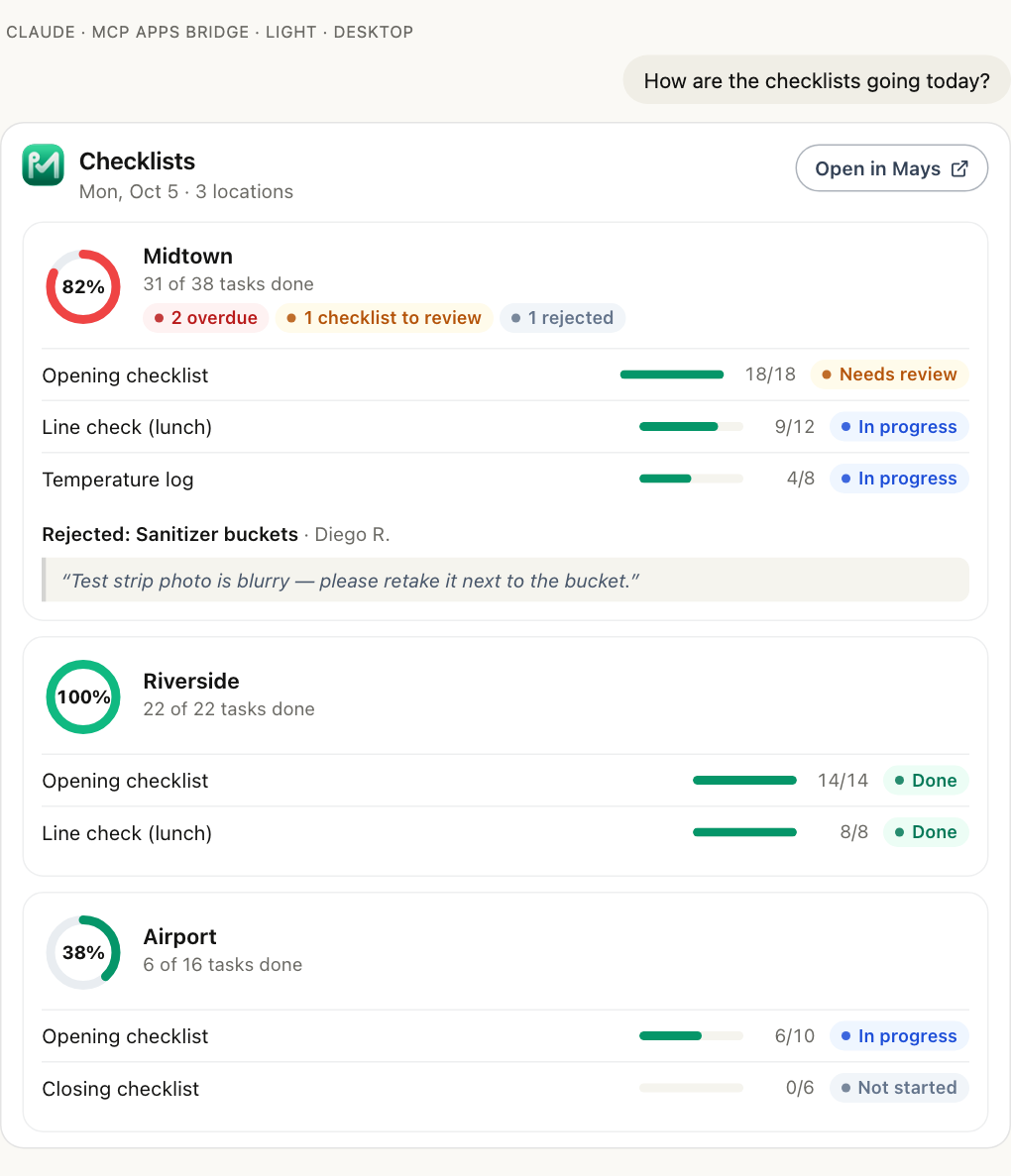
You can also look back up to 7 days: "How did closing go this week?" gives each day its own ring.
A note on "who"
Mays tells you what's done and what isn't, which tasks were rejected and who they were assigned to, and who was on shift. It doesn't accuse anyone. An unfinished task on a busy morning has many causes, from a late delivery to one person opening alone. Use the answer to start a conversation, not to end one.
Set the follow-up in one message
The opening is over, so the useful move is making sure it's right by tonight, and right tomorrow. With actions allowed, ask:
"Create a task for tonight's closer at Midtown: restock the sanitizer test strips and leave them at the 3-compartment sink. Answer with a photo."
The AI asks Mays for a preview of a one-off task at Midtown, due today: the title, who gets it, the due day, the priority and how it's answered (a checkbox, a photo, a number with a range, text or multiple choice). If you name the closer, the task goes to them; they must work at Midtown. Say yes, and it shows up in their task list in the Mays app with a push notification.
A short list works too: "For the opener tomorrow: check the test strips, log the sanitizer reading, photo of the bucket." Each step becomes its own task in a group, due on the day you name.
And if the checklist waiting for review is fine, approve it from the chat: "Approve the kitchen opening checklist at Midtown" (with its own preview).
What it replaces
Before | With Mays connected to your AI |
|---|---|
Call the store and ask someone to read the clipboard | Progress, overdue and rejected items in one answer |
Look for photos in the group chat | Rejected tasks come with the reviewer's note |
Text the closer and hope they see it | A task in their app, with a notification |
Remember to check tomorrow | Ask again tomorrow, or set it as a task |
What Mays doesn't do here
- One-off tasks have no due time. They're due by the end of the day on the location's calendar. For a deadline at a set time, add the item to a recurring checklist with a time window.
- It doesn't create tasks for past days. Pick today or a later day.
- It doesn't change the recurring checklist from this request. To add an item to every opening, say so: "Add 'check test strips' to the Midtown opening checklist". That's a change to the checklist itself, with its own preview.
Who can do it
Reading checklist progress needs access to tasks in Mays. Creating tasks needs permission to manage tasks, plus the organization's Allow AI apps to take actions setting and make changes ticked when you connected. Managers see and act on their own locations only.
Try it tomorrow at 9
- Connect Mays to ChatGPT, Claude or Grok from mays.app/ai (ChatGPT, Claude, Grok). Connect Mays to ChatGPT, Claude or Grok covers the rest.
- Ask how opening went.
- Put the follow-up in the closer's app, not in a text.
More on tasks: Creating one-off tasks.
Try Mays free for 30 days, with no credit card, and connect it to the AI you already use.